Tag: syndicated

  • SQL Nexus in Copenhagen

    The Nordic SQLNexus conference is taking place in Copenhagen on May 2-4. I’ve never been to the event, or the country, but I was accepted to speak, so I embark on another multi-city, multi day trip.

    SQLNexus has quite a lineup, and I suspect a few of these people will be travling alongside me, in Copenhagen at the beginning of the week and Liverpool at the end.

    • Joseph Sirosh, Microsoft Vice President
    • Troils Peterson, Professor of Particle Physics at the Niels Bohr Institute
    • Allan Hirt
    • Itzik Ben Gan
    • Denny Cherry
    • and more

    I’m looking forward to the event, and if you want to come to a SQL Server conference packed with content, think about making your way to Denmark on May 2-4, 2016.

    Hopefully I’ll see some of you there.

  • The OUPUT Clause in an INSERT–#SQLNewBlogger

    Another post for me that is simple and hopefully serves as an example for people trying to get blogging as #SQLNewBloggers.

    I got asked a question about the OUTPUT clause recently and realized I didn’t remember the syntax. I’ve rarely used this, so I had to look it up and thought this would be a good basic post.

    The idea with OUTPUT is that the data from the inserted and deleted tables can be output from the INSERT statement, outside of your triggers. This is the same data, but you can access it in the insert.

    The format is

    INSERT xxx OUTPUT yyyy INTO @zzz VALUES (or SELECT) mmmm

    The xxx is your normal insert target, table or view. The yyyy from the OUTPUT clause is a list of items to output. These is a comma separated list of fields in the format of inserted.col1, inserted.col2.

    The @zzz is a table variable. No inserts into scalar variables. This has to work with the set based nature of T-SQL. This means you’ll need to declare this variable. The mmmm is your normal insert stuff.

    Example

    Here’s a quick, short example. Let’s say  I have this table:

    CREATE TABLE MyCustomers
    (
    MyID INT IDENTITY(1, 1)
    , MyCustomer VARCHAR(200)
    , Active TINYINT
    );
    GO
    INSERT dbo.MyCustomers
    VALUES (‘Acme’, 1), (‘Roadrunner’, 0), (‘Bugs’, 1)

    I want to insert data into the table, and capture the identity value of MyID  as well as the name, separately from the insert. Note, I might really have a TRY..CATCH in production to deal with issues.

    If I add a new row, the identity should be 4. I want to capture this. I’ll first declare my OUTPUT variable.

    DECLARE @customers( id int, customer varchar(200);

    I don’t have to make this match the entire table, I can use a subset.

    Next, let’s build the INSERT. I want to capture the two fields from the inserted table, so we’ll include those.

    INSERT dbo.MyCustomers
    OUTPUT Inserted.MyID
    , Inserted.MyCustomer
    INTO @customers
    VALUES
    (‘Wile E Corp’, 1);

    I also need to output my table variable

    SELECT
    *
    FROM
    @customers;

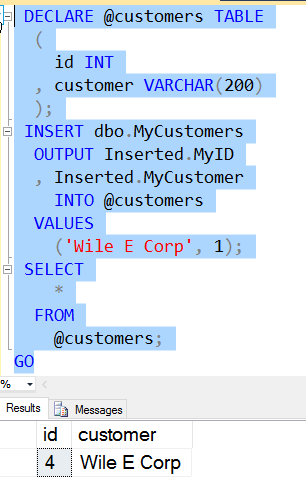
    If I run this, I’ll see this:
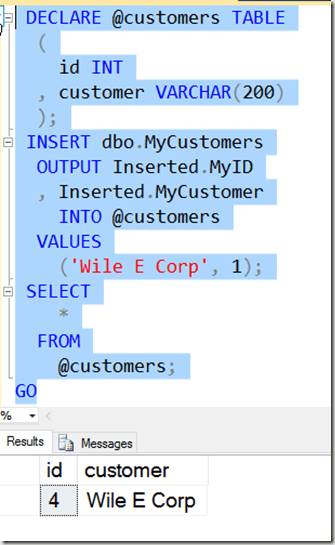
    2016-03-11 14_19_28-Settings

    Of course, I can do other processing with my table variable, using the output elsewhere in code.

    SQLNewBlogger

    This is a quick look at how you can use the OUPUT clause. This took me about 10 minutes to play with and remember the syntax, and 10 more minutes to write.

    I’d encourage you to play with this and write your own blogs. What can you discover about this construct?

    Reference

    OUTPUT – https://msdn.microsoft.com/en-us/library/ms177564.aspx
  • SQLBits in Space

    It’s coming in May. The official UK SQL Server 2016 launch event is SQL Bits and the conference returns to Liverpool on May 4-7.  With a fun theme.

    Check out the launch video here: SQLBits XV

    Update (Mar 24): The agenda is live. I’m speaking Saturday at 2:30pm.

    There are two days of pre-cons, packed with some great sessions, as well as two additional days of fantastic content and a fun party Friday night. You can register today, and I’ll see you there.

    Now, to find something to wear…

  • SQL Data Generator –Specific Domains for a Column

    This is a series on SQL Data Generator, covering some interesting scenarios I’ve run into. If you’ve never tried it, SQL Data Generator is a part of the SQL Toolbelt. Give it a try today with an evaluation today.

    I was mocking up some test data and wanted to limit my list of values to specific items. In this case, I was modeling the game, Rock Paper Scissors. In my modeling, I had a field for the value played by someone. In this case, I used a text field in a quick model, but I wanted only those three values in the list.

    However I wanted a lot of data and used SQL Data Generator to put a few thousand rows in the table. In doing this, I needed to customize the pattern for this field.

    TLDR; Use (Rock|Paper|Scissors)

    My table was simple, a player, a game, the play, and a win. The schema looked like this:

    2016-03-10 11_17_50-Start

    In data generator, I selected a first name for the first column, and then noticed the default data generation preview.

    2016-03-10 11_19_08-Store

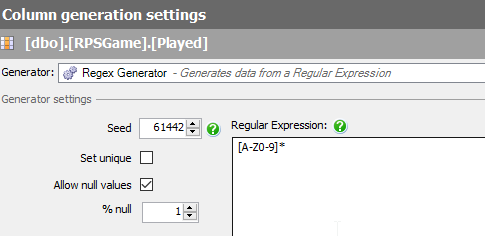
    Random text, which isn’t what I need. This comes from this mask.

    2016-03-10 11_20_03-Store

    This is a Regular Expression, and will use random letters to fill the field. What I want is specifics. To do this, I need to specify the values I want. If I replace the middle values with Rock, I get this:

    2016-03-10 11_22_09-Store

    Not really what I need. This is randomly choosing values. What I want is a literal, so I’ll change the brackets to parenthesis.

    2016-03-10 11_22_52-Store

    This gives me Rock in places, repeats or NULL in others.

    To specify an OR, I use the | operator. This allows me to choose one of two options.

    2016-03-10 11_23_12-Store

    Or three

    2016-03-10 11_24_05-Store

    Removing the * removes the matching multiple times.

    If I have a domain of specific values (say for a lookup table or limited entries), using a custom regular expression can allow you to generate useful, but specific, test data.