I joined the beta program for SQL Source Control recently. I know, I work for Redgate, I should be in all beta programs. However I present on our various products, and I need those presentations to work reliably. As a result, I rarely get ahead of our RTM products because I value stability.
However, I really, really like SQL Source Control, and wanted to get the migrations stuff working in Git. Of course, I’m also looking for holes and problems, so I’ll be giving feedback.
Install is simple, though after I download the beta, it took me a week to get going because of other tasks. In the meantime, there were updates. I always check for SQL Source Control updates, and I had to download and install an update. Redgate operates on a very agile, DevOps development cycle, so always check for updates.

That was easy, other than the SSMS reboot. Here are the versions of SQL Source Control:

And SSMS:

I had a previous database I’ve been using for demos that I keep in GitHub. This hasn’t worked with migrations in the past, but I want it to, so I decided to see how this database would “upgrade” to migrations.
Syncing from GitHub
First I created an empty database.
![2016-03-11 12_33_24-Settings[3]](https://voiceofthedba.com/wp-content/uploads/2016/03/2016-03-11-12_33_24-settings3_thumb.png?w=244&h=133 "2016-03-11 12_33_24-Settings[3]")
I then linked this to my git repo. This is easy, but I’ll run through it. I select the database in the Object Explorer (OE) and then click link in the SQL Source Control (SOC) plugin. I’m using Git, so this is a good place to start.

Next I pick the folder and let the system create the link. Note this repo already is updated from the remote (Github) and contains all my database scripts.

Once that’s done, I switch to the Get Latest tab and click “apply” to move all the code to my database. This process reads all the .SQL files and runs them in my database, in the appropriate order.

When that’s done, I have a database. Simple setup, and this makes it easy for me to get a dev system on a new instance quickly.

Migrations
Now the fun part. Migrations. I’ve been waiting for this version of SOC to support Git. No message here saying my VCS isn’t supported.

Now I want to create a migration script. There are a lot of things I could do here, but let’s do something simple. I’ll go ahead and add a not null column to my RSSFeeds table.
Let’s try the designer. This is easy enough to do. We’ll add the last column.

However we can’t save this:
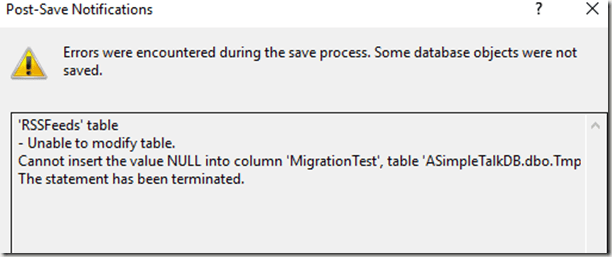
This doesn’t work as a script, either. The reason is that SQL Server doesn’t know how to manage this change. What goes in the NOT NULL space?
There are lots of ways to do this, but the way many people want to deal with this is”
- Add a NULL column
- Populate data
- Change the column to NOT NULL
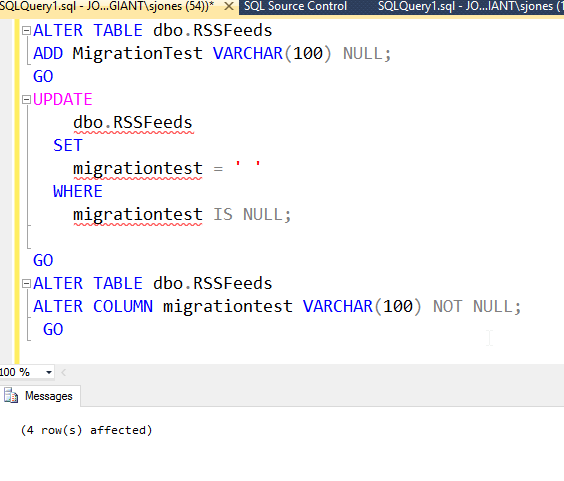
Let’s do that. We’ll use a script to do this:

This works, but when we go to commit this change, we see this:

The tool lets us know this might cause issues, and we need a migration script. If I click on the the “Add a migration script”, I go to the Migrations tab, where I see the table effected. Let’s select it and click “Create migration script.”

This brings me to the script editor. I’ve pasted in my script.

Note I also need to give this a name. The default isn’t great.

Once I’m done here, I close and save. Now I can see all the items listed on the Commit tab. I’ll start at the bottom. Here is my data change, which is subordinate to the migration script. I’ve scrolled over to see the actual data.

Now let’s look at the schema. Here the NOT NULL is added, but we know this won’t work. This needs the migration script.

And here’s the script. This is what I wrote and pasted in.

I commit this, and I’ve got a script. Or do I? Do you know what the issue is?
It’s that I didn’t set a default. I left this out to show you there’s no magic here. SQL Source Control isn’t doing the work for you of deciding how schemas should change. Instead, you need to write the appropriate scripts. In this case, I’ll acknowledge and commit, which it lets me do.

However, this will be an issue, so I’ll add another commit. I can check this in my history tab (I committed too quick).

You can see this has added the default. What happens on another machine? Let’s check my presentation VM, which is also updated to SOC v5 Beta (with a snapshot to undo this).
I created a new database and linked it. At the bottom of the list of objects, I see my migration script.
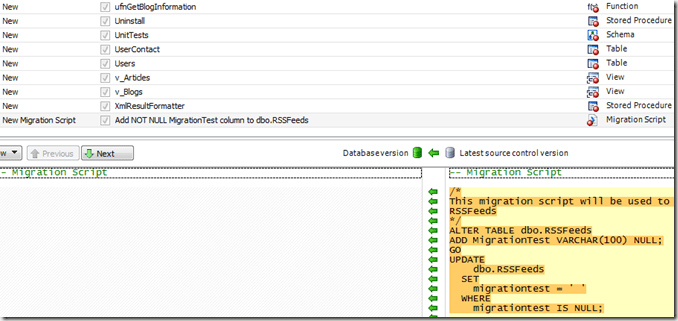
I also see this in the migrations tab.

Applying all changes worked. If I look at the table, I see what I expect, with the the NOT NULL setting, the data, and the default is set correctly

This is a very basic look at what’s happening with the new SQL Source Control v5. It’s in beta, and if you’re interested, we want more testers and lots of feedback. We’re excited about this release, but we want to ensure it’s the best there is.


![2016-03-11 12_33_24-Settings[3]](https://voiceofthedba.com/wp-content/uploads/2016/03/2016-03-11-12_33_24-settings3.png "2016-03-11 12_33_24-Settings[3]")




 Voice of the DBA