Tag: syndicated

  • Quick Encryption with Always Encrypted

    What do you need to do in order to access data in a SQL Server that’s encrypted with Always Encrypted? It’s not much, and it’s really simple.

    1. The certificate used for encryption
    2. A parameter in the connection string

    That’s it. It’s a small list of things.

    I was experimenting with this, and I set up encryption on a VM, then copied the certificate backup to another VM and installed it in the Certificate Store.
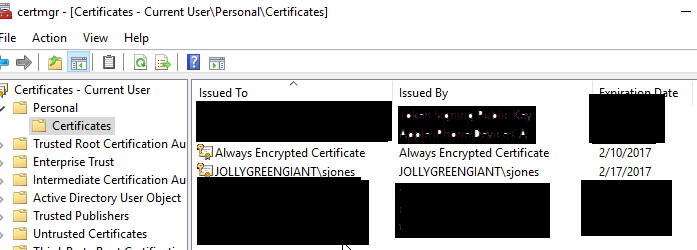
    2016-03-28 17_56_00-Settings

    This is all I changed on my C# application to enable encryption.

    strConnstring += “; Column Encryption Setting = Enabled”

    I had a connection string built, and I added this one little option to the end and when I queried my encrypted table, I could read the data.

    There are certainly more caveats and more to learn about encryption, but this shows how easy it can be to change your application. Just alter the connection string.
  • Locking sa

    When I started working with SQL Server, the sa account was “the” account used for admin operations. This was the default account for many DBAs and as a result, it couldn’t be locked out.

    This changed in SQL Server 2005, which is a good thing. We don’t want unlimited attacks on the sa account with brute force password guesses. I wasn’t aware of this, as I haven’t had an issue with attacks in a long time. However Jeff Moden pointed out to me recently that we can lock out sa.

    I decided to test.

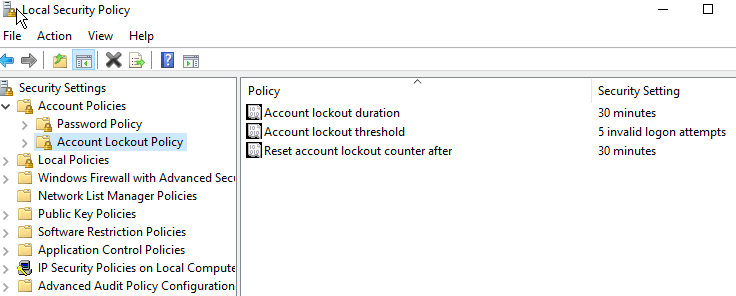
    First, I went to the local policy on my desktop and checked the security policy. No lockout was set, which probably makes sense for consumer OSes. I took a minute to then set my lockout to 5 attempts with a 30 minute timeout.

    2016-03-28 17_46_26-Settings

    I then restarted my SQL instance. I couldn’t get this to lock me out at first, so I decided to ensure the policy applied.

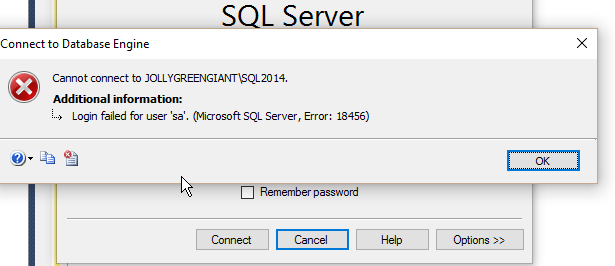
    I then tried logging in with the sa account 6 times with the the wrong password. Each time I got this message. Including the 7th time with the correct password.

    2016-03-28 17_39_02-SQLQuery1.sql - JOLLYGREENGIANT_SQL2014.master (sa (51)) - Microsoft SQL Server

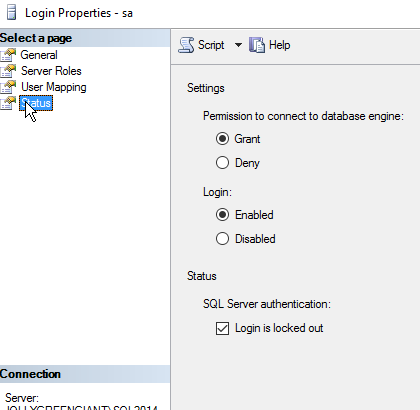
    No note about being locked out. However when I check the properties for sa, I find the login is locked out.

    2016-03-28 17_39_25-Settings

    I could uncheck the box, but I can easily use T-SQL as well.

    ALTER LOGIN sa  WITH PASSWORD=’test’ UNLOCK

    Please don’t use a password like this. I actually ran this to test and then reset the password to something more complex.

    Reference

    ALTER LOGIN – https://msdn.microsoft.com/en-us/library/ms189828.aspx

    SQL Authority – http://blog.sqlauthority.com/2009/04/23/sql-server-fix-error-18486-login-failed-for-user-sa-because-the-account-is-currently-locked-out-the-system-administrator-can-unlock-it-unlock-sa-login/

  • #SQLNewBlogger–Adding Local Accounts


    What do you do if you need a process running under Local Service to connect to your SQL Server? Most of the advice out there is to change the login account. I actually agree with that, but there are times you can’t, or don’t want to.

    There are certainly times when I’ve seen some automated process use one of these accounts:

    • NT Authority\Network Service
    • NT Authority\Local Server

    Often this is because someone doesn’t want to bother to learn how to enable other accounts for their application, which isn’t a good excuse. In my case, I had a local VSTS agent service running as part of a demo, where I had very limited rights. I couldn’t affect a change, and I needed to get a new login for SQL Server.

    I searched a bit, but most advice said to just change the account, after all, if you had a process connecting from another machine, Local Service won’t work. However I found one item on Stack Overflow that helped.

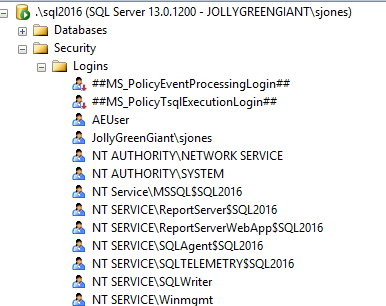
    Here’s my Login list. As you can see, I have Network Service, but not Local Service.

    2016-03-25 12_50_57-Alarms & Clock

    I the run this code:

    CREATE LOGIN [NT AUTHORITY\LOCAL SERVICE] FROM WINDOWS;

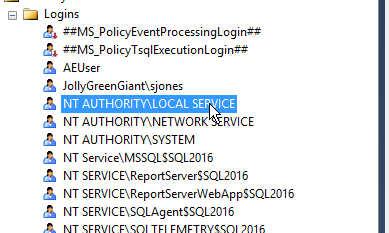
    This gives me a new login.

    2016-03-25 12_52_48-Alarms & Clock

    In my situation, I then had to add this to the dbcreator role, but I could treat this like any other login and assign the minimum privileges needed.

    SQLNewBlogger

    I had to solve this and decided to write about it. The writing took 10 minutes, the research was 15-20 minutes to find a good reference and experiment a bit.

    A good learning exercise, and all of you should know how to do this. Prove it with your own blog.

  • Protecting the SA Account

    The sa account is a well, known, built in account for SQL Server. Years ago, in previous

    versions, I’d see people often use the “sa” account for development, usually with a blank password. Even those speakers and experts often showed demo code with a blank “sa” password.

    Ugh, a horrible example that was repeated over and over until the SQL Server setup program stopped allowing blank password. However people then had “12345” or other simple things to type on stage. I guess some habits never change.

    In any case, I saw someone ask recently about changing the “sa” password in response to auditors’ requests. This person asked about how to randomly set this on a regular basis.

    It’s easy. Even if you have Windows Auth only, you can use this script.

    DECLARE @pwd UNIQUEIDENTIFIER = NEWID()
    , @new VARCHAR(50);

    SELECT @new = CAST(@pwd AS VARCHAR(50))

    EXEC sp_password @new = @new, @loginame = ‘sa’

    That seems to work fine in testing. I get a new sa password each time, whether I have Windows Auth or Mixed mode set. If I change the password with only Windows Auth, the last password set works if I change to mixed mode.

    This is a great little script to set up in a job and run it monthly. This will protect your sa account in case someone ever enables mixed mode.

    If you need the account, just change the password then, for the job/application that needs to run. Then run your job again to reset it.