Tag: syndicated

  • Using the DAC

    Another post for me that is simple and hopefully serves as an example for people trying to get blogging as #SQLNewBloggers.

    The DAC is a really important tool for anyone managing a SQL Server. You might not use it often, but when you need it, you really need it. I’d suggest you connect to your instances one a month or so using the DAC, just to be sure you know how to do it.

    The most common reason to use the DAC is when a runaway query is consuming so many resources the user can’t connect. The DAC is guaranteed resources, so you can always connect.

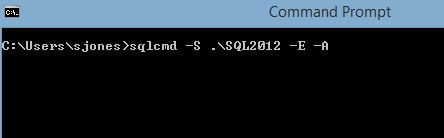
    When you use SQLCMD, the -A switch lets the connection method know you want to use the DAC. The DAC only allows one connection, so only one admin can connect. This also means it’s important to disconnect quickly if you don’t need the DAC.

    To connect, I use a normal set of parameters, -S for my server and -E for Windows auth. However I then add the -A, which connects me through the DAC.

    2015-07-13 10_48_04-Command Prompt

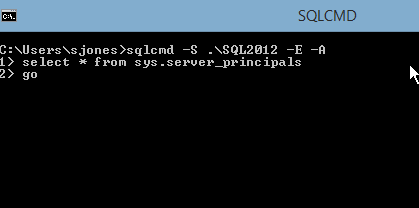
    Once I connect, I can run any of the normal commands, I need, like rebuilding master or killing a connection.

    2015-07-13 10_48_23-SQLCMD

    Keep this as a tool in your toolbox and practice regularly.

    SQLNewBlogger

    This was a quick post that follows on from starting SQL in single user mode as well as using the DAC in SSMS. I really just took some shots as I connected from SQLCMD.

    References

    The first link I saw was from my friend, Pinal Dave.

  • Halloween at PASS–Donate for some fun

    This year’s PASS Summit will end on Oct 30, which is just before Halloween in the US. I’m sure lots of people will have some fun on Friday, though I also suspect we’ll see no shortage of people leaving early to get home to spend the holiday with families.

    A few of us in the #SQLFamily community are going to have fun with this. There’s a campaign to raise money for Doctors Without Borders, and it’s been named Argenis Without Borders 2.0. We did this last year and raised over $13,000. This year we’ve already gotten $2k in donations are are looking for more.

    Argenis is on the hook for a TED costume, and I’ve asked for ideas. So far the Goldmember one looks like the most fun, though I may go Austin Powers instead. However feel free to continue to suggest things to me.

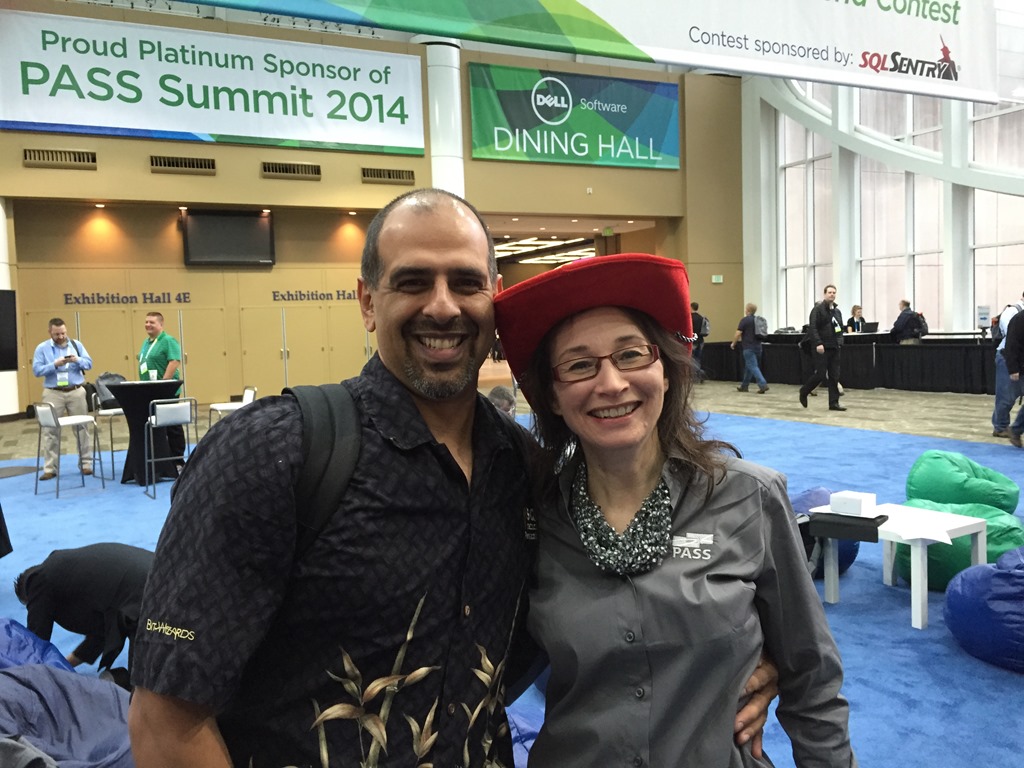
    This is a great cause, and it should be fun again. Who knows, maybe you’ll get yourself a great picture with me if you’re there, like one of these.

    Photo Nov 06, 1 50 47 PM

    I’ll probably have some hat, so I might even convince you to wear one and pose with me.

    Photo Nov 05, 8 48 00 AM

    And if you dress up, I’m more than happy to snap a shot with you.

    Photo Nov 06, 1 52 26 PM

    This is all in fun, and for a good cause, so I’ll likely be costumed just for those reasons. The goal for me is to raise some awareness and some money, so I’d ask you to donate if you agree.

    Donate to Argenis Without Borders 2.0


    banner_468x60_2015_speaking

  • Password for SQL Server Service Accounts

    I wrote recently about my philosophy for service accounts, and wanted to add a few more thoughts.

    Security is important for our database servers. One of the loopholes that everyone should be aware of is that the service running SQL Server has complete control over the service and potentially if this account were compromised, the security of our installation would be at risk.

    In this post I wanted to address two things related to service account passwords. The mechanics of building and working with these passwords and the ongoing maintenance in terms of changing the passwords.

    Creating Passwords

    One of the tools I recommend for anyone administering computer systems, including my parents on their personal computers, is a password manager. There should be a way for you to create and store complex passwords that are not easily guessed. I use Password Safe, but 1Password, KeyPass, and others are just as good.

    Typically I’ve used these to store the administrative passwords for various systems for all DBAs, sysops, etc. to use. However I haven’t used these for service accounts.

    Why not?

    Mostly because I don’t think any of us should be logging in as services. Apart from initial setup and testing, we shouldn’t use service accounts for anything.

    I always recommend long, complex, random passwords for services. The password should be created and written down long enough for someone to enter it twice in the areas reserved for credentials, and then the paper should be destroyed.

    I write these down because I want extremely long (20+), random strings that aren’t memorable and are really a one-time use string. Used just long enough to enter into the Services applet or as a credential in a PoSh (or other) script.

    If you use groups for your account rights, and you should even for service accounts (SQL Server makes this easy), you can always use another account to test access. Grant it the same permissions and groups, and perform your tests.

    Changing Passwords

    I don’t worry about changing service account passwords. Yes, I know this isn’t recommended, but services rarely change or are used to log on, we can limit the access of an account to a particular machine, and since the password isn’t stored, it’s not very vulnerable to cracking.

    If you are worried, then create a new, long, random string for the particular service(s) that are suspected to be vulnerable.

    I don’t allow expiration of service account passwords, though in a few organizations that have required yearly service account password changes, we’ve scheduled the changes for slow periods, not waiting until the expiration occurred. I can almost guarantee that accounts will expire during a critical time when machines should not go down.

    One caution. I know that changing passwords to long, complex strings is hard, and that there’s a temptation to set services to the same password or use some pattern to build passwords.

    Don’t.

    Patterns are poor security, and coupling services together with the same password (or account) is not worth the risk of issues if one system requires a change or the password is disclosed.

    banner_468x60_2015_speaking

  • Culture Differences: US v UK

    This is a bit of an off topic post from the technical stuff, but there’s a bit of a tie-in, so stick with me.

    I had to get a tire fixed this morning. I actually owned a replacement tire, so I just needed someone to mount it on the existing wheel (the existing tire needed to come off). I stopped by Discount Tire this morning in Parker, and I had a quick conversation with the salesman, Brian. He arranged for the service, even gave me a discount, and told me it would take about an hour.

    At this point I knew I needed to do some work, and at 9am, I wanted some coffee. I mentioned this to Brian, who said, “It’s a long walk to get coffee.”

    He noted that Starbucks was quite a distance for a walk. Certainly it was a hot day, approaching 85F as I exited the shop with my laptop, but a long walk?

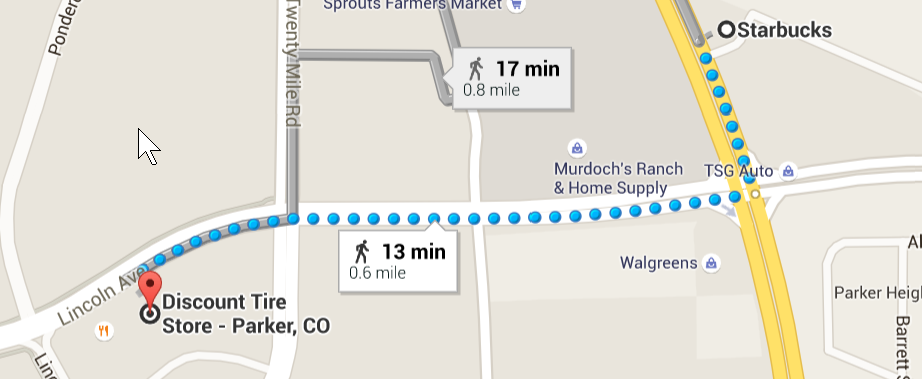
    My friends and colleagues in the UK would laugh at this. I had to go down a busy road, and it was warm, but 0.6mi is “long”? I think not. Certainly no navigational issues following the blue dotted path.
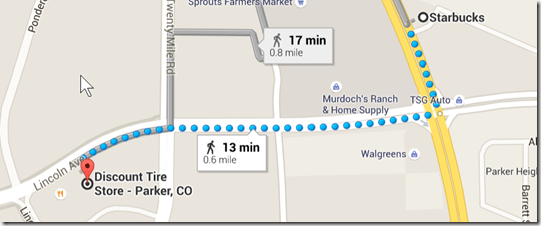
    2015-07-27 12_53_47-Starbucks, South Parker Road, Parker, CO to Discount Tire Store - Parker, CO - G

    This struck me as strange as I walked along the road. Certainly I think lots of people in the US might see this as a long walk. They would perhaps ask the shop for a ride, or they’d stay in the store and skip coffee. I suspect that lots of people think any distance outside of the parking lot of an establishment might be seen as “long”.

    Far too many of us in the US as lazy in this manner, not willing to move dozens, much less hundreds, of yards. I’ve seen people wait minutes for a close parking spot to a store, when there were plenty of parking spots seconds away.

    I thought about this as I walked, and as I walked back. The thought bothered me a bit as I tried to answer some emails and check on SQLServerCentral. Why do we struggle with simple movement in the US? Are so many of us really wedded to cars that much? A summer morning is hot, but it’s a few minutes in the sun.

    I was curious how far I traveled in terms of steps, so I checked my Fitbit before leaving Starbucks. It was around 3,100 steps for the day. I checked when I got in my car, and I was at 4,500 steps. That’s about 1,400 steps for a cup of coffee. Each way, of course, but just a mile.

    When I think about how little we need to walk, it’s amazing. My job is worse than many in some ways. My meetings are at my desk. My commute is a few dozen steps. Getting lunch in the kitchen is maybe 50 steps. If I don’t make a concerted effort to move, I can easily spend a day at work and get to 6:00pm having traveled less than 2,000 steps.

    That’s sedentary.

    I do make an effort to exercise and move. Certainly I could do better with my diet, but I am at least attempting to move. That goal was one thing that kept me going on my running streak. I often felt refreshed and no matter how much time I’d spent in front of a computer, I at least ran a mile.

    We can all make an effort to move a bit more, especially those of us that spend lots of time in front of a computer. Taking breaks, walking up and down stairs, parking far away, scheduling walking meetings at times, or just making sure we spend some time before/after work moving.

    Many of you will have long lives, regardless of how you treat your body. Your career might not be affected at all by poor physical health. However the quality of your life is lower, in my opinion, if you aren’t taking care of yourself a bit.

    In the past we often had daily exercise as we lived. We walked around, we had to work to grow our food, or transport it, or just to find social company. Today we can avoid much of that, but I’m not sure we should.

    Find some exercise in the margins, find a sport you enjoy, or just take some long walks to contemplate life and enjoy your own, or a friend’s, company.