Tag: syndicated

  • Looking Back at a Sabbatical – One Year Later

    Last year at this time I was nearing the end of my sabbatical. I’ve been using the Timehop app on my phone to look back at the past and I’ve noticed the tweets and pictures that I had from last year popping up. I decided it was a good time to look back at a year in the past.

    Here was one of my projects, and the one I was most proud of: a flagpole made of wood.

    If you’re interested, you can read the journey I went on.

    Looking Back

    It’s been a year since I had six weeks off to do whatever. I think I had some memorable experiences from the time off, but I wanted to first look at how I feel this year, with no long set of time away from work scheduled.

    First, I don’t miss the sabbatical. I didn’t develop this craving to not work any longer, or work less. I didn’t think I needed to change my life around. In hindsight, it felt like a summer vacation between semesters in college. A fun time, and a break between the more serious work of building a career.

    That’s how I see it now. I’d like to do it again, and I’m not sure I’ll wait five years to do it again. I’ll have to see how our family finances go, and probably wouldn’t self-finance 6 weeks, but I am thinking to take a week or two again, separate from vacation, and just get away from work. However, like my sabbatical, I’ll want a plan of something I do that’s different than sitting around or vacationing. I’ll be looking for some self-improvement.

    Growth

    What did last year teach me, or how did I grow? Those are good questions. I’m a little torn on how to answer them. Let me tackle the teaching first, since that’s easier.

    I learned quite a few things about building, Habitat for Humanity, and woodworking by tackling projects. Those were easy skills, and things I picked up. I have more work to go and more to learn, but I’ve documented some of that stuff. The other thing I learned is that I can still learn and grow and make an effort to improve my life in numerous ways.

    I also learned some confidence. By stepping back, tackling some physical projects that might have intimidated me a bit prior to last summer, I know I can do more. This has helped me in having a bit more confidence to tackle other projects, both in an outside of, work in the last year.

    In terms of growth, I had the chance to reflect and appreciate what a great life I have, and what a great company I work for. Both of those definitely helped to recharge me and have made it a bit easier to manage life and travel in the last year. I’m a bit more mature in how I watch my schedule.

    Perhaps the biggest thing I learned is that time truly is my most precious asset. It is hard to set aside time for large projects, and I have a few half finished ones because I can’t get to them with a busy family life. In some sense I’m willing to let them go for now because I’m busy, but it made me appreciate the time I had last year to just methodically plod along. Even on weekends it’s hard to find that now.

    The Future

    Andy Warren has always said that we don’t get enough thinking time at work. Many of us are so busy moving from project to project, from work item to work item, that we fail to stop and consider the bigger picture. I doubted how much value there was in that, but the sabbatical helped me re-consider my thoughts.

    I have a clearer picture of the value of being able to step aside for a day or so and just think about things. I still find it hard to find the time, but when I can spare an hour or two and think about SQLServerCentral, or how Redgate works, or how some part of the world could be better, I appreciate that more.

    Finding this time also has me considering self-financing a shorter sabbatical sometime in the next year. At some point I want to be able to take a few days to myself, thinking about life, and career, and how to improve them for me.

  • Database Version Control Workshops

    We’ve got more Workshops coming this fall from Redgate Software to help you get the most out of our tools and improve your database development processes. The list of our training schedule is out, and I’ll be at a few of these.

    The schedule does changes as we can add more dates and partners, so keep checking it, or let us know if you’d like to have a class near you.

    Baton Rouge, LA – Jul 31, 2015

    I’ll be traveling to Baton Rouge, LA for our July 31 class with Ike Ellis on Database Source Control. Ike’s teaching, and I’m there to help and manage the labs that we’ve put together for the class.

    This workshop is the day before SQL Saturday #423 in Baton Rouge, so if you’re attending that, consider coming a day early and getting some hands on knowledge of database and version control on Friday. It’s only $100 (a limited time sale), so register today.

    New York City – August 20, 2015

    We’ve also scheduled to give a Database Source Control workshop in New York City, in Manhattan on August 20, 2015. Once again, Ike and I will run the workshop, giving you a chance to learn how you can better manage the code in your databases with a VCS.

    Come Learn

    I hope to see some of you at one of these workshops, or one later in the year. We’ve really worked hard to pack a lot of information into a long day, helping you actually use the tools and technologies to control your database code. We’ll talk about how a VCS integrates with your code, what to include, how to handle branching and merging, and more.

    We’ve put the price of these workshops on sale for the remainder of the year, so take advantage and register today.

  • Azure SQL Database – Adding a Login

    I’m writing this post as a way to help motivate the #SQLNewBloggers out there. Read the bottom for a few notes on structuring a post.

    I am trying to slowly do a little work in the Azure SQL Database world, building some skills that I can use, and I can teach you a bit more about. One of the things I needed to do lately was add a new login to my system, which isn’t intuitive in the portal.

    I did go to the Managing Databases and Logins in Azure SQL Database to get some help, but it wasn’t completely clear how to do this.

    I setup a database recently for a test project, but I wanted a different user for this database than others I have on this particular Azure SQL Server. I am using the new (2015) portal, and there didn’t seem to be a good way to add a new login, so I connected to do this in SQL. The reference below showed me the standard “CREATE LOGIN” statement I’d use with an on-premise instance, so I tried to run that.

    CREATE LOGIN sscqa WITH PASSWORD = mypwd; GO

    I got this:

    2015-06-23 14_45_19-SQLQuery3.sql - mhknbn2kdz.database.windows.net,1433.AdventureWorks2012 (sjones

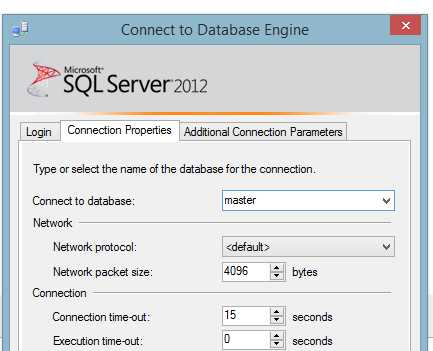
    OK, no issues. I changed the connection to the use the master database. I used the options after clicking the “Change Connection” button and put in master.

    2015-06-23 14_47_06-SQLQuery3.sql - mhknbn2kdz.database.windows.net,1433.AdventureWorks2012 (sjones

    I connected and ran the code to get this:

    2015-06-23 14_47_30-SQLQuery3.sql - mhknbn2kdz.database.windows.net,1433.master (sjones (63))_ - Mic

    I needed to not only change my database user connection, but also use the admin user I have. In this case, it’s the jt user I inherited from Jamie Thomson as part of the Hosted AdventureWorks project he started.

    Once I did that, the login was created without an issue. Now I need to link it to a user.

    SQLNewBlogger

    This took about 5 minutes to write, and 5 minute to reshoot some screen shots. The rest was really the 20 minutes I spent mucking around, researching, and reading how to do this. Hopefully this is quicker for me, and you, if you have this need.

    Anyone could write this, and I’d encourage you to write your own stories about working with an Azure database if you want to learn about the topic.

    Reference

  • Get a comma separated list

    I’m writing this post as a way to help motivate the #SQLNewBloggers out there. Read the bottom for a few notes on structuring a post.

    I was working on a test of sorts and wanted to return multiple values as the output, but as a single variable. In other words, I couldn’t return a result set, I needed to return a string.

    I knew this was easy, and decided this would make a nice simple blog. Here we go.

    Let’s start with a simple table. Here’s one that has a few rows in it.

    CREATE TABLE MyTest
    ( id int);
    GO
    INSERT mytest values (1), (2), (3);
    go

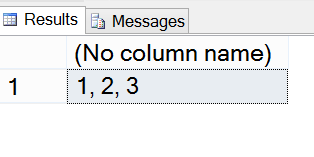
    I want to return the values “1, 2, 3” as a string, in any order. Here’s how it works:

    DECLARE @i VARCHAR(MAX);
    SELECT @i = COALESCE(@i + ‘, ‘,”) + CAST( Id AS VARCHAR)
    FROM MyTest;
    SELECT @i;

    The COALESCE is important as the first time this runs, we have a NULL for the variable. In this case, we return an empty string. This is almost like the inverse of the operation that ends recursion. We add in the first row, and we end up with ‘1’ as the string.

    Note: it could be 2 or 3 in the string as I don’t have an ORDER BY. DO NOT depend on the order of insertion in the table. If you care about ordering, always include an ORDER BY.

    The next execution has a blank string (NOT NULL), so that is returned. In this case, we have ‘1’ + ‘, ‘ for the first part. The second part adds in the next row.

    This continues, and I get a nice set of output.

    2015-06-10 17_20_39-SQLQuery4.sql - ARISTOTLE.sandbox (ARISTOTLE_Steve (62))_ - Microsoft SQL Server

    SQLNewBlogger

    This one was short. It took me almost as much time to write the code and find a reference as it did to write the post. Five minutes.

    References

    This is basic T-SQL, but here’s another look at this.