Tag: syndicated

  • Get Away from the Heat and Learn some Database Version Control

    I have enjoyed the trips I’ve made to New Orleans and Baton Rouge in the past. It’s a good getaway, stopping in the French Quarter for a few minutes before an easy drive up the road. However it’s warm, and I can’t ever get my wife or kids to come with me. For some reason, they don’t seem to enjoy the warm, August Baton Rouge weather. I, however, am looking forward to a jog around University Lake.

    LSU University Lake at BREC Milford Wampold Park

    This might be the best time to run, but I’ll likely be going around when it’s sunnier, and a touch warmer.

    However if you want to get out of the heat, perhaps you’d like to come learn about Database Version Control with Ike Ellis and me? Redgate Software has partnered with Crafting Bytes to deliver our workshop in Baton Rouge. We’ve put the workshops on sale, and only $100 for a full day of training.

    What will we cover?

    We’ll show you how to get your database in a Version Control System (VCS). We use Redgate’s tools, but the idea of using version control can be done in other ways. I’m running the labs, and you’ll see how you can keep track of all of your database DDL code, including Lookup data!
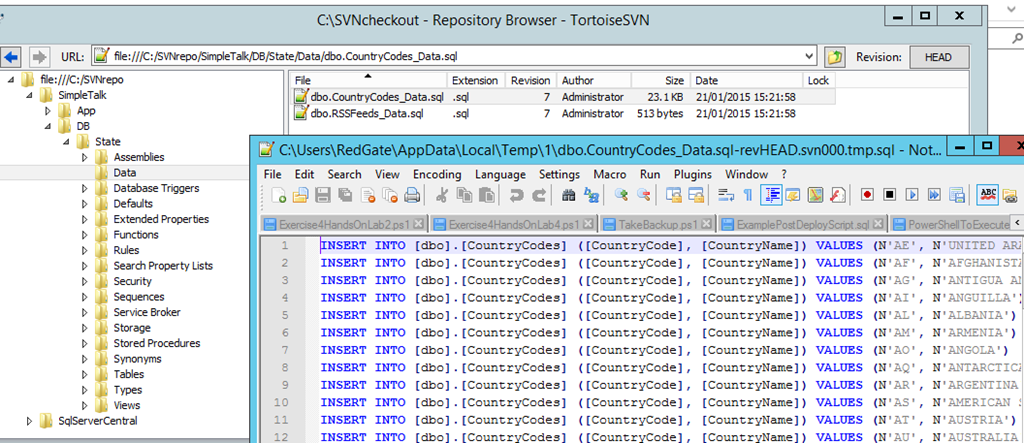
    2015-07-23 18_45_53-DLM-Workshop-2015-02-19-1708-export-i-fg1k1eq0 - VMware Workstation

    We are also covering some advanced features that the Redgate tools make easier. Things like branching, merging, and deployments. How many of you would love to know that development is done and we can deploy our changes like this:
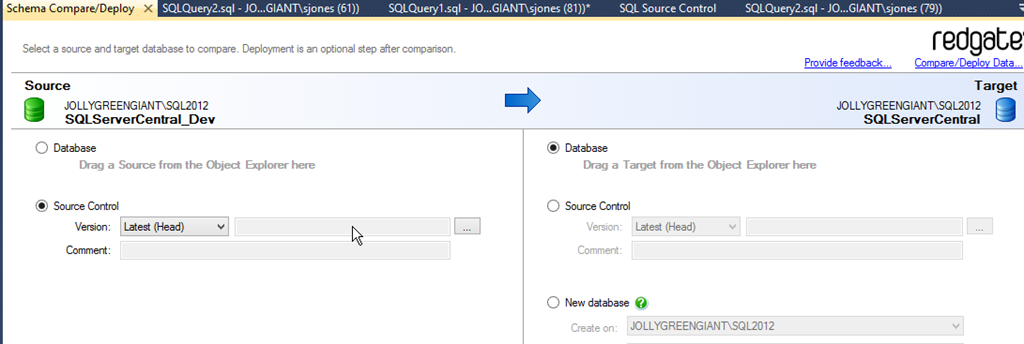
    2015-07-23 17_14_22-Schema Compare_Deploy - Microsoft SQL Server Management Studio

    I’ll show you how you can deploy your changes right from inside SSMS.

    This is an in-depth workshop, covering way more than I could ever do at a SQL Saturday or conference. What’s more, we provide you with a VM and let you actually work through the skills we teach you. You will get real practice during the day to give you the confidence and practice for your own environment back at the office.

    I hope to see you at either the workshop or SQL Saturday #423 in Baton Rouge.

  • My SQL Server Service Account Philosophy

    Recently someone sent me a question about service accounts. They weren’t sure how they should go about setting accounts up for various instances and services in their environments. Specifically they asked me about having domain accounts, or accounts separate for services.

    Note that I’ve managed SQL Server for years this way in environments up to hundreds of instances. I haven’t managed thousands, so there might be issues with this philosophy at scale.

    Here’s how I view service accounts. In a short list, I try to manage things like this:

    • Domain accounts for the SQL database engine and SQL Agent
    • Separate accounts for all instances and all Agent services
    • Long, complex, one-time passwords that aren’t stored.

    This has worked well for me, providing separation of services so that password changes or security issues on one instance don’t affect other instances.

    It’s also been scalable in that I rarely setup SQL Server instances. In most organizations I’ve worked in, we are adding a few instances a week at the most. The overhead to create two new accounts per instance (db engine and Agent) is minimal.

    Note that I would also have a separate domain account for SSAS or other items I install.

    With today’s rapid provisioning of machines through virtualized environments, I realize this isn’t necessarily a good hard and fast rule. If I expect an instance to be a production level instance and live for some period of time in the organization, I’d follow this philosophy.

    However if I am bringing online development and test instances that may not be kept around permanently, I think the local service accounts are fine. These will probably handle your needs and are worth scripting into your VM/instance creation process.

    I’ll add a few more thoughts on this across other posts, but there’s my idea in a nutshell.

  • Argenis Without Borders – v2

    Last year at the PASS Summit, Kristen Benzel and Argenis Fernandez put on a fundraiser to raise money for Doctors Without Borders. It was very successful, bringing over $13,000 to the charitable work this organization does.

    We had fun with it, with some great rainbow costumes that were displayed at the PASS Summit, including me.

    doctorswithoutbordersrainbow

    This year, 2015, there’s a new campaign. Once again, we’re raising money for Doctors without Borders. The goal is $20k, but we’re already close to $1,000 raised. That means that Argenis will be dressed like Ted.

    Halloween Steve

    My costume has yet to be chosen. I’m not usually a Halloween person, but in this case I’ll make an exception. The last day of the PASS Summit this year is Halloween, so I’m thinking that’s the day to

    However, I’m not sure what to commit to. Should I be a super hero? A classic horror look? What would make you donate a little to the campaign? I’m looking for a few ideas, thoughts, things that you think would bring a smile to your face, and the willingness to help raise some money for a great cause.

    Donate today and post your costume suggestions below. Feel free to see if you can come up with something that might embarrass me.

  • Azure SQL Database – Link User to Login

    I’m writing this post as a way to help motivate the #SQLNewBloggers out there. Read the bottom for a few notes on structuring a post.

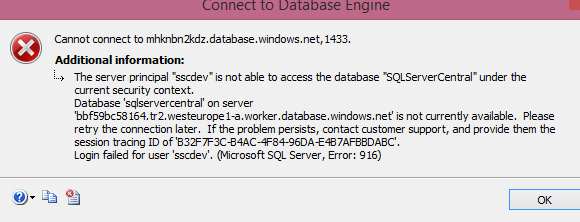
    I created a login for an Azure SQL Database, but couldn’t log in. I would get this message, which makes perfect sense.

    2015-06-23 14_52_41-Connect to Database Engine

    Just like an on-premises instance, I need to link a user to the login for access. However, unlike an on-premises SQL Server, I can’t willy-nilly change databases. If I do this:

    Use SQLServerCentral GO

    I’ll get this message.

    2015-06-23 15_00_31-SQLQuery3.sql - mhknbn2kdz.database.windows.net,1433.SQLServerCentral (jt (58))_

    I can’t switch, I need to reconnect. In this case, I use the same login (an admin level) and reconnect to a different database. This certainly can make scripts more cumbersome, and imply that your work, whether through T-SQL or PoSh, needs to include the connection strings for the correct database. In fact, I might recommend PoSh over SSMS for this reason.

    Once I’ve connected, I can use standard commands. In this case, I’ll use this code:

    add user to SQLServerCentral database connect to database CREATE USER sscdev FROM LOGIN sscdev; add a role for ddl admin EXEC sp_addrolemember db_ddladmin, sscdev;

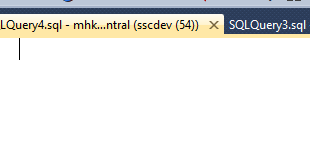
    Now when I click connect with my user, I see this:

    2015-06-23 15_02_22-SQLQuery4.sql - mhknbn2kdz.database.windows.net,1433.sqlservercentral (sscdev (5

    Just what I need.

    SQLNewBlogger

    This was a second post as part of the previous one. I was adding a user and login as part of a bit of work and when it didn’t work, I captured screen shots and split this part from the last one.

    Five minutes writing this one, probably no more than five minutes slower in running the code to capture the images.

    You can do this.

    References