Tag: syndicated

  • Defining Foreign Keys at Table Create Time

    Another post for me that is simple and hopefully serves as an example for people trying to get blogging as #SQLNewBloggers.

    How many of you can define a foreign key when you create the table? Probably a few of you, but I bet most of you are like me and don’t necessarily know the syntax. I have often defined these later, which is fine. As long as they get defined.

    However I knew I needed a specific key when I was creating a table and couldn’t remember the syntax, so I had to search and learn how. I used Google and saw a few links from MSDN, but those tend to be overly documentation heavy. One of the links was to SQL Authority, run by Pinal Dave. He does a great job of simplifying things (and he’s a friend), so I followed that link. I could see the syntax and tested it in minutes.

    It’s easy to create a Primary Key in CREATE TABLE, and I wrote about that for one of my first SQLNewBlogger posts. The Foreign Key is similar, but not quite as simple.

    Imagine that I have a parent table:

    CREATE TABLE orders ( orderid INT IDENTITY(1, 1) CONSTRAINT Orders_PK PRIMARY KEY ( orderid ) , orderdate DATETIME , complete BIT ); GO

    I now want to create a child table and link the orderid in the child to the parent. I can do it like this:

    CREATE TABLE OrderLines ( orderlineid INT IDENTITY(1, 1) CONSTRAINT OrderLines_PK PRIMARY KEY ( orderlineid ) , orderid INT CONSTRAINT orderlines_order_fk FOREIGN KEY REFERENCES orders ( orderid ) , qty INT ); GO

    Note that I define a constraint inline, just as I did for the parent. However I note this one is an FK and it "references" another table. In this case, I list the Orders table and put the columns in parenthesis.

    Quick, easy, build your FKs inline when you know about them in advance.

    SQLNewBlogger

    While trying to remember how to create an FK, I ran a search and chose the reference below to start. A matter of seconds had me seeing the syntax and writing the code.

    Putting this together was less than ten minutes.

    References

    Creating Primary Key and Foreign Key Constraints – http://blog.sqlauthority.com/2008/09/08/sql-server-%E2%80%93-2008-creating-primary-key-foreign-key-and-default-constraint/

  • Updating Extended Properties on a Table

    I’m writing this post as a way to help motivate the #SQLNewBloggers out there. Read the bottom for a few notes on structuring a post.

    I wrote recently about adding an extended property to a table. As part of what I was testing, I also needed to update properties, changing values back and forth. It’s fairly easy to do so, and I wanted to document this for my own reference.

    The sp_updateexteendedproperty is analogous to the sp_addextendedproperty procedure. Here’s the code I used to change my property value on the table from the last post.

    EXEC sp_updateextendedproperty 
    @name = N'PKException', 
    @value = '1',
    @level0type = N'Schema', @level0name = 'dbo',
    @level1type = N'Table',  @level1name = 'SalesTax3'
    ;


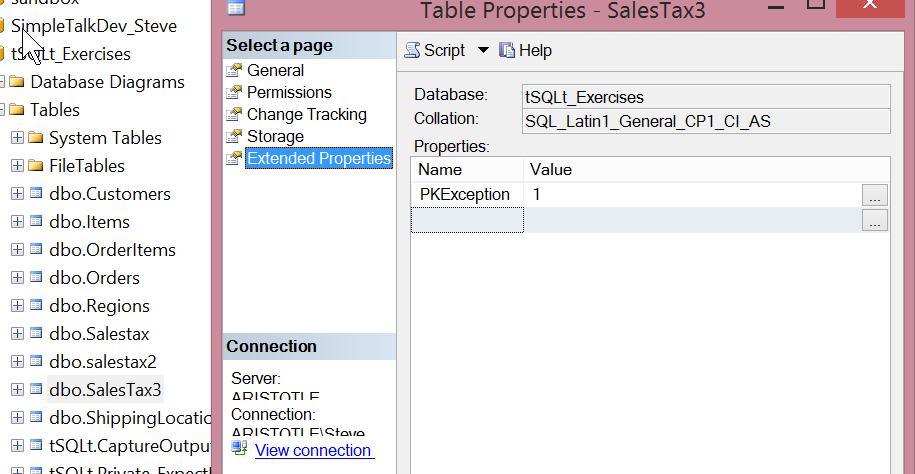
    As you can see, I pass in the same parameters. The procedure then changes the parameter in the table. A quick check in SSMS will show you the values changed. In my case, I was changing the value from 0 to 1 to test a query.

    The property does need to exist. If I execute this:

    EXEC sp_updateextendedproperty 
    @name = N'PKcheck', 
    @value = '1',
    @level0type = N'Schema', @level0name = 'dbo',
    @level1type = N'Table',  @level1name = 'SalesTax3'
    ;


    I get an error thrown from the database engine.

    Msg 15217, Level 16, State 2, Procedure sp_updateextendedproperty, Line 112

    Property cannot be updated or deleted. Property ‘PKcheck’ does not exist for ‘dbo.SalesTax3’.


    This is a good way to handle this, as a TRY..CATCH can trap the error and do an insert instead of something else.

    SQLNewBlogger

    This was another side post from my testing of a solution. As I used this code to solve a problem, I kept a copy and made a few screenshots. This one was about 10 minutes in total.

    References

    sp_updateextendedproperty – https://msdn.microsoft.com/en-us/library/ms186885.aspx

    sys.extendedproperties – https://msdn.microsoft.com/en-us/library/ms177541(v=sql.90).aspx

  • Congrats Summit 2015 Speakers

    I'm Speaking Graphic_SmallThe PASS Summit 2015 Speaker list has been released and I wanted to congratulate everyone that was accepted. It’s a great honor and I’m proud to be on the list once again.

    I also apologize to everyone that submitted and wasn’t accepted. I hadn’t planned on submitted, but part of my job is speaking to the community. I was asked to submit sessions, which I did. Of the three I submitted, one was accepted.

    I saw a post from Mark Broadbent (@retracement) today that talks about his submission experience this year. He’s spoken at the Summit before the Rally, and numerous SQL Saturdays. He’s got experience and success as a speaker. It’s hard to call a single session selection a failure, and I hope Mark doesn’t feel that way.

    It’s Not You

    One of the things I’d like to say is that if you submitted a session and weren’t picked, it’s not necessarily you. This is certainly true for the Summit, but the same thing can apply at SQL Saturdays or other events.

    I’m sure you doubt I know what I’m talking about, and that might be true, but I certainly understand how you feel. I’ve received two rejections this year from events that didn’t like my submissions. It’s tough, and it can be a blow to your self-confidence, but it’s not necessarily you.

    Don’t get me wrong. It could be. Please solicit feedback from the organizers and friends about your submissions. There might be things that you are doing poorly, and if so, you should learn to do a better job at writing abstracts, and a better job of speaking. I regularly ask people what they thought of my talks, and I’m happy to go watch and give feedback to others as well.

    I’m sure some of you have heard of, or seen spoofs, of medical school grading where professors start a test letting students know that there will be x As, y Bs, z Cs, i Ds, and j Fs. In other words, a forced ranking where you must compete in order to succeed. That’s the PASS Summit submissions, but in a more complex scenario.

    You might submit a great abstract, on an outstanding topic. Maybe you’re a SQL Server memory guru and you want to put in a 400 level internals talk on memory pressure. Great. But if Adam Machanic submits on a similar topic, I bet you don’t get picked.

    In the various areas, sessions are ranked, and no matter how good a job you do, it’s possible you’ll get beat out by someone else. That’s not to say it’s hopeless. I believe that some slots are reserved for first time speakers (to the Summit, not in general), but it does mean that your abstract needs to be good AND not have great competition in your topic area.

    Submitting to the Summit and getting picked is a bit of a lottery. It helps to speak at multiple other events (user groups, SQL Saturdays, etc), and get some reputation, but it’s also important to pick topics that will be both interesting and don’t have lots of competition. It also becomes important to write a great abstract, and if you need help, read Adam Machanic’s post on this topic.

    Above all, don’t get discouraged. Get help in putting your submission together. Ask friends, ask colleagues, ask your family and read what others have done. Pick a topic area you’re comfortable with and try to find a niche that minimizes competition. Above all, make sure you get feedback from PASS and try to use that to tailor the next submission.

    You can do it. We see more and more new speakers every year, and you have a better chance if you think about how to best present yourself to the world.

  • Adding Extended Properties to a Table

    Another post for me that is simple and hopefully serves as an example for people trying to get blogging as #SQLNewBloggers.

    I had the need recently to get put an extended property on a table in a database. I could easily have done this in SSMS, and have used the GUI before, but since I wanted to make a number of changes for testing, I wanted this done programmatically.

    I knew there had to be an easy way to do this, and was hoping for an ALTER TABLE statement, but that’s not the way it works right now. There’s an sp_addextendedproperty procedure that you can use.

    This procedure is somewhat of a generic procedure that takes a number of parameters, which are used to specify where the extended property applies. There is a name and value of the property, essentially a key-value pair, and then there are 3 levels of properties you can specify.

    Each of the levels has a name and type as well, so this is almost like a hierarchical EAV table. It’s a bit of a mess, IMHO, but that’s OK. It’s nice to have the ability to use Extended Properties for objects, though I wish this were better implemented at different levels and embedded as a core part of your database. The levels are

    • Level0 – Should be used for database scope items. For our purposes, we will use SCHEMA as the type here.
    • Level1 – The next level and should be the type of object getting the property (table, view, procedure, etc.)
    • Level2 – The level that gives the part of the Level1 object, i.e. COLUMN, TRIGGER, etc.

    These will change, and there are some notes on BOL, so be careful and read this before you do much.

    This post looks only at adding a property to a table, so let’s do that.

    I want to add a property to note that a particular table doesn’t need a Primary Key (PK). To do that, I’m going to call my type [PKException] and use a value of 1 to indicate that no PK is expected on this table.

    My call for the procedure will be:

    EXEC sp_updateextendedproperty 
    @name = N'PKException', 
    @value = '1',
    @level0type = N'Schema', @level0name = 'dbo',
    @level1type = N'Table',  @level1name = 'SalesTax3'
    ;


    In this case, I have a table called “SalesTax3” and it’s in the dbo schema. Those are my values for the Level0 and Level1 parameters. I can ignore the Level2 parameter since I am specifying this as a table level property.

    When I do this, I can then see the property in a few ways, but the easiest for most people is in the table properties, the Extended Properties tab,

    2015-05-26 09_55_09-Table Properties - SalesTax3

    That’s about it. If I want more properties, I can add them by changing the name and value of the property in the code above. I can also change the schema and table if I want this property added to other tables.

    SQLNewBlogger

    This was another side post from a separate post I was writing. I was working on solving a problem and needed an extended property. As I looked up the data to solve my issue and wrote code, I copied the Extended Property code and took a screenshot, leading to this side post.

    Once I had that, this was about 15 minutes to write. I’ll publish this one first, and refer to it in the post that solved my original problem.

    References

    sp_addextendedproperty – https://msdn.microsoft.com/en-us/library/ms180047.aspx

    sys.extendedproperties – https://msdn.microsoft.com/en-us/library/ms177541(v=sql.90).aspx