Tag: syndicated

  • Software Design and Schizophrenic Windows 8 Part 2

    I know it’s not schizophrenic, but that sounds better. It’s really a split personality.

    I wrote recently about Windows 8 and what I consider to be poor design in the update system. Today I want to look at another aspect that troubles me.

    Programs

    I’ve gotten used to the taskbar and finding the applications I need. I actually pin 12 applications to my bar because I use them on a daily basis and it’s much easier to start them from the task bar.

    I actually have gotten used to finding applications (other than Windows Update) on the Start Screen by typing the name. I know this worked in Windows 7, and I should always have been doing this, but the design of Win 8 actually forced me to get in the habit of hitting the Windows key and then typing the first 3-5 characters of the application name.

    In any case, here’s my taskbar.

    win8_schizo_3

    I’m running a number of apps, almost all of these are active. If I hover the mouse over any of them, I can find them. It’s no four-finger up swipe in OSX, but it works very well for finding stuff.

    Most stuff.

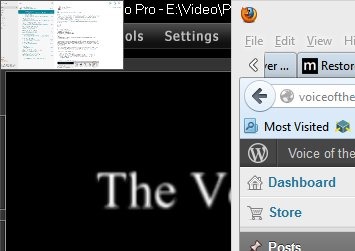
    I actually was running the Mail app in Windows a minute ago, however it’s not on my taskbar. I have to do one of a few things to find it. I can put my mouse in the upper left corner, and I’ll see it as thumbnail.
    win8_schizo_e

    I an alt+tab through my list of stuff and find it there, but that’s slow. I’d also say hovering I the upper left corner to be slow (to me).

    Schizophrenic.

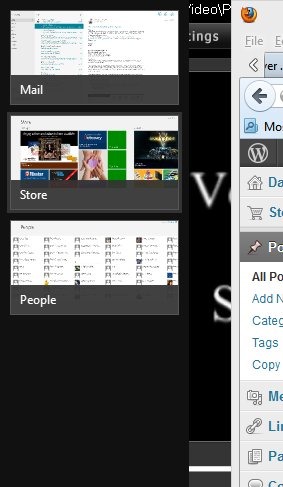
    I also had the People app running. That’s in my alt+tab list, but quite by accident I realized that if I hover my mouse in the upper left and then move it slightly down, I get this:
    win8_schizo_f

    A list of the running metro-style applications.

    Now I have two task bars. One at the bottom of both my monitors (it’s duplicated) and a separate one on the left side of my screen (either one), if I correctly move my mouse along the left side of the screen. I don’t always do it correctly, and so switching to the metro apps becomes a little dicey at times, usually slow, and occasionally maddening.

    I thought we learned a long time ago that two separate menus was poor design.

    I don’t mind the idea of the left hand bar. It’s fine, and if it’s ergonomically better, great. Get people to move that way. However make sure you’ve integrated into the taskbar at the same time. Don’t give me two places that do the same thing for different items. Give me consistency.

  • Not My Google Reader Replacement

    Someone suggested Newsblur to me, and I went to their home page. Like many sites, it asks you to sign up, so I decided to give it a try.

    newsblur2

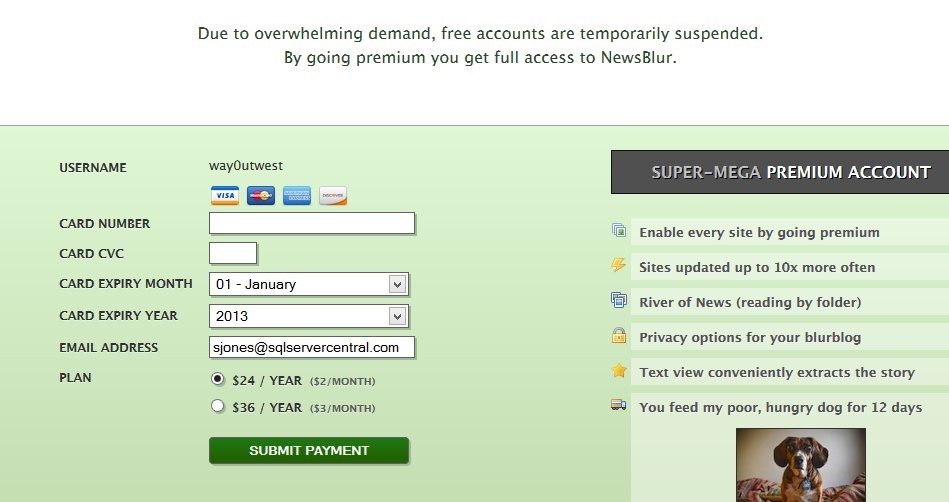
    The import from Google Reader caught my attention, so I clicked it. It asked for an authorization from Google, and then I got this page:

    newsblur

    I have to say. Not only do I now see anyway to understand the difference between $2 a month and $3 a month, but I also feel like this is a bait and switch, given the top banner. This could have been called out on the home page, though I suspect not as many people will click through.

    I’d gladly pay Google Reader $2 a month, but I know what I’m getting. Here I’m not sure, and I’m already annoyed.

    The search continues.

  • T-SQL Tuesday #42–The Long and Winding Road

    tsqltuesdayIt’s T-SQL Tuesday time, this month hosted by Wendy Pastrick who asks you to talk about the Long and Winding Road. Wendy asks us to talk about your job, your road map to the future, and what might be in store for you.

    T-SQL Tuesday is a monthly blog party on the second Tuesday of each month, hosted by a different person. You can participate by writing a blog post on the topic for the month and following a few rules that you’ll find in Wendy’s invitation.

    If you want to host yourself one month, contact Adam Machanic (@AdamMachanic).

    The Long and Winding Road

    I’ve been in the same job for about 11 years: the editor of SQLServerCentral as my primary role. About 6 years ago, Red Gate Software bought the site, and I now work for them. The job is mostly the same, though a couple things have changed over the years. Three years ago I made an effort to begin speaking more, both on technical topics as well as Red Gate software. I’ve had a busy speaking schedule across that time, and I’m scheduled for about 15 events in 2013.

    That change in speaking for me, along with the SQL in the City events that Red Gate sponsors keeps me busy with building presentations and delivering them all over the world.

    These events are designed to provide attendees with free training just like other conferences with one exception: we can talk about Red Gate tools. The sessions I do aren’t marketing talks about the tools, but rather presentations about things you should do in your environment, but I do show how the tools Red Gate provides makes these tasks easier. That’s the idea behind our tools: they make you more productive.

    This year that has meant I’m moving a little bit away from the administration areas where I spent most of my career and back into some development work. I’ve been setting up Git and working with source control, learning about Continuous Integration, and more. Mostly this is to support the work Red Gate is doing on Deployment Manager, which I think is a great idea. It solves a lot of problems and hassles that I’ve dealt with when developing software. I’m excited, and looking forward to seeing how people like the tool, as well as watching it evolve based on feedback.

    I have no plans to leave my job or Red Gate in the foreseeable future. The position I’m in is unique, and I don’t expect to move up, or around, in the company because of that, but that’s OK.

    I have the best job in the world.

  • Schizophrenic Windows 8

    I’ve been using Windows 8 almost exclusively for about 3 weeks. I got a new desktop a couple months back, which has only had Windows 8 installed on it. My new laptop arrived about 4 weeks ago and a week later I finally abandoned my Macbook Air and moved fulltime onto the Windows 8 platform.

    Overall I like Windows 8. It boots quickly, so quickly that I don’t mind the occasional restart when an update requires it. It’s gotten to where I get annoyed at the length of time it takes for me Windows 7 VMs to restart. The restore time from sleep when I open my laptop is OSX-esque. Almost immediately after I open the machine, I can log in.

    There are improvements that make my life easier, like duplicating my taskbar across both my monitors. I’ve learned the Windows+I shortcut, which is really the only one I need. I’ve gotten used to the charms/settings bar on the right, and I rarely invoke it. Overall, this feels like a faster, more complete version of Windows 7.

    Except.

    It’s schizophrenic.

    I know that’s not what I mean. Really I mean it has a split personality, but I like the word schizophrenic.

    Updates

    When I want to update Windows, I need to run Windows Update. I know that this is supposed to be automatic, but I don’t like things breaking, and so I need to run Windows Update and select the updates I’ll apply. If I go to the Start menu and type “windows u”, here’s what I get:

    win8_schizo_a

    That seems strange, because I know there’s an application of sorts for Windows Update. Fortunately I know that Windows+I, and then selecting Control Panel gets me to the main panel. I’ve learned to use search, which I can do:

    win8_schizo_b

    If search is the way to do things, and lots of recommendations say it is, why doesn’t a search on my start menu find "Windows Update? I can search in every Explorer Window. The Start screen starts searching as I type. The Store searches.

    Schizophrenic.

    What’s even worse is that apps I’ve installed from the Windows Store, of which there is a dearth as of this writing, are updated separately. I get a note on the Start Screen for the “Store” tile:

    win8_schizo_d

    Or in the upper right corner if I select Store. I actually missed this a few times when looking for updates. That might be me, and I’m not complaining about updates being here.

    win8_schizo_c

    I’m complaining they are in two different places.

    This is endemic of poor design. Not because of the Start Screen, or the tiles, or the movement of items around in the OS. Because of the lack of integration between the old, desktop style view of the world and the Windows 8 Metro/Tile interface.