Tag: syndicated

  • Thirty Hours at Home

    This is a busy travel week for me, and one of those times that stresses out everyone in the household. I attended SQL Saturday #197 – Omaha over the weekend, arriving home Sunday morning from my trip. I had a good time at the event, my first time to Omaha, and would like to go back again sometime.

    However it’s a quick turnaround for me. Fortunately I have packing down to a science since I’m leaving today at 2:00 for Las Vegas and the first SQL Intersection conference. I have two talks to deliver on Tuesday and a few sessions I’d like to see Wednesday before I head home again.

    Back in time to cook a couple meals (and extra leftovers) for the family and spend a day with everyone before heading back out of town. These are tough times, and it’s a lot of support from the family that allows me to do this.

    I’ll have the same type of turnaround at the end of the month between SQL Saturday #175 – Fargo and SQL Bits.

    I may have to limit some trips later in the year after this month, so please don’t be offended if I decline any offers to speak.

  • Reminders and Rehearsal

    I’ve spoken at quite a few SQL Saturday events. I won’t hit 50 this year, like Kevin Boles, but by my count, I’ve been to 21, with 4 or 5 more coming this year.  I have no idea when I’ll get to 50, but I hope I do.

    Capture_028

    That’s in addition to other events, which will likely bring my 2013 total to close to 15 events, similar to what I’ve done the last few years. That doesn’t seem like a lot, maybe 1 every six weeks, but I end up doing multiple talks, on multiple subjects sometimes. There was a stretch late last year where I did 12 talks in 7 different areas in about 3 weeks. It was slightly confusing for me.

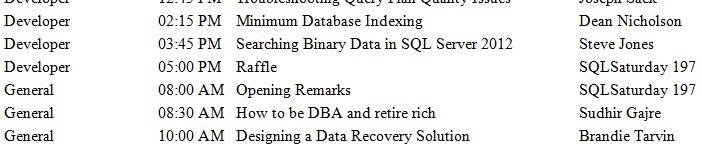
    Yesterday I received an email from SQL Saturday #197 – Omaha, which had the schedule in it. I’d glanced at it before, and had seen I was giving my Encryption Primer talk, but this time as I scrolled down, I saw my name at the end.

    sqlsat197

    Hmmm, that didn’t say “The Encryption Primer”. I’m glad I looked and double checked the schedule because I’m giving two talks. In addition to encryption, I’m talking FTS with Searching Binary Data in SQL Server.

    I’ve given the talk before, and I’m not too worried about it, but I do want to refresh my memory of the flow, and practice the demos again. I have given the Encryption talk a few times this year already, but I was planning on double checking demos again before the event. Especially as I changed the talk around and added some material for a variation I’m giving next week at SQL Intersection.

    I find it’s always good to rehearse my talks. I’m comfortable in front of people, and I know I can get through the talk, but I want things to flow and to make sense to attendees, The more practice I do, the better things go. The less “ums”, “errs” and other placeholders I use as well.

    Plus this will be good practice for SQL Bits, where I’ll deliver this talk again in May.

  • The Great Laptop Search of 2013

    It’s time for a new laptop. I don’t think it’s time, as I love the Macbook Air I bought a couple years ago. Rather some requirements for work, mainly Hyper-V, have come up and I can’t meet them with the Macbook Air. Even a 2013 summer refresh of this platform likely won’t get me what I need and I’m back to Wintel. I have a sad face, but since my daughter will likely inherit the Air, she’s smiling ear to ear.

    However that means I have work to do. Grant Fritchey went with a Lenovo W530, just getting a powerful machine. I had that form factor with a W510, and I had issues with the suspend/hibernate. However I also didn’t love the size of the machine. It was heavy and cumbersome and as much as I travel, I’d prefer something lighter.

    Ultrabooks are tempting, though I seem to only find them with 8GB of ram. The bare minimum I need. The IT group as Red Gate told me that I needed:

    • Windows 8 or Win 2012 for the Hyper-V images
    • Core i7
    • 8GB of RAM at a minimum, being prepared to give 6GB to our complex VM system.
    • 100GB of disk space
    • SSD preferred.

    That doesn’t’ give me a lot of choices in the sub 4lb range, 13” display range.

    If I was going to get a new laptop, a touch screen with Windows 8 is something that came to mind first. With that in mind, I started looking at the Lenovo X series, since I’ve had a few friends that liked those models. The X1 Carbon Touch got my first look. It’s a nice looking machine, but I’ve seen a number of complaints from people about order fulfillment for this model. That concerns me, since I would guess some of these issues are problems with the hardware. A few people I know have gotten the W530 in the same timeframes and there haven’t been issues. Besides, this machine tops out at 8GB, which is the base minimum I need.

    There were a few other machines I looked at, all in the touch screen, convertible form factor, which were interesting, but unfortunately these topped out at 8GB. That’s plenty for an ultra book or convertible that runs one operating system, even a couple virtual machines. However I don’t have control over my demo image, which others have noted really needs 6GB to run smoothly. The list I considered and rejected was:

    I suspect 8GB could work, but I don’t want to be limited if it doesn’t. We have a complex set of VMs to work with, and I think I need more RAM to be safe. After my post on the Surface Pro last week, I had a few other recommendations.

    I decided to examine each of those over the weekend and make a decision.

    I first looked at the ASUS. I’ve seen a few developers that liked this model, and it looks interesting. I can upgrade it to 10GB, which gives me a little breathing room. It’s small and thin, lightweight, and looks good. However I decided to skip this because the 10GB makes me only slightly less nervous than 8GB. I decided to check other options.

    The Toshiba is a nice machine. I used to have a 15" Qosmio, and I liked the machine. I ditched it when Toshiba wasn’t very helpful with Windows 7 drivers for my model. My son had it for about 6 months before the motherboard died, but during the 3 years it was my main machine, it worked well. The R930 looks nice, and has most of what I need. Worth considering further.

    The Sony was interesting. I’ve never had a Sony, but I’ve heard good things from people about the laptops. The Duo would have been a choice for me if it held more than 8GB. The S Series is interesting, and it goes up to 12GB of RAM. That’s likely enough for me. The display is 1600×900 and it’s under 4 lbs. It seems to meet all the criteria. A few reviews didn’t love the keyboard, and they mention going to 12GB of RAM means single channel access. I’m not sure how big a deal this is, but it’s one item.

    The Lenovo T-430 meets my criteria as well. A nice 1600×900 screen, 16GB of RAM, and it has the eraser head mouse movement. I have liked that format since IBM introduced it in the 90s. This one is a touch heaver, but it gets good reviews, and it’s a format I’m familiar with. It also has the advantage of the switching out the optical drive for a second SSD. That is what I did in my W510, and it’s what I’d likely do here as well. The T431 looks better, but since it’s not yet out, I can’t consider it.

    In weighing all the options I finally decided to get the Lenovo T431. The Toshiba was close, but I know the Lenovo product and the ultra bay that would let me stick in two drives was appealing. The Sony worries me slightly with 12GB with mismatched memory. Not a lot, but all things being equal, the T431 seems like a good fit for me.

    It’s ordered, and on the way. As soon as it comes, I suspect I’ll be looking for a new laptop bag as well, but we’ll see how this one fits in my existing bag.

    Now to learn a bit more about Hyper-V.

  • The DBA Team #1–Code and Slides

    Our first DBA Team event, in Richmond, VA just before SQL Saturday #187 went well. Overall I think our experiment was a success and we’re already talking about where and when we might do this again.

    In the meantime, we didn’t make a separate site for this series of events, being an experiment and all. I’m adding this post as a placeholder for the various slide decks and code.

    Core Monitoring for SQL Server (Steve Jones)

    Good DBAs ensure that they are always aware of the state of their instances. All systems should have monitoring in place, not just so you know when things go wrong, but so you understand what a normal workload looks like and can plan for the future. This session will cover the basics of monitoring a SQL Server system and the various metrics you should be tracking.

    Getting Started with SQL Server Backup (Grant Fritchey)

    Backups are fundamental to protecting the investment your business has in its data and they’re the foundation of disaster recovery planning. We’ll go over best practices for database backups, to ensure you’re establishing that foundation correctly within your systems. This introductory level session covers full, log, and differential backups, as well as restores and restores to a point in time. Come along to be sure you’ve got the right protection in place for your systems.

    Understanding Database Corruption (Grant Fritchey)

    A DBA’s primary purpose is to ensure that the information in their charge is accessible by the correct people within their organization. Despite everything you do to make sure you’ve got your servers configured, monitored, and tuned, with well-tested backups in place, you can still lose data through corruption. But what is corruption in a database? This session lays out exactly where database corruption can come from, how to find out exactly where the corruption is within a database, and  the methods you have available to recover from database corruption.

    Indexing for SQL Server (Steve Jones)

    Indexes are important for improving the performance of your queries, but they add overhead to your server and require maintenance. This session examines how indexes work and the basic maintenance that you should perform to ensure your system is running at its peak level.