Tag: T-SQL Tuesday

  • T-SQL Tuesday #128–Learning From Others

    tsqltuesdayIt’s the second Tuesday of the month and time for T-SQL Tuesday again. This month I’m grateful that Kerry Tyler is hosting. I had the pleasure of sitting with Kerry and his wife at a SQL Saturday last year before the world locked down and presented travel. At the time I was looking for hosts and pressured a few people into agreeing to host a month.

    This month Kerry wrote an interesting invite based on his passion with airplanes and flying. Mistakes and errors with planes can be catastrophic, so they are always revisiting issues and learning from others. He asks us to do the same this month.

    Root Cause Analysis

    One of the things that we talk about in technology is analyzing incidents and failures to determine a root cause. Despite the talk, relatively few places I’ve worked in actually perform a root cause analysis and produce actions that are taken into account in future protocols, processes, and documentation. Too few people perform a blameless postmortem, which is what we need more of.

    And too few companies share their learnings publicly.

    I can’t change that, but I can think forward.

    DevOps

    I talk a lot about DevOps and work with companies to transform what they do. This is part of my job, but it’s also an area I have passion in because I’ve worked in organizations that were following the tenets of DevOps before the term existed. A couple of areas where I learned from others to build better systems for the future.

    Networking is something that relatively few of us deal with as technical professionals. Since DHCP became a very solid platform and the amazing growth of wireless, we don’t need to dig into networking most of the time. However, understanding how DNS works and the networking protocols is still relevant.

    I was fortunate to work with a talented network engineer at one company. We were having issues with a client being able to connect to our database server, and he managed to show us how the DNS records were different between our office and theirs, when working across a VPN. Since then, I’ve always learned to check simple things, with tools like nslookup, to verify a client can see a server.

    As a data professional, I know backups are important. I use BackBlaze at home, but at work I often deal with a variety of products, even with SQL Server. While the backup process has been very consistent and stable in SQL Server, we’ve had different options emerge, as well as third party products that sometimes deal with backups in a different way. I’ve often insisted on verifying that we can restore databases to a point in time, precisely because this is what will be required during some DR incident.

    Over the years, many people have helped me understand how their product or system worked, too many to name, but I’m grateful for those that have helped explain to me exactly how a particular backup or restore process works and helped me validate the process to recover data.

    For the most part, I’ve just been the one pushing to ensure documentation was captured and available for others to use in the future.

    I do try to give back and teach others as well. I’ve been writing about Version Control Systems, including some basics I’ve learned over the years. Sometimes by reading a tutorial or blog, sometimes by making mistakes and trying to work through documentation. My learnings from others inform most of the content I produce to teach you, so it’s not that I’m doing anything innovative; I’m translating the lessons from others and myself for you.

    We all learn from others. We stand on the shoulders of giants and of ordinary people. Remember that, continue to learn, and help others where you can.

  • T-SQL Tuesday #127–Non SQL Tricks

    tsqltuesdayToday is T-SQL Tuesday, with this month being hosted by Ken Fisher. This is an interesting topic, looking at tips, but ones outside of SQL Server. Since many of us are data professionals, I think this is a place where I might learn a few things from others. Looking forward to the recap.

    I spent a number of years working in network administration and desktop work, as well as some software development teams, so I have to think about what I think makes a good tip.

    A Quick Fix with Contig

    One of the problems with a machine that runs out of memory or disk space is that it will act slow and suspicious. It often isn’t obvious that you’ve run out of resources, since we often don’t think about a slow degradation for RAM or disk space. Usually we’re looking for a runaway process, a virus, or something else. I’ve been surprised sometimes that I spent an hour, or watched someone else do this, before checking disk space.

    These days Windows is better about warning us when space is low, but it can be easy to ignore this or defer action until a later time when you’re busy. This tip won’t help you with RAM, but it can help with storage, which often affects things like pagefiles.

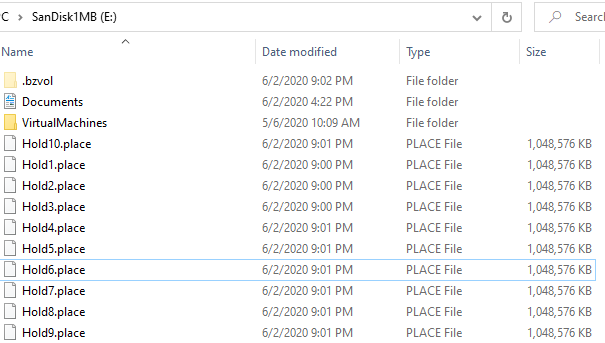
    Contig.exe is a utility from the Sysinternals utilities. It is designed to defragment files, but it can be used to create new files. Of whatever size you want. I’ve written about this before, and I use this on my machines. Whenever I get a new drive, I usually make 10 new files, each 1GB in size and keep them around. This post reminded me to do this on a new drive.

    2020-06-02 21_03_35-SanDisk1MB (E_)

    If I run low on space, I can get 10GB back quickly, without searching my filesystem for something to delete.

    You could do the same thing with a large ISO if you want, but keeping a file ready to delete can be handy. It always seems I run out of space when I’m in a hurry to get something else done.

  • T-SQL Tuesday #126–Folding@Home

    tsqltuesdayIt’s T-SQL Tuesday time, and this one is interesting. This also relates to the desktop upgrade I wrote about last week. Glenn Berry is the host, and he asks us to talk about any work we’ve done with Folding@Home.

    If you’d like to be a part of T-SQL Tuesday, get a blog and post on the second Tuesday of the month. Follow the Twitter #tsql2sday hashtag of check out the sqlcommunity.slack.com channel for T-SQL Tuesday.

    Supporting a Cause

    Years ago I did some of the work for the SETI project, by setting an agent on my home machine. At some point I rebuilt the machine, forgot I’d had this set up and went on with life.

    With the recent Covid-19 pandemic, Glenn wrote about supporting the cause by using some of your CPU cycles to process data for medical teams. I was interested in this, along with some other ideas, and this was easy for me.

    I’ve been in the process of rebuilding my home machine, as I wrote about. While I’m slowly moving things over to the new machine, I am using it online as a client for the Folding@Home project, donating CPU cycles for whatever medical research I can. With my old machine also running, I’ve been getting quite a bit of work done overnight as I set both machines to use lots of resources.

    Other Covid-19 things I’ve been doing are the daily coping tips, which I’ve put in the SQLServerCentral newsletters, on my blog, and on the Community Circle. Small things, but more than a few people have noted they help.

    A few minor things:

    • T-SQL Tuesday live – a weekly open video call to just chat (this week’s call)
    • Live Stairways – teaching a class live, as I learn.
    • Open space get togethers with a few friend. We have a lot of land, and some friends, kids I’ve coached, and others are cramped in small suburban spots. We’ve hosted a few outside times, socially distanced, people brining their own chairs, just to help them cope.
  • T-SQL Tuesday Live – 12 May 2020

    Once again, I’ll be live tomorrow, ready to just chat, shoot the breeze, answer tech questions, anything. No agenda, but I’m on for an hour.

    If you’re bored, struggling, or need a break, feel free to join us tomorrow. I’m going earlier, at 12Mountain time, for an hour.

    Details
    • Date: 21 Apr 2020
    • Time: 12:00MDT/14:00EDT/18:00UTC/190:00BST (1 hour)
    • Meeting: (add a 6 to the end) https://redgate.zoom.us/j/9281834800
    • Password: Cast this as a varchar(10) –  0x303136333439 (you should get a number starting with 0 and ending with 9.
    • Issues: DM me on Twitter @way0utwest