Tag: T-SQL Tuesday

  • No Defaults – T-SQL Tuesday #68

    tsqltuesday

    It’s the second Tuesday of the month, and time for T-SQL Tuesday. This month’s invitation is from Andy Yun, where he asks you to Just Say No to Defaults.

    This is the monthly blog party started by Adam Machanic, and it’s the chance for you to write on a particular topic every month. The hosts rotate, so you have to watch the #tsql2sday hashtag for the topic. Posts for the month need to go live during the day according to UTC time.

    I also keep a list of topics on the blog here, and you should feel free to write about any past topics and post something on your blog. It’s great practice, and a good way to get started as a #SQLNewBlogger.

    Default Changes

    There are all sorts of defaults in SQL Server. The setup program presents you with a number of choices, but in most cases a default exists for setting because SQL Server needs something.

    I used to have a setup script that I would run for every new install. In a few jobs, back when we used to have physical servers, a hardware person or sysadmin would install Windows and SQL Server onto a new computer and then send me the name for customization. My script, which was really a series of SQLCMD calls in a batch file that in turn called various other scripts, was designed to add an administrative database, create some jobs to track the system, setup backups, and more.

    The process really did part of what Policy Based Management can do, but was simpler and tailored to ensure that all of our SQL Servers worked in a similar manner. We could override settings, but this quick script gave us a starting point that all DBAs understood. We even ran this on development machines for instances we didn’t manage as it allowed us to troubleshoot other issues, it only took a few minutes, and it removed some of the management headaches from the developers’ minds.

    However, there is one thing I’ve almost always changed on my instances. I try to do it during setup, but at times I need to do it later. That setting is the default location for files. I do this as I want to usually have data files, log files, and backup files separate from each other.

    Even if I don’t have different drives, but setting up separate locations here now, I can easily move the files later and make one change here for the defaults and I know I’ll have things separate.

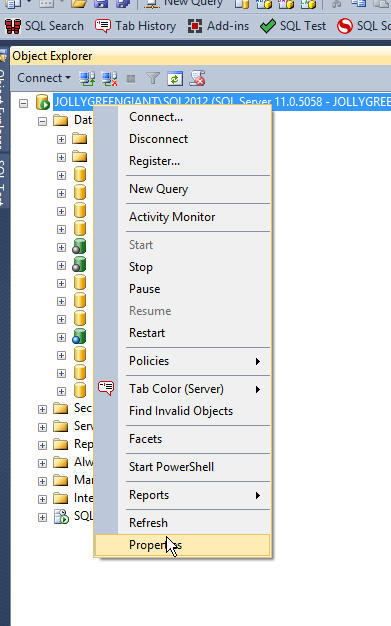
    I’m not running a new install this week, but I’ll show you how to change it on an instance that’s installed. First, right click the instance in Object Explorer and click Properties.

    2015-07-06 14_17_48-SQLQuery2.sql - not connected_ - Microsoft SQL Server Management Studio

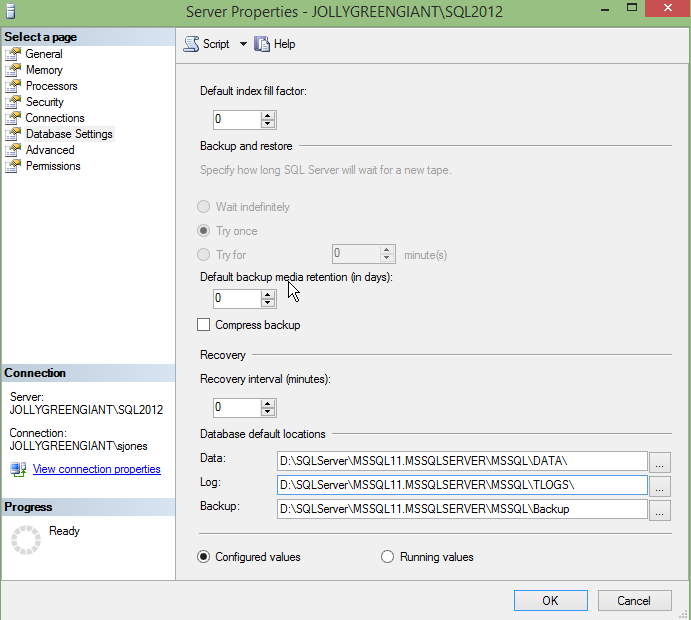
    Next, go to the Database Settings section.

    2015-07-06 14_24_07-Server Properties - JOLLYGREENGIANT_SQL2012

    At the bottom here you see locations for data, log, and backup. In this case, on my laptop, I only have two drives, so I can’t achieve great separation.

    However in any production system, I’d have the data and logs separated to different physical drives, or at least different LUNs. Backups might go with logs, but they’d ideally be separated to another location.

  • T-SQL Tuesday #67 – Extended Events for DBCC

    tsqltuesdayIt’s the second Tuesday of the month and time for another T-SQL Tuesday. This time it’s #67 from Jes Borland on Extended Events. You can read the invite, and whether you can participate today or not, write your blog and leave a comment for Jes on her blog.

    If you want to see all the topics from the past, I have them on a post here.

    If you want to host, contact the founder of T-SQL Tuesday, Adam Machanic. He chooses the hosts and is always looking for people that want to participate. You just need a blog and a good idea.

    Who Ran DBCC?

    I ran across a question recently from someone that said DBCC messages had appeared in the error log, but no one had run DBCC. That’s not possible as DBCC isn’t run without someone, whether that’s a human or a service, executing the DBCC command.

    In the past, I might recommend a trace to track this, but not I’d choose an Extended Events (XE) session. I’ll show how to set up a simple session, though be aware I’m not an XE guru. I’m sure there are better ways to structure this, but it worked well for me.

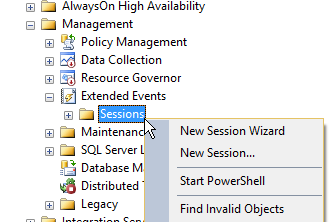
    You can start quickly building a specific XE session by right clicking the Sessions folder under Extended Events in SSMS under Management. I tend to pick the wizard for getting started, though be sure to save the script later.

    2015-06-08 11_36_10-SQLQuery2.sql - JOLLYGREENGIANT_SQL2012.Sandbox (JOLLYGREENGIANT_sjones (86))_ -

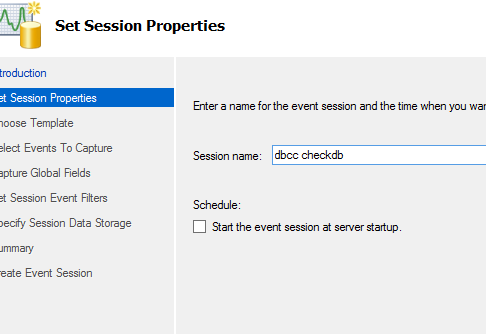
    From here we get the opening screen for XE, which I won’t show. The next screen asks for a name for the session. It doesn’t matter, but once you start using XE, you’ll start to get quite a few session, so it’s handy to pick something that’s simple and easy to understand later.

    2015-06-08 11_38_23-New Session Wizard_ Set Session Properties

    I can choose to start the session here when I’m done, but don’t worry if you’re not sure. You’ll get a chance again later.

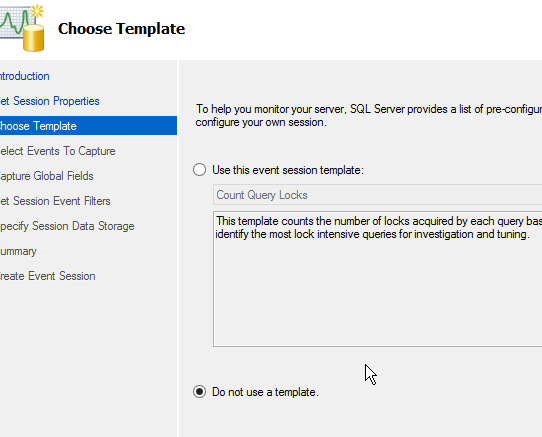
    The next step is to decide whether you use a template or build a session from scratch. I’m not sure if any of these templates will work well as I haven’t dug in. In my case, I decided to just choose a generic session.

    2015-06-08 11_41_07-New Session Wizard_ Choose Template

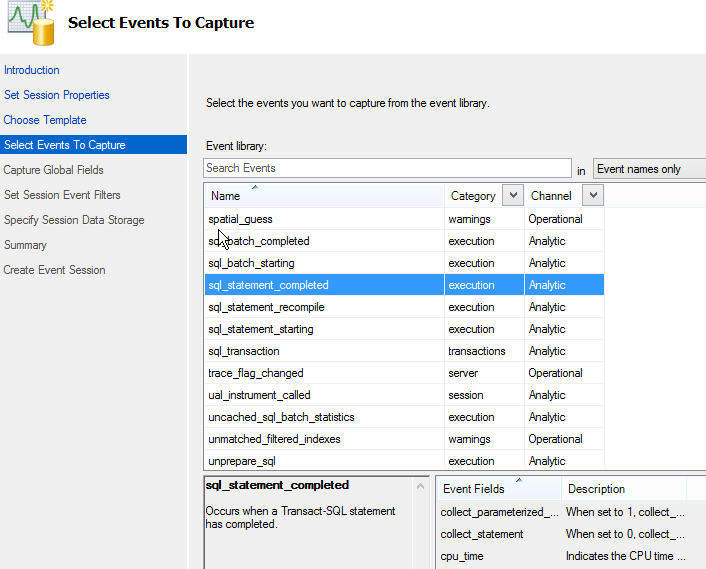
    Now I need to pick the events. There are a lot, but I went down to get the sql_statement_completed as my event. This will let me see the text of a call, which is what I need.

    2015-06-08 11_41_32-New Session Wizard_ Select Events To Capture

    A couple notes here. One, you might want to grow this screen so that you can read what’s in the lower windows. I know there’s a lot of data here, but this screen doesn’t seem well defined.

    The second note is that don’t forget to add the event with the arrow button. Until you have an event (or multiple events) in the right window, you can’t click "Next".

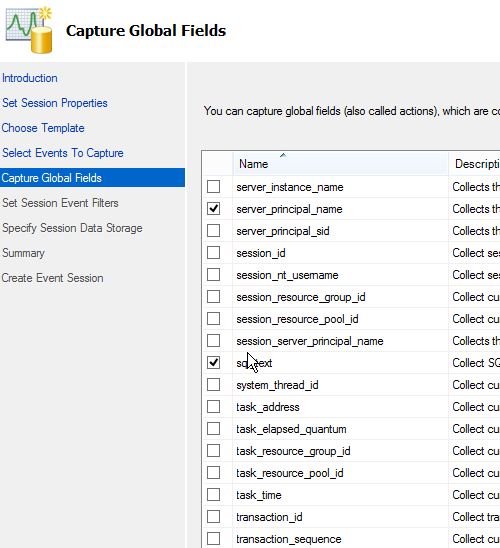
    The next step is to get the data fields you need. Again, there are a lot, and I limited this to what I needed. I grabbed the client host and app, as well as the database. Then I grabbed the service_principal_name and sql_text as well. This should let me determine who’s running the command.

    2015-06-08 11_45_29-New Session Wizard_ Capture Global Fields

    I’ve got lots of data here, but I only care about the execution of dbcc checkdb. This means I need to filter things, which is my choice with the next screen.


    Here I need to click in the top line to get a place to add a filter. Then I select sql_text from the drop down and choose like for the operator and "dbcc checkdb" for the value. This should grab events that execute with a dbcc call.

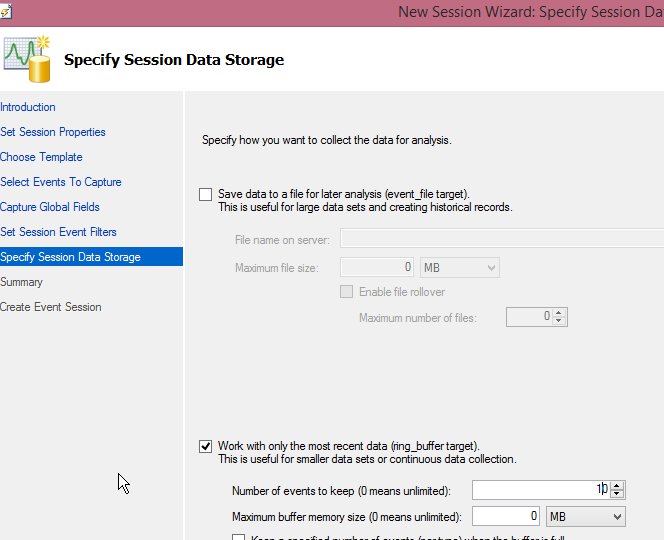
    2015-06-08 11_49_19-New Session Wizard_ Specify Session Data Storage

    I have to choose where to store this data. Since this is mostly a check for me, I can just use the ring buffer and keep data in memory. I lowered this to 10 events, but you can certainly pick what works for you. If you care about auditing, drop this in a file. For a small session like this, there’s not much data that’s going to be captured.

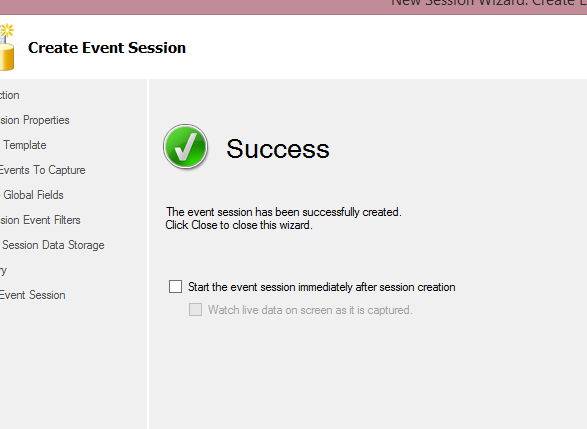
    I get a summary screen, which lets me review settings. I haven’t shown it here, but once I pass that, I get the "Success" screen. This is where I can start the session, and actually watch live data if I want.

    2015-06-08 11_51_20-New Session Wizard_ Create Event Session

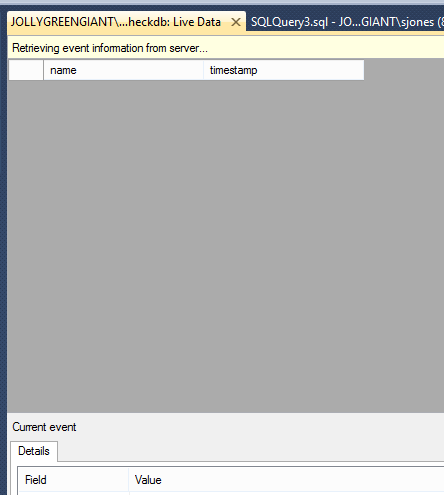
    For this, I’ll watch the live data.

    2015-06-08 11_52_20-JOLLYGREENGIANT_SQL2012 - dbcc checkdb_ Live Data - Microsoft SQL Server Managem

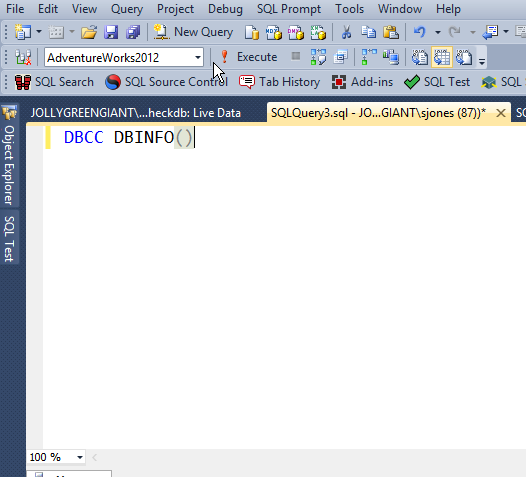
    I decided to test this first and see if it captures anything else. I ran a few queries, and then this:

    2015-06-08 11_52_30-SQLQuery3.sql - JOLLYGREENGIANT_SQL2012.AdventureWorks2012 (JOLLYGREENGIANT_sjon

    Still a blank, live data screen. Then I ran checkdb. I saw the results, and then ran it a few more times.

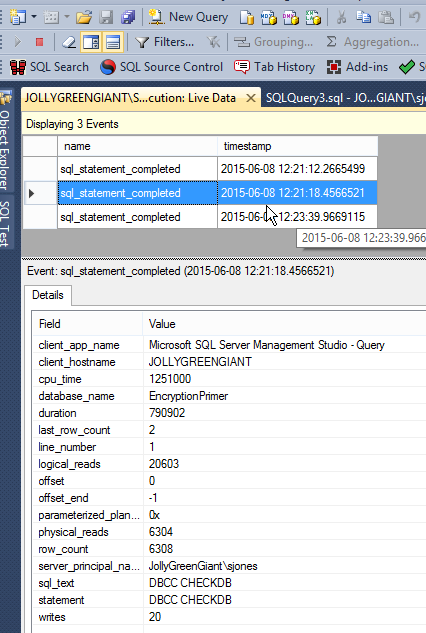
    2015-06-08 12_23_59-JOLLYGREENGIANT_SQL2012 - DBCC execution_ Live Data - Microsoft SQL Server Manag

    As you can see, I now can see that I ran checkdb against the EncryptionPrimer database.

    This lets me do some quick auditing of what’s happening with my DBCCs. A smart DBA might even use this to ensure that DBCC is being run against some databases, perhaps on a spare machine.

  • T-SQL Tuesday #66 – Monitoring SQL Server

    tsqltuesdayThis is a T-SQL Tuesday that not only makes me smile, but makes my boss happy. In fact, I’m sure that quite a few people at Redgate Software, my employer, are thrilled with this topic since we have a product that helps you here: SQL Monitor.

    T-SQL Tuesday #66 has the theme of monitoring, hosted by Catherine Wilhelmsen. Anything having to do with monitoring is fair game. Custom scripts, home grown applications, even third party software.

    If you’re a #SQLNewBlogger, this is a great chance to keep going with a new post. If you can’t write now, come back and publish something later. If you post something on May 12, 2015, you’ll get included in Catherine’s roundup. However if you can’t make it, you’re still a T-SQL Tuesday writer.

    Either way, follow #tsql2sday and learn a few things.

    Self Monitoring

    My post is going to be more of a philosophical one, with a little code.

    Most of the time I’ve worked with SQL Server, I’d had some responsibility for a production instance. Even when I was writing code and building software, I’d still find myself as the backup, if not the primary, accidental DBA. I learned early on that I needed to have some way to track what was happening on an instance.

    One of the ways in which I did this was by ensuring each instance could monitor itself. I’d found far too many times that having a process connect remotely to the instance and gather data was a way to lose data. Too often something would get missed. The exact time that a process connected was the time things didn’t work.

    As a result, I decided to keep some monitoring on the local instance. Even though I usually had a central server roll up information, if that instance dropped off the network (or my monitoring server died), I’d still know what was going on. This was especially important when I worked in the financial industry or was bound by ISO 9000 standards.

    Note: These days I don’t bother to manage monitoring software of my own on an instance. I use SQL Monitor because I work for Red Gate, but no matter who my employer might be, I’d buy software because it’s worth the cost. I don’t have the time to worry about maintaining my own software for most monitoring tasks.

    DBAAdmin

    I had a setup routine that I used to use on every instance. It did a few things, the first of which was create a DBAAdmin database. This was the place I could put anything I needed to monitor my instance. I tried to keep all the code the same between instances, and tried to write idempotent code so that re-running the install wouldn’t cause issues.

    Once I had the database, I’d add tables and procedures for various purposes. For example, one of the things that needed to be tracked each day was the backups for the databases. So I created a table called DBBackups.

    CREATE TABLE DBBackups ( BackupID INT IDENTITY(1,1) , Backupdate DATETIME , DatabaseName VARCHAR(2000) , BackupType CHAR(1) , Filename VARCHAR(2000) , sizeGB NUMERIC(15,2) ) ;

    This table had a corresponding procedure that was designed to scan the filesystem and report back on the latest backups written to the file system. The details of each file are recorded here.

    Why? If there’s a problem with monitoring, the local machine still has the information about backups. What’s more, I can usually get more details here than I’m capturing in a monitoring system that’s looking at the last backup date or just getting full backups. If msdb history is wiped, I have a second copy here.

    However I also need to remove data over time, so this solution usually has three parts.

    • Table for data storage
    • Procedure(s) for gathering data
    • Procedure and job to remove data older than xx days

    That’s simple, but it’s a decent amount of work. However I only use this for certain areas. I used to really care about backups, but SQL Monitor captures that for me. However I might care about sp_configure settings. While SQL Monitor can alert me if there are changes, how do I know what changed? I’ve used a process like this to keep the last week’s worth of sp_configure information, captured every day to let me look back.

    As I noted above, I wouldn’t rebuild a monitoring solution for overall checking of a database, but I might capture specific information using this process, with the table and procedures tailored to the specific information I care about.

  • T-SQL Tuesday #65 – Learning Computed Columns for XML

    It’s T-SQL Tuesday time again, and this month the invite comes from Mike Donnelly (@sqlmd). The topic is Teach Something New and it’s a good one.

    I try to learn something all the time, and this post is about something I ran into recently with a submission from a user that I needed to check. I had to dig in a bit and see how XML worked in computed columns and I decided to write about it for this month’s entry.

    T-SQL Tuesday is a monthly event on the second Tuesday of each month. There’s a new invite each month, and you need to watch Twitter and the #tsql2sday tag to find the next one. I keep a running list of past topics, and feel free to write on any of them and post something.

    Learn Something New

    I haven’t done a lot of work with computed columns or XML in my career. At least not in SQL Server. I do remember using VB and traverse XML documents and pull out nodes, but that was years ago.

    Recently I had to verify how XML computed columns work and that required me to dig in a bit to the rules for both. This post looks at the way in which I learned how to return part of an XML column from a table.

    Imagine that we have a table storing some XML data inside it. For my demo, I have a table storing profile information for users. I’ve actually seen a table like this, grabbing information for a website and then shredding it later if there are changes needed in the database. Here’s the setup of the table with a row of data inserted.

    CREATE TABLE UserProfile ( UserID INT IDENTITY(1,1) , profile XML ); GO INSERT INTO dbo.UserProfile ( profile ) VALUES ( N'<user> <username>way0utwest</username> <history> <pageurl>/default</pageurl> <pageurl>/scripts/</pageurl> <pageurl>/scripts/id/2433</pageurl> </history> <points> <forums>32432</forums> <qotd>1123</qotd> </points> </user>' );

    If I want the username from this table, I can use this query:

    SELECT profile.value('(/user/username)[1]', 'varchar(max)') FROM dbo.UserProfile AS up;

    That will return this data:

    xmlshred_a

    However, suppose I don’t want to use that code in all my queries in the application. Certainly it’s not bad for stored procedures, but I don’t want to repeat that over and over either.

    Instead I want to use a computed column. I’d think that we could do something like this:

    ALTER TABLE dbo.UserProfile ADD Username AS (profile.value('(/user/username)[1]', 'varchar(max)'));

    However that doesn’t work. I get this error:

    Msg 435, Level 16, State 16, Line 1

    Xml data type methods are not supported in computed column definitions. Create a scalar user-defined function to wrap the method invocation. The error occurred at column "Username2", table "UserProfile", in the ALTER TABLE statement.

    I haven’t seen this documented in Books Online, but it’s a restriction. However, there is a specific document on using XML in computed columns, which gives a workaround. The way to do this is to use a user-defined function. I need to build a function with my query:

    CREATE FUNCTION UserProfile_XML_UserName(@xml xml) RETURNS varchar(200) AS BEGIN RETURN @xml.value('(/user/username)[1]', 'varchar(max)') END ; GO

    Now, I can use my function in the computed column

    ALTER TABLE dbo.UserProfile ADD Username AS (dbo.UserProfile_XML_UserName(profile));

    Now when I query the table, I have a new column with the username:

    SELECT top 10 * FROM dbo.UserProfile AS up

    Here are my results

    xmlshred_b

    That’s what I learned in the last month in working with T-SQL. This came from a user submission, and it required me to dig into BOL and find out how I could make this work.

    References

    Here are the references I used to learn about this: