Tag: T-SQL

  • No Scalars with JSON_QUERY–#SQLNewBlogger

    Another post for me that is simple and hopefully serves as an example for people trying to get blogging as #SQLNewBloggers.

    I started to dig into JSON queries recently, and as I continued to experiment with JSON, this struck me as strange. Why is there a NULL in the result?

    2020-12-04 14_43_02-SQLQuery3.sql - ARISTOTLE_SQL2017.Compare2 (ARISTOTLE_Steve (58))_ - Microsoft S

    The path looks right. This appears to be somewhere I ought to get a result back. As I looked up the JSON_QUERY documentation, and it says I get an object or array back. I’d somewhat expect that position, while containing a single value, could be seen as an object of

    {“setter”}

    The fact that I need to know I have a single value here seems like poor design. If the document changes, perhaps someone might enter this:

    DECLARE @json NVARCHAR(1000)
         = N'
      {  "player": {
                  "name" : "Sarah",
                  "position" : "setter, DS"
                 },
        "team":"varsity"
      }
    ';

    In this case, a JSON_VALUE would fail, while a JSON_QUERY wouldn’t work in the first example above. This means that I need to modify my code based on documents.

    I don’t like this, but I need to know this, so if you work with JSON, make sure you know how the functions work.

    SQLNewBlogger

    While writing the previous post, I changed one of the function calls and got the NULL. I had to fix things for the other post, but I kept the query and then spent about 10 minutes writing this one to show a little thought into the language.

    You can easily take something you are confused about, made a mistake doing, or wonder about and write your own post.

  • Basic JSON Queries–#SQLNewBlogger

    Another post for me that is simple and hopefully serves as an example for people trying to get blogging as #SQLNewBloggers.

    Recently I saw Jason Horner do a presentation on JSON at a user group meeting. I’ve lightly looked at JSON in some detail, and I decided to experiment with this.

    Basic Querying of a Document

    A JSON document is text that contains key-value pairs, with colons used to separate them, and grouped with curly braces. Arrays are supported with brackets, values separated by commas, and everything that is text is quoted with double quotes.

    There are a few other rules, but that’s the basic structure. Things can next, and in SQL Server, we store the data a character data. So let’s create a document:

    DECLARE @json NVARCHAR(1000) = N'
    {
      "player": {
                 "name" : "Sarah",
                 "position" : "setter"
                }
      "team" : "varsity"
    }
    '

    This is a basic document, with two key values (player and team) and one set of additional keys (name and position) inside the first key.

    I can query this with the code:

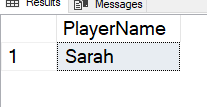
    SELECT JSON_VALUE(@json, '$.player.name') AS PlayerName;

    This returns the scalar value from the document. In this case, I get “Sarah”, as shown here:

    2020-11-21 14_58_17-SQLQuery3.sql - ARISTOTLE_SQL2017.Compare2 (ARISTOTLE_Steve (58))_ - Microsoft S

    I need to get the path correct here for the value. Note that I start with a dot (.) as the root and then traverse the tree. A few other examples are shown in the image.

    2020-11-24 14_49_16-

    These show the paths to get to data in the document.

    In a future post, I’ll look in more detail how this works.

    SQLNewBlogger

    After watching the presentation, I decided to do a little research and experiment. I spent about 10 minutes playing with JSON and querying it, and then another 10 writing this post.

    This is a great example of picking up the beginnings of a new skill, and the start of a blog series that shows how I can work with this data.

  • Strange T-SQL Operator Syntax

    I can’t remember where I saw this, but it made an interesting Question of the Day:

    select *

    from Sales

    where Profit !< 10000;

    I had never seen anything like this, in all my years of working in C, C++, Java, Lisp, APL, Pascal, Fortran, VB, C#, SQL, and more. However, there are apparently a few operators that I’ve never used:

    • !<
    • !>

    These are the not less than and not greater than.

    Weird, though I guess this makes sense. Personally, I think restructuring as greater than or equal to instead of not less than makes perfect sense.

  • Adding a Check Constraint to a Table–#SQLNewBlogger

    Another post for me that is simple and hopefully serves as an example for people trying to get blogging as #SQLNewBloggers.

    I had to do this the other day, and while I guessed at the syntax, I wasn’t sure of it, so I thought this would be a good post.

    The Check Constraint docs are good, and a quick search got me over there.

    I was trying to add a column to a table that has a domain of values. In my case, I was aiming for something like this:

    CREATE TABLE MyTable (somekey int, result tinyint)

    The result value can be 0-4, and while front end validation can handle this, it’s easy to get lazy and assume they will. It’s easy for someone to forget, or use an application like SSMS or Access to edit data, or more.

    Add a constraint. It will help with data quality.

    My thought was to do this:

    CREATE TABLE MyTable (somekey int,
    result tinyint check result <= 4)

    That actually is fine, and it’s almost what the docs show. After my column, I include the CHECK keyword, and then I can give the expression. The problem with this code is that I need to parenthesis added, like this:

    CREATE TABLE MyTable (somekey int,
    result tinyint (check result <= 4)
    )


    SQLNewBlogger

    This was a 5 minute post, showing something I thought I knew, had to check, and then corrected. A good case of how I am improving skills.

    Write a post like this for something you did in your job.