Tag: T-SQL

  • Cleaning up bad dates–#SQLNewBlogger

    Another post for me that is simple and hopefully serves as an example for people trying to get blogging as #SQLNewBloggers.

    I got some data recently from an online service, MapMyRun.com, where I track my workout data. I’ve been doing this for years, but with some of the instability and security issues with services, I decided I need to periodically grab a copy of my data and load it.

    This post describes an issue with cleaning up the date data.

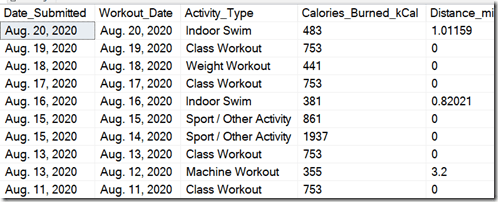
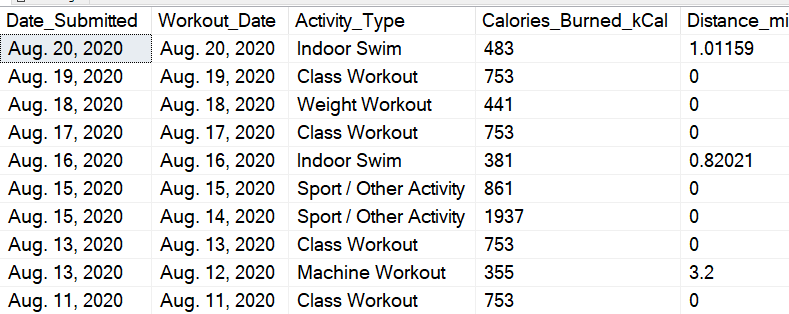
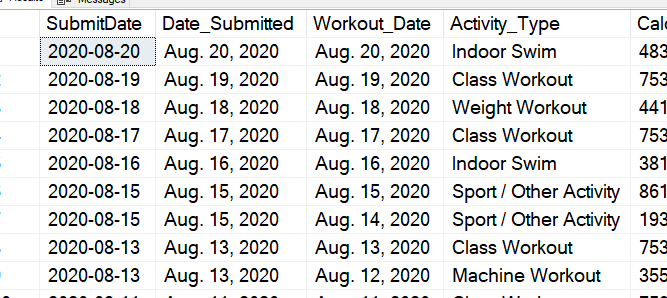
    When I tried the load from SSMS (Tasks->Load Flat File), I got errors if I attempted to insert into a date field. My goal is to use the pattern of loading to a staging table and then merging data into my main table, so I decided to just load into a staging table. When I did this, here is what I saw.
    2020-08-27 12_30_53-~vs7264.sql - ARISTOTLE_SQL2017.way0utwest (ARISTOTLE_Steve (58))_ - Microsoft S

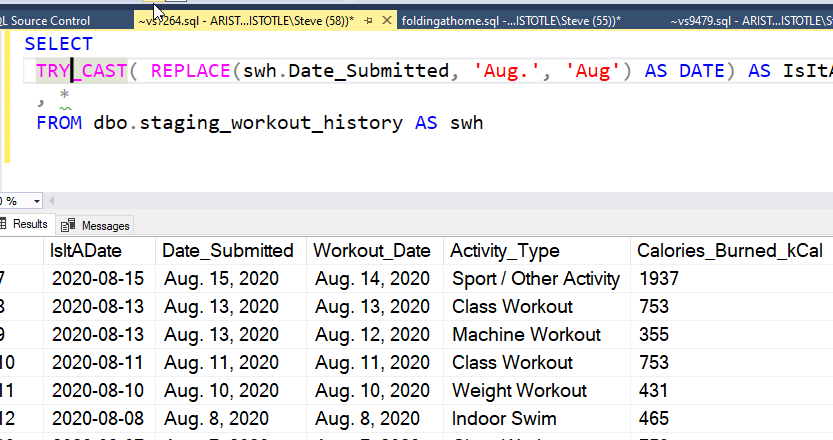
    For a human, the dates make perfect sense. For a computer, however, translating this to a date via an implicit conversion doesn’t work well. No problem, I can fix this. I’ll replace the date:

    SELECT top 10
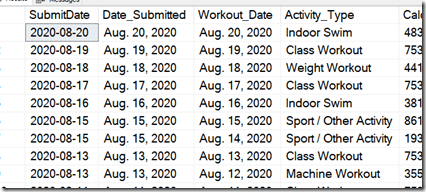
    CAST( REPLACE(swh.Date_Submitted, 'Aug.', 'Aug') AS DATE) AS SubmitDate
    , *
    FROM dbo.staging_workout_history AS swh

    This works great.
    2020-08-27 12_33_28-~vs7264.sql - ARISTOTLE_SQL2017.way0utwest (ARISTOTLE_Steve (58))_ - Microsoft S

    However, if I scroll through the entire file, I find issues with other dates. Once I remote the top, I get this:

    Msg 241, Level 16, State 1, Line 1
    Conversion failed when converting date and/or time from character string.

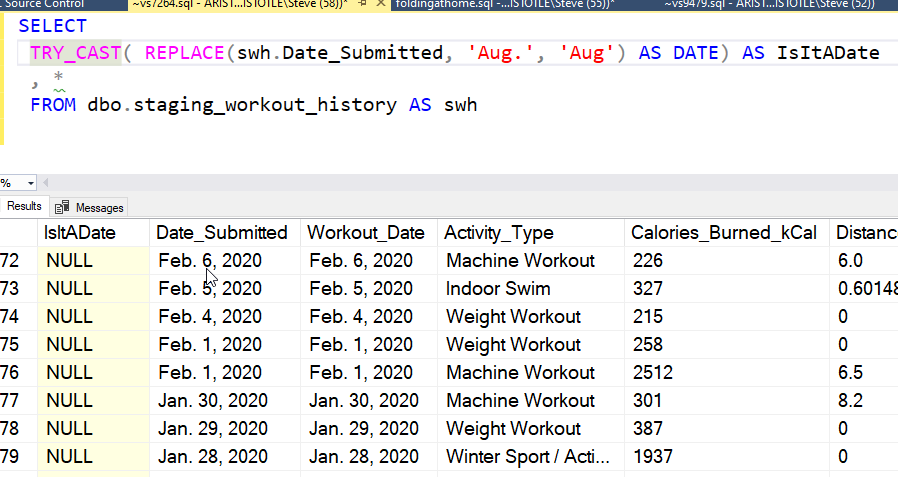
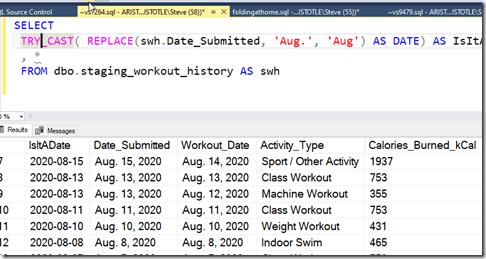
    Hmmm, there are other issues. I could remove my CAST and scroll through, but there’s an easier way. I’ll use TRY_CAST() instead. If I restructure my query, I can run it to completion.
    2020-08-27 12_40_27-~vs7264.sql - ARISTOTLE_SQL2017.way0utwest (ARISTOTLE_Steve (58))_ - Microsoft S

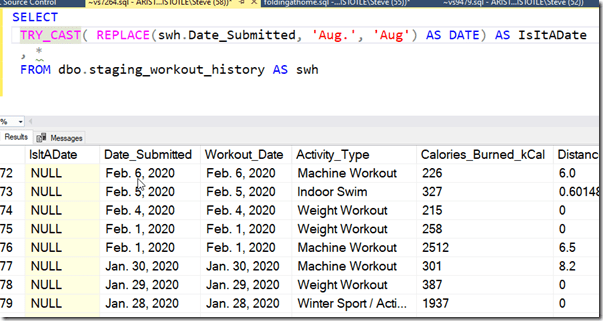
    Now I can scroll through. I could also add a test for getting NULL from TRY_CAST to find the problematic dates. Here’s where I see more problems.
    2020-08-27 12_41_08-~vs7264.sql - ARISTOTLE_SQL2017.way0utwest (ARISTOTLE_Steve (58))_ - Microsoft S

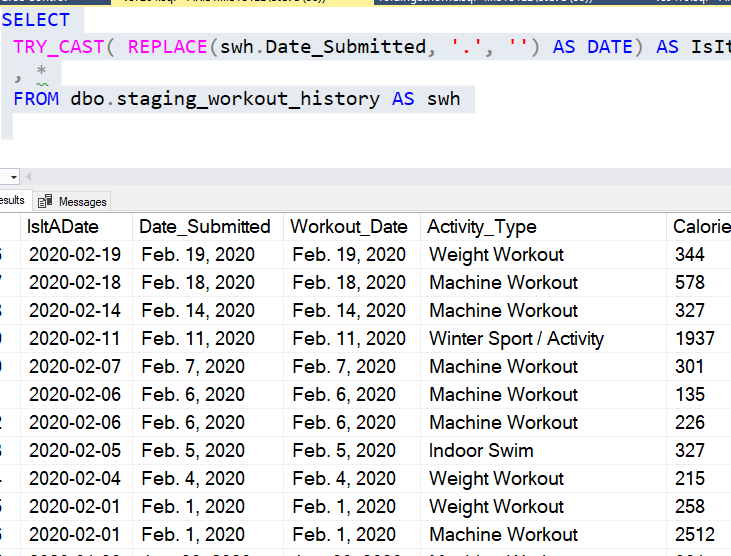
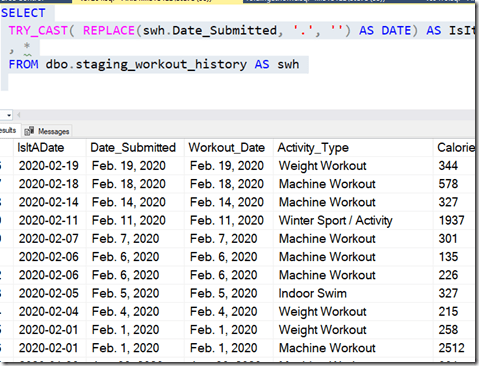
    It seems that whoever exported data, from whatever system, decided periods in months make sense. I can amend the REPLACE in this way, which should fix things.

    SELECT
    TRY_CAST( REPLACE(swh.Date_Submitted, '.', '') AS DATE) AS IsItADate
    , *
    FROM dbo.staging_workout_history AS swh
     

    Now I see this seems to work
    2020-08-27 12_46_22-~vs7264.sql - ARISTOTLE_SQL2017.way0utwest (ARISTOTLE_Steve (58))_ - Microsoft S

    One More Problem

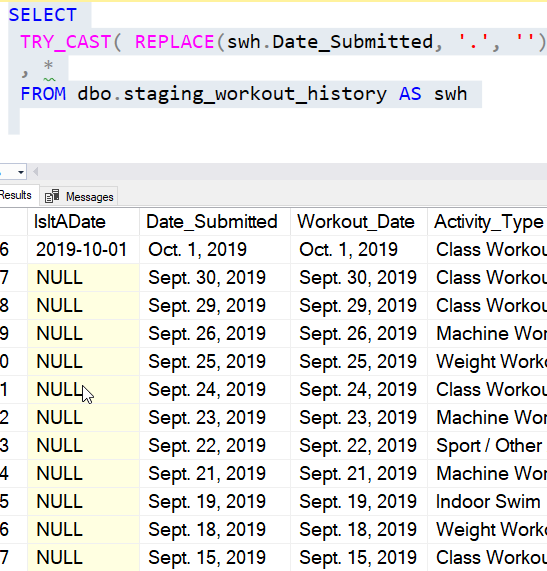
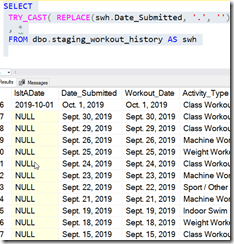
    I’m glad I kept scrolling through a full year. That’s because I saw this:
    2020-08-27 12_47_33-~vs7264.sql - ARISTOTLE_SQL2017.way0utwest (ARISTOTLE_Steve (58))_ - Microsoft S

    Who thinks Sept is the abbreviation for September? Technically it is, and I see April, June, and July spelled out, so the inconsistency in this extract is bizarre to me. Perhaps there is a database that formats English month names like this and deals with conversions, but this seems like sloppy programming to include “April”, “Jan.”, and then “Sept.” in your data set.

    In any case, I can add another REPLACE() to my code.

    SELECT
    TRY_CAST( REPLACE(
                       REPLACE(swh.Date_Submitted, '.', '')
                       , 'Sept', 'Sep') AS DATE) AS IsItADate
    , *
    FROM dbo.staging_workout_history AS swh
    WHERE  TRY_CAST( REPLACE(
                       REPLACE(swh.Date_Submitted, '.', '')
                       , 'Sept', 'Sep') AS DATE)  IS null

    This converts all the dates in my column to the expected value. Now I need to do the same thing for other date columns, change TRY_CAST() to CAST() and I can import data.
  • Don’t Forget Unique with FILESTREAM–#SQLNewBlogger

    Another post for me that is simple and hopefully serves as an example for people trying to get blogging as #SQLNewBloggers.

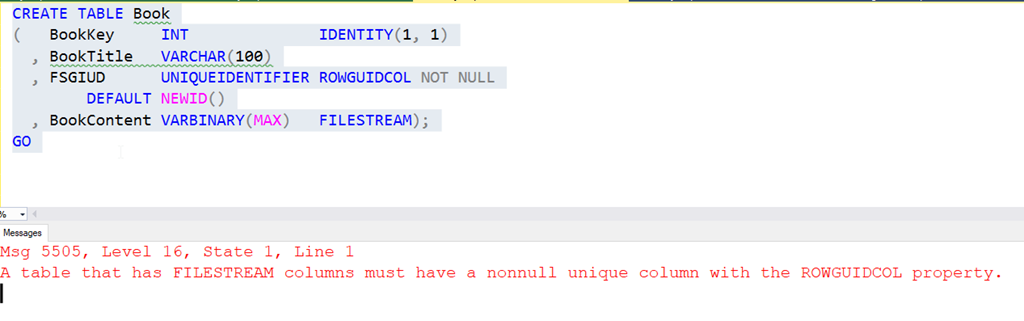
    While testing FILSTREAM with SQL Clone the other day, I kept getting an error while trying to create a table. I’d click Execute and see this:

    2020-08-12 14_10_37-SQLQuery2.sql - ARISTOTLE_SQL2017.FSTest (ARISTOTLE_Steve (58))_ - Microsoft SQL

    My mind kept focusing on the ROWGUIDCOL part, and not thinking unique. It’s been a few years since I worked with FILESTREAM as it’s not an Azure feature and things have been going that way for me.

    In any case, after running this a few times, and then checking an old demo, I realized that I had forgotten UNIQUE as an attribute for the column. Once I added that, it worked.

    The docs for CREATE TABLE shows this that unique is listed as a constraint property, but under the FILESTREAM section, is does say this about the ROWGUID column: “This column must not allow null values and must have either a UNIQUE or PRIMARY KEY single-column constraint.”

    Don’t forget this, but if you do, read the error message,

    SQLNewBlogger

    This post took me about as long to write as it did to realize I was being silly and forgetting to read. Overall, this was about 10 minutes to compile, take the screenshots, and get the references.

    When you write, look for places you’ve learned something, and then use those as ideas for blogs.

  • Adding a FK to a Table–#SQLNewblogger

    Another post for me that is simple and hopefully serves as an example for people trying to get blogging as #SQLNewBloggers.

    One thing that helps ensure your data is intact and doesn’t get out of synch in a relational database is a foreign key. You ought to have these as a part of your design, ensuring that a linkage between a parent and child cannot be broken.

    This post looks at adding a FK to an existing table. I’ve written about how to do this in the CREATE TABLE statement in another post.

    I have two tables set up: Contacts and Status. Both of these have a StatusID column in them. The Status table contains the lookup values, and these are stored in the child table, Contacts.

    To add the foreign key, I add a constraint with the ALTER TABLE ADD CONSTRAINT syntax. After this, I use FOREIGN KEY to list the column(s) and then the REFERENCES phrase to point out the parent table and column.

    The example is shown here:

    ALTER TABLE dbo.Contacts
       ADD CONSTRAINT FK_Contacts_Status_StatusID FOREIGN KEY (StatusID)
          REFERENCES dbo.Status (Statusid)
    ;

    This will give me  a FK that enforces the values in Contacts as existing in Status.

    SQLNewBlogger

    I had to do this recently and decided to quickly write this up as I had to look up the syntax to be sure I remembered it correctly. Then it took me about 5 minutes to produce this.

    It took me almost as long to see if I’d already written about altering a table with a FK.

    Do this for your career, and to show interviewers that you know how to handle common data referential integrity tasks.

  • Getting the Proc Code–#SQLNewBlogger

    Another post for me that is simple and hopefully serves as an example for people trying to get blogging as #SQLNewBloggers.

    I saw a question recently about getting the code in a stored procedure. I’ve become dependent on SQL Prompt, which gives me a nice preview of code when I see a proc:

    2020-06-30 16_42_34-ObjectDefinitionBox

    The main way I’ve gotten code is right clicking a proc in Object Explorer and clicking Modify. That opens up an ALTER statement for the proc.

    2020-06-30 16_42_44-

    However, there’s one more way to do this: sp_helptext.

    2020-06-30 17_26_18-SQLQuery2.sql - ARISTOTLE_SQL2017.Sandbox (ARISTOTLE_Steve (82))_ - Microsoft SQ

    Not the best solution, but it gives me a quick look from SQL without futzing through a big list in the OE.

    SQLNewBlogger

    This is a quick example of some knowledge that I can use in my regular work. When someone asked the question, I knew the code for procs was stored somewhere, but I wasn’t sure what the proc to get this was. I tried sp_help, but that wasn’t right, so I had to go look up sp_helptext.

    This took about ten minutes to write.