Tag: T-SQL

  • SQL Grouping on Sums (with testing)

    I ran across a post recently that I thought was an interesting T-SQL problem. The user wanted to group values into a running total, but the groups would reset based on a sum.

    In this case, the user had this set of data:
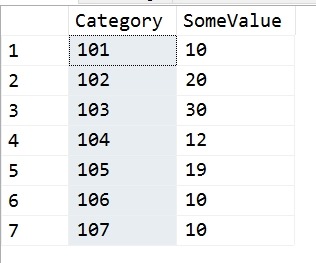
    2017-09-14 18_09_39-SQLQuery1.sql - (local)_SQL2016.sandbox (PLATO_Steve (72))_ - Microsoft SQL Serv

    Their goal was to run through these values, in Category order, and whenever the running total sum of SomeValue exceeded 30, reset the sum. Their requirement was that this could only be a single value or two values, which boxes in the problem nicely. In other words, they wanted these results:
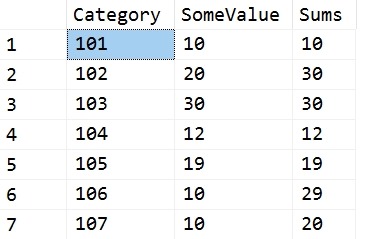
    2017-09-14 18_12_02-SQLQuery1.sql - (local)_SQL2016.sandbox (PLATO_Steve (72))_ - Microsoft SQL Serv

    The first two rows equal 30, so we reset for the third row. The third row is 30, so we reset for the fourth. The fourth and fifth would exceed 30, so each gets a reset. Five and six give 29, so we stop there.

    I don’t know what the use case is here, but it’s an interesting problem.

    My Solution

    I had a quick solution using Lag. I created a quick query that looked back 1 and 2 rows. I could have stopped with one, but originally I thought that the poster might go to three rows if the 30 value wasn’t met. I use a CTE to get the current row and previous values, then  a simple CASE to sum values or return the current row.

    WITH lagCTE
    AS (SELECT
              Category,
              SomeValue,
              LagValue1 = LAG(SomeValue, 1, 0) OVER (ORDER BY Category),
              LagValue2 = LAG(SomeValue, 2, 0) OVER (ORDER BY Category)
         FROM Source
        )
    SELECT
          lagCTE.Category,
          lagCTE.SomeValue,
          Sums = CASE
                     WHEN lagCTE.SomeValue + lagCTE.LagValue1 > 30 THEN
                         lagCTE.SomeValue
                     ELSE
                         lagCTE.SomeValue + lagCTE.LagValue1
                 END
    FROM lagCTE;

    I also created a test, because, why do the math. Once I’ve done this, I want to ensure any code changes, any logic changes will still pass the same test. Here’s my test code:

    EXEC tsqlt.NewTestClass @ClassName = N'tTSQLTests'
    GO
    CREATE PROCEDURE tTSQLTests.[test running total reset]
    AS
    -----------------------------------
    -------   Assemble
    -----------------------------------
    EXEC tsqlt.FakeTable
         @TableName = N'RTSource'
    
    INSERT RTSource
    VALUES ('101', 10),
            ('102', 20),
            ('103', 30),
            ('104', 12),
            ('105', 19),
            ('106', 10),
            ('107', 10);
    
    CREATE TABLE tTSQLTests.Expected
    (   Category     VARCHAR(5),
         SomeValue    INT,
         RunningTotal INT
    );
    INSERT INTO tTSQLTests.Expected
    VALUES
           ('101', 10, 10),
           ('102', 20, 30),
           ('103', 30, 30),
           ('104', 12, 12),
           ('105', 19, 19),
           ('106', 10, 29),
           ('107', 10, 10);
    SELECT
           Category,
           SomeValue,
           RunningTotal
    INTO  tTSQLTests.Actual
    FROM  tTSQLTests.Expected
    WHERE 1 = 0;
    
    -----------------------------------
    -------   Act
    -----------------------------------
    INSERT tTSQLTests.Actual EXEC RunningTotalQueries
    
    -----------------------------------
    -------   Assert
    -----------------------------------
    EXEC tsqlt.AssertEqualsTable
         @Expected = N'tTSQLTests.Expected',
         @Actual = N'tTSQLTests.Actual',
         @Message = N'incorrect query'
    GO

    Adding Counters

    The poster then asked for a group counter, which becomes much harder. I was about to try for another CTE that would give me some counter I could work with when Jeff Moden used the quirky update to build a better script. You can read his code here.
  • The Code Coverage Report

    I had someone that told me recently that they needed to find a way to get code coverage in T-SQL. Not for them, not to improve quality, but because their manager wanted a report.

    OK, here it is.

    First, build a nice SSRS report that displays your company logo, a header, the current date, and a pie chart. Yes, I know pie charts are bad, but they’re good for managers that want something like code coverage.

    Now, for the data source of the report, here’s your query:

    SELECT 90 + ((RAND() * 8)-2)

    Now, you won’t always get over 90%, which is what some people want, but you’ll get over 90 eventually.

  • Bulk Inserting Build Data–#SQLNewBlogger

    Another post for me that is simple and hopefully serves as an example for people trying to get blogging as #SQLNewBloggers.

    One of the common tasks that many DBAs need to do is insert data into a database. Often this comes from various sources, but a CSV (comma separate value) format is common. One could use the data import wizard, but that seems to be very flaky with CSVs, so I’ll show a quick way to use the BULK INSERT command.

    This command is a way to read files and load them into a table, similar to how bcp works. However, this is a T-SQL command, and can be included inside your database.

    The basic format is

    BULK INSERT <table>

    FROM <source>

    WITH <options>

    For most CSV imports, this means we need to pick a table, in my case, the BuildStaging table, and a source file. My statement looks like this:

    BULK INSERT dbo.BuildStaging
    FROM ‘e:\Documents\ssc\BuildList_SQLServer2014.csv’

    I also need some options. The basics for a CSV are:

    WITH
    (   FIELDTERMINATOR = ‘,’,
         ROWTERMINATOR = ‘\n’
    );

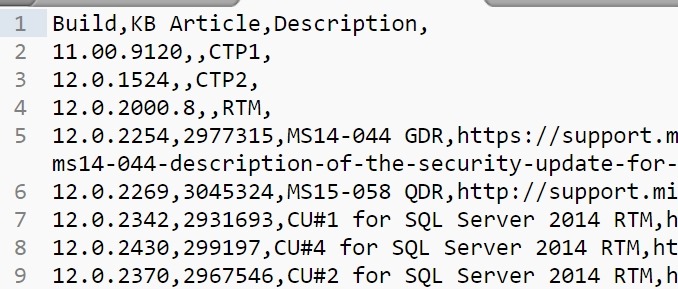
    There could be other items you want to enable, and there is quite a list. In my case, my file looks like this:

    2017-08-24 14_26_20-E__Documents_ssc_BuildList_SQLServer2014.csv - Sublime Text

    I have a header row, so let’s get rid of that by adding a FIRSTROW = 2 option.

    Now when I run my command, the data is inserted.

    2017-08-24 14_28_12-SQLQuery1.sql - (local)_SQL2016.SSBuilds_1_Dev (PLATO_Steve (62))_ - Microsoft S

    From here, I need to work with the data and clean it futher for insert into other tables.

    SQLNewBlogger

    This was a quick task I needed to accomplish. I knew most of the syntax, but had to double check the option names, and ended up taking about 2 minutes to import the data and 10-15 to write this post.

    And, I’ll likely remember how to do this import after spending time writing about it.

  • Adding a New Default to a Column

    Another post for me that is simple and hopefully serves as an example for people trying to get blogging as #SQLNewBloggers. This is also a part of a basic series on git and how to use it.

    This is a fairly simple process, but I bet more than a few people don’t know how to do it. I had to double check some syntax the other day, and I thought this is a perfect SQLNewBlogger post, based on something I had to (re)learn.

    If I have a table, there are existing columns and I want to add a constraint to one, I need to alter it. To do that, I’ll use the ALTER TABLE x ADD CONSTRAINT syntax.

    One of the common use cases is to add a default date to a date column. For example, I have a Blogs table and want to ensure the CreatedDate column is always populated. I’d do that with

    ALTER TABLE dbo.Blogs
    ADD CONSTRAINT df_SysUTCDate DEFAULT SYSDATETIME() FOR createdate;

    In this case, I use ADD CONSTRAINT and then name the constraint. Using specific names is always good since this means I can be sure that I have matches between development, QA, and production.

    I then use the DEFAULT keyword and follow this with a function name. I then use the FOR and the column name. This means I’ve added a default constraint to the CreateDate column and if no value is included in an insert statement, sysdatetime() used.

    This is a basic idea, but one that few developers think about or include in their design. Learn to use defaults and add them when you start building or adding columns.