Tag: T-SQL

  • Basic XML Node Query–#SQLNewBlogger


    Another post for me that is simple and hopefully serves as an example for people trying to get blogging as #SQLNewBloggers.

    I saw a question recently about querying an XML document. Certainly avoid this in the database if you can, but there are times you need to. Rather than link to the post, I wanted to show the basics of how you query a node.

    Let’s suppose I have an XML document like this:

    <Order>
      <OrderID>4FB9</OrderID>
      <ORderDate>2019-07-20-00.31.23.000000</ORderDate>
      <Status>Open</Status>
      <Customer>
        <CustomerName Type=”Individual”>
          <FirstName>Jon</FirstName>
          <LastName>Doe</LastName>
        </CustomerName>
      </Customer>
      <Customer Type = “Company”>
        <CustomerName>
          <CompanyName>Acme</CompanyName>
          <Account>12345</Account>
        </CustomerName>
      </Customer>
      </Order>

    Now, I saw someone query this with code like this to get the OrderID.

    DECLARE @xml XML;
    SET @xml = N’
    <Order>
      <OrderID>4FB9</OrderID>
      <ORderDate>2019-07-20-00.31.23.000000</ORderDate>
      <Status>Open</Status>
      <Customer>
        <CustomerName Type=”Individual”>
          <FirstName>Jon</FirstName>
          <LastName>Doe</LastName>
        </CustomerName>
      </Customer>
      <Customer Type = “Company”>
        <CustomerName>
          <CompanyName>Acme</CompanyName>
          <Account>12345</Account>
        </CustomerName>
      </Customer>
      </Order>
    ‘;

    SELECT
          t.b.value(‘(ORDERID)[1]’, ‘NVARCHAR(100)’) AS MSGID
      FROM
        @xml.nodes(‘/Order’) t(b);

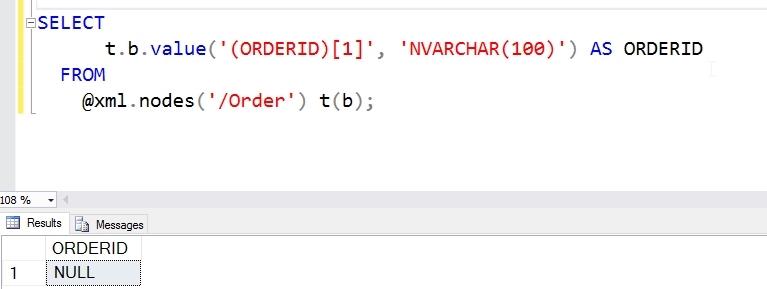
    This doesn’t work.

    2016-06-15 13_09_07-Photos

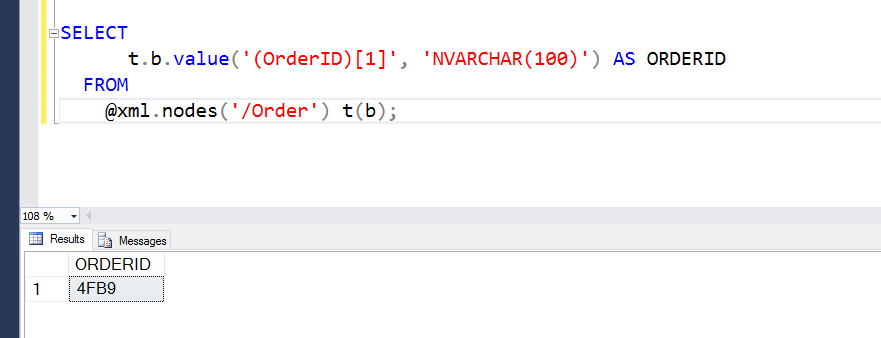
    The reason this doesn’t work is that XML is case sensitive. Meaning ORDERID != OrderID. The former is in the query, the latter in the XML document. If I change the query, this works (note I have OrderID below).

    2016-06-15 13_11_23-Photos

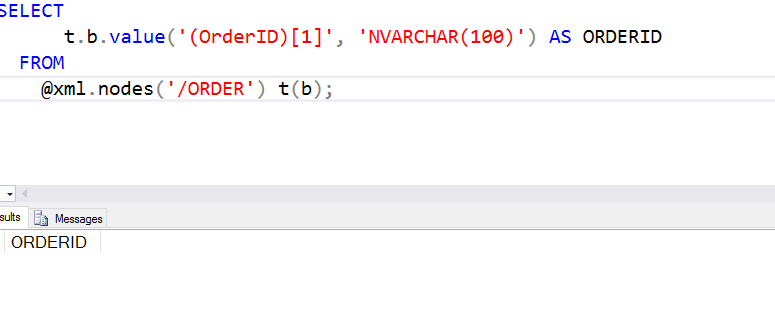
    This would also apply to the .Nodes call. If I had .ORDER, this also wouldn’t work.

    2016-06-15 13_11_54-Photos

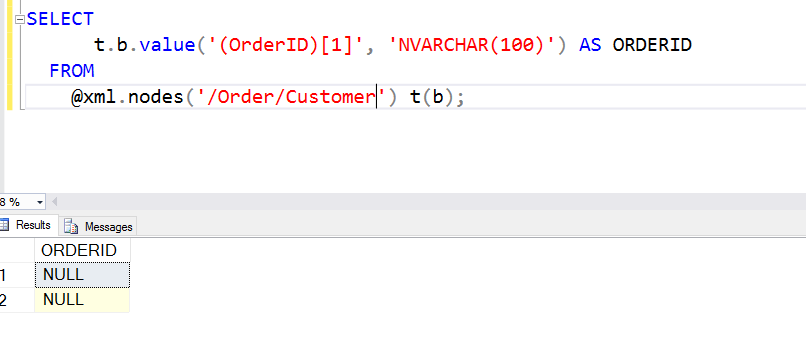
    The @xml.nodes() call determines the root at which I’ve essentially set the document. I could have this as /Order/Customer if I wanted. In that case, I couldn’t access the OrderID. The OrderID isn’t below the Customer node.

    2016-06-15 13_13_21-Photos

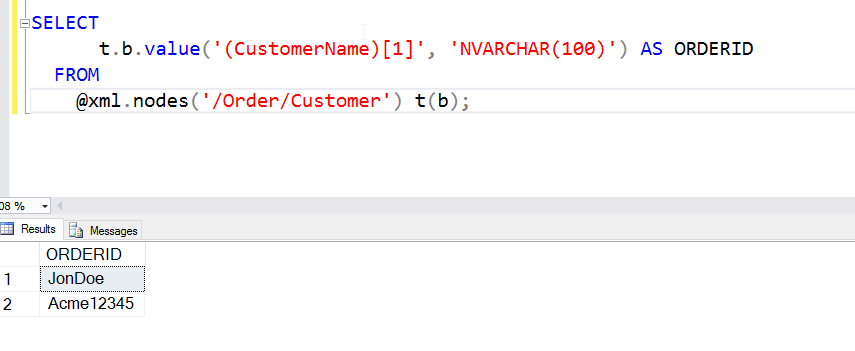
    However, from below Customer, I can get to the names.

    2016-06-15 13_14_05-Photos

    There is a lot more to know about XML, but you can experiment with the various nesting levels by including different paths. I’ll show a few more things in another post.

    SQLNewBlogger

    Querying XML is hard, and can be frustrating as the document size grows and complexity grows. However, this is a good way to showcase your skills (or build them), but tackling different query questions or challenges and writing about them.

    Hint: this will also help solidify your XML skills.

  • Getting the Previous Row Value before SQL Server 2012

    Another post for me that is simple and hopefully serves as an example for people trying to get blogging as #SQLNewBloggers.

    I ran across a post where someone that was trying to access the previous value in a table for some criteria. This is a common issue, and  one that’s very easily solved in SQL Server 2012+ with the windowing functions.

    However, what about in SQL Server 2008 R2-?

    NOTE: I’m solving this quickly, the way many people do, but this is an inefficient solution. I’ll show that in another post. However, I’m showing how you can describe and solve a problem here. If you need to solve this, look for a temp table solution (or find a later post from me).

    Setup

    It’s pretty easy. Let’s get some data together. I’ll use a big sample since that’s easier to see the differences.

    CREATE TABLE MyID
    ( myid INT
    , myvalue INT
    );
    GO
    INSERT MyID
    VALUES (1, 10 ),
            (1, 20 ),
            (2, 400),
            (2, 500),
            (2, 600),
            (3, 8000),
            (3, 9000),
            (3, 10000),
            (3, 11000);

    Now, what I want is something that returns the previous row, assuming we’re ordering by the ID and value. If there is no previous value, let’s return a zero. Essentially what we want is something like this:

    select MyID        , MyValue       , MyPrevValue = ISNULL( x, 0)
    from …

    That’s the pseudocode. Obviously I need to fill in blanks. However, let’s build a test. Why? Well, I can then see my result data, and I can re-run the test over and over as I experiment with the query. It’s not hard, I promise.

    EXEC tsqlt.NewTestClass
      @ClassName = N'WindowTests';
      go
    CREATE PROCEDURE [WindowTests].[test check the previous row value for MyID]
    AS
    BEGIN
    -- assemble
    CREATE TABLE #expected (id INT, myvalue INT, PrevValue int) INSERT #expected
    VALUES (1, 10  , 0  ),
            (1, 20  , 10 ),
            (2, 400 , 20 ),
            (2, 500 , 400),
            (2, 600 , 500),
            (3, 8000 , 600),
            (3, 9000 , 8000),
            (3, 10000 , 9000),
            (3, 11000 , 10000) SELECT *
    INTO #actual
      FROM #expected AS e
      WHERE 1 = 0 -- act
    INSERT #actual
    EXEC dummyquery;
    -- assert
    EXEC tsqlt.AssertEqualsTable
      @Expected = N'#expected'
    , @Actual = N'#actual'
    , @FailMsg = N'Incorrect query' END

    If you examine the test, you’ll see that I create a table, insert the results I expect, and then call some procedure. I compare the results of the procedure with the table I built.

    That’s it. A simple test, but I’ll let the computer compare the result sets rather than trusting my eyes.

    Last thing, I’ll build my dummy procedure, which can look like this:

    CREATE PROCEDURE dummyquery
    -- alter procedure dummyquery
    AS
    BEGIN select MyID   , MyValue , PrevValue = MyValue from MyID
      END

    Now I have the outline of what I need. If I run the test now, I’ll get this:
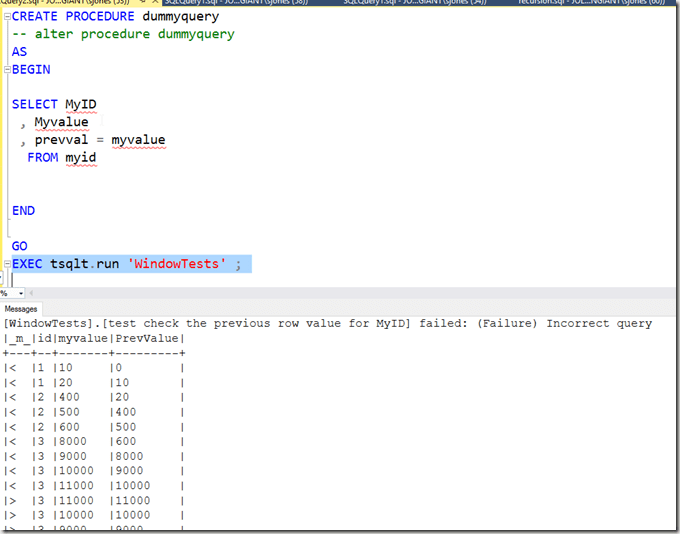
    2016-06-07 10_18_23-Photos

    The test output tells me it has failed, the values in the #expected table (with a <), and the values from my query in the #actual table (with a >).

    Now I can debug and work on this.

    Solving the Problem

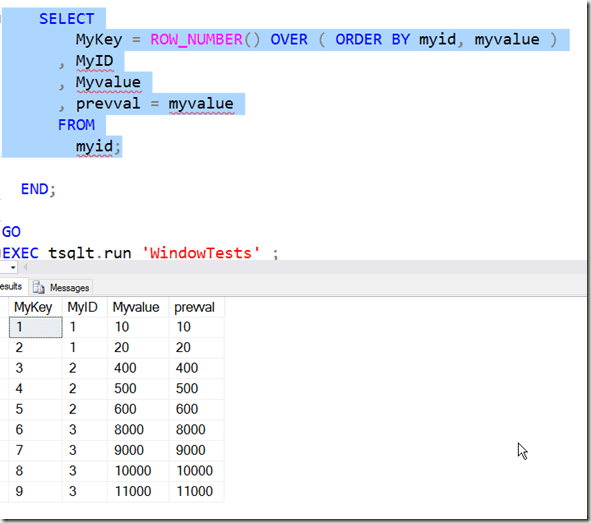
    First, I want to order the data and get a number that counts the order. The ROW_NUMBER function does this, which is available in SQL Server 2005+. I won’t go into SQL 2000- solutions because, well they’re more complex and there should be very few SQL 2000 instances left coming up with new problems.

    I can do this with this code:
    2016-06-07 10_21_40-Photos

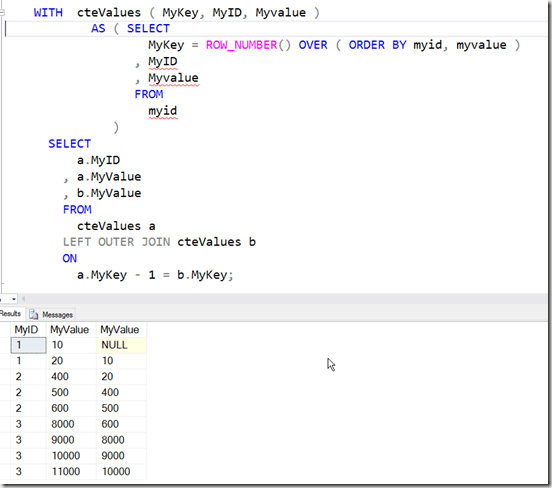
    Note that I have a sequential counter that lets me order every row with an index. Now, I can access the previous row, since I know the MyKey value will be one less than the current row.

    With this in mind, let’s turn this into a CTE (removing the previous value). Outside of the CTE, I’m going to self-join the CTE to itself. I’ll use a LEFT JOIN since not every row will have a previous row. In fact, the first row won’t.

    The join condition, which you can play with, will be on the outer table’s ID being one less than the first table’s key. You could reverse the math as well, but that’s up to you.
    2016-06-07 10_29_37-Photos

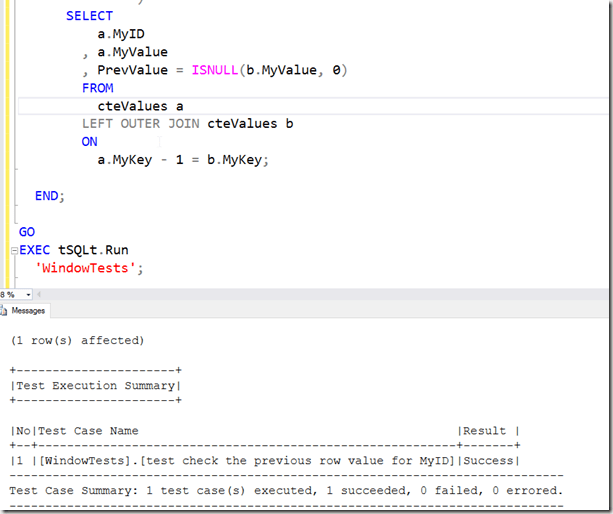
    One last issue. Add an ISNULL to the previous value to return a 0 if there is no match. Now, let’s run the test.
    2016-06-07 10_31_58-Photos

    SQLNewBlogger

    This was a slightly longer post, where I tried to explain how I setup the problem and solved it. I included a test, which didn’t add much coding time. In fact, the writing took far longer than the coding itself.

    This is the type of problem I’d encourage you to solve on your blog. If you want to repeat this, look for a solution with temp tables, as the CTE incurs a lot of reads. This isn’t really what you’d like to do in production code.

  • LAST_VALUE–The Basics of Framing

    I did some work a 3-4 years ago, learning about the Windowing functions and enjoying them so much I built a few presentations on them. In learning about them, and trying to understand them, I found some challenges, and it took some experimentation to actually understand how the functions work in small data sets.

    I noticed last week that SQLServerCentral had re-run a great piece from Kathi Kellenberger on LAST_VALUE, which is worth the read. There’s a lot in there to understand, so I thought I’d break things down a bit.

    Framing

    The important thing to understand with window functions is that there is a frame at any point in time when the data is being scanned or processed. I’m not sure what the best term to use is.

    Let’s look at the same data set Kathi used. For simplicity, I’ll use a few images of her dataset, but I’ll examine the SalesOrderID. I think that can be easier than looking at the amounts.

    Here’s the base dataset for two customers, separated by CustomerID and ordered by the OrderDate. I’ve included amount, but it’s really not important.

    2016-06-06 13_38_55-Phone

    Now, if I do something like query for LAST_VALUE with a partition of CustomerID and ordered by OrderDate, I get this set. The partition divides the set up into the two customer sets. Without an ORDER BY, these sets would exist as the red set and blue set, but in no particular order. The ORDER BY functions as it does in any query, guaranteeing the same order every time.

    2016-06-06 13_46_36-Movies & TV

    Now, let’s look at the framing of the partition. I have a few choices, but at any point, I have the current row. So my processing looks like this, with the arrow representing the current row.

    2016-06-06 13_49_22-Movies & TV

    The next row is this one:

    2016-06-06 13_49_33-Movies & TV

    Then this one (the last one for this customer)

    2016-06-06 13_49_44-Movies & TV

    Then we move to the next customer.

    2016-06-06 13_49_54-Movies & TV

    When I look at any row, if I use “current row” in my framing, then I’m looking at, and including, the current row. The rest of my frame depends on what else I have. I could have UNBOUNDED PRECEEDING and UNBOUNDED FOLLOWING in there.

    If I used UNBOUNDED PRECEEDING and CURRENT ROW, I’d have this frame, in green, for the first row. It’s slightly offset to show the difference.

    2016-06-06 13_53_22-Movies & TV

    However, if I had CURRENT ROW and UNBOUNDED FOLLOWING, I’d have this frame (in green).

    2016-06-06 13_54_21-Movies & TV

    In this last case, the frame is the entire partition.

    What’s the last value? In the first case, the last part of that frame is the current SalesOrderID (43793). That’s the only row in the frame. In the second frame, the last one is 57418, the last row in the frame, and partition.

    What if we move to the next row? Let’s look at both frames. First, UNBOUNDED PRECEEDING and CURRENT ROW.

    2016-06-06 13_56_16-Movies & TV

    Now the frame is the first two rows. In this case, the last value is again the current row (51522). Below, we switch to CURRENT ROW and UNBOUNDED FOLLOWING.

    2016-06-06 13_56_29-Movies & TV

    Now the frame is just the last two rows of the partition and the last value is the same (57418).

    There’s a lot more to the window functions, and I certainly would recommend either Kathi’s book (Expert T-SQL Window Functions in SQL Server) or Itzik’s book (Microsoft SQL Server 2012 High-Performance T-SQL Using Window Functions). Either one will help. We’ve also got some good articles at SQLServerCentral on windowing functions.

  • It’s 2016 RLS for T-SQL Tuesday #79

    tsqltuesdayIt’s T-SQL Tuesday time again. I missed last month, being busy with travel, though I should go ahead and write that post. Maybe that will be next week’s task.

    In this case, Michael J Swart is hosting this month’s blog party and he asks us to write about something to do with SQL Server 2016. Read the rules at his invitation.

    Row Level Security

    I’ve wanted this feature to be easy for a long time. In fact, I’ve implemented a similar system a few times in different applications, but it’s been a cumbersome feature to meet, plus each developer needs to understand how the system works for it to work well. Even in the case where we once used views to hide our RLS, it was a performance issue.

    Microsoft has made things easier with their Row Level Security feature. This was actually released in Azure in 2015, but it’s now available in SQL Server 2016 for every on premise installation as well.

    Essentially for each row, there is some data value that is checked to determine if a user has access. This doesn’t mean a join. This doesn’t mean you write a lot of code. The implementation is simple, and straightforward, and I like it.

    Security Predicate Functions

    The one piece of code you need is an inline table valued function (iTVF) that returns a 1 for the rows that a user should see. You need to have some way to match up a row with a user, and that can be tricky, but if you identify a row, even in another table, you can use it.

    For example, I have this table.

    CREATE TABLE OrderHeader
      (
        OrderID INT IDENTITY(1, 1)
                    PRIMARY KEY
      , Orderdate DATETIME2(3)
      , CustomerID INT
      , OrderTotal NUMERIC(12, 4)
      , OrderComplete TINYINT
      , SalesPersonID INT
      );
    GO

    There’s nothing in this table that really helps me identify a user that is logged into the database. However, I do have a mapping in my SalesPeople table.

    CREATE TABLE SalesPeople
      (
        SalesPersonID INT IDENTITY(1, 1)
                          PRIMARY KEY
      , SalesFirstName VARCHAR(200)
      , SalesLastName VARCHAR(200)
      , username VARCHAR(100)
      , IsManager BIT
      );

    Granted, this could mean some change of code, but perhaps you can somehow use a user name in tables to query AD or other directory and map this to a user name.

    Once I have that mapping, I’m going to create a function. My function will actually look at the SalesPeople table, and map the parameter passed into the function to the value in the table.

    CREATE FUNCTION dbo.RLS_SalesPerson_OrderCheck ( @salespersonid INT )
    RETURNS TABLE
        WITH SCHEMABINDING
    AS
    RETURN
        SELECT
                1 AS [RLS_SalesPerson_OrderCheck_Result]
            FROM
                dbo.SalesPeople sp
            WHERE
                (
                  @salespersonid = sp.SalesPersonID
                  OR sp.IsManager = 1
                )
                AND USER_NAME() = sp.username;
    go

    In the function, I look at the USER_NAME() function and compare that to a value in the table. This is in addition to checking the SalespersonID column.

    I can use a Security Policy to bind this function to my OrderHeader table as shown here:

    CREATE SECURITY POLICY dbo.RLS_SalesPeople_Orders_Policy
      ADD FILTER PREDICATE dbo.RLS_SalesPerson_OrderCheck(salespersonid)
      ON dbo.OrderHeader;

    This sets the function, passing in a column from the OrderHeader table, which is the column I want evaluated in the function.When I now query the OrderHeader table, I get this:

    2016-06-13 11_42_16-Photos

    There is data in the table. However, I don’t get rights by default, even as dbo. My USER_NAME() doesn’t match anything in the table, therefore no SalesPersonID matches. However, for other users, it works.

    2016-06-13 11_42_32-Photos

    There is a lot more to the RLS feature, but I think it’s pretty cool and it’s something that will be highly used in many applications moving forward, especially those multi-tenant systems.

    Go ahead, get the free Developer Edition and play around with RLS.