Tag: T-SQL

  • Rounding Challenges–#SQLNewBlogger

    Another post for me that is simple and hopefully serves as an example for people trying to get blogging as #SQLNewBloggers.

    Rounding is an interesting activity, and one that I think people sometimes don’t pay enough attention to. Recently I saw a problem that intrigued me and I spent a few minutes looking at the issues.

    Let’s suppose you have data like this for pricing.

    0.3

    0.7

    1.2

    1.6

    How would you round this data? If you use a simple ROUND(n,0) function, you get this:

    0.0

    1.0

    1.2

    2.0

    Now, that’s fine, but what if you want this:

    0.3

    1.0

    1.2

    2.0

    That’s a bit more challenging. I’ll leave the solution out, but note that if I ROUND(n, 1), I get this.

    0.3

    0.7

    1.2

    1.6

    That’s not quite right either. ROUND() is using the number of decimals I’ve given it, but in some cases, I might want to round up. In this case, I only round up when we’re at .5 or higher, but don’t round down. In those cases, I need to limit rounding. This could be done in a WHERE clause, or with a function (be really careful of scalar functions).

    The important part is knowing that I really want this:

    ROUND(0.3, 1)

    ROUND(0.7, 0)

    ROUND(1.2, 1)

    ROUND(1.6, 0)

    How I get these is up to me, and there are a few ways, but really I want to be sure that I understand how ROUND() works and then apply it appropriately for my situation.

    SQLNewBlogger

    This is a quick one, literally about 6 minutes to write. About a minute of that was playing with formatting. Understanding functions, and knowing how they affect data is important to show your knowledge.

    Also, make sure that you know how to solve something like this if you write about it. I’d encourage you to write the solution as well as remember it. Someone might ask you in an interview Winking smile

  • Dropping Masking from a Column–#SQLNewBlogger

    Another post for me that is simple and hopefully serves as an example for people trying to get blogging as #SQLNewBloggers.

    This is a quick one. As I experimented with Dynamic Data Masking for the Stairway to Dynamic Data Masking, and writing my Using SQL Compare with Dynamic Data Masking, I needed to remove masking from a column. I didn’t want to rebuild tables, and hoped there was an easy way to ALTER a column.

    There is.

    Here’s my table. I added masking to this table, but this is the scripted DDL.

    CREATE TABLE [dbo].[OrderHeader](
        [OrderID] [INT] IDENTITY(1,1) NOT NULL,
        [Orderdate] [DATETIME2](3) NULL,
        [CustomerID] [INT] NULL,
        [OrderTotal] [NUMERIC](12, 4) MASKED WITH (FUNCTION = 'default()') NULL,
        [OrderComplete] [TINYINT] NULL,
        [SalesPersonID] [INT] NULL,
    PRIMARY KEY CLUSTERED 
    (
        [OrderID] ASC
    )WITH (PAD_INDEX = OFF, STATISTICS_NORECOMPUTE = OFF, IGNORE_DUP_KEY = OFF, ALLOW_ROW_LOCKS = ON, ALLOW_PAGE_LOCKS = ON) ON [PRIMARY]
    ) ON [PRIMARY]
    
    GO

    Note, I have masking enabled on the OrderTotal column. If I want to turn this off, I merely run this:

    ALTER TABLE dbo.OrderHeader
    ALTER COLUMN OrderTotal ADD MASKED WITH (FUNCTION='default()');

    This removes masking, and if I script the table again, I get this:

    CREATE TABLE [dbo].[OrderHeader](
        [OrderID] [INT] IDENTITY(1,1) NOT NULL,
        [Orderdate] [DATETIME2](3) NULL,
        [CustomerID] [INT] NULL,
        [OrderTotal] [NUMERIC](12, 4) MASKED WITH (FUNCTION = 'default()') NULL,
        [OrderComplete] [TINYINT] NULL,
        [SalesPersonID] [INT] NULL,
    PRIMARY KEY CLUSTERED 
    (
        [OrderID] ASC
    )WITH (PAD_INDEX = OFF, STATISTICS_NORECOMPUTE = OFF, IGNORE_DUP_KEY = OFF, ALLOW_ROW_LOCKS = ON, ALLOW_PAGE_LOCKS = ON) ON [PRIMARY]
    ) ON [PRIMARY]
    
    GO

    Easy to turn off if you need to. No application changes, and no security changes.

    SQLNewBlogger

    A quick, handy piece. Give a why you need this, and show how to do it. Any of you could write this in 5 minutes.

  • Quick Scalar Tables–#SQLNewBlogger

    Another post for me that is simple and hopefully serves as an example for people trying to get blogging as #SQLNewBloggers.

    This actually comes from Itzik Ben-Gan, by way of Kevin Feasel.  Kevin’s post is about CROSS APPLY, which is something I need to play with more because I hadn’t thought about this.

    However, the one thing I did see as interesting is the use of VALUES to get a quick table. Here’s an example. Suppose I want to get a list of the last four years in a table for some reason, I can do this:

    WITH    cteYears ( Yr )
    
              AS ( SELECT   2015
    
                   UNION
                   SELECT   2014
                   UNION
                   SELECT   2013
                   UNION
                   SELECT   2012
                 )
        SELECT  Yr
        FROM    cteYears;

    Or I could be more compact and do this:

    WITH    cteYears ( Yr )
              AS ( SELECT  Yr = y
                   FROM ( VALUES (2016), (2015), (2014), (2013) ) a(y)
                 )
        SELECT  Yr
        FROM    cteYears;

    Is one arguably easier? Certainly some might like the UNION, but it’s a lot more typing, and I think it can be easier to make some mistake in editing. The VALUES clause can easily simulate a table, and you can quickly see groups of rows as well.

    WITH    cteYears ( Yr, champ )
              AS ( SELECT   y
                          , c
                   FROM     ( VALUES ( 2016, 'Broncos')
                               , ( 2015, 'Patriots')
                               , ( 2014, 'Seahawks')
                               , ( 2013, 'Ravens') ) a ( y, c )
                 )
        SELECT  Yr, Champ
        FROM    cteYears;

    SQLNewBlogger

    This is a quick item I noted, and one I’ve started to use more and more to build quick tables. It seems much easier for me to visualize and create the virtual table. I have started to use this to mock data, or run quick tests.

  • Rename a Primary Key–#SQLNewBlogger

    Another post for me that is simple and hopefully serves as an example for people trying to get blogging as #SQLNewBloggers.

    Having system named objects is one of those things that people may debate, but as you move to more automated and scripted processes can cause you issues. In the case of a Primary Key (PK), if you do something like this:

    CREATE TABLE OrderDetail
        (
          OrderID INT IDENTITY(1, 1)
                      PRIMARY KEY ,
          OrderDate DATETIME
        );

    What you get is something like this:

    2016-06-27 13_58_47-SQLQuery4.sql - (local)_SQL2016.EncryptionDemo (PLATO_Steve (60))_ - Microsoft S

    When you compare that with the same table in another database, what’s the likelihood that you’ll have the PK named PK__OrderDet__D3B9D30C7D677BB4? Probably pretty low.

    This means that if you are looking to deploy changes, and perhaps compare the deployment from one database to the next, you’ll think you have different indexes. Most comparison tools will then want to change the index on your target server, which might be using this technique. Or the choice might be something that performs much worse.

    What we want to do is get this named the same on all databases. In this case, the easiest thing to do with rename the constraint on all systems. This is easy to do with sp_rename, which is better than dropping and rebuilding the index.

    I can issue an easy query to do this:

    exec sp_rename ‘PK__OrderDet__D3B9D30C7D677BB4’, ‘OrderDetail_PK’

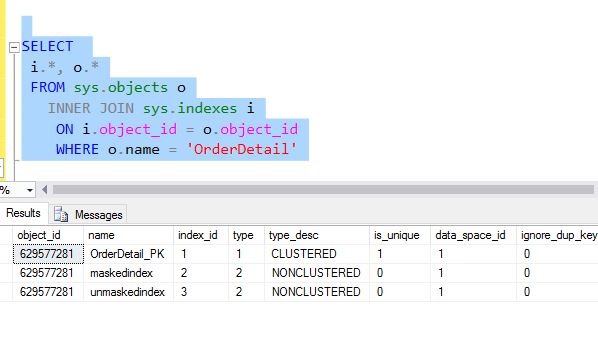
    When do this, I see the object is renamed.

    2016-06-27 13_59_20-SQLQuery4.sql - (local)_SQL2016.EncryptionDemo (PLATO_Steve (60))_ - Microsoft S

    This table has over a million rows, and while that’s not large, it does take time time to rebuild the index. With a rename, the change is to the metadata and takes a split second.

    SQLNewBlogger

    These quick, easy, administrator items are great to blog about. As an exercise, if this table has millions of rows, how much longer does the index rebuild take?

    This is a great topic for you to write about (or learn about) and show how you can better administer your SQL Server databases.