Tag: T-SQL

  • Create a Database Master Key–#SQLNewBlogger

    Another post for me that is simple and hopefully serves as an example for people trying to get blogging as #SQLNewBloggers.

    One of the first things you need in a SQL Server database in order to implement encryption is a database master key, DMK. This is simple to create, though you need one in each database that will support encryption.

    The syntax is easy, with only really an option to specify a password. There is no name, as there’s a single DMK per database. Set your context to the correct database and end enter:

    CREATE MASTER KEY ENCRYPTION BY PASSWORD = ‘Som3thingR3ally$|tr0ng’;

    When you execute this, you’ll just get a result message. At least, if it works you will. The password must conform to the password requirements of your Windows OS, which is good.

    Note: This is a securable code, like the password for a user account. Make sure you store this in a password manager for your organization.

    By default, this is protected by your password as well as the Service Master Key (SMK) on your instance. In practice this doesn’t usually mean much for you, but be aware of this.

    You do need CONTROL permission on the database, though usually I’d expect a db_owner or more permissions to actually create these keys.

    And, of course, back up the key as soon as you can.

    SQLNewBlogger

    This was about 5 minutes work for me. I would guess most new bloggers could read, understand, and produce an explanation of this in 30 minutes.

    References

    CREATE MASTER KEY – https://msdn.microsoft.com/en-us/library/ms174382.aspx

    Create a Database Master Key – https://msdn.microsoft.com/en-us/library/aa337551.aspx

  • CONVERT and HEX

    Another post for me that is simple and hopefully serves as an example for people trying to get blogging as #SQLNewBloggers.

    In working through the Advent of Code and solving some of the problems in SQL, I found that I needed to take hex values and convert them to strings. In other words, I had a value like this:

    select @hex = 0x3c044139f4fe36d7df0f4e87f948fc52

    and I needed to determine if the first few characters (5 or 6), were 0s. In other words, I wanted to look at this part of the data above as a string.

    3c044

    I thought this would be simple. I tried this

    select @value = CAST( @hex as varchar(50))

    That’s my default, as it reads nicely. However the returned this:

    <A9ôþ6×ßN‡ùHüR

    That’s strange. I then tried CONVERT:

    select @value = convert( varchar(50), @hex)

    I got the same result. Why am I not getting the same value as a string? I looked at a few other code samples from others, and they looked the same, so I checked the documentation for CONVERT. I saw this:

    Binary Styles: When expression is binary(n), varbinary(n), char(n), or varchar(n), style can be one of the values shown in the following table. Style values that are not listed in the table return an error.

    Under the table, the information for 1 or 2 as a style has this:

    If the data_type is a binary type, the expression must be a character expression. The expression must be composed of an even number of hexadecimal digits (0, 1, 2, 3, 4, 5, 6, 7, 8, 9, A, B, C, D, E, F, a, b, c, d, e, f). If the style is set to 1 the characters 0x must be the first two characters in the expression. If the expression contains an odd number of characters or if any of the characters are invalid an error is raised.

    The characters 0x will be added to the left of the converted result for style 1.

    All of that essentially means that if I use the default, 0, or have nothing, I get the binary data converted to to the binary bytes in ASCII. If I use 1 or 2, I get the string. Here’s a shot of the difference:
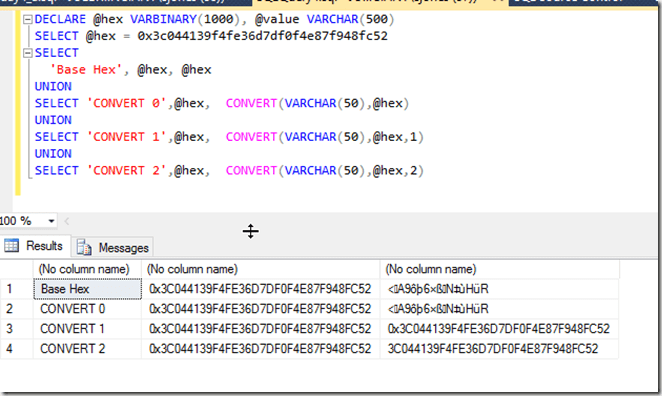
    2016-02-02 11_00_14-Settings

    Two lessons. First, learn the data types and how they convert. Second, read the documentation carefully when things don’t work as expected.

  • Quick Tests–Function Returns

    I ran across a neat piece of code recently from Gail Shaw. She answered a question on returning the base path from a path in a string. Meaning if I had this string:

    c:\Users\Sjones\Documents\text.txt

    I’d want to return this:

    c:\Users\Sjones\Documents

    Her code looked like this, which is a nice, simple, elegant way of finding the path, no matter how many backslashes.

    LEFT(@FullPath, LEN(@fullpath) – CHARINDEX(‘\’, REVERSE(@fullpath)))

    Of course, you can easily add the last backslash with a slight change to the math.

    However I wanted to add some tests. Does this really work? What if I don’t have a backslash? I thought the best way to do this was with a few tSQLt tests, which I quickly built. The entire process was 5-10 minutes, which isn’t a lot longer than if I had been running random tests myself with a variety of strings.

    The advantage of tests is that if I come up with a new case, or another potential bug, I copy the test over, change the string and I have a new test, plus all the regressions. I’m not depending on my memory to run the test cases.

    I first put the code in a function, which makes it easier to test.

    CREATE FUNCTION GetParentPath
      ( @fullpath VARCHAR(4000)
      )
    RETURNS varchar(4000)
    AS
    BEGIN
      RETURN LEFT(@FullPath, LEN(@fullpath) – CHARINDEX(‘\’, REVERSE(@fullpath)))
    END

    Here’s my base test:

    EXEC tsqlt.NewTestClass ‘StringTests’;
    go
    CREATE PROCEDURE [StringTests].[test simple path with one backslash]
    AS
    BEGIN
    — Assemble
    DECLARE @input VARCHAR(4000) = ‘c:\myfile.txt’
       , @expected VARCHAR(4000) = ‘c:’
       , @actual VARCHAR(4000)

    — Assert
    EXEC @actual = dbo.GetParentPath
      @fullpath = @input

    — Assert
    EXEC tsqlt.AssertEquals
      @Expected = @expected
    , @Actual = @actual
    , @Message = N’Incorrect Path’
    END
    GO

    I can easily copy this and add new inputs with different paths, and matchout outputs, to test new cases. For example, my first cut produced five tests for these inputs:

    • c:\myfile.txt
    • c:\
    • c:
    • c:\Documents\myfile.txt
    • c:\Users\sjones\Documents\myfile.txt

    There are certainly other tests, but this 5-10 minutes of work gives me repeatable testing, and if I needed to include this function in a larger project, I already have a series of tests that can be run in my CI process.

    What’s more, if I replaced this with a CLR function, such as something with SQL#, I could still use these tests.

  • CROSS APPLY v InLine Functions

    While working on the Advent of Code problems in SQL, I ran across something interesting. Day 4 involves hashing, which is done with the HASHBYTES function in SQL Server. This is a computation and given the problem, there is no good way to do this without brute force. The problem says

    • hash a specific string + an integer.
    • If the leftmost digits are 0 (5 or 6 of them), stop
    • increment the integer
    • repeat

    Since a hash doesn’t lend itself to a pattern, you can’t start with 100,000 and determine if the integer you need is higher or lower. Instead you need to work through the integers.

    I decided to try this with a tally table and hashing with TOP 1. BTW, TOP 1 makes a huge difference.

    However, my structure was to query my tally table like this:

    SELECT n
         , HASHBYTES(‘MD5’, ‘iwrupvqb’ + CONVERT(VARCHAR(15), n))
              FROM cteTally

    This was in a second CTE, and in the main query I then use a WHERE clause to filter the list down to the entry with leading zeros. When I ran this, I noticed it was rather slow at first, at least, what I considered slow. I checked with a few other people that had solved the problem, and I found their times were faster than mine.

    I wasn’t sure the brute force technique would benefit from a TOP clause, but I added a TOP 1 to the outer query. This made the entire process run much quicker, which is interesting. Apparently the filtering is collapsed across the tally table join with the hash computation and as soon as a valid match is found, this ends the calculations. My average went down by a factor of 10.

    However, I wondered if moving the calculation to a join, with CROSS APPLY, would be quicker. I couldn’t imagine why, but I decided to try this. I moved the calcuation by changing the HASHBYTES calculation to a SELECT statement in a derived table for the CROSS APPLY and then taking the result of that as part of my column list. This changed my CTE to this:

    SELECT n
         , hb.hashvalue
      FROM cteTally
       CROSS APPLY (SELECT HASHBYTES(‘MD5’, ‘iwrupvqb’ + CONVERT(VARCHAR(15), n))) AS hb(hashvalue)

    That resulted in a slightly faster query time. When I added a TOP to this, the times improved slightly from using HASHBYTES in the column list with a TOP. Intuitively this doens’t make sense, as it would seem the same number of function calls need to be completed, but the CROSS APPLY handles them a bit more efficiently. I’m sure someone has a much more in-depth understanding of the query optimizer here, and I won’t try to explain things myself. The times are close enough that I suspect some minor optimization from CROSS APPLY.

    As a comparison, I also ran a brute force loop, with this code, that calculates the values sequentially until the result is determine. This should be equivalent to the results from TOP 1, and we find that they aren’t. The tally table solution with CROSS APPLY is much quicker.

    DECLARE @t BIT = 1;
    DECLARE @i INT = 0;
    DECLARE @start DATETIME = GETDATE();
    WHILE @t = 1
    BEGIN
       IF LEFT( CONVERT(VARCHAR(50), HASHBYTES(‘MD5’, ‘iwrupvqb’ + CAST(@i AS VARCHAR(10))), 2), 6) = ‘000000’
         BEGIN
           SELECT @i
           SELECT @t = 0
         end
       SELECT @i = @i + 1
       –IF @i > 10000000
       — SELECT @t = 0
    END
    SELECT starttime = @start
         , seconds = DATEDIFF(SECOND, @start, GETDATE())
    ;

    Here’s a summary of the code timings (averaged across 5 executions), for the second part of the puzzle, which looks for 6 leading zeros and has a result in the 9million range.

    Query Timings (sec)
    Hashbytes in column list, no TOP

    185.6

    CROSS APPLY, no TOP

    182.3

    Hasbytes in columns list, TOP

    17.8

    CROSS APPLY with TOP

    16.0

    Brute Force, WHILE loop

    33.8

    Conclusion

    The conclusion I’d take here is that CROSS APPLY ought to be a tool you keep in the front of your toolbox and use when you must execute a function for each row of a set of tables. This is one of the T-SQL  techniques that I never learned early in my career (it wasn’t available), and I haven’t used much outside of looking for execution plans, but it’s a join capability I will certainly look to use in the future.

    However, if you are using UDFs instead of system functions, I’d certainly recommend you read Adam Machanic’s post on Scalar Functions and CROSS APPLY, and perhaps you can change to ITVFs and get some great performance gains.