Tag: T-SQL

  • Default Data Masking

    Dynamic Data Masking is a neat new feature in SQL Server 2016. I didn’t think much of it when it was introduced in Azure SQL Database, but since then I realize there is some value here. Even if it’s just making life simpler for developers.

    I’ve been experimenting with this a bit, learning how it works, and one of the options we have for masking data is to use the default option. However, what seems misleading to me here is that this doesn’t use a default from the column. Instead it replaces the values with

    • 4 x’s (xxxx) if the column size is > 4 characters (same for numerals)
    • the number of x’s that fit in the column if the size is < 4.
    • 0 for numbers

    This makes some sense, but not completely. I think I’d prefer to set a default mask for all types, so that I don’t disclose a value is a number or string (or date or anything).  I also see that NULLs are disclosed, another potential area I’d prefer to keep hidden.

    I also think the name is misleading. I’ d prefer to see this called something like xmask, or defaultmask, not default.

    If you want to learn more, you can look at a piece I’ve written to cover how this works, details on the default mask, or check out our list of resources at SQLServerCentral.

  • The OUPUT Clause in an INSERT–#SQLNewBlogger

    Another post for me that is simple and hopefully serves as an example for people trying to get blogging as #SQLNewBloggers.

    I got asked a question about the OUTPUT clause recently and realized I didn’t remember the syntax. I’ve rarely used this, so I had to look it up and thought this would be a good basic post.

    The idea with OUTPUT is that the data from the inserted and deleted tables can be output from the INSERT statement, outside of your triggers. This is the same data, but you can access it in the insert.

    The format is

    INSERT xxx OUTPUT yyyy INTO @zzz VALUES (or SELECT) mmmm

    The xxx is your normal insert target, table or view. The yyyy from the OUTPUT clause is a list of items to output. These is a comma separated list of fields in the format of inserted.col1, inserted.col2.

    The @zzz is a table variable. No inserts into scalar variables. This has to work with the set based nature of T-SQL. This means you’ll need to declare this variable. The mmmm is your normal insert stuff.

    Example

    Here’s a quick, short example. Let’s say  I have this table:

    CREATE TABLE MyCustomers
    (
    MyID INT IDENTITY(1, 1)
    , MyCustomer VARCHAR(200)
    , Active TINYINT
    );
    GO
    INSERT dbo.MyCustomers
    VALUES (‘Acme’, 1), (‘Roadrunner’, 0), (‘Bugs’, 1)

    I want to insert data into the table, and capture the identity value of MyID  as well as the name, separately from the insert. Note, I might really have a TRY..CATCH in production to deal with issues.

    If I add a new row, the identity should be 4. I want to capture this. I’ll first declare my OUTPUT variable.

    DECLARE @customers( id int, customer varchar(200);

    I don’t have to make this match the entire table, I can use a subset.

    Next, let’s build the INSERT. I want to capture the two fields from the inserted table, so we’ll include those.

    INSERT dbo.MyCustomers
    OUTPUT Inserted.MyID
    , Inserted.MyCustomer
    INTO @customers
    VALUES
    (‘Wile E Corp’, 1);

    I also need to output my table variable

    SELECT
    *
    FROM
    @customers;

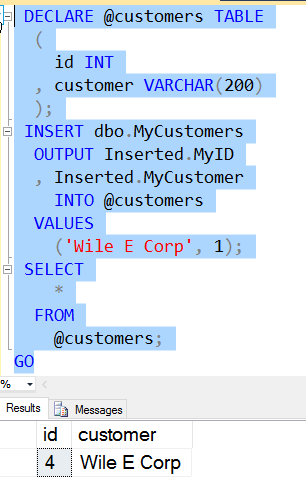
    If I run this, I’ll see this:
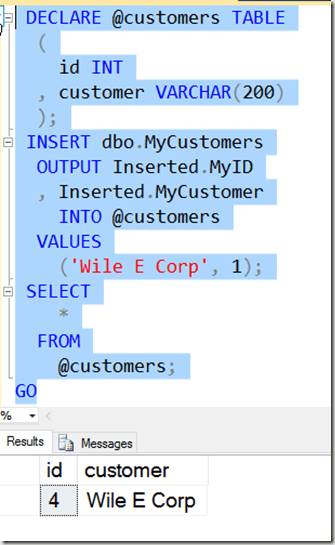
    2016-03-11 14_19_28-Settings

    Of course, I can do other processing with my table variable, using the output elsewhere in code.

    SQLNewBlogger

    This is a quick look at how you can use the OUPUT clause. This took me about 10 minutes to play with and remember the syntax, and 10 more minutes to write.

    I’d encourage you to play with this and write your own blogs. What can you discover about this construct?

    Reference

    OUTPUT – https://msdn.microsoft.com/en-us/library/ms177564.aspx
  • What Database am I in?

    Another post for me that is simple and hopefully serves as an example for people trying to get blogging as #SQLNewBloggers.

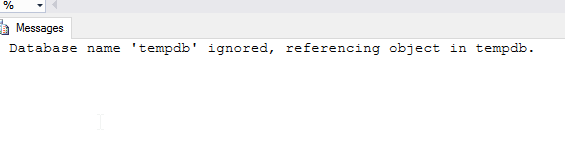
    I saw someone trying to get the database context recently and they were confused. They had some code referencing @dbname, but received an error with this code. I thought maybe they meant @@DBMAME, but when I looked, there isn’t a variable tracked by SQL Server.

    A quick search (really experimenting with SQL Prompt) showed me there is a DB_NAME() function. Without a parameter, this returns my current context. That’s useful in programming systems.

    If I pass in a database ID, I get the name.

    I haven’t typically had an issue here. In code, if I doubt anything, I issue a USE statement to set context, but if you are looking to take actions in a generic script based on the database, this can help.

  • Finding Strings

    Another post for me that is simple and hopefully serves as an example for people trying to get blogging as #SQLNewBloggers.

    A quick one today, just looking for strings. I wrote an article on this, so there’s more detail there, but here’s a bit of code you can look through and see what it does.

    CREATE TABLE dbo.MyTable ( mystring VARCHAR(200) );

    GO

    INSERT dbo.MyTable

        ( mystring )

      VALUES

        ( ‘This is a 7’ )

      , ( ‘There is a 7 in this string’ )

      , ( ‘Why must 7 always be here’ )

      , ( ‘No 7s here. JK’ )

      , ( ‘My 7s here’ )

      , ( ‘An 7s here.’ )

      , ( ‘On 7s here.’ );

    GO

    SELECT

        ‘SetPosition’ = SUBSTRING(mystring, 4, 1)

      , ‘FindThe7’ = SUBSTRING(mystring, CHARINDEX(‘7’, mystring), 1)

      FROM

        dbo.MyTable AS mt;

    DROP TABLE dbo.MyTable;