Tag: T-SQL

  • Creating a User Without a Login

    Another post for me that is simple and hopefully serves as an example for people trying to get blogging as #SQLNewBloggers.

    This is one of those simple things that many people should be able to do in order to build in better security for their database code. However I’m sure many people haven’t ever built one. I ran into this recently, and thought it would be a great SQLNewBlogger post.

    Creating the User

    It’s a bit anticlimactic, but creating a user in a database without a login is simple:

    CREATE USER UpdateStatsUser
    WITHOUT LOGIN WITH DEFAULT_SCHEMA = [dbo];
    GO

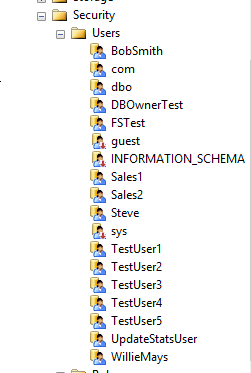
    This creates a new user in my database,

    2016-01-25 13_38_56-Start

    that is not associated wtih a login.

    2016-01-25 13_39_13-Netflix

    I can assign this user permissions, like any other user.

    GRANT CONTROL ON dbo.Authors TO UpdateStatsUser;

    I could then use these permissions any other way.

    Why would you do this?

    A short summary from Pinal Dave, which is pretty good. Essentially you want to give different permissions to a user, without using something like an Application Role, which has a name and password that must be managed. Here, you can allow a user to execute a routine as another, more privileged user, without giving the original user additional permissions.

    SQLNewBlogger

    This is a really simple post that took my longer to write than create the user. About 10 minutes. I wouldn’t expect most of you to stop here. I’d want a post that shows you understand something about how this user can be used, show me an example of reading or writing a table as a user with this impersonation in action.

    References

    CREATE USER – https://msdn.microsoft.com/en-us/library/ms173463.aspx

  • Loading a Text File with a Line Feed

    Loading text files is a skill that probably every DBA needs. I know that the import wizard is available, but there are times that you might want to automate this without using SSIS. In those cases, it’s nice to know how to load data from a programmatic standpoint.

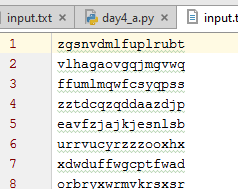
    I had the need to do this recently with a text file that looked normal. When I opened it in my editor, it looked like a normal text file, one column of data.

    2016-01-28 17_44_07-Start

    I thought this would be easy to load, so I created a simple table:

    CREATE TABLE MyTable ( teststring VARCHAR(100))

    I then ran a simple BULK INSERT command.

    BULK insert MyTable
         from ‘C:\SampleFiles\input.txt’

    And I received this:

    Msg 4863, Level 16, State 1, Line 3
    Bulk load data conversion error (truncation) for row 1, column 1 (mychar).

    That’s not good. I suspected this was because of the format of the file, so I added a row terminator.

    BULK insert MyTable
         from ‘C:\SampleFiles\input.txt’
    with ( ROWTERMINATOR = ‘\r’)

    That didn’t help. I suspected this was because of the terminators for some reason. I also tried the newline (\n) terminator, and both, but nothing worked.

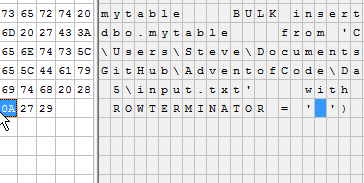
    Since I was worried about formatting, I decided to look at the file. My first choice here is XVI32, and when I opened the file, I could see that only a line feed (0x0A) was used.

    2016-01-28 15_43_19-Settings

    However, I wasn’t sure how to get this in my code.

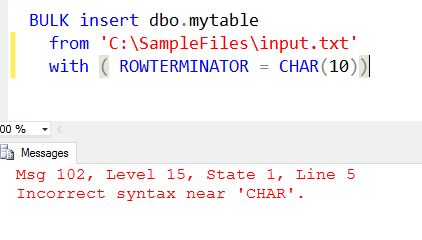
    I tried CHAR(), and that didn’t work.

    2016-01-28 17_58_47-Cortana

    I could look to edit the code with XVI32, but that seems odd. However, let’s try that.

    2016-01-28 17_57_28-Settings

    I replaced the \r with 0x0A and then deleted the r. Once I saved this, and reloaded into SSMS (do not normalize to CRLF), I could run this.

    2016-01-28 17_58_09-Start

    I suppose I could also do this with the ALT key, and a number pad, though I couldn’t get that to work on my laptop. I need to try that on my desktop, but it’s not a great way to code. Easy to forget that characters are in the code.

    I tried searching a bit and found that SQLDenis had a solution. He used dynamic SQL, but with a little formatting, the code is still easy to read, and this works fine.

    DECLARE @cmd VARCHAR(8000)
    SELECT @cmd = ‘BULK insert Mytable
                    from ”C:\SampleFiles\input.txt”
                    with ( ROWTERMINATOR = ”’ + Char(10) + ”’)’
    EXEC(@cmd)

    I executed this and loaded my file just fine.

    It’s not often you might need to do this, but it’s a handy little trick for those files that might be formatted from other OSes.

  • Loading a Text File from T-SQL

    Another post for me that is simple and hopefully serves as an example for people trying to get blogging as #SQLNewBloggers.

    One of the interesting things I’ve had to work on with the Advent of Code puzzles is loading files into SQL Server. Some of the inputs are large strings, but many are files with lines of code that need to be loaded into SQL Server.

    I thought this might be a nice, simple SQLNewBlogger post. Do you know how to load a text file? Certainly the Import/Export wizard can work, but can you quickly load a file from T-SQL itself?

    If you can’t, go work that out. If you get stuck, come back or search for help.

    Loading a Text File

    Obviously you need a place to load the file. I created a table for each puzzle, and here is the table for Day 2.

    create table Day2_WrappingPresents
    ( dimensions varchar(12)
    )
    go

    Now ordering doesn’t matter for this puzzle, so I have a very simple table. If ordering mattered, I’d have to do this differently.

    To load this file, I’ll use the BULK INSERT command. This takes a table as a target, and optionally has a number of parameters.  Since this is a simple load of a simple file with one column of data to a table with one column of data, I can use the defaults.

    bulk insert Day2_WrappingPresents
    from ‘C:\Users\Steve\Documents\GitHub\AdventofCode\Day 2 – Wrapping\input.txt’

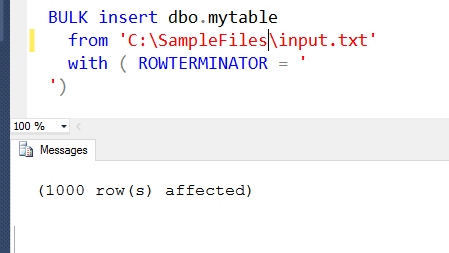
    In this case, the insert will load all 1000 rows into the table. A simple query shows this works:


    Now I can get on with the rest of my puzzle solution.

    SQLNewBlogger

    This is a great example of a simple thing that we might not need to do often, but we may need to do at times. Knowing how to do this, a simple operation, showcases that you are improving your SQL Server skills. This post took me about 5 minutes to write.

  • Advent of Code–Day 2

    I’ve continued working along, and while I found Day 2 to be straightforward in Python and PowerShell, I thought it was tricky in SQL I decided this one was worth a post, since I had to futz around a few times to solve it, and I managed a slightly different way than some others.

    If you haven’t solved it, then try. Come back here later and compare solutions, but give it a try first.


    Solution coming below, so don’t scroll if you don’t need the solution.


    But first,


    Missteps

    I had a misstep in this one. I loaded the entire list of packages as separate lines into separate rows into a single column table. My challenge to myself was not to use ETL work to break this apart, or updates. I wanted a simple solution, thinking I didn’t want to take up extra space in the database.

    As a result, I wanted a single query from a single string column that had the package size stored as one column, ‘2x3x4’ as an example.

    My first attempt used the Moden Splitter function, which seemed to work well. I got three rows for each package. I then used a WIndow function to grab that data, order by the sizes, and then start performing calculations. When I didn’t get the right result, I started digging in.

    One of the first things I saw was that I had multple packages with the same sizes. So I had two 22x3x1 packages, and when I used a partition based on the dimensions, I had calculation problems. That’s because the window partition doesn’t know that three rows are one package and three are another.

    I could have fixed this with some other value to capture the package, maybe a row_number even, but I decided not to go down this route.


    My Solution

    I decided to break this down, and I used a series of CTEs to do this. I haven’t gone back to optimize things, or combine CTEs, which is possible, but instead left the CTEs as I wrote them to solve parts of the puzzle. Multiple CTEs are east, and they help examine the problem in pieces.

    My first step was to parse the string. I don’t love this solution as it is limited to a three dimension package, but it does seem to be the easiest way to break down the dimensions of the package. My query looks to find the string positions for:

    • end of the first dimension
    • start of the second dimension
    • start of the third dimension.

    This gives me the simple query:

    with cteSplit (d, el, sw, sh)
    as
    (
    select
       dimensions
    , endlength = charindex(‘x’, dimensions) – 1
    , startwidth = charindex(‘x’, substring(dimensions, charindex(‘x’, dimensions),20)) + charindex(‘x’, dimensions)
    , startheight = len(dimensions) – charindex(‘x’, reverse(dimensions))  + 2
    from day2_wrappingpresents d
    )

    Once I had these values, a little math gives me the length, width, and height.

    , cteDimensions
    as
    (select
       d
       , l = cast(substring(d, 1, el) as int)
       , w = cast(substring(d, sw, sh-sw-1) as int)
       , h = cast(substring(d, sh, len(d)) as int)
    from cteSplit d
    )

    Now I’m in business. These two queries were fairly simple, despite all the nested functions. I’ve got integers with the dimensions of each package.

    Now the tricky part. I want these ordered. They’re columns, not rows, and I can’t put an ORDER BY in the CTE, so I need to use some comparisons.

    , cteOrder
    as
    ( select
       d
    , small = case
                when l <= w and l <= h then l
                when w <= l and w <= h then w
                when h <= l and h <= w then h
            end
    , middle = case
                when (l >= w and l <= h) or (l <= w and l >= h) then l
                when (w >= l and w <= h) or (w <= l and w >= h) then w
                when (h >= l and h <= w) or (h <= l and h >= w) then h
            end
    , large = case
                when l >= w and l >= h then l
                when w >= l and w >= h then w
                when h >= l and h >= w then h
            end
      from cteDimensions
    )

    Not the prettiest code, and perhaps there are better ways to determine this, but this passed all my tests, and seemed to work.

    I could have put the next part in the final query, but I decided to make this a separate CTE to easily read the math. I know some people don’t like lots of CTEs, but in this case, I think they make the query very readable. I should look back at this in six months and see what I think.

    , cteFinal
    as
    (
    select
      d
      , area = (2 * small * middle) +
               (2 * small * large) +
               (2 * middle * large)
      , slack = (small * middle)
    from cteOrder
    )

    Now I use a final outer query to sum things up.

    select
    sum(area + slack)
    from cteFinal

    The other thing I noticed here is that when I needed to solve the second part, I only had to change the math in the cteFinal to get the new values. It took longer to re-read the second part than to change the code and solve it.

    I looked over how Wayne Sheffield and Andy Warren solved this in T-SQL, and I thought their approaches were interesting. I didn’t want to PIVOT or UNPIVOT anywhere, nor did I look at performance here. This runs so quickly, I’m not sure it matters, though I wonder if we were calculating across 1mm rows, would one be better?

    I may look, but for now, I’ll leave that to someone else.