Tag: T-SQL

  • Loading XML Data–CONVERT Option 2

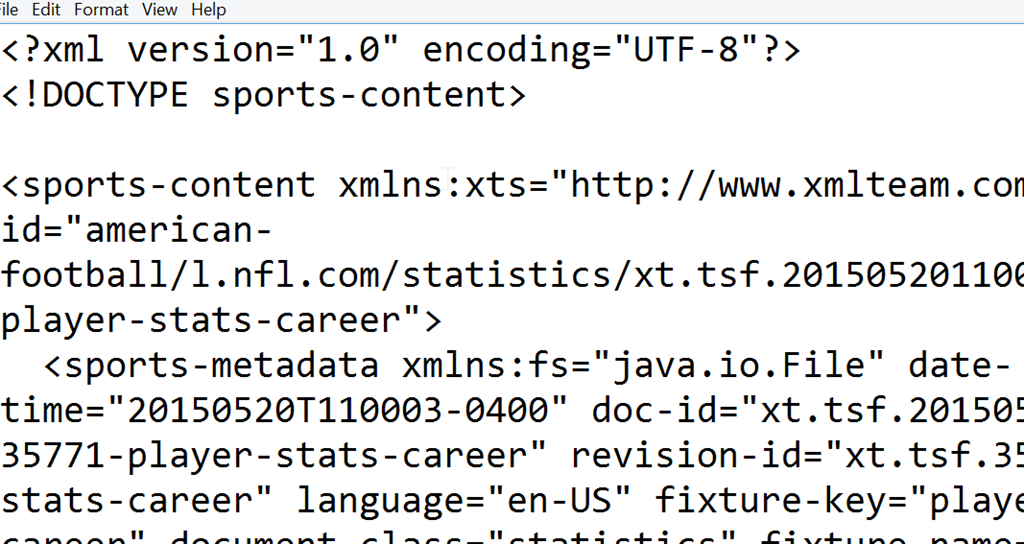
    I was playing around with some XML lately, and had to load a file that looked like this::

    2015-07-22 14_40_59-mathis.xml - Notepad

    I ran a simple query, one that used the OPENROWSET and a CONVERT to load the data.

    WITH XmlFile (Contents) AS (
    SELECT CONVERT (XML, BulkColumn) 
    FROM OPENROWSET (BULK 'C:\mathis.xml', SINGLE_BLOB) AS XmlData
    )
    SELECT *
    FROM   XmlFile
    GO
    

    However, that didn’t work. I received this message in SSMS.

    Msg 6359, Level 16, State 1, Line 1

    Parsing XML with internal subset DTDs not allowed. Use CONVERT with style option 2 to enable limited internal subset DTD support.

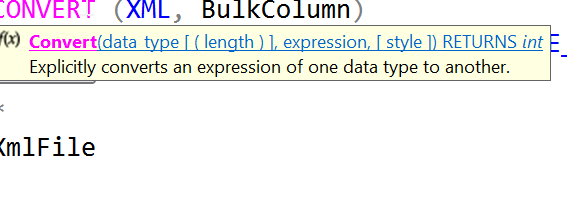
    Hmmm. That seems to make sense. Let’s add an option to CONVERT of 2. I’ve assumed the last parameter is the one mentioned, as with date conversions, and added that. I can hover with SQL Prompt and see that.

    2015-07-22 14_43_13-SQLQuery1.sql - ARISTOTLE.sandbox (ARISTOTLE_Steve (71))_ - Microsoft SQL Server

    Let’s change the code:

    WITH XmlFile (Contents) AS (
    SELECT CONVERT (XML, BulkColumn,2) 
    FROM OPENROWSET (BULK 'C:\mathis.xml', SINGLE_BLOB) AS XmlData
    )
    SELECT *
    FROM   XmlFile
    GO
    

    That works.

    Why?

    If you go to the BOL page for CAST and CONVERT, you will find an XML styles section. There are possible values of 0 (default), 1, 2, and 3. In this case, the 2 enables an internal DTD processing, which basically uses a default document of sorts for parsing the XML. No external DTD is needed and this is treated as a standalone document.

    I am not an XML expert, but I’m guessing here that I’ve included a document that doesn’t conform to some specification and the additional style parameter allows SQL Server to ignore some of what’s there.

    If anyone knows more, I would like to better understand how this works.

  • Presenting Data

    Many of us that develop or manage database systems are concerned with the actual bits and bytes that compromise data. However our clients and customers are more interested in the information, in gaining knowledge from the numbers, strings, and dates that are kept in our database tables.

    I really think that one of those things that can truly allow a developer or DBA to show their employer they are valuable to the organization. Employees prove this when they can retrieve information in a way that clients find valuable. Not that we, as the technical people value, but in the ways that clients find valuable.

    This doesn’t mean you need to learn PowerBI or PowerPivot or any other Power tools, but that you learn how to present the data you work with in the best way you can. Whether that’s in an SSRS report, an Excel worksheet you email around, or a complex visualization, all of these formats have one thing in common: a query. One of the best things you can do as a developer or DBA is ensure you can write efficient queries that assemble data from a variety of tables in different formats. Queries that retrieve data that can answer a question or reveal a pattern.

    Learning how to build a fancy visualization is great, but be flexible. If you get the opportunity, work with a new technology and develop some comfort, take it. However make sure that above everything else you can get the data sets to the end user. Clients can always use their own tools, but the efficiency and performance they experience will often come down to your query writing skills.

    Make sure you are constantly improving those skills.

    Steve Jones

    The Voice of the DBA Podcast

    Listen to the MP3 Audio ( 2.0MB) podcast or subscribe to the feed at iTunes and LibSyn.

  • Get a comma separated list

    I’m writing this post as a way to help motivate the #SQLNewBloggers out there. Read the bottom for a few notes on structuring a post.

    I was working on a test of sorts and wanted to return multiple values as the output, but as a single variable. In other words, I couldn’t return a result set, I needed to return a string.

    I knew this was easy, and decided this would make a nice simple blog. Here we go.

    Let’s start with a simple table. Here’s one that has a few rows in it.

    CREATE TABLE MyTest
    ( id int);
    GO
    INSERT mytest values (1), (2), (3);
    go

    I want to return the values “1, 2, 3” as a string, in any order. Here’s how it works:

    DECLARE @i VARCHAR(MAX);
    SELECT @i = COALESCE(@i + ‘, ‘,”) + CAST( Id AS VARCHAR)
    FROM MyTest;
    SELECT @i;

    The COALESCE is important as the first time this runs, we have a NULL for the variable. In this case, we return an empty string. This is almost like the inverse of the operation that ends recursion. We add in the first row, and we end up with ‘1’ as the string.

    Note: it could be 2 or 3 in the string as I don’t have an ORDER BY. DO NOT depend on the order of insertion in the table. If you care about ordering, always include an ORDER BY.

    The next execution has a blank string (NOT NULL), so that is returned. In this case, we have ‘1’ + ‘, ‘ for the first part. The second part adds in the next row.

    This continues, and I get a nice set of output.

    2015-06-10 17_20_39-SQLQuery4.sql - ARISTOTLE.sandbox (ARISTOTLE_Steve (62))_ - Microsoft SQL Server

    SQLNewBlogger

    This one was short. It took me almost as much time to write the code and find a reference as it did to write the post. Five minutes.

    References

    This is basic T-SQL, but here’s another look at this.

  • Defining Foreign Keys at Table Create Time

    Another post for me that is simple and hopefully serves as an example for people trying to get blogging as #SQLNewBloggers.

    How many of you can define a foreign key when you create the table? Probably a few of you, but I bet most of you are like me and don’t necessarily know the syntax. I have often defined these later, which is fine. As long as they get defined.

    However I knew I needed a specific key when I was creating a table and couldn’t remember the syntax, so I had to search and learn how. I used Google and saw a few links from MSDN, but those tend to be overly documentation heavy. One of the links was to SQL Authority, run by Pinal Dave. He does a great job of simplifying things (and he’s a friend), so I followed that link. I could see the syntax and tested it in minutes.

    It’s easy to create a Primary Key in CREATE TABLE, and I wrote about that for one of my first SQLNewBlogger posts. The Foreign Key is similar, but not quite as simple.

    Imagine that I have a parent table:

    CREATE TABLE orders ( orderid INT IDENTITY(1, 1) CONSTRAINT Orders_PK PRIMARY KEY ( orderid ) , orderdate DATETIME , complete BIT ); GO

    I now want to create a child table and link the orderid in the child to the parent. I can do it like this:

    CREATE TABLE OrderLines ( orderlineid INT IDENTITY(1, 1) CONSTRAINT OrderLines_PK PRIMARY KEY ( orderlineid ) , orderid INT CONSTRAINT orderlines_order_fk FOREIGN KEY REFERENCES orders ( orderid ) , qty INT ); GO

    Note that I define a constraint inline, just as I did for the parent. However I note this one is an FK and it "references" another table. In this case, I list the Orders table and put the columns in parenthesis.

    Quick, easy, build your FKs inline when you know about them in advance.

    SQLNewBlogger

    While trying to remember how to create an FK, I ran a search and chose the reference below to start. A matter of seconds had me seeing the syntax and writing the code.

    Putting this together was less than ten minutes.

    References

    Creating Primary Key and Foreign Key Constraints – http://blog.sqlauthority.com/2008/09/08/sql-server-%E2%80%93-2008-creating-primary-key-foreign-key-and-default-constraint/