It’s T-SQL Tuesday again, and this month Matt Velic is the host. His topic this month is the APPLY operator, after a challenge from Adam Machanic that you are not that proficient in T-SQL if you don’t know how to use this operator. I agree with Adam, and I think APPLY was an amazing addition to the T-SQL language.
If you’re not sure what T-SQL Tuesday is all about, check out Adam’s initial T-SQL idea and post on the monthly blog party. T-SQL Tuesday is the second Tuesday of every month and the host rotates.
You can also follow T-SQL Tuesday on Twitter with the #tsql2sday hashtag.
APPLY
The APPLY operator is one that I wished had been available in SQL 7/2000. There were many times when you were trying to apply a result set to a function and there was no easy way to do this. Most of the time this resulted in some type of cursor/temp table solution to make things work.
One classic example was in trying to determine the SQL that someone had executed when they were blocking another user. The old sp_who2 gave limited information and often we were query a blocking tree and then start sending SPIDs through dbcc inputbuffer to get an idea of what SQL queries were being run.
APPLY doesn’t help with DBCC, but it does help in other ways. In a modern twist to this problem, you can take a plan handle and run it through sys.dm_exec_sql_text to get the SQL that was executed
If I did that for one of the connections I have locally, I could get something like this:
SELECT *
 FROM sys.dm_exec_sql_text(0x010005003E60AD1C901E7D81000000000000000000000000)
Which will give you this:

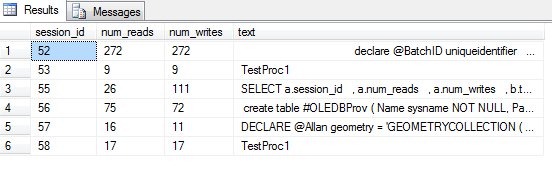
Now, if you have a whole list of data, say perhaps a list of everyone connected from sys.dm_exec_connections, you can combine these two together.
SELECT a.session_id
    , a.num_reads
    , a.num_writes
    , b.text
 FROM sys.dm_exec_connections a
   CROSS APPLY sys.dm_exec_sql_text(a.most_recent_sql_handle) b
From this, you’ll get some result similar to this one:
Note that you can’t join these two items together because this doesn’t work:
SELECT *
 FROM sys.dm_exec_sql_text
It returns an error:
Msg 216, Level 16, State 1, Line 3
Parameters were not supplied for the function ‘sys.dm_exec_sql_text’.
You have to pass in a parameter, which means that either you create some cursor or loop to do this, or use the power of APPLY.