Tag: T-SQL

  • Foreign Keys Help Performance

    I have always put FKs into my database for data integrity purposes. I’ve worked on enough applications that didn’t have FKs, or any RI in place and it was always a nightmare when the application broke down or there were enhancements that allowed duplicates, orphans, or other data integrity problems.

    However I ran across an old post form Grant Fritchey that shows Foreign Keys do more than that. They can actually help performance because the SQL Server database engine knows that there is data in the related tables that matches because of the FK relationship.

    Does that matter?

    If you read Grant’s post, and you should, it shows two different queries of the same data, but one has FKs enabled. That results in a much smaller execution plan, hitting fewer tables. I took Grant’s test and added one more twist.

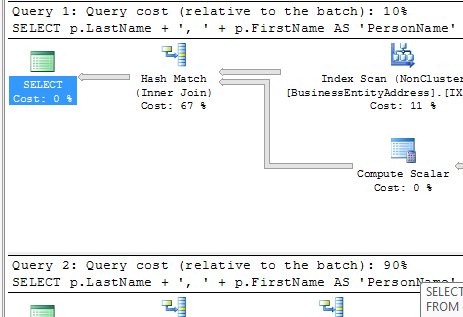
    I ran both queries in the same batch, with the execution plan. Guess what I found? Check out this image:

    query1

    Guess which query has FKs and which one doesn’t? If you read Grant’s post, you’ll realize the first one has the FKs, but more importantly, if you look at the relative percentages of the batches, you see that there’s a 9x difference in resources.

    Use FKs. They do more than protect data, they speed things up.

  • Building an algorithm

    When I was in college, and even high school, all of my computer science classes required me to build algorithms. Often they were simple things, like implement a sort, or reverse a string, or shuffle a deck of cards. Those seemingly silly and trivial exercises, however, build the skills of pattern recognition and implementation in computer science. Sometimes I think we don’t do enough of that for people that are tackling computer careers these days.

    I saw a post from someone that had an incrementing column, an identity, that impacted another field. Basically whenever the first column reached “10”, you wanted to add one to the second column.

    Easy, right? I think so, and to show someone how they might create an update statement, or even see the pattern, I built a quick tally table.

    SELECT Top 205 IDENTITY(INT,1,1) as N
      INTO Tally 
      FROM master.dbo.syscolumns SC1, master.dbo.syscolumns SC2

    From there, I then looked at the pattern. Every 10 items, I need to add one. That’s a pattern, and the way that pattern is easily discerned in math is with a modulo operation. To the rest of the world, that’s a remainder. If you look at the pattern of remainders of an increment divided by 10, it’s this:

    n           modulo

    ———– ———–

    1           1

    2           2

    3           3

    4           4

    5           5

    6           6

    7           7

    8           8

    9           9

    10          0

    11          1

    12          2

    13          3

    14          4

    15          5

    16          6

    17          7

    18          8

    19          9

    20          0

    21          1

    22          2

    from this code:

    SELECT Top 205 IDENTITY(INT,1,1) as N
      INTO Tally 
      FROM master.dbo.syscolumns SC1, master.dbo.syscolumns SC2
      
    
    SELECT n
      , n % 10
     FROM Tally  
      
    DROP TABLE tally

    That mans that we can see each time there is a zero remainder, we want to perform an increment. So essentially if you detect an update, do a modulo, and get a zero, then you update the next column.

    It gets a little more complicated if there can be multiple rows updated or added at once, but here is the overall code that essentially builds a table of numbers that increment for each 10 on the previous value.

    SELECT Top 205 IDENTITY(INT,1,1) as N
      INTO Tally 
      FROM master.dbo.syscolumns SC1, master.dbo.syscolumns SC2
      
    DECLARE @b INT
    
    SELECT @b = 1
    
    SELECT n
      , n % 10
      , @b
      , n
      , @b + (1 * (n / 10)) 'col b'
      , CASE WHEN (n % 10) = 0 THEN 'add 1' ELSE '' END 
     FROM Tally  
      
    DROP TABLE tally

    You end up with this:

    n                                   n           col b      
    ———– ———– ———– ———– ———– —–

    1           1           1           1           1          
    2           2           1           2           1          
    3           3           1           3           1          
    4           4           1           4           1          
    5           5           1           5           1          
    6           6           1           6           1          
    7           7           1           7           1          
    8           8           1           8           1          
    9           9           1           9           1          
    10          0           1           10          2           add 1

    11          1           1           11          2          
    12          2           1           12          2          
    13          3           1           13          2          
    14          4           1           14          2          
    15          5           1           15          2          
    16          6           1           16          2          
    17          7           1           17          2          
    18          8           1           18          2          
    19          9           1           19          2          
    20          0           1           20          3           add 1

    21          1           1           21          3          
    22          2           1           22          3          
    23          3           1           23          3      

    If I had started at zero, you’d see a more traditional increment of 0 for column b to start with.

  • T-SQL Tuesday #17 – APPLYing Yourself to T-SQL

    TSQL2sDay150x150It’s T-SQL Tuesday again, and this month Matt Velic is the host. His topic this month is the APPLY operator, after a challenge from Adam Machanic that you are not that proficient in T-SQL if you don’t know how to use this operator. I agree with Adam, and I think APPLY was an amazing addition to the T-SQL language.

    If you’re not sure what T-SQL Tuesday is all about, check out Adam’s initial T-SQL idea and post on the monthly blog party. T-SQL Tuesday is the second Tuesday of every month and the host rotates.

    You can also follow T-SQL Tuesday on Twitter with the #tsql2sday hashtag.

    APPLY

    The APPLY operator is one that I wished had been available in SQL 7/2000. There were many times when you were trying to apply a result set to a function and there was no easy way to do this. Most of the time this resulted in some type of cursor/temp table solution to make things work.

    One classic example was in trying to determine the SQL that someone had executed when they were blocking another user. The old sp_who2 gave limited information and often we were query a blocking tree and then start sending SPIDs through dbcc inputbuffer to get an idea of what SQL queries were being run.

    APPLY doesn’t help with DBCC, but it does help in other ways. In a modern twist to this problem, you can take a plan handle and run it through sys.dm_exec_sql_text to get the SQL that was executed

    If I did that for one of the connections I have locally, I could get something like this:

    SELECT *
     FROM sys.dm_exec_sql_text(0x010005003E60AD1C901E7D81000000000000000000000000)

    Which will give you this:

    tsqltues_code2

    Now, if you have a whole list of data, say perhaps a list of everyone connected from sys.dm_exec_connections, you can combine these two together.

    SELECT a.session_id
        , a.num_reads
        , a.num_writes
        , b.text
     FROM sys.dm_exec_connections a
       CROSS APPLY sys.dm_exec_sql_text(a.most_recent_sql_handle) b

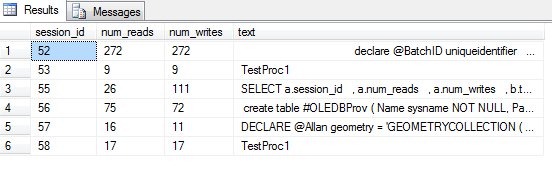
    From this, you’ll get some result similar to this one:

    tsqltues_code1

    Note that you can’t join these two items together because this doesn’t work:

    SELECT *
     FROM sys.dm_exec_sql_text

    It returns an error:

    Msg 216, Level 16, State 1, Line 3

    Parameters were not supplied for the function ‘sys.dm_exec_sql_text’.

    You have to pass in a parameter, which means that either you create some cursor or loop to do this, or use the power of APPLY.

  • Am I a sysadmin? (or other SQL Server role)

    How do you check if you are a sysadmin? It’s fairly easy to do in Management Studio. You can go to Security \ Server Roles \ Sysadmin, as shown here:

    sysadmin1

    You right click sysadmin and click properties to get a list of sysadmins. You can do this for any role, and that’s the easy way if you want to verify permissions.

    sysadmin2

    What if you have an open connection to the server, say in a Query window or Powershell session and want to verify your role. There’s a function to help you: Is_SrvrRoleMember().

    If you execute something like this:

    SELECT IS_SRVROLEMEMBER('sysadmin');

    You’ll get a one back if you are a member of that role, and a 0 otherwise. That will allow you to easily determine your current permissions, or check permissions programatically and continue on with your work depending on the results.