Tag: T-SQL

  • Checking Permissions

    Someone posted this query recently:

    select a.*,name, b.* from sys.database_principals a, sys.database_permissions b
    
    where permission_name = 'INSERT' and b.grantee_principal_id = a.principal_id

    That’s a little ugly, so let’s fix it:

    SELECT  a.name, a.principal_id, a.is_fixed_role
          , a.default_schema_name
          , b.permission_name, b.permission_name
          , b.state_desc
     FROM sys.database_principals a
      INNER JOIN sys.database_permissions b
      ON b.grantee_principal_id = a.principal_id
    WHERE permission_name = 'INSERT' 

    If you run this, you’ll get INSERT permissions in your database. In this case, the person had one row returned that had “public” in it, as shown.

    results1

    I normally don’t have permissions for public, but in this case I had run this first:

    GRANT INSERT ON Person.Address TO Public

    I don’t recommend permissions for public, and you really ought to run this on all your servers:

    SELECT a.name, a.principal_id, a.is_fixed_role
          , a.default_schema_name
          , b.permission_name, b.permission_name
          , b.state_desc
     FROM sys.database_principals a
      INNER JOIN sys.database_permissions b
      ON b.grantee_principal_id = a.principal_id
    WHERE a.name = 'public' AND major_id > 0

    How do you find out which objects have permissions? There’s a clue in the last query. If you scroll across in the results, there’s a major_id column. You can use that to find the object.

    results2

    The OBJECT_NAME function is handy here, and it takes an object_id, which is the major_id. If I run this:

    SELECT OBJECT_NAME(85575343)

    I get “Address” back, which is the object I altered.

    And, of course, we need to clean up

    REVOKE INSERT ON Person.Address TO Public 
  • Clean Code is Easier to Read – SQL Prompt

    I saw a post recently that had query that looked like this:

    select a.*,name, b.*
     from sys.database_principals a, sys.database_permissions b
    
    where permission_name = 'INSERT'
    and
    b.grantee_principal_id = a.principal_id


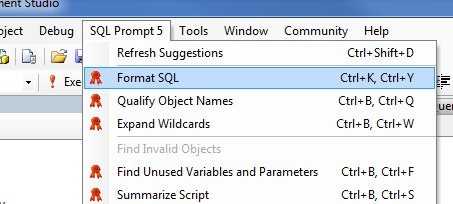
    Ugly to read, at least to me, and in a poorly written format. The table, table format isn’t ANSI compliant and isn’t recommended. So I did this:

    formatsql

    A little better, and easier to read, but not great.

    SELECT  a.* ,
            name ,
            b.*
    FROM    sys.database_principals a ,
            sys.database_permissions b
    WHERE   permission_name = 'INSERT'
            AND b.grantee_principal_id = a.principal_id

    However now I can make a few quick edits. Remove the comma between tables and add “INNER JOIN” and then move the AND clause up to an ON clause to give me this:

    SELECT  a.* ,
            name ,
            b.*
    FROM    sys.database_principals a
      INNER JOIN sys.database_permissions b
        ON b.grantee_principal_id = a.principal_id
    WHERE   permission_name = 'INSERT'

    Much better, and easier to read.

  • T-SQL Tuesday #18 – My CTE

    It’s time for T-SQL Tuesday again, and it’s number 18. Hard to believe it’s been a year and a half since Adam Machanic (blog | @AdamMachanic) thought of the idea. I’ve participated in most and it’s something I look forward to each month. This month Bob Pusateri hosts the party with the theme of CTEs. No, it’s not thermal unit of expansion, and I hated chemistry.

    My CTE

    When CTEs were introduced, I thought they were a great idea. They made it much easier to write complicated queries that might need derived tables. In the past, writing something like this was hard to read.

    SELECT p.Class, p.Color, p.DaysToManufacture, p.ListPrice
    FROM Production.Product p
    INNER JOIN ( SELECT ph.ProductID, ph.StandardCost, pri.Quantity
    FROM Production.ProductCostHistory ph
    INNER JOIN Production.ProductInventory pri
    ON ph.ProductID = pri.ProductID
    WHERE StandardCost > 10
    ) b
    ON p.ProductID = b.ProductID
    INNER JOIN Production.ProductInventory pi ON p.ProductID = pi.ProductID
    WHERE p.Color IS NULL AND p.DiscontinuedDate IS NULL

    A CTE can make this much easier to keep track of, especially in places where you don’t want to create a view instead.

    WITH ProductCTE
    AS ( SELECT ph.ProductID, ph.StandardCost, pri.Quantity
    FROM Production.ProductCostHistory ph
    INNER JOIN Production.ProductInventory pri
    ON ph.ProductID = pri.ProductID
    WHERE StandardCost > 10
    ) SELECT p.Class, p.Color, p.DaysToManufacture, p.ListPrice
    FROM Production.Product p
    INNER JOIN ProductCTE b
    ON p.ProductID = b.ProductID
    INNER JOIN Production.ProductInventory pi ON p.ProductID = pi.ProductID
    WHERE p.Color IS NULL AND p.DiscontinuedDate IS NULL

    I know this isn’t a great example, but by moving subqueries to a CTE structure, the end query is easier to debug and read.

    Top X of a Group

    Suppose you have a small result set of something like this.

    CREATE TABLE Books
    ( BookID INT IDENTITY(1,1) , BookName VARCHAR(200) , Genre VARCHAR(50) , reads INT ) go INSERT Books SELECT 'Old Man''s War', 'Sci-Fi', 200
    INSERT Books SELECT 'Ender''s Game', 'Sci-Fi', 345
    INSERT Books SELECT 'Red Thunder', 'Sci-Fi', 143
    INSERT Books SELECT 'Quarter Share', 'Sci-Fi', 25
    INSERT books SELECT 'The Enemy', 'Thriller', 67
    INSERT books SELECT 'The Hunt for Red October', 'Thriller', 678
    INSERT books SELECT 'Bad Luck and Trouble', 'Thriller', 545
    INSERT books SELECT 'Game of Lions', 'History', 644
    INSERT books SELECT 'The Rise of Theodore Roosevelt ', 'History', 67
    INSERT books SELECT 'An American Life: The Autobiography', 'History', 267

    Suppose I wanted to top two books from each genre, ranked by reads. A TOP 2 won’t work because that doesn’t allow you to specify groups. However using ROW_NUMBER and an OVER clause in a CTE, this becomes an easy query.

    WITH BookRanks AS ( SELECT b.BookID
    , b.BookName
    , b.Genre
    , b.reads
    , ROW_NUMBER() OVER (PARTITION BY b.genre ORDER BY reads DESC) AS Counter FROM Books b
    ) SELECT bookID
    , Genre
    , reads
    , bookname
    from BookRanks
    WHERE counter <= 2

    That gives me an easy to read result set:

    bookID  Genre    reads bookname

    ——- ——– —– ———————————————————-

    8       History  644   Game of Lions

    10      History  267   An American Life: The Autobiography

    2       Sci-Fi   345   Ender’s Game

    1       Sci-Fi   200   Old Man’s War

    6       Thriller 678   The Hunt for Red October

    7       Thriller 545   Bad Luck and Trouble

    Older T-SQL Tuesday Topics

    Just a quick list of the past topics and the roundups.

  • A row has no row number

    It seems that every month I have someone asking the question about ordering or row numbers for a query. Let’s get one thing clear from the start: there are no "row numbers" in a table.

    You can assume that the first row you inserted is row number one, but it’s not. In fact, depending on the indexing or lack of indexing, you may or may not get that row returned first by a query. You can add an ORDER BY when you query the table, and in that case you can get the rows returned in a certain order every time, however the row number is not linked to a row.

    As an example. If I have this People table:

    ID Name
    -- -------
    1 Steve
    2 Gail

    and I query:

    select ID, name from people order by name

    I get

    ID Name
    -- -------
    2 Gail
    1 Steve

    I could add a row number

     
    SELECT row_number() OVER (ORDER BY [name])
           , [Name]
       FROM dbo.People

    and get this:

       Name
    -- -------
    1 Gail
    2 Steve

    But "Gail" isn’t linked to "1" as a row number. If I do this:

     
    INSERT people SELECT 3, 'Bob'

    SELECT row_number() OVER (ORDER BY [name])
           , [Name]
       FROM dbo.People

    I now get this:

       Name
    -- -------
    1 Bob
    2 Gail
    2 Steve


    Now "Bob" is 1. You can get row numbers, but they are only linked to an ORDER BY and a specific result set. If the data changes, the row numbers may move.

    While it might appear in some queries that you are getting consistent ordering of results, don’t confuse coincidence with causality. You might live on those assumptions for years, building code on them, and then make a few changes and lots of things break.

    If you need ordering, use ORDER BY.