Tag: T-SQL

  • HASHBYTES – A T-SQL Function

    Someone was asking if the HASHBYTES function was a good one to use in T-SQL as far as performance goes.. I wish I had a good reference for the function, but the best one I had on SQLServerCentral was this piece on using it to load a data warehouse. I also wrote an editorial on it not working with strings beyond 8k, which seems to be a bug, or a lack of resources devoted to ensuring string functions work with varchar(max).

    The HASHBYTES function returns a hash of an input string. A hash is essential a calculation based on the values of the input, and two inputs that are the same, ought to produce the same hash. One catch with this function is that you provide the algorithm used, which can be one of these:

    • MD2
    • MD4
    • MD5
    • SHA
    • SHA1

    Each of these produces different output, returning a varbinary(max) value. As an example, suppose I hash “Steve Jones”

    SELECT HASHBYTES('MD2', 'Steve Jones') 'MD2'
    UNION
    SELECT HASHBYTES('MD4', 'Steve Jones') 'MD4'
    UNION
    SELECT HASHBYTES('MD5', 'Steve Jones') 'MD5'
    UNION
    SELECT HASHBYTES('SHA', 'Steve Jones') 'SHA'
    UNION
    SELECT HASHBYTES('SHA', 'Steve Jones') 'SHA1'


    The results look like this:

    MD2

    ———————————————-

    0x27851A666BFCB4A35F971DD742CDA15F

    0x2E978DE4841B1F3651A8DF4B2D2CF5F5C624A76B

    0x75931813C7EAAEAB3CD1D8D621935903

    0x979AC597C05CA6DE3A88C31A456D1125

    As you can see, there’s a different hash for the same value using different algorithms. However if I were to compare the same string to itself, I can easily tell if something has changed. If the hashes aren’t the same, there’s a difference. I’m not sure this is a great use, but the more obvious use is that I can hash a password and then have the user enter their own version, hash it, and compare the results. In this way, the system never needs to know the value.

    Just make sure you use the same algorithm Winking smile

  • Setting a Unique Index on a Bit Field

    Can you set a unique index on a bit field? Well, you can, but you’d end up with a very short table of two (or three) rows. I defined this table:

    CREATE TABLE [dbo].[BitTest](
        [MyBit] [bit] NULL,
        [MyName] [varchar](50) NULL
    ) ON [PRIMARY]
    
    GO
    
    USE [db1]
    GO
    
    CREATE UNIQUE NONCLUSTERED INDEX [IX_BitTest] ON [dbo].[BitTest] 
    (
        [MyBit] ASC
    )WITH (PAD_INDEX  = OFF, STATISTICS_NORECOMPUTE  = OFF, SORT_IN_TEMPDB = OFF, IGNORE_DUP_KEY = OFF, DROP_EXISTING = OFF, ONLINE = OFF, ALLOW_ROW_LOCKS  = ON, ALLOW_PAGE_LOCKS  = ON) ON [PRIMARY]
    GO
    

    and then added some data

    INSERT BitTest SELECT 1, 'Test'
    INSERT BitTest SELECT 0, 'Test2'
    INSERT BitTest SELECT NULL, 'Test 3'
    
    SELECT * FROM BitTest

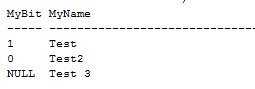
    This table has these rows:

    bittest2

    Adding another row:

    INSERT BitTest SELECT 1, 'Test 4'
    

    gets you an error:

    bittest3

    However what about a compound index? What if I make the table larger and add more fields. Here’s a larger table:

    CREATE TABLE UniqueBit
    ( BureauID INT
    , CompanyID INT
    , DivisionID int
    , DefaultType BIT
    , ProductName VARCHAR(100)
    )
    GO
    INSERT Uniquebit SELECT 1, 1, 1, 1, 'Product 1'
    INSERT Uniquebit SELECT 2, 1, 1, 1, 'Product 2'
    INSERT Uniquebit SELECT 3, 1, 1, 1, 'Product 3'
    INSERT Uniquebit SELECT 4, 1, 1, 1, 'Product 4'
    INSERT Uniquebit SELECT 1, 2, 2, 1, 'Product 5'
    INSERT Uniquebit SELECT 1, 2, 3, 1, 'Product 6'
    INSERT Uniquebit SELECT 4, 1, 1, 0, 'Product 7'

    If I now add a unique index:

    CREATE UNIQUE NONCLUSTERED INDEX [IX_UniqueBit] ON [dbo].[UniqueBit] 
    (
        [BureauID] ASC,
        [CompanyID] ASC,
        [DefaultType] ASC,
        [DivisionID] ASC
    ) ON [PRIMARY]
    GO
    

    It works fine. I can add another unique row like this:

    INSERT Uniquebit SELECT 4, 2, 1, 0, 'Product 7'

    without an error. Adding in a non-unique row:

    INSERT Uniquebit SELECT 4, 1, 1, 0, 'Product 7'
    

    gives me an error:

    bittest4

    There’s nothing special about a bit column for a unique index. There are restrictions for bit fields in some ways that relate to indexing, but uniqueness is not one of them.

    This was inspired by this post (before the complete details from the OP): http://www.sqlservercentral.com/Forums/Topic1126794-149-1.aspx#bm1126850

  • SQL Server Default Backup Directory

    Someone asked me in a webinar how to change the default backup directory. I knew, but realized that I didn’t have a reference and ended up with more explanation than needed if I’d had a post. So here it is:

    If you right click on a server in Management studio and select properties, you get dialog with lots of options.

    serverpropertoes


    If you click on the “Database Settings” you get this:

    serverdbsettings

    Note that there is a default path for data files and log files, not not one for backup files.

    serverdbsettings1

    So how do you change it? In XP or Win 7, click Start and type this right away “regedt32”

    regedior

    That will start the registry editor. You ought to get a UAC box to confirm access, which is fine. Do that and you’ll be in the registry. In the left pane, browse to this path:

    HKey_LocalMachine\Software\Microsoft\Microsoft SQL Server\MSSQL.1\MSSQLServer”

    Note that the “MSSQL.1” might be different, depending on your instance. For me it’s SSQL10.MSSQLServer.

    backupdir

    Note that there’s a “BackupDirectory” key here. You can double click it to change the path:

    backupdir2

    I changed mine to a new path, c:\sqlbackup. Note that I had to create this folder.

    change path

    That’s not enough, however. If you go into your adminstrative tools and find the Computer Management and look for Users and Groups (Select groups), you’ll find groups like this. The name varies, depending on the name of your workstation/server and instance.

    security


    Once you have this name, I’d copy it and go to your new folder. Right click, select properties, and then the security tab

    sevc1

    As you can see, my group isn’t in here, but this group, with the SQL Server service account in it, needs permissions to this folder. So add them, with modify.


    sec2

    Is my default changed? I could now run this:

    backup1

    and I find a file in my new default folder:

    backup2

  • Combinations and Permutations

    I ran into an interesting question from someone asking for all combinations of numbers. The thread was here, and it was confusing at first. However we started to understand what was being asked and eventually the person stopped, realizing that there were too many combinations.

    However at one point there was this quote: I’m looking for combinations, not permutations since the order is unimportant.

    That surprised me since I was thinking of things in the opposite manner. However when I read this article, it made sense: combinations and permutations

    There is a table in the article that cleared it up. I’ve reproduced it here:

    Order does matter Order doesn’t matter

    1 2 3


    1 3 2


    2 1 3

    1 2 3

    2 3 1


    3 1 2


    3 2 1

    The left hand side is permutations, where order matters. The right hand side is combinations, of which there is only one. Order doesn’t matter so 1-2-3 is the same as 1-3-2, which is the same as 3-2-1 and all other orderings.

    This shows mathematical semantics, but those are important in SQL because we do need to talk about combinations and permutations. A CROSS JOIN is normally how we handle combinations, which for three numbers are usually thought of as the way to handle all combinations, but I’m not sure how that works here.

    If I create a quick table:

    CREATE TABLE Combinations
    ( id int) GO INSERT Combinations select 1
    INSERT Combinations select 2
    INSERT Combinations select 3

    and then perform a cross join:

    SELECT a.id, b.id
     FROM Combinations a
       CROSS JOIN dbo.Combinations b

    I get this:

    id          id

    ———– ———–

    1           1

    2           1

    3           1

    1           2

    2           2

    3           2

    1           3

    2           3

    3           3

    Not all combinations. Even if I add in a third result:

    SELECT a.id, b.id, c.id
     FROM Combinations a
       CROSS JOIN dbo.Combinations b
       CROSS JOIN dbo.Combinations c

    id          id          id

    ———– ———– ———–

    1           1           1

    1           2           1

    1           3           1

    1           1           2

    1           2           2

    1           3           2

    1           1           3

    1           2           3

    1           3           3

    2           1           1

    2           2           1

    2           3           1

    2           1           2

    2           2           2

    2           3           2

    2           1           3

    2           2           3

    2           3           3

    3           1           1

    3           2           1

    3           3           1

    3           1           2

    3           2           2

    3           3           2

    3           1           3

    3           2           3

    3           3           3

    However, what about if I limit the result to remove duplicates:

    SELECT a.id, b.id, c.id
     FROM Combinations a
       CROSS JOIN dbo.Combinations b
       CROSS JOIN dbo.Combinations c
    WHERE a.id != b.id
    AND b.id != c.id
    AND a.id != c.id

    That seems to work better:

    id          id          id

    ———– ———– ———–

    1           3           2

    1           2           3

    2           3           1

    2           1           3

    3           2           1

    3           1           2

    However that’s not a great solution. I’ve hardcoded the number of items, and it’s a cumbersome query. I think there has to be a better solution, but it’s probably one that’s beyond my T-SQL skills. If I look at 5 numbers, I get this:

    SELECT a.id 'a', b.id 'b', c.id 'c', d.id 'd', e.id 'e' FROM Combinations a
       CROSS JOIN dbo.Combinations b
       CROSS JOIN dbo.Combinations c
       CROSS JOIN dbo.Combinations d
       CROSS JOIN dbo.Combinations e
    WHERE a.id != b.id
    AND a.id != c.id
    AND a.id != d.id
    AND a.id != e.id
    AND b.id != c.id
    AND b.id != d.id
    AND b.id != e.id
    AND c.id != d.id
    AND c.id != e.id
    AND d.id != e.id
    ORDER BY a, b, c, d

    I get 120 rows. If I look at 5!, that’s 120, so I think I’m correct. I’m not duplicating all the results, nor am I  going to look through them all, but they seem correct and ordered.

    The thing this solution leaves out is the combinations that are less than the total number of items, as asked in the thread. So expanded combinations would be:

    1

    2

    3

    4

    5

    1 – 2

    1 – 3

    1 – 4

    1 – 4

    1 – 2 – 3

    Not worth including those, but I think that would result in a series of UNION queries, which would get really ugly.

    I’ll ask around, but if anyone has an interesting way to solve this that’s cleaner, I’d be interested.

    Update

    Someone posted this, which seems to work wonderfully:

    DECLARE @s VARCHAR(25)
    ,@Iteration Int
    SET @s = ‘ABC’;
    SET @Iteration = LEN(@s);

    WITH E1(N) AS ( –=== Create Ten 1’s
    SELECT 1 UNION ALL SELECT 1 UNION ALL
    SELECT 1 UNION ALL SELECT 1 UNION ALL
    SELECT 1 UNION ALL SELECT 1 UNION ALL
    SELECT 1 UNION ALL SELECT 1 UNION ALL
    SELECT 1 UNION ALL SELECT 1 –10
    ),
    cteTally(N) AS (SELECT ROW_NUMBER() OVER (ORDER BY (SELECT N)) FROM E1
    ),CteCombos AS (
    SELECT CAST(SUBSTRING(@s, N, 1) AS VARCHAR(25)) AS Token,
    CAST(‘.’+CAST(N AS CHAR(1))+’.’ AS VARCHAR(52)) AS Permutation,
    CAST(1 AS INT) AS Iteration
    FROM cteTally WHERE N <= @Iteration
    UNION ALL
    SELECT CAST(Token+SUBSTRING(@s, N, 1) AS VARCHAR(25)) AS Token,
    CAST(Permutation+CAST(N AS CHAR(1))+’.’ AS VARCHAR(52)) AS
    Permutation,
    s.Iteration + 1 AS Iteration
    FROM CteCombos s
    INNER JOIN cteTally n
    ON s.Permutation NOT LIKE ‘%.’+CAST(N AS CHAR(1))+’.%’
    AND s.Iteration < @Iteration
    AND N <= @Iteration
    )
    SELECT Token,Permutation,Iteration
    FROM CteCombos
    WHERE Iteration = @Iteration
    ORDER BY Permutation

    If you alter the variable (abc) to the number of items you need, so “abcde” for 5, this returns the combinations.