Tag: T-SQL

  • Basic Inner Joins – Basic Skill #4

    This post is part of a series based on my presentation The Top Ten Skills You Need for SQL Server. This post is part of Skill #4 – Joins.

    T-SQL Tuesday #23

    This post is also serving as my T-SQL Tuesday post for the month. This month the party is brought to you by Stuart Ainsworth. If you want to know more about what T-SQL Tuesday is about, read Stuart’s post as well as Adam Machanic’s original post and then join in next month.

    An inner join is essentially an intersection of two sets. If you go back to grade school, and think about sets, you can have two items like this:

    set1

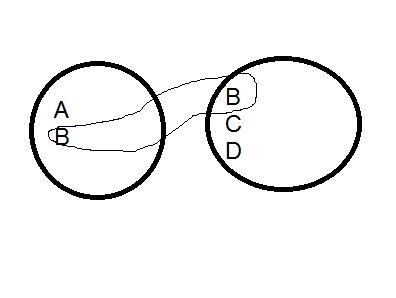
    If you look at these two sets, you see that there are various elements in each set. If we were to show the intersection, it would be this set: (B). This is shown below (excuse my horrible artwork):

    set2

    In SQL, we deal with tables, but we can model this as follows:

    CREATE TABLE SET1
    ( mychar varchar(1) ) GO CREATE TABLE SET2
    ( mychar varchar(1) ) GO INSERT SET1 SELECT 'A' INSERT SET1 SELECT 'B' GO INSERT SET2 VALUES ('B'), ('C'), ('D') GO SELECT a.mychar
      , b.mychar
     FROM SET1 a
       INNER JOIN set2 b
         ON a.mychar = b.mychar
    mychar mychar
    ------ ------
    B      B

    The results are the matching values in each table. In this case each table is a single column, modeling the images above where there is a single letter in each item of the set. The matching columns are the join columns, and in database work, these would be the data items that we are storing in both tables.

    However to expand this, in a database table, we usually have multiple items, so each letter could be a series of data elements, or could have a series of other fields attached to it. Suppose I change these “sets” a little:

    DROP TABLE set1
    DROP TABLE dbo.SET2
    go CREATE TABLE SET1
    ( mychar varchar(1) , Customer VARCHAR(50) , ActiveDate datetime ) GO CREATE TABLE SET2
    ( mychar varchar(1) , Customer VARCHAR(50) , ActiveDate datetime ) GO INSERT SET1 SELECT 'A', 'Bob', '1/1/2011' INSERT SET1 SELECT 'B', 'Bill', '2/1/2011' GO INSERT SET2 VALUES ('B', 'Steve', '1/2/2011'), ('C', 'Andy', '3/1/2011'), ('D', 'Brian', '3/3/2011') GO SELECT a.mychar
      , b.mychar
     FROM SET1 a
       INNER JOIN set2 b
         ON a.mychar = b.mychar

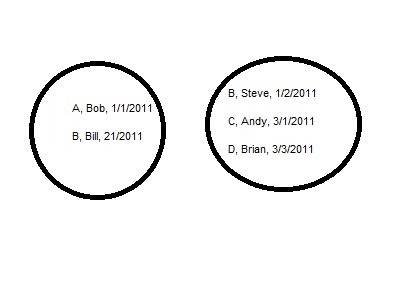
    I still only have one matching row, but there are other data points. If I alter my diagram, they look like this:

    set3

    The matching rows, in this case the rows with a “B” in them, have different data, which seems to be an issue. However suppose set 1 was a list of customers along with their first order date and set 2 was a list of salespeople and the dates they started. Then the join might be on sales, with the letter (A, B, C, D) representing the order.

    That’s the basic of a join. It gets complicated as you look to join three, four, or more tables, but this is the basic idea of an inner join in SQL.

  • Decimal Data Types in SQL Server

    I learned something new about decimal data types in SQL Server recently. If you do something like this:

    DECLARE @d DECIMAL(10,10)
    SET @d = 1.0


    You get this:

    Msg 8115, Level 16, State 8, Line 2

    Arithmetic overflow error converting numeric to data type numeric.

    That threw me for a minute since I’d never experienced it, but then I realized what was going on. The declaration of a decimal data type goes like this:

    DECLARE @d DECIMAL( @p, @s)

    Where we have

    • d – the name of the variable
    • p = precision, the number of digits in the number.
    • s = scale, the number of digits for the decimal

    You can think of this as the following,

    @d = nnnn.ssss

    Where the count of n’s and s’s must equal p.

    In the first example above, I’ve essentially declared:

    @d = 0.ssssssssss

    There’s no room for a digit, other than zero, to the left of the decimal. So you get an error. If I’d added one more digit to the p variable, like this:

     
    DECLARE @d DECIMAL(11,10)
    SET @d = 1.0

    I don’t receive an error. Likewise, I can add multiple digits to the other side like this:

    DECLARE @d DECIMAL(10,10)
    SET @d = 0.999999999

    Works fine.

    I had never run into this because I don’t ever declare these the same. I almost always go larger than I need, and allow for more decimals. So for US money, I often declare things at decimal(10,3), giving me more space than needed. It pays to think ahead, and declare your variables properly, and understanding how they are structured is part of that.

    Note: this applies to numeric types as well.

  • Data Presentation – T-SQL Tuesday #22

    TSQL2sDay150x150It’s T-SQL Tuesday again, with our host this month being Robert Pearl, of Pearl Knowledge Solutions. He chose the topic of Data Presentation for September.

    If you haven’t participated in a T-SQL Tuesday, it’s easy. Read the rules in Robert’s post and read the basic idea in Adam Machanic’s original invittation. Then write a blog post with the logo to the right in it and link it back to Robert’s post.

    That’s it.

    Formatting Data

    One of the things that DBAs and data professionals should learn is that formatting typically doesn’t belong in the database. The client, front end, or the tools used to extract the data should handle formatting, presenting the data as the client wants to see it.

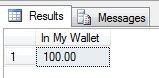
    When you store numbers, you don’t want to store things like currency symbols. So in SQL Server I should see this:

    datapresent1

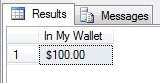
    and not this:

    datapresent2

    The former gives more flexibility, and the latter limits what you display (and requires character storage).

    The same thing goes for other data, for example, phone numbers. We don’t want to store our phone numbers like this:

    datapresent3

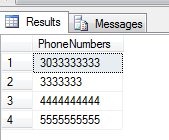
    If someone wants to see just the number, or they add in another format of number (say European), then you have inconsistencies. Also, it becomes harder to separate out issues. When you do separate out the number from the area code, how do you handle things if you have this:

    datapresent4

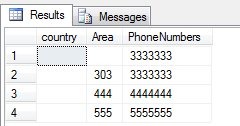
    That’s hard to handle. If all the phone numbers were numbers, it’s easier to handle. This allows one easy CASE statement based on length.

    datapresent5

    Or better yet, use better design and let the front end handle data presentation.

    datapresent6

    Doing It Right

    I guess I haven’t talked data presentation so much as how not to handle data presentation. I know that SQL Server can do things like ordering, formatting, combining or splitting strings, or more, but ultimately I think that’s not the right way to handle things.

    I’ve always viewed the database as the single bottleneck. It’s incredibly hard, and expensive, to scale a database server, while it’s easier to scale web servers, app servers, and client tools, and much less expensive. It’s even easier to scale developers and have them write more code to handle presentation on the front end instead of using SQL Server to do the work. I’d try to always push any presentation work to the client instead of the database server, just because of the workload and bottleneck on the server.

    It might seem like more work up front, and it will be, but it will be infinitely better than trying to re-write code or upgrade your database server later when the load becomes larger.

  • Computed Columns and UDFs

    I wrote about the basics of computed columns and also using CASE in a computed column recently, but there’s a better way to implement a computation, and reuse the code. You can include a UDF in a computed column.

    UDFs are a great way to encapsulate your code into an object that can be included in stored procedures or even computed columns. The basic definition of a UDF is that it’s a function (as in other languages), but it’s designed to be included in other code, unlike a stored procedure. They’re very similar, but there are a couple types of UDFs:

    * The CLR UDFs can be scalar or table valued.

    For computed columns, you can use a UDF as well. Let me set up a couple tables here and a function. First I’ll set up a table similar to the one on SQLServerCentral that holds user points, add some data, and then create a quick function that calculates the sum of a user’s points.

    CREATE TABLE points
    ( USERID int
    , ItemID int
    , points tinyint
    )
    GO
    INSERT INTO points SELECT 1, 1, 2
    INSERT INTO points SELECT 1, 2, 1
    INSERT INTO points SELECT 1, 3, 1
    INSERT INTO points SELECT 2, 1, 1
    INSERT INTO points SELECT 2, 2, 1
    INSERT INTO points SELECT 2, 3, 2
    INSERT INTO points SELECT 2, 4, 1
    
    CREATE FUNCTION UDF_GetUserPoints
    ( @UserID int
    ) RETURNS int
    AS
    BEGIN
     DECLARE @sum INT
    
     SELECT @sum = SUM( points)
       FROM Points
       WHERE UserID = @UserID
       
    RETURN @Sum
    END
    

    If I run the function by itself, I can get the sum of each user’s point total.

    SELECT dbo.UDF_GetUserPoints(1) AS 'points'
    UNION 
    SELECT dbo.UDF_GetUserPoints(2) AS 'points'
    ------------------------*/
    points
    -----------
    4
    5

    Now let’s go back and set up the user table. I could alter this table if it existed, but in this case I’ll add the points as well as a calculated value for the user’s points. As long as I’m not asking for lots of user’s from this table, this technique is probably OK. Otherwise, I might have a big performance issue. (no SELECT *s from this table)

    CREATE TABLE UserProfile
    ( UserID INT
    , UserName VARCHAR(200)
    , points AS dbo.UDF_GetUserPoints(USerID)
    )
    go
    INSERT INTO userprofile SELECT 1, 'Steve'
    INSERT INTO dbo.UserProfile SELECT 2, 'Andy'
    

    Note that I’m not adding a value for the points column. This is a computed column, so I ignore it in inserts.

    SELECT TOP 10  UserID ,
            UserName ,
            points 
     FROM dbo.UserProfile
    
    UserID      UserName      points
    ----------- ------------- -----------
    1           Steve         4
    2           Andy          5

    Here the values are calculated from the other table, pulled from my UDF in the computed column.

    Not necessarily a great technique, and I would be careful about using this. Since this function is non-deterministic, we can’t persist the values in the table, so this means that any access of this table for the points column would result in the function execution for the row. Potentially a performance issue.

    If you want to see this idea in action, there’s a similar video on UDFs in Computed Columns at SQL Share as well that covers the topic.

    Disclosure: I am a part owner in SQL Share

    .