Tag: Tesla

  • Tesla Warranty Service for Trim

    This is part of a series that covers my experience with a Tesla Model Y.

    I noticed a problem on the driver seat of my Tesla a month or so ago. The trim piece around the side of the seat was loose. It appears a piece of the trim cracked off.
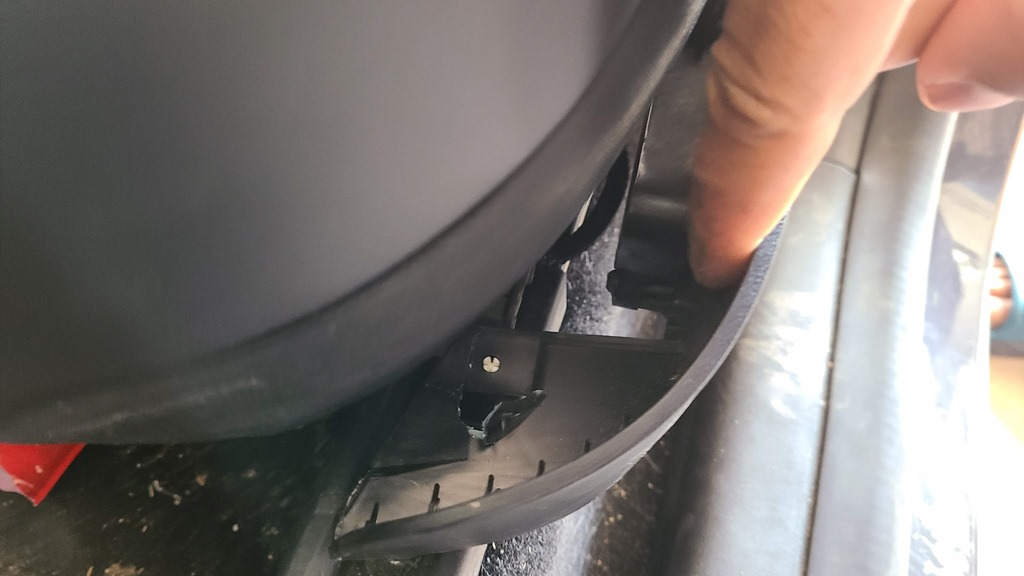
    20220818_140751

    I picked the Service tab in the app and started to schedule things. I went through a couple menus to note this was interior to the car and a seat issue, then typed a few sentences to describe the issue. I uploaded this picture, and then was given the option to schedule service at one of the service centers.

    Apparently this didn’t qualify for mobile service, which is fine. I picked one of the service centers near me (both about the same distance) and scheduled a date and time about a week out. I could have picked a time 3 days out, but that didn’t work in my schedule.

    Communication

    I got a few messages in the app during the week. First, one a day later to ask that I confirm I still want the appointment. A day or two later, they sent a note asking which seat, to confirm the driver seat. Then they sent an estimate of US$58, though noting this might be covered under warranty.

    I approved them all as I assume I can argue the warranty thing in person.

    I also got a note the day before that they were thinking this might take a couple hours with their load and letting me know that they were giving me ride share credits.

    The Appointment

    The morning of, I drove to the service center. I parked the car, and as I walked up, I checked the app. A new message showing me how to get a rideshare credit with Uber. No loaners, but that is nice.

    I checked in with the reception person and then walked away. No need to give them a key. Apparently they have geo-fenced service keys for the Tesla Service Centers. Cool, also slightly disconcerting.

    In any case, I worked for an hour and then had another appointment, so I called an Uber.

    When I returned to Tesla, I realized I didn’t have my wallet, so I wanted to grab it. I went in the app to check the location and saw this:

    Screenshot_20220823-104631_Tesla

    Interesting. The car is in service and I can’t see app functions. I walked over to where I’d parked and it was still there. My phone worked as a key, and I could get in, but an “About” screen was visible, not the normal view. Also, a notice that the car was speed limited at this time, which is probably a good thing when techs are 20-something and have the opportunity to test a Plaid Model S for some reason.

    In any case, glad I could get my wallet for lunch instead of playing the “where will my NFC phone work” game.

    I went to lunch and about 30 minutes later I got a text that there was a message in the app. I checked and they said my car was done. They provided a message that told me where the car was located. I walked over, checked the repair (looked great) and drove away without talking to anyone at the end.

    The repair was covered under warranty and I got an invoice for $0.00 in the app.

    All in all a good, albeit slow, experience.

  • Summon in the Tesla FSD

    This is part of a series that covers my experience with a Tesla Model Y.

    One of the features that came with my FSD subscription was Summon. This allows you to move the car from the mobile app without being in the car. I decided to test this a few times and see what happens. I ran these tests:

    • Coming out of the garage – failure
    • Backing out of a parking space at the gym – failure
    • Crossing the parking lot at the doctor – mostly OK
    • Summon to target in the gym parking lot – mixed
    • Summon to me in the gym parking lot – works

    I’ve described the experiences below.

    Garage

    When I first subscribed, I drove home and parked the car short of coming into the garage. I walked into the garage and selected the forward arrow. The car drove very slowly into the garage, with lots of minor adjustments left and right. Not sure I loved that.

    In the video of my testing, I tried to get the car to come out of the garage. It would wake up and start for an inch, and then stop. I think the right corner of the garage made the car nervous, and it didn’t quite believe it could back straight up. I didn’t test the come to me or come to target.

    In a Parking Lot

    I had tried this at a doctor’s office once, and stood in the middle of a parking lot, away from other cars. When I pressed come to target, the car backed up, turning out of a parking spot and then drove forward to me, though past me to a spot marked on the map. I’m not quite sure how a “target” is picked, but since I could have stopped the car near me, I wasn’t too worried.

    Later I went to the large, mostly empty parking lot at my gym and did some other testing. Two tests couldn’t get the car to back out of the parking space, and I’m not sure why. No other cars around, so it was strange.

    When I backed in, I could get the car to drive to me, though only with selecting “Come to Me”. The “Come to target” again picked a weird spot. Actually across a couple parking spots.

    Summary

    During a month of having FSD, I never really had a time when I wanted to summon the car. Of course, in Colorado in the summer, it rains rarely, and I’m not one to be worried about a little rain on the few days we have some. I also don’t quite know when I find it useful. Maybe if someone parks too close to let me get in or park.

    The feature worked OK, though not great. Certainly not enough, or not consistently enough, for me to want to pay for this.

    I made a video of my tests that you can check out.

  • Proving Minimal Charge Loss for the Tesla

    This is part of a series that covers my experience with a Tesla Model Y.

    One of the reasons I have some data capture taking place on my own systems is in case some vendor I use has a DR event. That might cause me to lose some data, since I’d be depending on them to keep the data around. If I lose my system, I can always (hopefully) go get their copy again.

    Maybe.

    Who knows.

    In any case, my wife and I spent the weekend in LA, coming back Monday. We got home from the airport and my wife said the Tesla was really low. The charge level was at 22%. She thought sitting parked at the airport from Fri-Mon drained a lot of charge. I countered that it hadn’t lost much of anything.

    I had actually left home Tues morning and returned late Thur, so I hadn’t driven the car (or plugged it in) since Monday. My wife said she hadn’t driven much, so there should be more charge.

    To settle the situation and understand, I turned to my Teslamate data logger. It’s been running in a container on my machine (Actually a few) and keeps the data backed up.

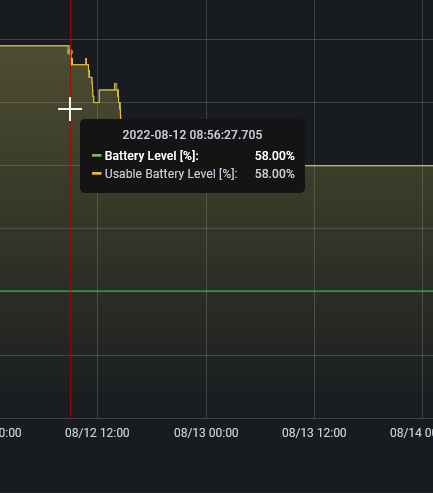
    If you look at the charge level, you’ll see that I got up to the 76% level (the max setting for us) on Monday.

    2022-08-17 13_39_55-Charge Level - Grafana — Mozilla Firefox

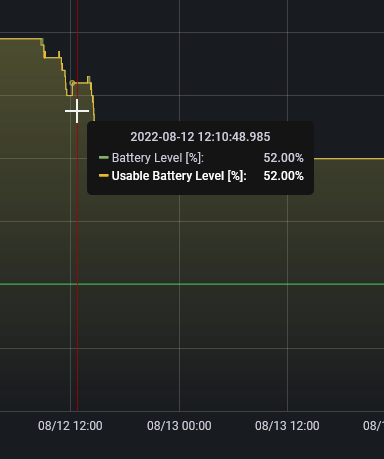
    I was in Seattle at 12:50p Tuesday when someone started driving it around. The normal driving that day took the charge down to 59%. I’m guessing a few errands throughout the day.

    2022-08-17 13_40_05-Charge Level - Grafana — Mozilla Firefox

    Then this remained the state until Friday morning just before 9a. That’s when I left for yoga, and you can see I drained down some charge.

    2022-08-17 13_41_40-Charge Level - Grafana — Mozilla Firefox

    I got home and plugged it in, but because I have this set for overnight charging, nothing happened at first. I finally remembered to click “start charge”, but only added 2″%.

    2022-08-17 13_42_15-Charge Level - Grafana — Mozilla Firefox

    That’s what we took to the airport. The drive up drained the batter down to 41%, and I’m guessing another % went down with cabin overheat running. This runs for a bit of time after the car is locked (it was hot in DEN). The charge remained at 40 through the weekend until Monday morning.

    2022-08-17 13_43_24-Charge Level - Grafana — Mozilla Firefox

    Driving home was the dip down to the 22% where we ended up in the right side of the graph above.

    Not that I wanted to win an argument, but more verify that what I told my wife was correct. We have sentry off and we should lose minimal charge from the car being parked.

  • Initial FSD Thoughts with a Tesla Subscription

    This is part of a series that covers my experience with a Tesla Model Y.

    I subscribed to the Tesla FSD in July, since I had a couple trips planned where I’d be driving longer distances on the highways. I wanted to see how well it worked and what value there was from the subscription.

    Cost-wise, this is a good way to try things out. The FSD cost is US$12,000. If I subscribe, it is US$199. Worth a month to test this out and see what it gets me. The additional items for FSD (and Enhanced Autopilot) are:

    • Navigate on autopilot
    • Auto lane change
    • Auto park
    • Summon
    • Smart Summon
    • Traffic Control and Stop Sign Control

    Note: This isn’t the beta version of FSD that everyone is writing about. This is production, which is less capable. I could have opted into the beta, but decided not to.

    Subscription was easy. I clicked a few buttons on the app and within minutes, I had new options in my Autopilot screen. I clicked on a few and set up some confirmations and enabled options.

    I then tried it on some shorter trips. Overall, I appreciated the ability for the car to stop at stop lights and stop signs, though the confirmation from me wasn’t great. However, I don’t completely trust the car, so I liked it.

    I also did like the lane change on the highway. Often when I’ve used Autosteer, I get behind a slow person at some point and I’d like to be able to change lanes. It did work well when I confirmed a lane change and waited for other cars that were close to pass (or fall back) before the car moved lanes. I could not initiate these changes, however. I had to wait for the car to ask if it could change lanes.

    There still is some phantom breaking and some weird speed changes at times, so it’s not anywhere close to perfect, but I liked the feature.

    I don’t think this is worth US$200 a month for these features, but maybe at $100 I’d use it I drove more. I just don’t go on enough longer rides to use this very often.

    I’ll write a few posts and shoot video of a couple of the features.