Author: way0utwest

  • Advice I Like: Rewards from Work

    The greatest rewards come from working on something that nobody has words for. If you possibly can, work where there are no names for what you do.” – from Excellent Advice for Living

    I work for a software company, trying to sell tools to companies for database work. It’s not hugely rewarding. I enjoy it, and I like going to work. I like the colleagues and customers, but this doesn’t fill my soul.

    I’m an average person and while I’m good at what I do, I don’t make huge differences. I make small changes, both at Redgate and while coaching. The latter is way more fulfilling to me. I coach at a small club, not the top one, we don’t make news locally, but I help and watch kids grow up before my eyes in many ways.

    I love that.

    The saddest thing I’ve seen across the last 30 years of my career is how many brilliant people have moved to work in finance and tech (including biotech), aiming to win the lottery with options and IPOs rather than spending their efforts on making the world better. Their focus is on clicks and trades, not bettering science, knowledge, or anything for humanity.

    Lots of people do great work still, but many of the brightest of my generation and the next aren’t focused there.

    I’ve been posting New Words on Fridays from a book I was reading, however, a friend thought they were a little depressing. They should be as they are obscure sorrows. I like them because they make me think.

    To counter-balance those, I’m adding in thoughts on advice, mostly from Kevin Kelley’s book. You can read all these posts under the advice tag.
  • Barely Reviewed Code

    Years ago I was giving a talk on software development and asked the audience how long it takes to review a PR that has 10 lines changed. Answers were in the minutes to tens of minutes range. I then asked how long it takes to review a PR that has 1,000 lines changed. Some people said hours, but a few people said seconds.

    I’ve often taken the latter, pessimistic view. Not because I don’t think engineers want to do a good job, but because I know human behavior. Most humans will get bored, lose focus, and end up skimming through a large amount of code. Many (most?) people don’t want to spend all that time, after all they have they their own code to write. They’ll just approve the PR and assume testing will catch any major issues.

    Even if a reviewer wants to do a great job, they likely will still miss things. It’s very hard to focus across that much code.

    This is a funny visual (from X) about code reviews. It’s titled “me reviewing code written by Claude before pushing it to production.” Plenty of people are probably laughing, or thinking this is a good reason to not use an AI to write code.

    However, I don’t think the problem is an AI writing code. If you trust the AI without reviewing things, that’s on you. You deserve blame if things fall apart.

    The bigger problem is that an AI can write code so quickly and can make so many changes that PRs will tend to be large. These changes will tend to not get human-reviewed with any level of focus or quality control. The problem is volume, not who wrote the code (or the quality). Certainly quality matters, but it’s easy to catch changes if you have a small volume of code. Harder if you have a lot.

    The more I use AI for spot work, to handle tedious things, to do something like subtly adjust spacing in a UI or focus on adjusting a few things in a data model, the easier it is to judge the focus and quality of the code. Is the change doing the job I need done, and is it doing it well?

    Code quality is a problem we’ve had ever since we started writing code. AI can make the problem worse, not because of poor coding, but because it will write so much code in a PR that you can’t review it appropriately.

    Steve Jones

    Listen to the podcast at Libsyn, Spotify, or iTunes.

    Note, podcasts are only available for a limited time online.

  • Republish: A Great Case for Powershell

    I’m still in Las Vegas coaching 13 year olds at the Red Rock Rave. Hopefully things are going well, though day 3 is often tough. It’s been a long weekend and players are tired (and coaches).

    I’ll be surviving today and then having a quiet night with my wife before returning tomorrow. I’ll see you Wednesday, but until then, you can read A Great Case for Powershell. Let me know how that has held up in the age of AI, 8 years later.

  • Monday Monitor Tips: A New Analysis Page

    We have multiple teams (8) working on Redgate Monitor. Some work on the Standard Edition, a few on the Enterprise Edition, and others handling core work, like the Linux/PostgreSQL option.

    We also have designers, and they regularly research how well the product works for customers, what is difficult, and they propose changes. One of them was recently release. We have a new analysis page in Redgate Monitor and this post looks at the changes.

    Video walk-through of this post below.

    This is part of a series of posts on Redgate Monitor. Click to see the other posts.

    The New Experience

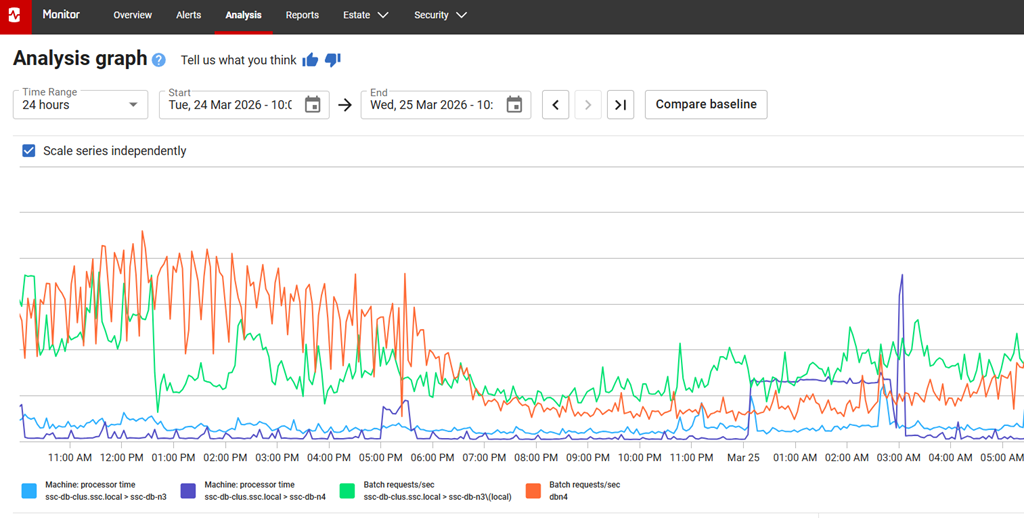
    If you go to monitor.red-gate.com, you can see this at: https://monitor.red-gate.com/Analysis. This shows the new analysis graph, which is easier to see and takes up the entire screen.

    2026-03_0166

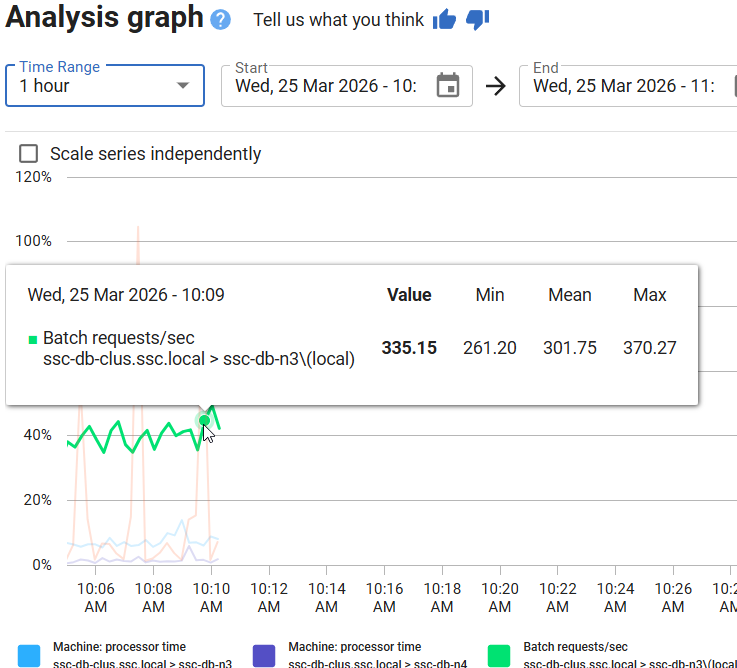
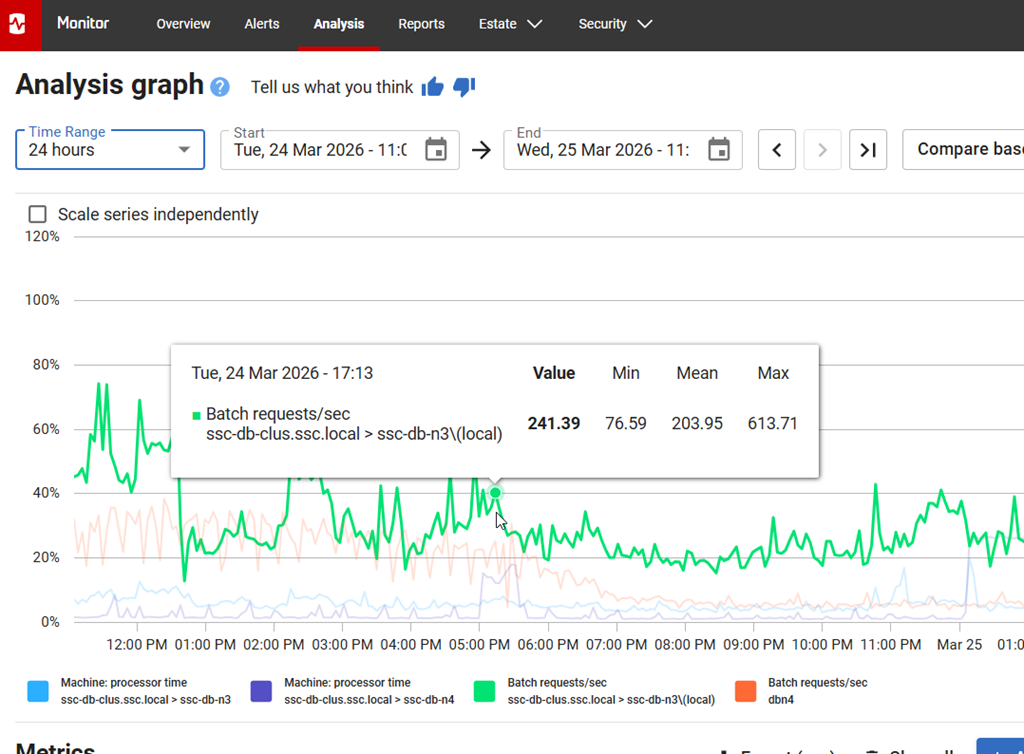
    If you haven’t used this, I’ve added metrics below this for certain servers. You can see in the legend that I’m looking at CPU time along with batch requests for both sides of my cluster. I can compare these to see if the number of batches is impacting CPU. A correlation I might use to research how a workload affects my system.

    If I put my cursor over the graph, I can get info on the metric, the current time and the value/min/mean/max. These values are for the time period.

    2026-03_0168

    If I change my time period, I see the values change for the stats.

    2026-03_0169

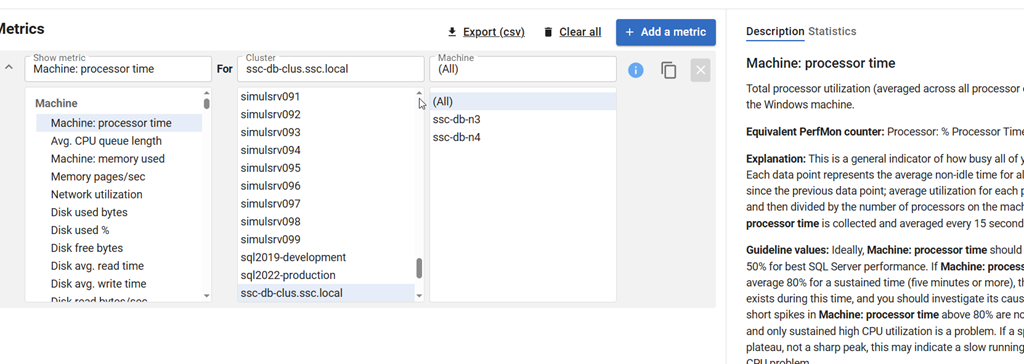
    Below this, for the metrics, it’s a little cleaner as well. The interface hasn’t changed a lot, but it’s a little larger and spread out. I can see that I pick a metric for a cluster, and then for a machine. This is the same.

    2026-03_0170

    What has changed is the “add a metric” is now at the top on the side. If I click this, I get a new set of metrics to pick below this. Note the “same as above” for the cluster, which is very handy. I can also type in the box to search.

    At the right, the explanation of the metrics and statistics are still on the far right.

    This makes an interesting experience that works smoother to ensure that

    The Classic Experience

    If you don’t like this, there’s a link in the upper right to switch back.

    2026-03_0173

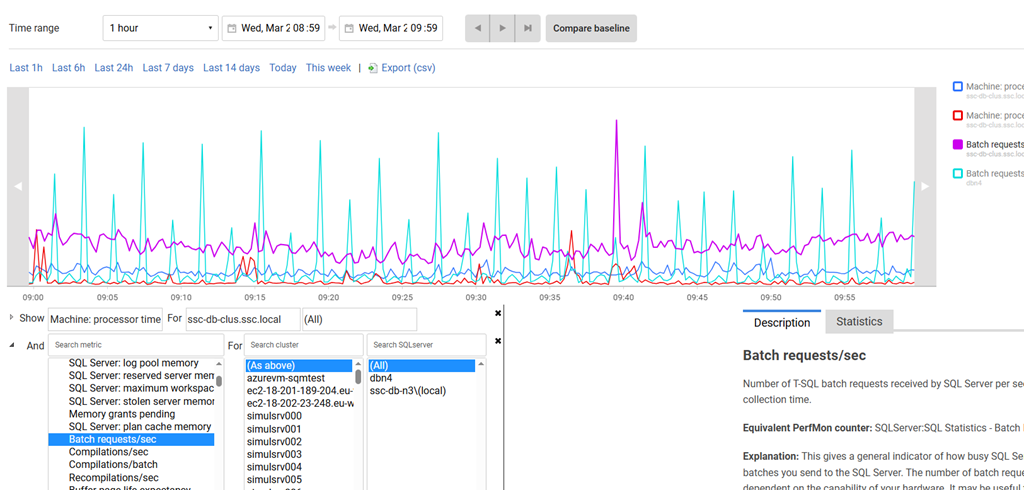
    Clicking this loses my metrics, but if I add them back, you can see the old view. It’s a little less appealing to me. The other thing I hated is that the “add a metric” is below the list shown below, which is annoying. I often scroll down to find it.

    2026-03_0167

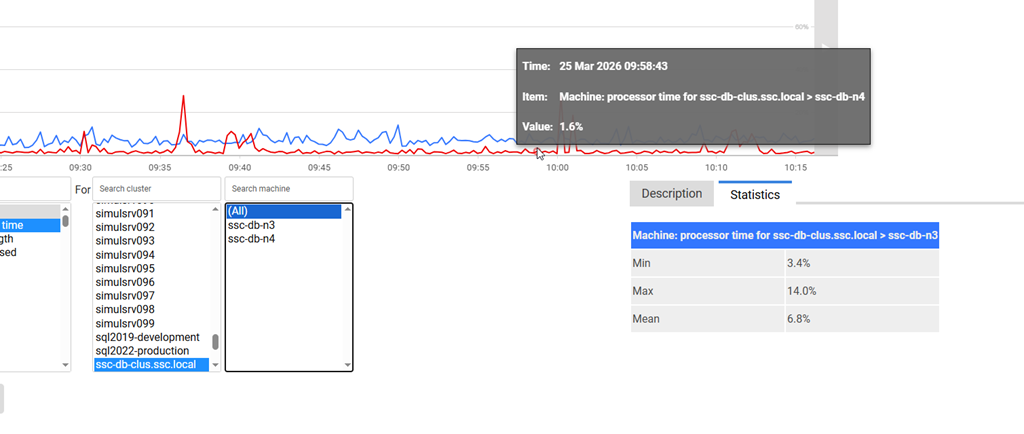
    I also have statistics which only show one of the metrics (first one?) and not both. I’m also missing stats of the average.

    2026-03_0174

    Summary

    This is a small change, but a nice one, IMHO. The ease with which the UX is designed can make a big difference to how users can interact with the data. This is a small one, but one that I really appreciated.

    If you have feedback in general, please let us know as we value your opinions and comments on how we shape the future of Redgate Monitor.

    Redgate Monitor is a world class monitoring solution for your database estate. Download a trial today and see how it can help you manage your estate more efficiently.

    Video Walk-through

    Video of this post below.