Author: way0utwest

  • Protecting Code

    There are so many data breaches taking place, that it’s hard to keep track of them. While I rarely find my email in any of the breaches loaded into haveibeenpwned.com, I do see Mr. Hunt regularly loading more data sets into the database. I don’t know how many you’ve been a part of, but I certainly hope you know, and I hope you’ve changed shared passwords and updated accounts.

    While we do need to protect data, we also need to ensure that we protect our code, as that might be where the vulnerabilities lie that others might discover. While I’m not a big fan of encrypting or hiding the code in a database from customers, I certainly don’t want that code, or the application code, to be visible to outsiders, especially potential hackers.

    While your team might not be are careless as the Boeing research team, I’d hope that you don’t expose your code on the Internet, as they did. Perhaps more importantly, I hope no one does a Black Hat talk about potential issues in your code. A researcher did this to Boeing, talking about potentially being able to jump from a customer network and application to a more privileged one to the command and control network. Boeing denies this is possible, and I’m not worried about my future Dreamliner flights, but I think Boeing should do more publicly here. Let the researcher have a few days on a plane and truly pen test the software.

    I’ve seen lots of “hidden” features in software that administrators use to get work done. I’ve seen sloppily written tooling that solves a problem and isn’t intended for general use. I’ve also see far too many of these features “discovered” by ordinary users. Even assuming your internal network is completely free of malicious users is a bad idea. We’ve seen plenty of viruses and trojan software that can be used maliciously.

    We don’t want to lock our networks and applications so tightly that we create impediments to work, but we certainly can do better jobs in limiting access, keeping tight privileges, ensuring administrative accounts are protected and more. Those might be hard to get done today, but you certainly can prevent simple things, like securing your VCS. Don’t use public places like GitHub, or ensure you have private repositories that only your organization can see. It’s not perfect, but it does stop the researchers and lazy criminals that are just scanning for easy targets on the Internet.

    Steve Jones

    Listen to the podcast at Libsyn, Stitcher or iTunes.

  • Finding SQL Configuration Manager in Windows 10–#SQLNewBlogger

    Another post for me that is simple and hopefully serves as an example for people trying to get blogging as #SQLNewBloggers.

    I went to check a network protocol setting for SQL Server the other day on my (newish laptop) and was disappointed.

    2019-08-15 08_26_25-Settings

    This is Windows 10 and on this machine, I’d installed SQL Server 2014, 2016, and 2017. I thought that at least SQL Server 2014 had the SQL Server Configuration Manager installed, but it appears not. I know that this has been a tool that sometimes gets hidden in recent versions, but I was sure I’d seen it here.

    Either I’m wrong or Windows 10 has changed.

    In any case, the Computer Management MMC plugin has it. You can run this in a couple ways. First, hit the Start menu and type “Computer Man”. You’ll get something like this and can run this:

    2019-08-15 08_29_15-Finding SQL Configuration Manager in Windows 10 - Open Live Writer

    The other choice is to his Win+R (run) and type “compmgmt.msc”. Both will get you here:

    2019-08-15 08_30_06-Computer Management

    If you now expand the Services and Applications, you’ll see the SQL Server Configuration Manager and the various items underneath it. For me, the top one (most recent?) was the SQL Server 2017 version. The others were below as other snap-ins.

    2019-08-15 08_31_03-Computer Management

    The good thing about this is I can also manage local users and see the local logs, things I sometimes need when configurating SQL Server.

    SQLNewBlogger

    An easy post that solves a common problem, and shows I know some tips and tricks. How would you rewrite this post? You could show this knowledge with a quick 10 minutes of your time.

  • Local Database CI Builds with Jenkins in a Container

    In two previous posts (Jenkins in a container, Adding SCA to Jenkins), I’ve showed how to configure Jenkins in a container as well as how to add the SQL Change Automation plugin. This post looks at an initial database build in Jenkins. I will build from my local repo, which gives me a bit of a pre-push check on my code.

    Note: I already have a SQL Source Control (SOC) project committed to Github that contains the database I want to build. If you haven’t done that, see this post on a basic SOC->GitHub link.

    Creating a Jenkins Job

    Jenkins calls these build processes jobs, and you see that if you set up Jenkins in a container. By default, there are no jobs, and Jenkins lets you know this.

    2019-07-27 17_23_07-Dashboard [Jenkins]

    When I click this, I get a choice of different projects. You can read about these in the Jenkins documentation, but I am just going to use a Freestyle Project. Give it a name and click the type and then OK.

    2019-07-27 17_24_04-New Item [Jenkins]

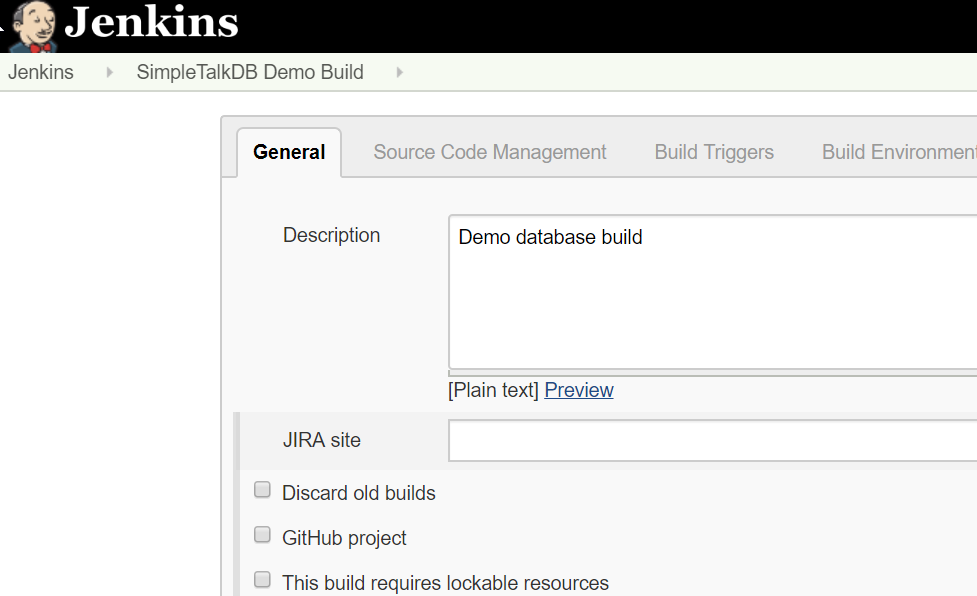
    At this point, we need to configure the job. I do like to provide a description, and normally I would set this as a Github project, but in this case, this is really just a local build..

    2019-07-27 17_30_56-SimpleTalkDB Demo Build Config [Jenkins]

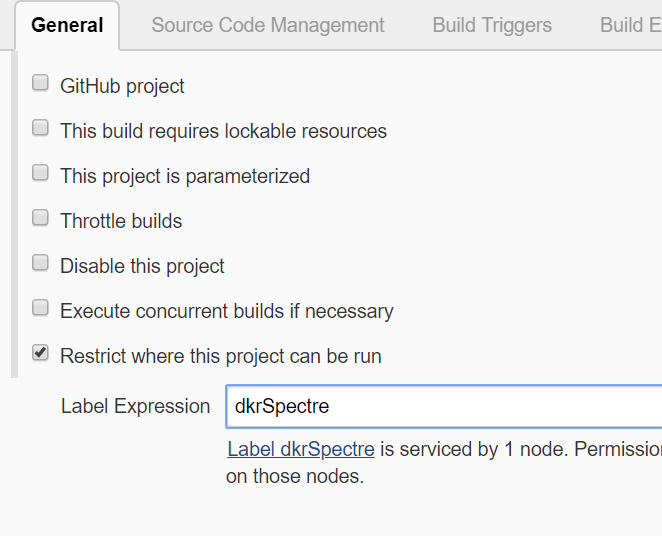
    I do want to restrict which agent will run this, since I have a master agent in the Jenkins container. That one can’t see my SQL Server (and doesn’t have tools), so I’ll restrict this to the local agent on my machine.

    2019-07-27 17_31_04-SimpleTalkDB Demo Build Config [Jenkins]

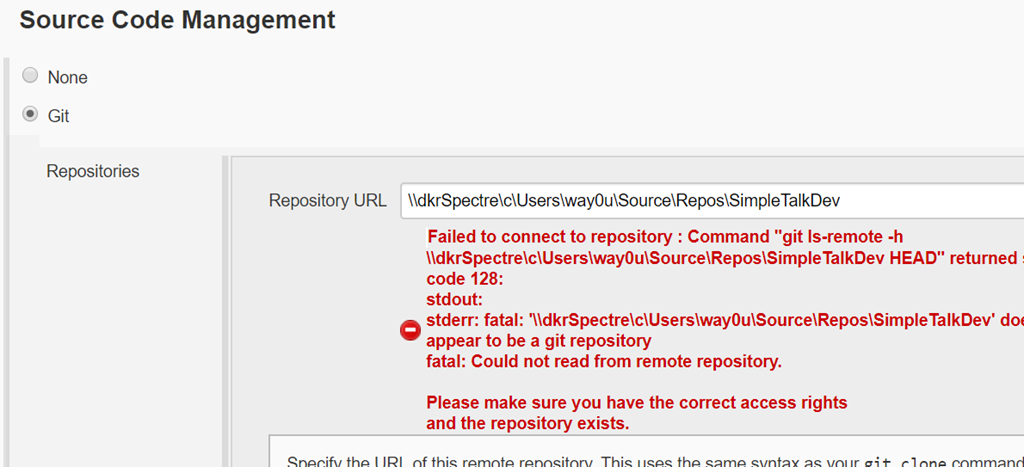
    There are tabs at the top for quick navigation, but this config is really just one long page. You can scroll down as needed. Below the agents, I find the VCS section. I’ll choose git, and then enter the path the agent will need.

    2019-07-27 17_35_56-SimpleTalkDB Demo Build Config [Jenkins]

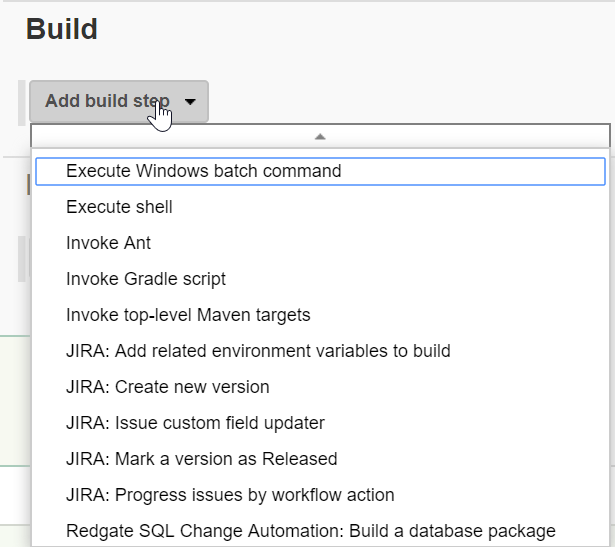
    When I scroll down to the Build area, I need to add a step. CI is just a step engine to assemble your software, and in this case, I see my Redgate SQL Change Automation plugin.

    2019-07-27 17_36_15-SimpleTalkDB Demo Build Config [Jenkins]

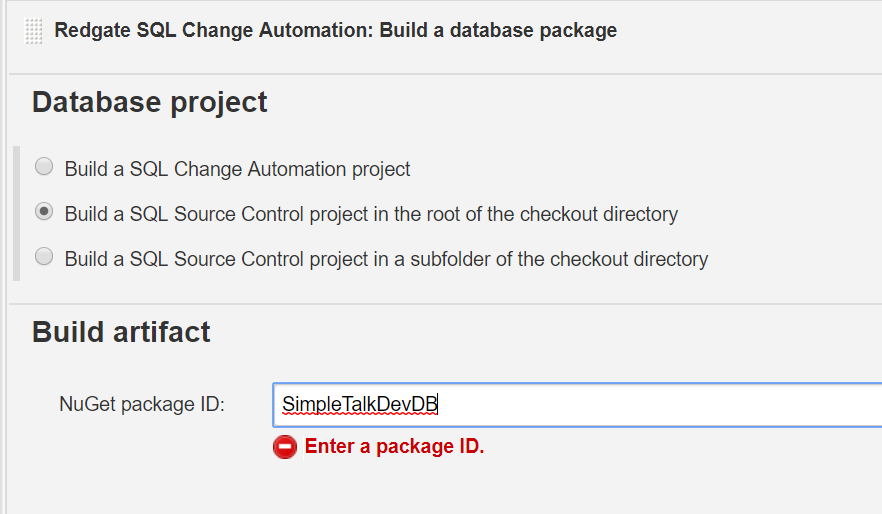
    When I click this, it is added as the first step. There is an implicit “git clone” checkout of code. I need to configure this step with just a few items. First, build in the local folder, rather than some specific area. We’ve already specified an agent location when we configured the Jenkins agent.

    Also, you need a package ID, which will be the place where the current state of all objects is stored. Unlike application code, the artifact is really the current version of the objects in source control, not any .exe or .dll.

    2019-07-27 17_36_38-SimpleTalkDB Demo Build Config [Jenkins]

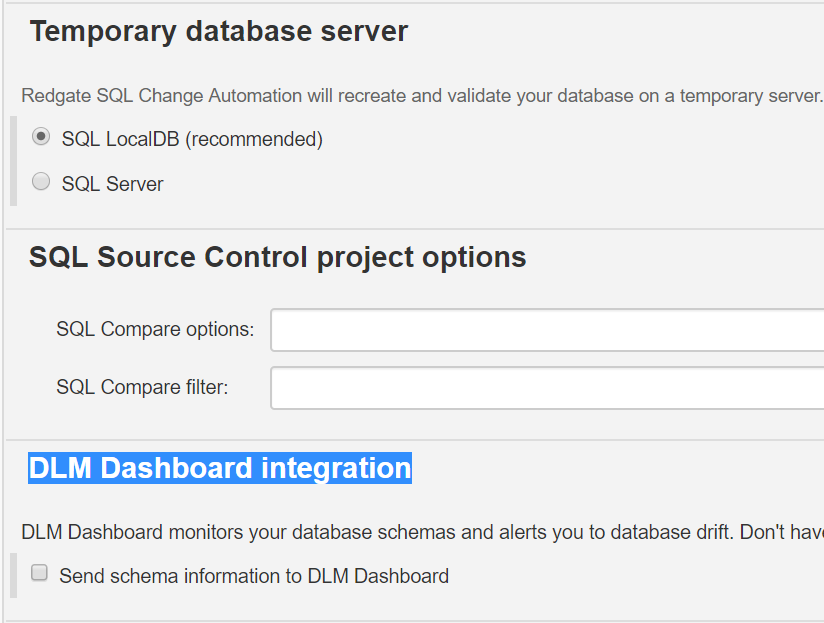
    The only way to build a database project in SQL Server is with an actual SQL Server. In this case, I don’t have any code that would error on LocalDB, so I’ll just use that. I coudl specify my local SQL Server development database if I had the need.

    This is a test build, so I also don’t need any SQL Compare options or other switches.

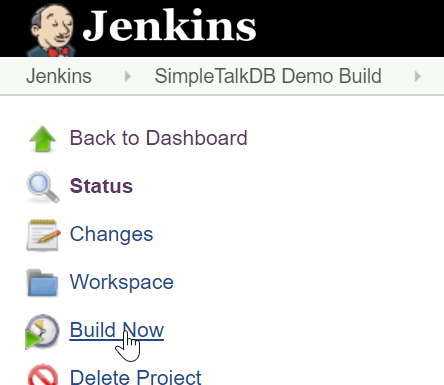
    2019-07-27 17_36_47-SimpleTalkDB Demo Build Config [Jenkins]That’s it. I click Save, and I get to the main project page. Now, the test. I’ll click Build Now.

    2019-07-27 19_05_12-SimpleTalkDB Demo Build [Jenkins]

    This kicks off a build on my agent. If your agent isn’t connected to the container, you’ll need to do that now. At the bottom left of the page, I see my build working.

    2019-07-27 19_05_28-SimpleTalkDB Demo Build [Jenkins]

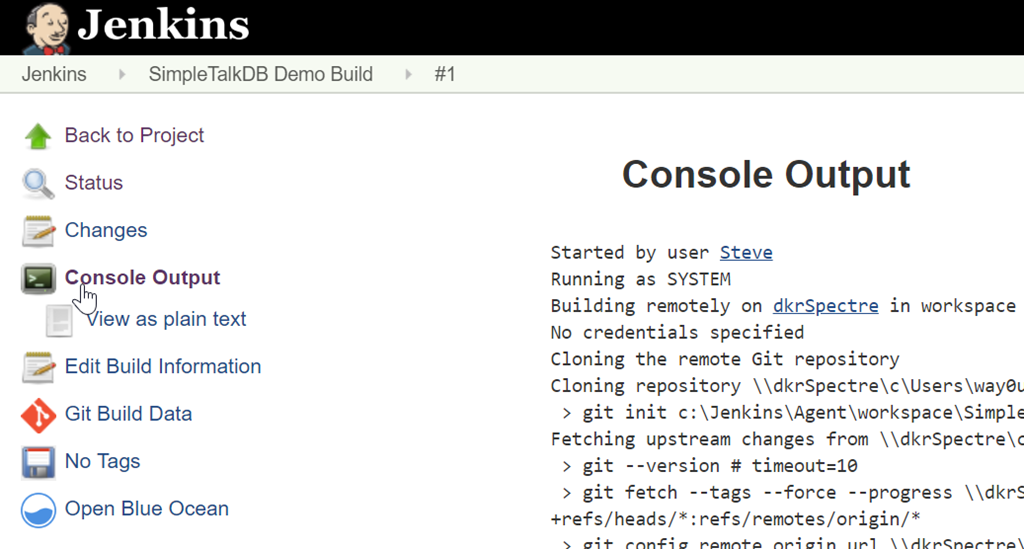
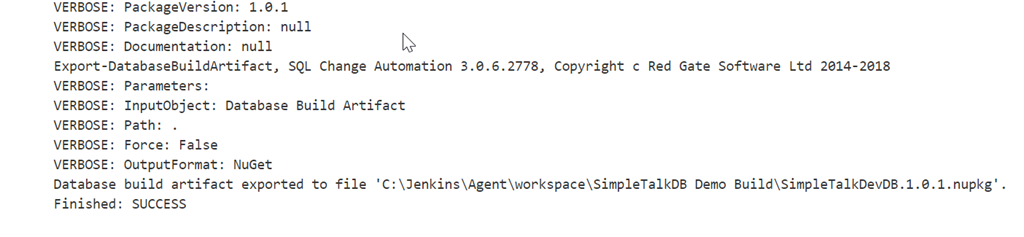
    The build number is a link, so click that to go to the details of the build. When you get there, you can see the build working by clicking the Console output. As you see, the output is on the right side of the screen.  As you can see, my local path worked fine, without any error.

    I also got to this part of the process on a plane, with no Internet. While there were some warnings as the plugin and other parts of the process tried to contact the PowerShell Gallery, things worked.

    2019-07-27 19_06_03-SimpleTalkDB Demo Build #1 Console [Jenkins]

    At the end, I see success, which means that the code I wrote in my database, and that was committed to my VCS, is valid. It’s a low bar, but you might be surprised how often someone breaks code by making a strange change to their project.

    2019-07-27 19_06_17-SimpleTalkDB Demo Build #1 Console [Jenkins]

    This is a basic build process, to which I can add other steps. Testing and releasing are further steps, and Jenkins can support you in these.

    Now I can move forward with additional development, knowing I have my own build system in my own environment, using Jenkins in a container.

    This Series

  • Growing and Changing

    When I started with SQL Server, I worked on OS/2 and SQL Server 4.2. Eventually I moved on to SQL Server 6.5 at a few places, one of which had heavy workloads. While I liked v6.5 much more than v4.2, there were issues with nested views, and certainly issues with heavy tempdb loads. In fact, at one job, I banned temp tables unless we had no other way to get queries to work. This helped stabilize some of our code, and we essentially had a review group that a developer had to convince to allow temp tables since there were situations where we needed them.

    I was reminded of this recently after Grant published his Best Practices and Band Plans editorial. There was this comment, which noted: ” I have talked to some people that state “our best practices is to never use…” because they tried it when it was first introduced in SQL Server 2005 and it didn’t work for them so now they won’t use it at all. ”

    I’ve encountered this in my career, and I’ve been guilty of it. It took me a few versions, and more complex code, to start thinking in terms of temp tables at times. I still try to avoid them, but I’m not afraid of them, and I know SQL Server handles tempdb loads better with each version. They are a tool I reach for sooner, but not immediately. I still try to get a simpler T-SQL query if I can.

    Many developers and DBAs have plenty of experience with T-SQL, but how often do they update their knowledge? How many people question that the way they first think to solve a particular problem is the best way? The T-SQL language has grown and changed across versions. Some language changes are great, like the OVER() clause for window functions. Some might not be so great (STRING_SPLIT among them) or have limitations that you might not expect. Without questioning the way you write code and periodically looking for new techniques, you might not be aware that the amazing code you wrote a few years ago could be better structured today.

    There is a balance between relying on your knowledge and trying new things. Certainly most of the time I’d expect a developer to write code based on their experience and what works well, but I do think that you also need to periodically investigate new techniques. Regular learning is part of what we hope to help you with at SQLServerCentral, with articles, the Question of the Day, and blogs in our daily newsletter. Maybe you don’t read every article, but go through one once every week or two. Whether it’s something you do every day or have never tried, you might be surprised what you learn.

    Steve Jones

    Listen to the podcast at Libsyn, Stitcher or iTunes.