Author: way0utwest

  • Testing as another user–#SQLNewBlogger

    Another post for me that is simple and hopefully serves as an example for people trying to get blogging as #SQLNewBloggers.

    This is one of those things I do often and thought I should write a short blog on the topic. Often I want to check how another user can interact with some object. I could certainly open a new window or change my connection string, but that can be disruptive. Not to mention I sometimes get confused about which user is in which window in SSMS or ADS.

    There’s a better way. I can use the EXECUTE AS USER statement.

    Testing Access

    Here’s a quick example. I create a new table with Dynamic Data Masking. I want to see if another user sees masked content. Here’s my table:

    CREATE TABLE dbo.Subscriptions (
        UserID int,
        SubscriptionName VARCHAR(200),
        SubscriptionValue MONEY MASKED WITH (FUNCTION ='random(100,1000)')
    );
    GO
    INSERT dbo.Subscriptions
         (
             UserID
           , SubscriptionName
           , SubscriptionValue
         )
    VALUES
         (1, 'My first sub', 50.99),
         (1, 'Time', 24.99),
         (1, 'ESPN Mag', 19.99),
         (1, 'Popular Mechanics', 19.99),
         (1, 'The Guardian', 24.99)
    GO

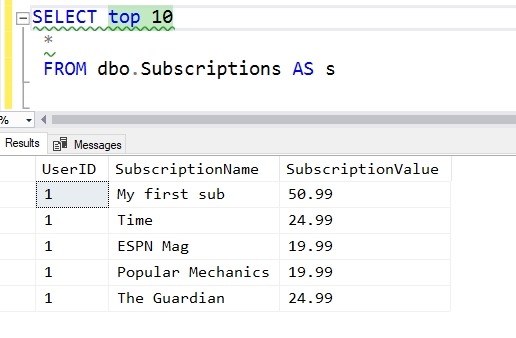
    When I access this, I see this data:
    2019-04-08 11_23_41-Window

    What does SallyDev see? I could log in as this user, but this is easier:

    GRANT SELECT ON dbo.Subscriptions TO SallyDev
    EXECUTE AS USER = 'SallyDev'
    SELECT top 10
      *
      FROM dbo.Subscriptions AS s
    GO
    REVERT

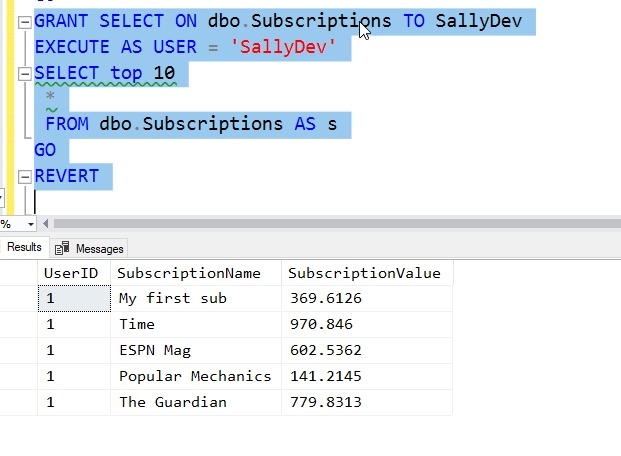
    Now I see this:
    2019-04-08 11_24_49-Window

    The EXECUTE AS USER allows me to simulate another user. The REVERT brings me back to my context.

    Use this to make testing easier.

    SQLNewBlogger

    I was using this technique recently and realized the I hadn’t blogged about it. I spent about 5 minutes creating a scenario and 5 minutes putting this together. You could do this, show some knowledge, and explain how this helps your scenario.

  • Understanding Your Database

    I ran across a neat post from Michael Swart recently. In doing some spring cleaning, he was looking to remove unused, or maybe unnecessary, tables from his database. He published a script that looks through the plan cache to determine what connections exist between tables. He joked that if he doesn’t find any joy when examining a table, he drops it. At least I hope he was joking. If not, I suspect we’ll see a note on LinkedIn soon.

    Actually, I’m sure he’s joking, and he makes a good point at the end of the his post. His script isn’t used to make decisions, but rather it provides a place to begin to investigate more about what the table might be used for in an application. It provides a starting point for more questions, such as is there value in removing this table. His company is embracing AWS, and they are becoming more cost conscious. This means keeping less data, and possibly moving cheaper data stores where possible to reduce license and/or hardware costs.

    I suspect that other organizations will start to embrace similar attitudes as more move to the pay per month model of the cloud. Many of us rent hardware, and when we do, the recurring costs become an issue. Suddenly we might rethink the amount of data we keep and archive or remove older data, either to reduce costs, or risks. The GDPR brings with it a push to not keep all data in perpetuity.

    The goal of better understanding our databases, and specifically tables, makes a lot of sense to me. Far too often I’ve inherited some system and only understood portions of the database. I’ve performed hours of investigation to try and better comprehend how data is stored, retrieved, and manipulated. I’ve found my share of unused tables, often renaming them for months and eventually deleting them.

    I do think that we poorly document databases, almost treating them like a file share where we drop a new item when we need it, without thinking through the usage, ensuring others know about the entity, and often forgetting it exists if we don’t regularly use it. A RDBMS isn’t a file share, or at least it’s not an inexpensive one, so we ought to be cognizant of the data we keep and trim unnecessary waste over time.

    I empathize with Michael and would relish the challenge to review and trim old tables where I could. However, I also know that often there are tables that won’t “make a difference”, either in cost or any other savings and aren’t necessarily worth the time to investigate and remove. Spending even an hour to decide if I should remove a 10 row table whose purpose is unclear doesn’t seem like a good use of time. Unfortunately, I’ve run into plenty of those, which nag me, but really shouldn’t be something I spend time on, and I have to leave them be.

    Steve Jones

    You can hear the podcast here: http://traffic.libsyn.com/voiceofthedba/understanddb_50_v2068.mp3

  • Code Building Code

    The dream for some people is to have an Artificial Intelligence (AI) system that you use to describe some requirements and it will build an application that meets your needs. Certainly some AI and ML systems have reduced the need to write code for portions of an application, but I don’t think there is any AI framework that can build an entire application from scratch.

    I was reading a blog post recently on using metadata in our database to produce a CREATE TABLE statement that could hold the output of a query. It’s not AI, but this is something I’ve done in the past, using code to help me get work done.

    Excel was one of my earliest helpers and still is. I find myself sometimes using Excel to build a series of statements that follow a pattern, but the contents of which might be based on some result set. A common example is a set of inserts based on some data. I use values in cells to build up a final statement and then copy these to SSMS or another tool and execute them. It’s quick and dirty, but it works well.

    In the past I have written code that would build other object code, usually to provide some API constructs for developers. In a few environments, we have had some standards about how to structure tables, views, and stored procedures, including at times an API-like standard that required certain functionality be implemented in stored procedures. Using a code writing stored procedure allowed me to quickly ensure that the required stored procedures were created and modified as tables were added or altered. This also ensured that we kept all these changes in sync, without depending on my to review every part of the API.

    I don’t know that I’ll see a true AI system that we can give a few specifications to and have it build a system, but the more we implement standards and known structures, the more we can use code to help us ensure those standards are implemented in a consistent manner. Using templates in our work, such as powerful snippets in SQL Prompt, along with code analysis that looks for poor practices can help us write better applications. Even if it doesn’t do all the work, these helper tools certainly improve the quality of the code we do write.

    Steve Jones

  • T-SQL Tuesday #113–Personal Databases

    This month we have a really interesting question for the T-SQL Tuesday invitation. Todd Kleinhans is the host and asks about personal databases. Do we use them for anything? Quite a create question for a professional.

    My Personal Database

    I don’t really have a lot of databases that are for personal use. I do a lot of testing and I have lots of sample databases from various sources. I have samples from Microsoft, various stats from sports leagues, even one with lots of SQL Saturday stuff (I need to make that one public). However, when I’m away from work, I’m usually away and don’t manage stuff in a database

    Except.

    I started to build one a few years ago to track some aspects of my life. It’ s a work in progress and like many of the databases out there, it’s a mish mosh of various unrelated items. For example, I’ve so far built some entities to track these items:

    • speaking events
    • places I’ve traveled or want to travel
    • a bucket list

    That’s it so far, and there’s no GUI. It’s not even accessible outside my desktop (though I do make backups). I need to move this into the cloud and be able to enter new data in there from any place. My intention is to get this back up in a website about life, maybe with links to pictures I want posted, maybe a visualization of travel, maybe just as a central list of things I’d like to do in life.

    I’m really not sure, but that’s it for now. I may add in exercise or other things in my life where I track data. In fact, that might be the next thing, perhaps sucking data from MapMyrun.com or Garmin Connect, where I’ve stored lots of data. Perhaps an ETL project is in the works here in the future.