Author: way0utwest

  • A Clean Values Clause with SQL Prompt

    I’ve had this code in a snippet for a long time:
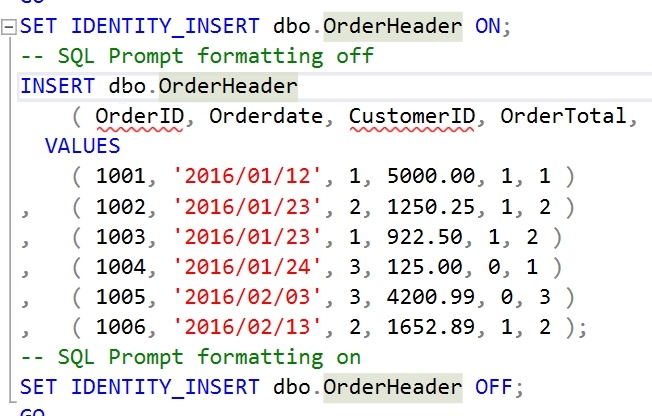
    2019-04-25 12_33_20-00_endtoend_initialsetup.sql - 192.168.1.35.sandbox (sa (60))_ - Microsoft SQL S

    I appreciate the markup to prevent SQL Prompt from doing this, which used to always happen.

    2019-04-25 12_34_33-00_endtoend_initialsetup.sql - 192.168.1.35.sandbox (sa (60))_ - Microsoft SQL S

    I can’t tell you how many times I’ve used CTRL+Z to undo that format, add the markup, and format again.

    A few months back. I was talking with someone and noticed this:
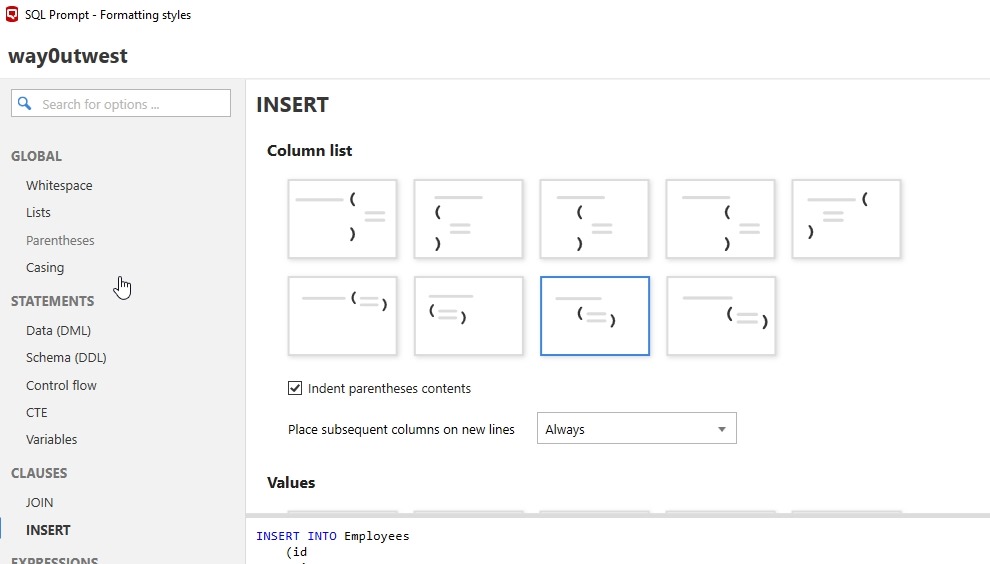
    2019-04-25 12_35_32-SQL Prompt - Formatting styles

    A new option for formatting called “INSERT”. This allows you to specify how you want to insert column list to appear. What’s even better, is at the bottom it says “Values”. Scroll down and you see options for separately formatting the VALUES clause, which I use all the time.
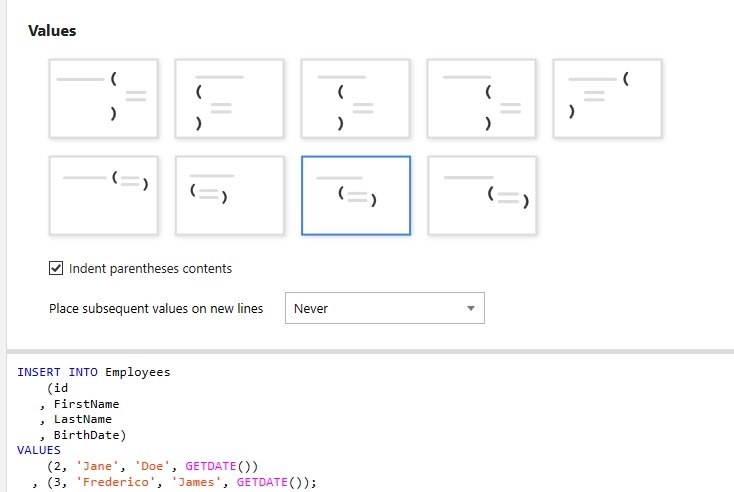
    2019-04-25 12_35_39-SQL Prompt - Formatting styles

    Now I can format easily without worrying my VALUES clause will get spread all over the page.
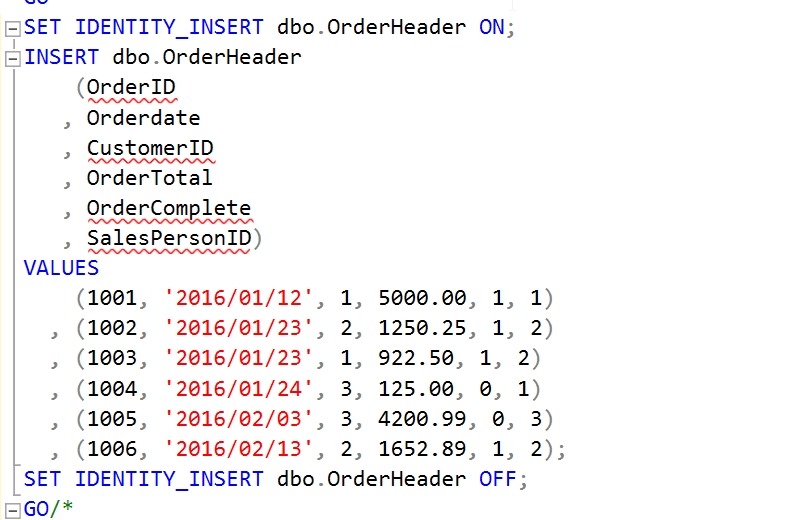
    2019-04-25 12_37_14-00_endtoend_initialsetup.sql - 192.168.1.35.sandbox (sa (60))_ - Microsoft SQL S

    SQL Prompt is amazing. If you haven’t given it a try, download an eval today. If you have the Toolbelt, you ought to be using this every day.

  • Always Use Roles–#SQLNewBlogger

    Another post for me that is simple and hopefully serves as an example for people trying to get blogging as #SQLNewBloggers.

    Which of these is more complex?

    GRANT SELECT ON dbo.Customer TO JoeDev

    or

    CREATE ROLE Sales
    GRANT SELECT ON dbo.Customer to Sales
    ALTER ROLE Sales ADD MEMBER JoeDev

    The second one, right? What if I change this slightly. I have this code:

    GRANT SELECT, INSERT, UPDATE ON dbo.Customer TO JoeDev
    GRANT SELECT, INSERT, UPDATE ON dbo.Customer TO SallyDev
    GRANT SELECT, INSERT, UPDATE ON dbo.Customer TO SaraDBA

    or

    GRANT SELECT, INSERT, UPDATE ON dbo.Customer TO Sales
    ALTER ROLE Sales ADD MEMBER JoeDev
    ALTER ROLE Sales ADD MEMBER SallyDev
    ALTER ROLE Sales ADD MEMBER SaraDBA

    What if I changed this slighly and told you that between the GRANTs to users, a few months of time had passed and you had to go figure out which rights JoeDev had because the request was “give Sally the same access as Joe.”

    That’s the type of thing I’ve done often as a DBA. I’ve often had to move permissions between users, duplicate the access, or quickly remove lots of access from multiple users.
    While it seems like there are just two extra statements using roles, there is often lots of time tracking down security and building statements to duplicate rights.

    Always use roles and your life will be easier.

    Plus you can script the permissions for objects once, log them, and forget about them. From that point forward you’re just adding/dropping users from roles.

  • The Impediments to Change

    SQL Server is releasing a new version of the engine every 12-24 months at this point. That puts pressure on all of us to learn constantly about the changes. Even if we don’t look to upgrade all of our existing instances, we can’t buy older versions when the new one is released. Often many of us would like to install the latest version for new systems, but that isn’t always possible. If we can, then we have a new version to support.

    Recently I was reading ArsTechnica and they posed a question about the impediments to adopting new technology at work. Their query was in the form of a survey, and they’d like you to answer if you can. I took the survey, and I thought it was a bit vague in some sense, mostly around networking and communications rather than other areas, but perhaps that’s their focus.

    In any case, it often can be difficult for some companies to decide to upgrade their database servers. Licensing cost is a real concern, and while it pales with the cost of labor, I am not sure I’ve seen many features that would actually reduce labor costs significantly. Most the features might make some aspect of development easier (or quicker), but often we have solutions or code in place that we don’t want to spent time changing. Upgrading older platforms is also a nebulous proposition. The improvements in HA/DR, quicker data loads, and more might be worth changing versions, but the capital cost can be hard to justify. Deciding to install the latest version for a new server isn’t necessarily going to reduce any labor costs, and it could increase them, since staff now needs to understand the new platform.

    Perhaps hardware inhibits you from making changes. Is there a point in upgrading from SQL 2008 to SQL 2017 for working applications if you don’t change hardware? Is it worth buying modern hardware? Glenn Berry would argue yes, but not everyone agrees, especially in upper management. This might even be true in upgrading minor parts of your existing system. Can you add RAM? Cores? Does your storage subsystem ever receive improvements? While hardware is certainly a capital expenditure, small changes could make big impacts to users, despite the reluctance to invest in older systems.

    Are there other reasons you don’t upgrade? Is staff knowledge an issue? Perhaps you have concerns about support personnel having to work with new systems. There might even be other reasons to avoid change. Time might be the biggest one with people busy on other projects. If you have some thoughts, drop a note in the discussion today. I’d be especially interested if you have Software Assurance and don’t regularly take advantage of that to upgrade. We’d also love some short articles on your experiences upgrading if you’re willing to write about them.

    Steve Jones

    Listen to the podcast at Libsyn.

  • SQL in the City Christchurch–June 7

    I’m going to New Zealand for SQL in the City Christchurch on June 7. It’s a day before SQL Saturday #831 – South Island. Take two days and get lots of Database DevOps and SQL Server training for a very low cost. I don’t know how many events come to New Zealand, but I’m hoping lots of you can come to our event and we’ll have the chance to do it again.

    Register today for a full day of training and talks about DevOps and Redgate products on Friday, then come back to SQL Saturday 24 hours later.

    I’m excited for the event. We completed our London Summit last week and it went very well. I’m taking over the keynote from Kendra and also doing a Monitoring session as well as covering privacy and the panel.

    It’s going to be an exciting day, so if you want to improve your Database DevOps process, in a Compliant way, sign up and come on June 7.

    2019-05-02 11_33_08-Window