Author: way0utwest

  • The 700 Milestone for SQL Saturday

    This past weekend was SQL Saturday #700. Another milestone in the franchise of events, and I was glad to attend. This is my fifth or sixth Colorado Springs event, and everything ran great. The leadership has changed over the years, as has the structure and format, but attendance continues to be strong and reliable.

    This year I was late, coming down after coaching youth volleyball. I arrived just as people were outside at the food trucks. That was a great idea, one that I think they took from our “no lunch”, bare-bones SQL Saturday in Denver. A few trucks pulled up and attendees could go outside and choose during a long break for lunch.
    IMG_20180324_154235

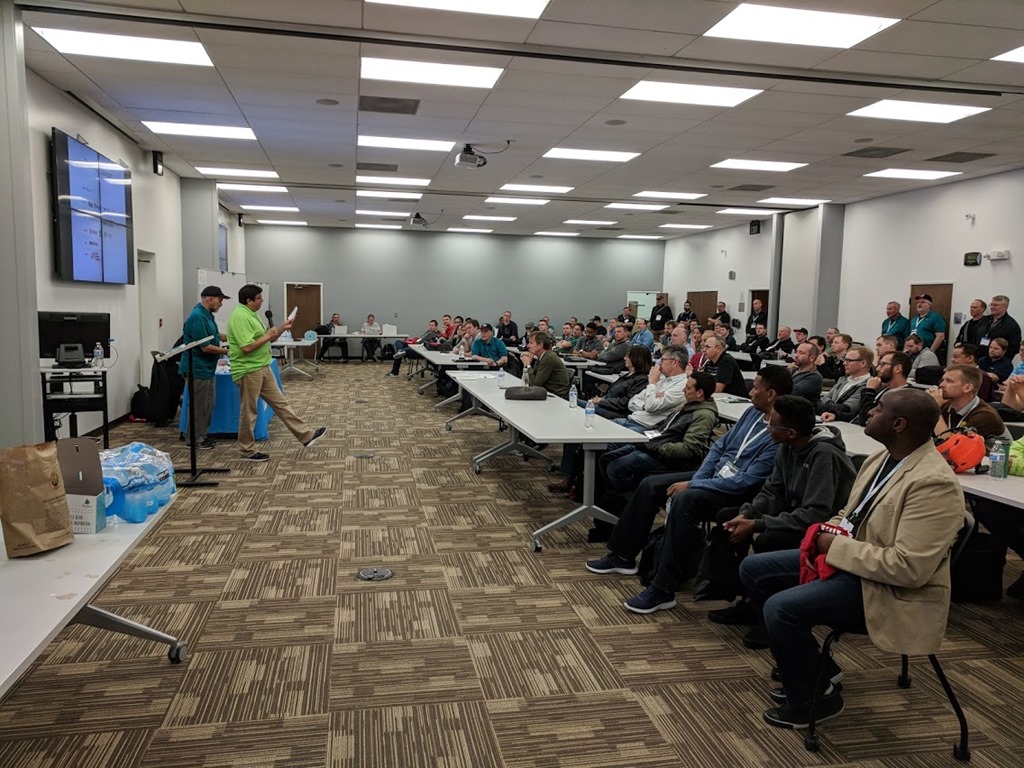
    This is a smaller event, but consistently draws over 100. Many of them were still around for the end of day raffles, as you can see above.

    I’m glad to see the changing of leadership over the years hasn’t prevented this event from continuing. I always worry about sustainability as organizers grow through life and become busy or change careers. As many of us age, retirement is also an issue, and it’s important that we continue to find ways to hand off responsibilities and knowledge, as well as enthusiasm to others.

    I was only around for a couple sessions, including my own, but I did get a chance to hang out and chat with friends, even getting a selfie with a few.

    IMG_20180324_154246

    I’d love to see more of you at the next Colorado Springs, but really more of you make an effort to attend, speak, volunteer, or organize for future SQL Saturdays. Fingers crossed we’ll meet at 800 (which should be coming soon).
  • A True Lift and Shift

    Microsoft bought a data center. That’s not news, after all, they’ve been building and buying data centers for some time as they look to expand their Azure footprint, as well as continue to power their own internal systems. As they’ve grown, they’ve also learned quite a bit and regularly redesigned their data centers, moving from racks to shipping containers, from large warehouses to outdoor facilities. They are always trying to become more efficient in how they not only power and cool the systems, but also manage the deployment of servers. They don’t want to rack individual servers, nor do they even want to have systems with unnecessary wiring, choosing to order custom motherboards and other hardware. In fact, they are looking to move beyond containers to ITPACs, whatever they are.

    I’m getting off track here, since I think data centers are really cool and well designed. I used to evaluate and rent space in them, so I get intrigued. Back to my point. Microsoft bought a data center.

    Is this news? I find it interesting because in this case, Microsoft bought a data center from Chevron for a facility valued at US$80mm. That’s not a lot for a data center, but it comes on the heels of a deal between the companies to use cloud services for Chevron and make Microsoft the primary provider. It seems like Chevron wants to get out of the data center business and just rent the services it needs from Azure. Since they work in the oil and gas industry, with lots of data analysis and predictive requirements, perhaps this makes sense.

    That’s a good sales tactic from Microsoft. Use our stuff, which can save you money, and by the way, we’ll buy your old DC so you don’t have to lose that investment. An argument like that might sway quite a few large customers, allow Azure to continue to grow, and also ensure a strong base for Azure revenues for some time to come. That kind of moves makes me think I ought to buy more Microsoft stock.

    This won’t make a difference for the smaller companies, but face it, many of them likely have a limited number of servers, dozens perhaps. There are still potential cost savings for them if they can move to a managed solution in the cloud, and I know quite a few Redgate customers that are considering a variety of moves, often a combination of IaaS and PaaS. Not everyone wants to move, but there are plenty of advantages for some companies to consider cloud type solutions.

    Microsoft Azure is growing quite a bit and I continue to be impressed with the capabilities and options available. From Managed Instances to Machine Learning on demand to Cognitive Services, I think there is tremendous opportunity for companies to use technologies that might have been cost-prohibitive just a few years ago. Of course, if you’re a basic, just need a RDBMS for an app, you probably are just as happy to run (or rent) space in a smaller data center, where you have more control over resources, options, and costs.

    Steve Jones

    The Voice of the DBA Podcast

    Listen to the MP3 Audio ( 4.5MB) podcast or subscribe to the feed at iTunes and Libsyn.

  • Scripting Tables with dbatools

    I really like the dbatools project. This is a series of PowerShell cmdlets that are built by the community and incredibly useful for migrations between SQL Servers, but also for various administrative actions. I have a short series on these items.

    I’ve been experimenting with scripting some tables, and I wanted to check to see if dbatools made that easier. I was amazed by the number of new cmdlets in the project, and after hunting around, I found a couple cmdlets: Get-DbaTable and Export-DbaScript. I decided to see how these work.

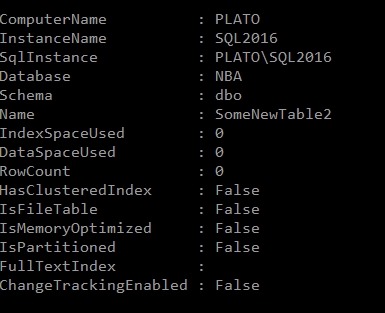
    My first experiment was to run Get-DbaTable. This takes an instance and database as parameters and returns a set of table objects. I get space and size information and some metadata. As a short look, here’s one table.

    2018-03-22 14_26_18-cmd - powershell (Admin)

    I decided to use this as input to Export-DbaScript to see what happened. I used this command:

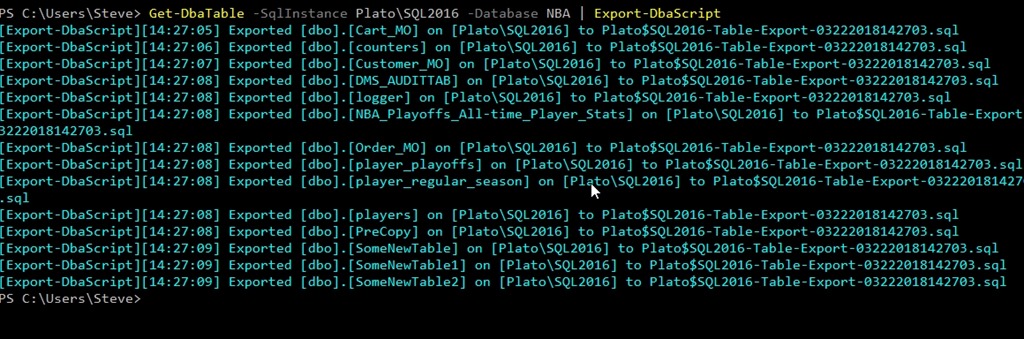
    Get-DbaTable -SqlInstance Plato\SQL2016 -Database NBA | Export-DbaScript

    This gave me some output. It wasn’t quite what I wanted, but it worked.

    2018-03-22 14_27_38-cmd - powershell (Admin)

    Note that all of the tables were exported to the same file. If I opened that file, here’s a snippet of the code. I get a header, and then each table’s code put together as single batch.

    2018-03-22 14_29_06-Plato$SQL2016-Table-Export-03222018142703.sql - (local)_SQL2016.WideWorldImporte

    Not quite what I wanted.

    I can determine the file, using the –Path parameter. This still gets me one file, but I can make this better. I’ll make a folder and change to that folder in my PoSh window. Now I can run this, using ForEach-Object to iterate over the tables, outputting each to a file.

    Get-DbaTable -SqlInstance Plato\SQL2016 -Database NBA | ForEach-Object { Export-DbaScript -InputObject $_ -Path ($_.Name + “.sql”) }

    When I do that, I get this:

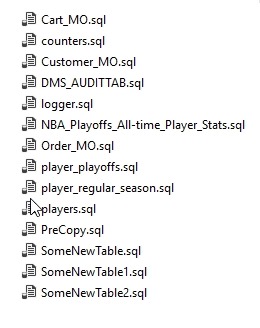
    2018-03-22 14_50_27-Tables

    Each table’s code is now in a separate file.

    That’s nice, and with filtering, I could have this generate scripts for specific objects, or types of objects and update them from PoSh, likely a job or task, relatively easily.

    Certainly the Generate Scripts process in SSMS is easier than writing this script, but that’s not programmable. This wraps around the SMO scripting objects and makes the process much easier.

    If you haven’t tried dbatools, give it a go. You’ll appreciate the ease of scripting and might start to enjoy working with SQL Server in PoSh.

  • Ad Hoc Logs

    A long time ago I started working in a team of people as a general systems administrator. I worked in a team of six people managing a large, 1000+ node network with a number of servers. In my first exposure to SQL Server, we had a very unstable application that forced us to provide 24×7 support. With a couple of contractors, we had to ensure someone was on-site all the time, often working with Microsoft and our corporate developers to stabilize the applications. We were constantly trying new techniques to fix our application, and with staff stretched thin, we struggled to understand what might have happened in the previous 12 hours when we reported for work. At the time, I suggested leaving a text document on each server’s desktop, updated with a note for each change.

    That worked well and I brought that technique with me to future positions. In another job, we constantly remotely connected to systems, and having a standard file on the desktop was helpful. As we became more security conscious, and stopped using shared logins, we moved our logging to Exchange public folders. Every action taken by an admin needed to be cut and pasted into a new post. That wasn’t a perfect system, but we built habits over time and we had an audit trail that helped us in understanding the changes we’ve made and assisted in troubleshooting.

    Today I’m curious. I want to ask the question about the data corrections, those quick changes, those fixes that get production working. Do you log everything? Is there some system in place to ensure you know what’s happening?

    I’ve been wondering about this and thinking hard as the date for GDPR enforcement approaches. One of the items that I’d glean from the law’s text is that any change to correct data, any quick fix made, needs to have an audit trail. We need to prove that we know who, when, and why this change occurred. This is especially important if a data subject requested some correction. You’ll need to prove you actually performed the action.

    I’ve never worked anywhere that some admin (including myself) completely avoided connecting to a production machine and making some change. Sometimes we’ve had great auditing, often not, but ad hoc fixes and changes, especially in the heat of an issue, are a fact of life. I’ve learned to deal with it and try to build lightweight habits to help me capture those changes.

    Let me know today. How bulletproof is your auditing?

    Steve Jones

    The Voice of the DBA Podcast

    Listen to the MP3 Audio ( 4.0MB) podcast or subscribe to the feed at iTunes and Libsyn.