Tag: Azure

  • The Hybrid Cloud

    When various vendors started to push the idea of using the cloud for computing infrastructure, the focus was on moving all your systems to a hosted solution. It didn’t matter if you were interested in IaaS, SaaS, or PaaS solutions, there press from salespeople and even some technology professionals was for a complete migration. Put all your infrastructure in AWS, Azure, or some other place and your systems will run great.

    Over time we’ve started to realize that moving to the cloud isn’t as simple as just renting a new box or service and there may be plenty of work to get settled. Even then, there are some limitations or restrictions, either technical or otherwise that might make the cloud a poor choice. Security and compliance are often reasons to not move, but certainly there are also challenges with technology mismatches between on-premises and cloud platforms as well.

    One of the very interesting things that I saw demonstrated a few years ago was the idea of the Azure Stack. The idea behind this technology is that a hybrid cloud can be built, with a single management view. Both the Azure cloud and local resources are combined together and managed as a single entity, with the choice of whether to run workloads on the vendor’s infrastructure or your own on-premises machines. There are other versions of this, for example, with OpenStack working in conjunction with AWS.

    There are many advantages to this, including the ability to limit certain workloads from bursting or moving from one environment to the other. One reason for this might be compliance. An organization might be required to keep some resources off of public networks, for example, the need to ensure that certain data is domiciled in a particular country. The reverse could also be true, with the desire to use a secure public portion of the Azure stack as their system might be certified in ways that your local infrastructure may not be.

    I think the idea of cloud resources, managed, moved, and scaled as needed is a great one. It doesn’t matter if this is all in your data center, all in the cloud, or both. Working this way allows a much more flexible use of any resource, wherever its located. Cutting edge organizations already do a small portion of this with ESX or Hyper-V hypervisors, software configured storage networks, or other software configured resources that can be reallocated on demand. Azure Stack, OpenStack, and other frameworks are a great way to start to leverage the cloud, but in a controlled manner that continues to use any capital investments you’ve made.

    Steve Jones

    The Voice of the DBA Podcast

    Listen to the MP3 Audio ( 4.1MB) podcast or subscribe to the feed at iTunes and Libsyn.

  • Storage that Expires

    Whether you like the idea of the GDPR (and the new California law), I’m sure you agree that these laws will likely change our data handling in business. Even if they are weakened through legal challenges, many companies have already started to comply and change some of their practices.

    I’ve written about the GDPR plenty of times this year, and I like the law. I hope the law stands strong and resists most challenges. While I’m sure there will be plenty of spurious or silly requests and complaints, I do think these laws are asking for the good data handling practices that most data professionals have advocated for years. These include not only security but also integrity. How often have many of us advocated for corrections to problematic data and been told no? How many times have we complained about security practices?

    One area that I think has been neglected too long in most industries is the area of retention. Most companies I’ve worked for have retained data indefinitely, without any thought or policy. In my mind, we ought to explicitly think about how long we hold data, and remove older data that isn’t needed for our organization’s operation. I feel more strongly about this over time as we find that data beaches become more and more prevalent.

    Azure has started a preview of immutable storage, essentially WORM (Write Once, Read Many) drives as an Azure container. I’ve used WORM storage, but it’s often been viewed as a way of keeping information forever. that can change with this new Azure storage, as you can set a lifecycle management period. The blobs will be removed after this time, which removes one management headache from administrators.

    I could see quite a few uses for this type of storage. If it’s inexpensive enough, what about storing backups here? We could have policies set to remove files after some limited period. I’m sure there are plenty of other uses for storage the is immutable, but also contains lifecycle management options. What creative use would you have for this type of expiring WORM storage?

    Steve Jones

    The Voice of the DBA Podcast

    Listen to the MP3 Audio ( 3.5MB) podcast or subscribe to the feed at iTunes and Libsyn.

  • It’s Azure T-SQL Tuesday #103

    tsqltuesdayI’m slightly surprised that there haven’t been more invitations about Azure, with the main development branch of SQL Server being in the Azure cloud, but I’m glad this one came along.

    The invitation is from Björn Peters, and he asks us to write about Azure SQL Database or Managed Instances. We can really write anything that’s a part of the platform, which gives us lots of choices.

    I’ve got two quick items.

    T-SQL Tuesday

    Did you know tsqltuesday.com is hosted on Azure? It’s actually at http://tsqltuesday.azurewebsites.net. When Brent gave me to the domain, and Adam wanted a quick site, I provisioned a WordPress site on Azure in a few minutes. It actually took longer to square away the initial DNS and domain name movement than getting the site up and configured. Templates and known configuration settings help to ensure that you can build a new version of xxx, very quickly.

    The cost was low as well, about $3.60/month and initially $5/month for the hosted MySQL database.

    This changed last year, when the MySQL hosting option was discontinued. I could have upgraded to $15/month, but decided to experiment. Azure has a MySQL as a Service PaaS offering for the same $15/mo, so I moved to that. I was somewhat amazed how easy it was to provision this database on my own and get things running. While the site costs me a little money, it’s a donation to the community, and I’m happy to see so many people participating in the monthly event.

    Quick Labs

    One of the things that I needed to do last year was setup a new cluster and Availability Group for a proof of concept. I have typically done this by getting some VMs ready on my desktop, making connections, etc. However, in this case, I decided to use Azure instead. I was curious about whether this was faster or easier.

    It was.

    Across a few days, as I learned a bit about provisioning new machines and connecting them with networking, I was able to get my set up with 3 machines, a load balancer, storage, etc. I had a working set of Availability Groups, that I could access from anywhere.

    Then I tore it down and started again.

    One of the great things about Azure is that you can use the Azure Resource Manager to provision new services fairly quickly. It’s not as instantaneous as you would like, though it’s not bad. I think the fact that you request actions and then wait until you are notified of something completing in the portal makes the process seem slow.

    In my case, the few days became < 1 hour the second time around.

    Plus, I didn’t use resources on my local machine, where I might have to balance the load with other tasks. I could also shut down my system and reduce costs. With ARM, I could even get rid of the lab and rebuild it in an hour in the future.

    To me, this is the place where the cloud makes lots of sense. If you have a load that is sporadic and can be up or down on demand, then the cloud is helpful. You can remove resources you don’t need, only paying as you go.

    If I were using this every day, I’d probably stick with the local system, but for a periodic use item, it makes sense to fire up the lab when I need it, rather than keeping it alive all the time.

    I look forward to doing more with Azure in the future and learning even more about how to build up the resources I need, when I need them.

  • Cleaning up Azure Client IPs

    I travel around, and as a result, I may find myself accessing my Azure databases from different locations. Since it’s a quick click and login to add my IP from SSMS, I’ll end up with multiple ones. I don’t want to leave systems open for a long time, and certainly don’t want to just add 0.0.0.0 without good reason.

    As a result, I periodically clean things up. I’d like to do this after each trip, but I sometimes forget. Here’s how I do this in the Portal.

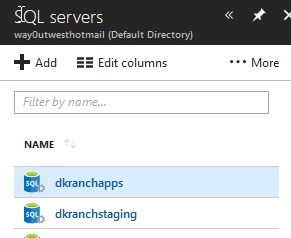
    First, I need to access my server, not my database. Servers are separate from databases, as you can see below. This isn’t an instance, but rather a logical construct for holding multiple databases.

    2018-05-22 08_26_04-Window

    From here, I get a list, and I can click one.

    2018-05-22 08_26_10-Window

    When I do this, I get the details of the server. On the right side of the overview are the firewall settings.

    2018-05-22 08_26_21-Window

    Click this and you see the list of firewall rules. Each of these has a name, a starting and ending IP range. You don’t really need to worry about this much if you’re a dev. If you want to give access to a group of IPs because your  company has them, talk to your network admin about the addressing.

    On the right side are three dots. Click these to get the delete option.

    2018-05-22 08_28_14-Window

    I click through these and it’s really quick. I can remove 10 IPs in about 20 seconds, so I don’t bother with too much automation here. I could use PoSh, but it might take me longer to figure out what to do than just click a few times.

    I can also edit a row. If I click the middle, I get edit boxes, and as you see, I can rename a rule that makes sense. I ought to do this for other times, but since I add access from SSMS in hotels, I don’t often go to the server at that time.

    2018-05-22 08_29_00-Window

    It can be a pain, and if I tended to work with a lot of different servers (I have 4), I’d likely automate this more.

    Actually I’ll automate it in another post as it’s a good skill to have.