Tag: car update

  • Tesla Autopilot and School Zones

    The other day I had to run an errand early in the morning. I happened to follow the route I used to travel daily to take my kids to school. I had to pass the elementary school near my house and then the high school.

    In neither of these cases was I using Autopilot. I find it to be a bit unnerving on busy country roads with no median. There’s a bias towards the middle of the road, and often I see drivers coming towards me staring at their phones, so I reserve Autopilot for those times when no one else is on the road. If I see a car, I disable it.

    I was using cruise control, however, and as I approached the active school zones, I turned it off. There weren’t any incidents, but the recognition of the road conditions by the Tesla OS (?) was disturbing to me.

    For both of these schools, they are facing a busy road. The elementary school is on a 45mph road. In the morning and afternoon, as school opens and closes, there is an hour during each time period where a flashing yellow light highlights a 20mph speed limit sign.

    Some people don’t see this, which is scary. There is a fence to keep kids back, this is still a little scary for me, even though my kids are adults. However, most people slow down, and that often gets humans who notice the change in speed to slow down. Not to 20mph, but I think most get down to 30mph.

    The Tesla usually notes speed limit signs. However, as I slowed into the zone and passed the 20mph sign, the Tesla still displayed 45mph on the console. The was repeated near the high school. That road is a 35mph zone, but has the flashing yellow above a 25mph sign.

    In both cases, I would think this is an easy AI/ML thing to recognize.

    What’s confusing to me is that the OS usually finds other signs. There is a construction area just West of my house, where the road detours slightly. There are orange signs propped up on the side of the road (along with cones) that note the speed limit goes from 40mph to 35mph to 25 mph. The Tesla recognizes and displays all these changes.

    When it sees a 40mph sign after emerging Southbound, it displays 40mph. Northbound, there is no speed limit sign after leaving the construction area. The Tesla continues to display 25mph for the next mile or two, while most humans realize the 25mpg no long applies. At least, I doubt a police officer would stop anyone for doing 40mph, though technically the limit is likely still 25mph without a sign.

    I’ve seen a few posts that Teslas don’t quite get school zones for some reason. This isnt’ an area where Autopilot should be used, IMHO, though I suspect there are people using the Full Self Driving near schools.

    I have often used cruise control in these zones, set to 20mph or 25mph, since the two near my house are rather long, but I haven’t trusted Tesla to enable it in this case. In other cars, I slow to 20 and then press a button, which keeps the car moving slow.

    I don’t know how other car companies might approach this, but I do think that school zones are one of those difficult cases that appear easy to recognize as humans, but might not be as easy for computers. This certainly is one of those situations that might prevent Level 5 driving from being accepted by many.

    I love the car, but I continue to respect that using some of the driver assist features means these are assisting you, not driving for you.

    There’s a video of this post as well.

  • The Tesla Charging Experience

    This is part of a series that covers my experience with a Tesla Model Y.

    It’s been a little over two weeks, and the odometer shows about 600 miles. Quite a bit, since we were gone for 5 days out of town without the car. We’ve driven most days, but not all of them, and the charging experience has been interesting.

    This was a capture recently of the main screen after a trip to town:

    20210922_103929

    If you look closely, this is plugged into a 110/120V circuit, pulling 12A, and charging at 5mi/hr. Since a trip to town is 25 miles for me (roundtrip), this means it takes about 5 hours to recharge.

    That’s slightly deceiving as I still have over 250mi of range after a trip to town. These trips usually use about 6% of my battery, but that means I could drive this without charging for over a week back and forth each day without issue.

    Well, the car would be fine. I might be a little concerned.

    Catching Up After Delivery

    We definitely had range anxiety after the first day of driving. We picked up the car and went over 100 miles. When I plugged in at home, the car said it would be over 24 hours to recharge.

    That’s disconcerting, but unlike a quick fill up at a gas station, I can keep recharging each day. While we hadn’t recovered back to a 90% charge before I drove it to the gym the next day, across 3-4 days, we did recover while also driving the car. Each overnight charging session got us a little closer to 90%, with some loss during the day from driving.

    It’s a weird feeling, but I’m getting used to relaxing about the charging.

    Maintaining 88%

    For most of these 2 weeks, I’ve had the max charge set to 88%. Tesla doesn’t recommend going to 100% unless you have a long trip the next day. I see all sorts of recommendations from 70-90, and I ended up at 88%, mostly because the granularity on the slider in the app isn’t great and I got close enough and decided to stop there.

    Almost every night I catch back up 88% after a trip or two each day to town. My wife takes it to do a few errands and some friends have wanted rides, so we sometimes get 50-80 miles of usage in a day, but rarely multiple days in a row.

    If the car hasn’t recharged to 88% before I drive it one morning, it usually does by the next day.

    Better Charging

    I was worried about recharging before I started tracking my mileage. Since then I’ve relaxed a bit, but mostly for the next month or so. In November the weather changes, and since I’ll be coaching again, there will be more trips during the week, and some longer ones to tournaments. Plus, ski season will start and I wouldn’t be surprised if we drove 100-150 miles one day for coaching and then wanted to go 200 to ski the next.

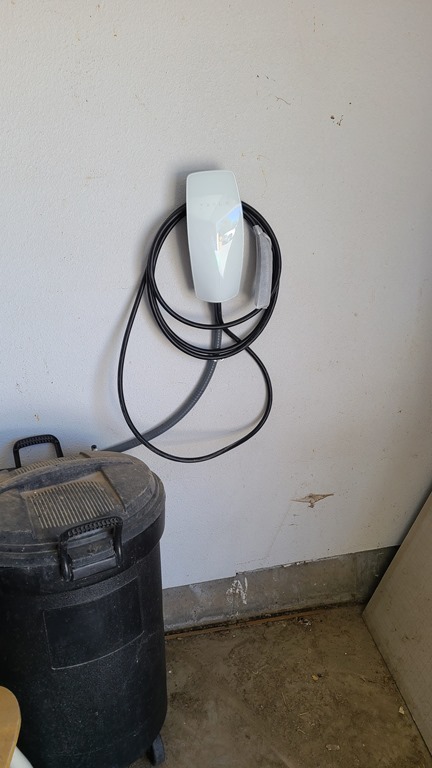
    I purchased a Tesla Wall Charger in August, but have been waiting for an electrician to come out to install it. This is a small job, and ultimately, it only took the team of 2 about 15 minutes to get it hooked up.

    I went from this:
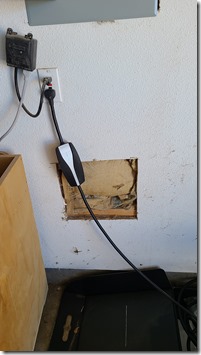
    20210922_103830

    to this:

    20210922_113910

    Charging went up as well:

    20210922_114102

    At this rate, a completely empty battery, which I wouldn’t want, could go from 0-80 in about 6 hours. That’s likely an overnight charge any day of the year for me, since I’m rarely out late.

    I don’t know that we need it, but the US$500 for the charger is worth some piece of mind. The install was $250, but with the 30% tax credit, we would likely get most of that back, so really it’s a $500 investment for me.

    The Bottom Line

    As I noted in the charging post, I think a 110V charging solution would work most of the time. At least, after tracking my mileage I think that. However, that’s summer, and I know that my pattern of driving is different in the winter.

    The Tesla charger seems like a good investment to me, but I had a setup that made this a relatively cheap install. If your breaker box isn’t close to the garage, this could cost more and a few people have said their cost was closer to $500-1000 for an install on top of the charger cost.

    We’ll see how I feel about the investment over time as I track our trips and mileage, but so far, charging hasn’t been an issue. Hopefully my range anxiety will lesson.

    The other bottom line is the cost of driving. Using a few apps (I’m testing them), it seems that I use about 3.5kW to get to town and back. With my current power rates, that’s about $0.45 for the trip. In the BMW, it’s about a $3.80-$4.00 trip right now. If we still had the Prius, this would still be about a $2.00 trip.

    It takes a long time to get a payback for that on a $50,000 car, but it certainly is a dramatic savings over what I was paying in the BMW to go to the gym.

    A video of this post is available as well.

  • First Week Driving the Tesla Model Y

    This is part of a series that covers my experience with a Tesla Model Y.

    I didn’t video the first drive. We were all excited, I had family in the car, and I know a few of them don’t want to be on video.

    However. It was very exciting. To be fair, almost every time I purchase a new car and get to drive it, I’m excited. My wife might be more excited, and as she said, it’s the best car we’ve ever had. And we’ve had a lot.

    General Thoughts

    The car is smooth. It’s strange to just get in, pull down the right lever and start driving. No starting that car, which feels very futuristic, Minority Report-ish. It’s also strange that when I shift gears, the car doesn’t move. I have regenerative braking on, which holds the car until the accelerator is pressed. So when I pick Reverse in my garage, I need to press the pedal for the car to move.

    The acceleration is smooth and instant. I tend to drive more carefully, watching the energy and saving power. I did the same thing when we first got our Prius, actually, throughout the life of the Priuses we’ve had. The feedback makes me try to game the system and get the most efficient ride. I also did this in the BMW, though getting 22.1mpg over 21.5mpg isn’t terribly exciting.

    I have hit the pedal hard a few times and my stomach jumps a bit each time. I was in the left lane at a stop light, and needed to make a right turn at the next corner, about 1/8mi ahead. I pressed hard and jumped from 0-40 in a couple seconds and was able to change lanes to the right without cutting off the person next to me. They’d barely entered the intersection when I was already past it.

    The large screen is easy to use and not distracting. Watching speed slightly down and to the right isn’t that hard compared to looking straight down. I do wish a HUD or small display was straight forward, but I think I’ll get over that.

    The rear window is small. When 5 of us were in the car, all I could see is my son’s face out the rear. Fortunately, I could easily put on the cameras and see behind me by glancing at the screen.

    We’ve gone about 400 miles, which is a lot in a week.

    Controls

    I’m learning to use controls more smoothly. The basics of turn signals are easy, and the headlights come on and switch low/hi automatically and quickly. The controls for cruise work well, and I’ve lightly used Autopilot.

    I saw someone with hazards on the other day and was wondering how to turn them on. I looked through lots of menus, finally searching in the owner’s manual, which is a digital copy in the Software section. Apparently, there’s a button for this, which I like. I do want some programmable physical buttons for some things.

    After that, I wanted to make sure I could turn on wipers. We don’t get much rain in Colorado, but we can get sudden downpours, so I practiced with both the screen and pushing in the left stalk.

    One thing I accidentally learned was mute. I wanted to try out the voice controls, and pressed the left button. That mutes audio, which is very handy when there isn’t a knob. My wife’s truck has volume buttons on the radio and steering wheel and quickly muting is a pain. This works well.

    I’ve only tried navigation and minor audio changes with voice controls, but I might try more. I am trying to look away from the road less, so it’s good to get used to that.

    In a week, I’ve also learned not to pull the door handle and only push the button to open doors. That’s took a few days.

    I do use cruise control often. On the country roads, with rolling hills, it’s easy to go too fast or slow, so I set this often and I like how it works. I really appreciate it slowing when the car in front of my slows.

    The last control is the lack of control. After a week it’s still weird to get into the car and not have to do anything to start going. It’s also weird to get out without shutting things down.

    Overall

    I constantly feel like I’m an actor in Minority Report, with a future car. The smooth dash, no dials in front, the quiet, it’s very futuristic. As I noted, I game the power a lot, but when you do want or need to move quickly, it moves. The acceleration is still very exciting.

    The car turns smoothly, the suspension feels tight, and like a few of the high performance cars I’ve owned, the Model Y responds crisply and rightly to my input. It’s a nice extension of my, which I like. I’ll keep testing Autopilot and trying to understand the limits and benefits. It’s nice, but not great.

    So far, quite happy with the vehicle.

    There is a video with some thoughts and  impressions on my channel. Check it out and let me know what you think.

  • Picking Up the Tesla

    This is part of a series that covers my experience with a Tesla Model Y. If you are thinking of ordering one, I’ve got a referral code. You get 1,000 free Supercharger miles and so do I. Use: http://ts.la/john92950

    This week I got my car. Actually our car, and I’m not sure if my wife or I is more excited.

    We started Monday, with finalizing paperwork. I got my insurance card uploaded over the weekend, but didn’t realize I needed to add in the policy number and expiration manually. I did that, and then we made the final payment for the pickup. I’ll write about that as well, since that was an interesting experience.

    The Plan

    In any case, we had scheduled the pickup for 4pm. I had tentatively planned to be out of town part of this week, so I asked to get it early. The agreed to try, but said to give it to the end of the day, just in case.

    Our plan (my wife, two boys, and me) was to go hiking and then pick it up later. As we got ready in the am, one of our party wasn’t feeling well and we decided to scrap the hike. We still wanted to get together, so we met in town.

    About the time we got together, I got an email from Tesla that the car was ready. Since I wasn’t sure what this meant, I emailed the delivery center. Within a minute they sent a reply that we could come over.

    The Pickup

    This wasn’t the completely smooth process I’ve heard about from a few people online, but it wasn’t bad. We arrived at a quiet delivery center. There was one customer inside and one employee. The employee took my name and went to fine paperwork. Meanwhile, my wife and I showed our boys the Model 3 and Y in the showroom. They hadn’t been with us when we test drove the car, so this was their first experience.

    After about 10 minutes, the rep came back with paperwork and asked me to accept delivery in my account to get started. I said we wanted to check out the car, and he was happy to oblige. He told us the car was on the supercharger and took us out to see it.

    firstview

    The Inspection

    He showed us how to get in with the key card and then said to take our time and come find him. We then commenced our inspection. I had a [paper checklist]() and my son was using the mobile app companion, and we walked around.

    The first thing my middle son found was the front hood appeared slightly off center. The gap on the lower right was more than the lower left. You can look at the video, and you can see it, but it doesn’t appear to be a big deal. At least not to me.

    The body looked fine otherwise, the wheels were good, no droopy doors, no chips or marks in the glass. The interior looked good to us, clean and unused. I think the car had 15mi on it when we got in, which was fine. Probably some light testing.

    We checked all the features and switches, of which there are few. Lights worked, windows, everything seemed fine. A license plate bracket was in the car, as was the mobile connector and tow hook. We adjusted seats, folder them, and spent about 30 minutes going through a nitpicky look at the car.

    It was a better inspection then I’d done on most other cars I’d bought.

    While all of us were in the car, my oldest son noticed the coat hook on the driver side wasn’t closing. It wouldn’t latch. He pressed it a dozen times and it finally stayed closed. Then we tried it again and it took 48 presses to get it to stick. Yes, we counted.

    Closing the Sale

    As we were finishing, the car got to 90% and stopped charging. I walked in and got a rep, who came out with the paperwork. She also brought a service tech, who looked at the hook. He wasn’t sure what was wrong, but said to just book an appointment if we wanted to leave soon.

    The rep opened paperwork and I accepted delivery in my account and then signed my name about 6 times. It was the easiest sale I’ve ever completed outside of private party sales. Then I logged into the app and the car recognized my phone.

    The rep then helped me get other drivers added, and gave us 2 extra key cards. One for my son and a spare since they come in 2 packs. We spent about 10 minutes programming drivers and getting accounts set up. Then he showed me a couple controls and said to enjoy it.

    Overall, the process was about 45 minutes for us. Some of that I attribute to us coming early, but I appreciated them accommodating us. The process was very smooth, I’m pleased with the quality of the car, and I think Tesla did a nice job here.

    A few things were last minute, and they could improve some of that communication to warn consumers of what is coming when, but overall, this is better than any other dealer. I assume as they stabilize manufacturing, their other IT systems will get better. Their car software certainly has.

    No regrets so far. I’ll do a combined post on the first drive and charging next week.

    There is a video version of this post on My Colorado Tesla Experience Channel. You can see all of these posts by following the Tesla tag.