Tag: car update

  • The First Tesla Ski Trips

    This is part of a series that covers my experience with a Tesla Model Y.

    After a bit over 4 months, we finally had a long road trip in the Tesla Model Y. As I live in Colorado, we went to the mountains to ski. This post covers two trips, a day trip and a multi-day trip.

    Day Trip

    My wife and I took a day off and drove to the Keystone on a Thursday for a day ski trip. I charged the Tesla up to 93% overnight and we headed up on a snowy day. A fairly heavy snow was falling as we left the house and kept falling until we were well into the Colorado mountains on I-70.

    The snow tires worked well, and I felt the car was gripping well on the road. Traffic wasn’t too bad, and the drive went as smoothly as it had gone in other cars.

    The one place where I was careful was driving through Dillon, CO, where the roads were snow-packed, and there are some substantial curves. I was careful here, as the Model Y is a heavy car and slips a bit more near the bottom

    A few stats from the drive up (109 miles)

    • Power: 48% of the charge (93%->45%)
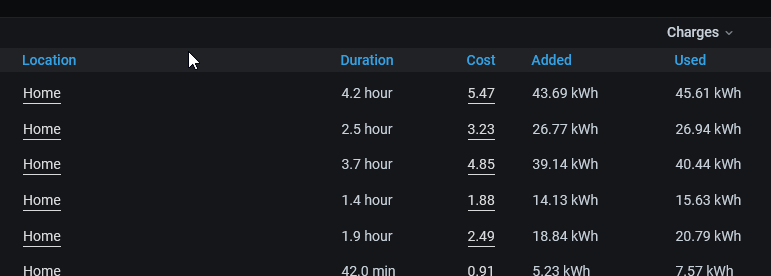
    • Cost: $4.81 (37kWh * $0.13)

    The drive down:

    • Power: 38%
    • Cost: $3.64 (28kWh)

    As a comparison, 110 miles in the X5 costs about $20 (at $3.50/gal). The Prius would have been about $9.20 or so.

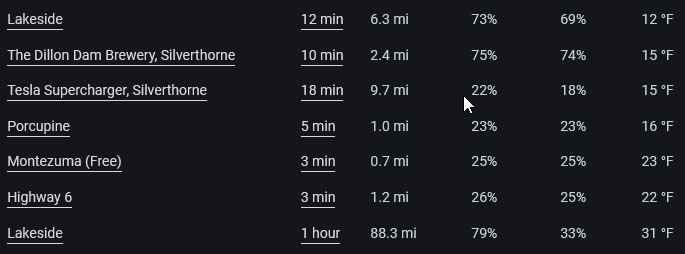
    We skied most of the morning in about 20-25F weather. We then left and headed home, having lots about 2% of charge while the car was sitting in the parking lot. We drove down to Idaho Springs, and at around 28%, we stopped at the Supercharger to add some power.

    We spent about 10-15 minutes adding power (about 25%). We sat in the car, checked some email and chatted, though this location is walking distance from a number of restaurants in Idaho Springs. On another day we might have walked over to have a quick lunch and left the car, as many others did.

    It was an easy trip and a pleasant experience for our first trip into the mountains.

    A (Cold) Three Day Trip

    The next week we went back, staying up at Keystone for three days. I charged the car up to 87% and we drove to coach kids and then left from the gym for a late night drive up. It was cold, around 20F, and we again used about 50% of the power. In this case, 87->33% with a few stops  along the way.

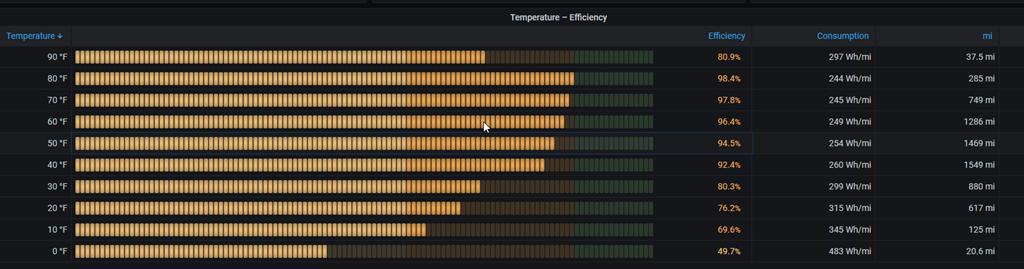
    The next morning, we were down to 26% on a night that dropped to about 8F. That was a 7% drop overnight. An interesting data point.

    We drove over and skied, and then went to the Silverthorne Supercharger, arriving with 18% power left. Our plan was to get a cup of Starbucks while it charged, as the chargers are in the parking lot for Starbucks, but the store was closed. Not enough staff with a few out sick..

    Sad smile

    Not a problem. Rather than drive over to another place, we just charged and talked with our kids on the phone. Interesting, I pulled into charger 4B and plugged in. The car would say “starting to charge” and after 2-3 minutes it would say that something was wrong and I needed to unplug and plug it back in. I did that twice, and got the message.

    I switched to a different flow and things worked flawlessly. The charger immediately jumped to about 50Kwh, putting around 240miles/hour of charge into the car. We spent about 25 minutes there, getting up to 75% before I decided to stop. I was hungry, so we left.

    Overnight the temps were close to 0F, and we dropped about 15%of charge that night. The next night was –8F when I woke up, and we’d dropped about 18% of charge. Not insignificant, and I can see why people recommend waking up and charging in the am before a long trip.

    If we were planning on a long drive, I’d have gotten up, gotten coffee and then gone and parked at the supercharger to eat, work a bit, and fill up. Slightly more cumbersome than a gas station, but really, I’d be moving some work time into the car rather than sitting inside and then hitting a gas station.

    Overall, the car worked well under cold, winter conditions. We didn’t have any range issues, and easily charged up at the Superchargers along our route. I could pre-heat the car before driving, and I’m getting used to remembering to do this. Most of the time I think about this about 10 minutes before we pack up and go, which isn’t inconvenient. It certainly is nice to pre-heat the car as I’m paying a bill in a restaurant and have the heat going when we get in the car.

    Tires worked well and gripped in the snowy conditions. It was informative to see how the battery faired driving into the mountains, as well as overnight in some of the coldest conditions I’ve seen in years. Not a lot of battery/range anxiety and charging was smooth and easy. Taking 15-20 minutes with a cup of coffee and my wife wasn’t a big interruption to our lives, and we didn’t mind taking a few breaks during our short holiday.

  • Tesla v11 UI Tips

    This is part of a series that covers my experience with a Tesla Model Y.

    One of the more interesting things about Tesla cars is that they have a computer system that essentially helps you run the car. There aren’t gauges or separate places to check things, as everything is in a large screen in the center of the car.

    Recently the UI and software updated with a major new release. I’ve had a couple updates since I got the car in September, but in late December, a major change occurred with a new UI. Since I work in software, I wanted to talk about a few of the things.

    I have a video of this post, which helps describe what I talk about, but I wanted to note a few things that I think improved, and some that didn’t.

    Cleaner and Slightly Customized

    The old UI was fine,  but I do think the latest version is an improvement in many ways. There are less buttons on the main screen, and some of the visible buttons can be customized. There are also some popups that appear when needed.

    An example. The old UI had a button for wipers at the bottom of the screen. Now, there is no button, but if you click the wiper button, a pop-up in the lower left lets you change settings. There are also settings in the main control menu, which appears if you click the “car” icon.

    There were also buttons for music, cameras, and other items, which have been replaced by a set of 4 buttons that you can customize with what you want. The same number of items is in a menu, but you can drag one down to the bar if you want it to be always visible.

    There also is a “recent” button that changes to whatever you last opened, if it’s not one of your custom buttons. I think this is very handy as I often find myself closing something and then opening it again because I forgot to do something.

    Blind Spots

    One of the features I really like, which I show in the video but forget to talk about,is the blind spot camera. If I enable a turn signal, I get a camera view on the left side of the display, below the animated car, that shows me the side camera on that side.

    Other cars do this, but Tesla didn’t build this in and enabled it through a software update. I couldn’t do this in Sept-Nov, but I can now. It’s very useful.

    Music Controls

    I listen to music often, actually we all do in my family, and we might move between Spotify, our phones, the radio, or the Tesla streaming. As we do this, picking an item means it becomes full screen. I used to swipe down to shrink it, or remove it, but now I can keep clicking the icon and I’ll get these views in rotation:

    • full screen
    • minimized at the bottom of the screen
    • hidden

    This is really nice as I can shrink or grow this easily with minimal distraction from my driving focus.

    They also added a menu button in each of the music item that gives me a drop down of all other music sources. Arguably, this should have been done before, but I’ve found design decisions in every car that I think are mistakes. In most cars this means you are stuck with what is there, but Tesla has adapted.

    Changes I Don’t Like

    I had first titled this as something like poor changes, but really the UI/UX isn’t a yes/no thing, but seen differently by different people. A few things here are items I think are problematic.

    First, I liked being able to swipe on the screen and get trip information. I now need to go into a menu and then click another menu. Not a great experience for me. Same for tire pressure as I’m slightly paranoid after my flat tire.

    I miss having the driver profile and LTE status on the screen. As someone that shares the car with others, I miss this. I also live in an area where connectivity isn’t always great, so when something doesn’t work, it’s nice to see if I’ve lost service.

    The swipe to raise/lower volume is worse now. I really need to click and the click/swipe the control. Not a huge issue as this isn’t used when I’m driving and I rarely mess with it when I’m the passenger.

    I do, however, change temperature often. The speed at which a swipe adjustment changes things is too rapid. I find myself wanting to increase the heat by 2-3 degrees and ending up changing it by 10. Then I have to fix it. I can tap tap tap, but all of this distracts me when driving. A poor change.

    Opportunities to Do Better

    There were things I’d like to see, and still hope I will. I think Tesla missed a chance to clean up a few things.

    First, if you allow customization, make sure it’s customized per driver profile. That should be easy.

    Second, I have issues with the USB drive losing connection sometime. Having some status or easy way to refresh the port would be nice. Or even a status item. Instead, I have to unplug/replug and wait. Or reboot the car.

    Third, an odometer or trip tracker should be visible on screen (or optional). Often I am following some directions or looking for something in xx miles. I’d like to know when I’ve gone xx miles.

    I find two sensors, the auto window up/down and the rain sensor for wipers to be far too aggressive. I’d like to see a way to change this slightly. Not sure if this is possible without hardware changes, but if it is, I’d like an option.

    Maybe the biggest annoyance is the response on the charging screen to changing the charge limit. It’s slow to respond, and when it does, I can’t get a digital readout of what it’s set to. I can in the mobile app, but I can’t in the car. I drag it around and usually end up at 83% or 91% instead of 80 or 85 or 90. Little thing, but silly to now show this. Or give me a +- set of buttons.

    Lastly, fonts. I am getting older and at times some of the fonts are too small to easily see. I could wear readers/bifocals, but shouldn’t I be able to increase the font for important info, like the speed or an info message? I think so.

    Summary

    Overall, I do think this is a cleaner and easier to visualize UI. There are a few annoying things, but only a few. For the most part I like the changes.

    The updates have been smooth and easy, and worked well. They run overnight and I see them in the morning. For the most part they changes from one version to the next are minor, and rarely is there something I really need while driving that I can’t find.

    I hope that all manufacturers figure out the software side of things and make it easy to work with the system while driving, at least for those important functions like lights and wipers.

  • Driving the Tesla in a Little Snow

    This is part of a series that covers my experience with a Tesla Model Y.

    I saw a couple videos of the Model Y in the snow (one with stock tires, one with all season Tesla tires) last year, but I hadn’t had the chance to experience it in Colorado yet.

    That is until earlier this week. We returned home from Las Vegas to freezing temperatures. The BMW showed –5 on the drive home from the airport. I was glad we hadn’t left the Tesla there. I don’t know what the drain would be, but I wasn’t interested in coming home to a low battery after a week.

    I got snow tires a couple weeks ago and wrote about the experience. When we had a light snow, really a half inch of sleet, the car slipped a few times taking turns in the neighborhood on pavement. It had me a bit worried as I’ve been in snow with summer tires and things don’t go well.

    In this case, we got about 2-3 inches of snow and I needed to run to town. It wasn’t a great test, as lots of the pavement was clear, but the driveway wasn’t. Ruts from a few trucks and the X5, but still snow. The kind of snow that the Prius could have navigated, but it would be slightly tricky and slip.

    Actually, there’s a chance the Prius would get stuck, but not a big chance.

    In any case, the new snow tires (Michelin X-Ice Snow) worked great. I felt confident and no slippage.

    We’ll see how it goes when we get real snow or drive to the mountains.

    Update Jan 6, 2022: We got about 2-3″ of snow late yesterday. We left the house around 6:15 for volleyball practice and there was very little snow. However, but the time I got to the gym, the roads were covered with a light 1/2″ or so. The tires seems to grip well and handle light acceleration and braking, which is how I’d drive other cars in the snow.

    When I came of practice, there was a good 2″ of snow on roads (and the car). We actually stopped by a store for a few things, and I grabbed a new long handled scraper/brush, as the Model Y seems to accumulate snow on the rear window (no wiper) and across the front.

    Driving went well. A little slippage when accelerating into turns, but about what I’d get from other cars. I felt safe, and I’m ready to take this to the mountains, but I was aware of the weight of the car. A few times turning while slowing and going down a hill, I could see it slipping. Definitely need to be careful coming down hills and braking, leaving more room and slowing earlier.

    A video of this post is available.

  • The Snow Tire Search

    This is part of a series that covers my experience with a Tesla Model Y.

    I’ve been looking for winter tires for about 6 weeks, checking the local inventory and the online places. It’s been hard to find tires, or at least any that are rated well. I found 3 of a few brands, but no sets of 4. My plan had been to get 4 tires and swap them on the same wheels for 4 winter tires. I’d do the same thing again in the spring and use these tires.

    I haven’t been in too much of a hurry, mostly because it’s been 50s and 60s in Denver, and it doesn’t seem like snow is coming. However, we got a surprise sleet storm the other day as I was leaving for the gym. Not too bad, but definitely moisture coming down. I could see a white surface on the paved roads as I drove through the neighborhood.

    Turning onto the main road was tricky. No cars coming, which was good, because I need to accelerate from a hill, and the car slipped. Not a lot, but enough that I know these tires aren’t going to be good.

    Brands

    I’d been looking for a few different brands. The Continental Extreme Contact DWS, the Pirelli WINTER SOTTOZERO 3, and the Michelin X-Ice 3 tires were on my list. A few local people recommended some others as well, but those were the main ones I was searching for from places.

    The Tesla uses a strange size, 255-45-R19, which is not good for a time where supply chains are messed up. Even looking at Nokian and Bridgestone, I wasn’t finding much.

    After my incident, I searched a bit more and saw that there might be some at Big O Tires, so after the gym I swung by the store.

    Big O Tires

    They didn’t have them, but the salesguy and I had a good talk. He told me the inventory system online doesn’t always track well with what is in the stores. He also had a Suburban he was restoring and needed tires that were hard to find, and I mentioned I owned one as well. He showed some pictures of his and became a bit more invested. He said they had swapped tires a few times for Tesla owners and always struggled to get tires in, but he’d look around more.

    I got a call to come back later and we talked a bit more. He noted that he had found some 245-45-r19 tires, so slightly narrower, but they’d fit on the same wheels. These were the Michelin X-Ice 3 ones, so I just bought them.

    I paid for the tires and made an appointment to drop the car off the next day. I got a ride with my son and we left the car there about 945. I went home and then headed back out to a doctor’s appointment. At 11:15, I got a call the car was ready.

    They had bagged up the old tires and left them in the back of the Model Y. I’d lowered the seats and 4 tires fit in there fine. Without the wheels, they also weren’t too heavy, and I put them in the shed with the BMW summer tires when I got home.

    Performance and Noise

    I have no idea about snow performance as its still 50F and dry in Denver. Even the day we went out for a long drive (about 90m) in 10F weather, it was dry.

    However, the car seems to drive the same, and my wife didn’t notice any noise difference. I hadn’t told her I had swapped tires, so I was curious if she’d see a difference. We got up to 90mph on the highway at one point and no real noise difference.

    We’ll see how they perform in snow, hopefully, but I’m confident as quite a few people run these tires.

    Total cost was about $1500 for the tires, mounting, and a warranty. After the issue with the nail, I think $150 for a tire shop warranty makes sense.

    Now, hoping we get some snow so I can test the tires.

    A video of this post is available.