Tag: DevOps

  • Flyway Desktop PoC–Adding a Shadow and Baseline Script

    In the last post, I created a baseline marker for Flyway in each database. This set the version in the dev and QA databases to v1. However, I also need a baseline script, at least the tool asks for one, so this is the process if you have objects in your production or other downstream databases.

    I’ll do this for SQL Server and then PostgreSQL.

    Why do this?

    The main reason to create a baseline script is to note which objects already exist in production. For these objects, I don’t want to track these are changes in their current form.

    For example, if I already have a CountryCodes table in production, when I create a project, I want to tell Flyway Desktop that this table exists in production, so if the dev version matches, don’t add this to scripts. If it doesn’t, then I’ve done something in development and need an ALTER script deployed to prod.

    What was the Other Baseline?

    The first baseline in this post, is a version marker. I hate that this is the case, but both Flyway (pre-Redgate) and Flyway Desktop (evolved from SQL Change Automation), had the concept of a baseline, but these were somewhat different things.

    Flyway Baseline – The initial version of the database. Don’t deploy any scripts that are <= to this version.

    Flyway Desktop Baseline – A script that has the structure and code of all objects that exist in the target database(s).

    We can create a baseline script for Flyway, which looks for a B script, but the baseline command expects that you create this script manually. This is used to populate a new database with the baseline migration script prior to running all other scripts.

    Setting up the Baseline Script

    Flyway Desktop makes it easy to create a baseline script, and in fact, prompts you to do so.

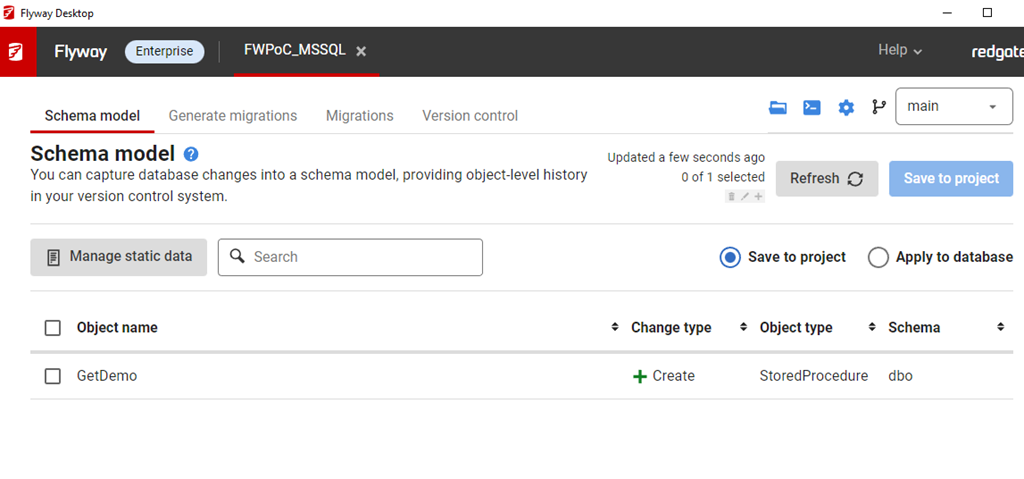
    In my project, if I go to the Schema Model (first) tab, I see there is an object in Development. This was the table I created when I set up the database. The goal is to get this table to other environments.
    2023-04-04 16_10_58-Flyway Desktop

    This table doesn’t exist in QA. I do have the flyway_schema_history table, which was the result of the baseline command.

    2023-04-04 16_15_58-SQLQuery4.sql - ARISTOTLE_SQL2022.FWPoc_1_Dev (ARISTOTLE_Steve (77))_ - Microsof

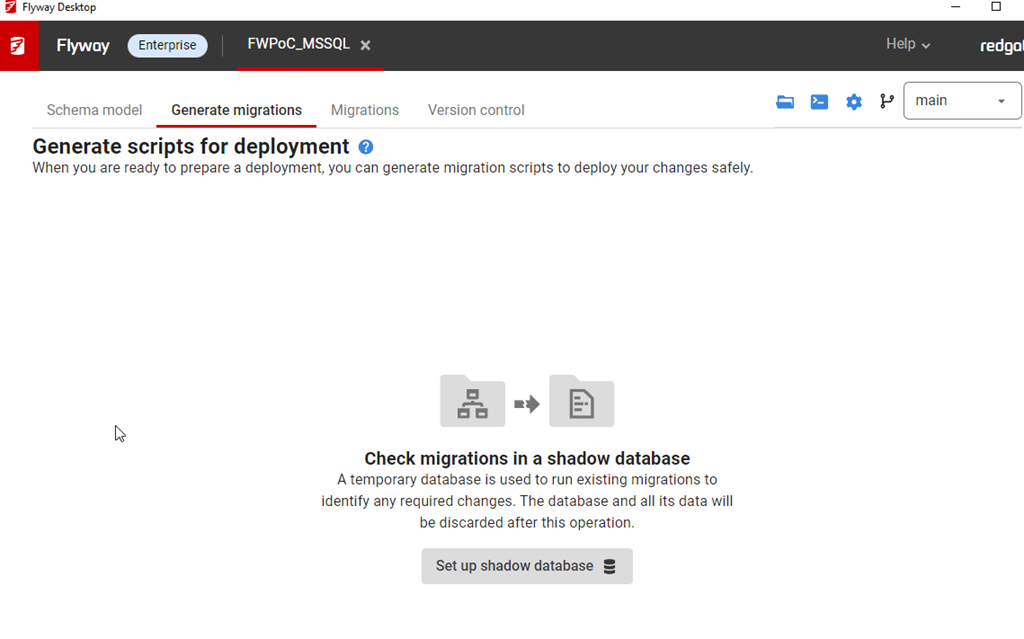
    If I go to the Generate Migrations (second) tab, I see this. The first thing that the tool wants is a Shadow database.
    2023-04-04 16_12_55-Flyway Desktop

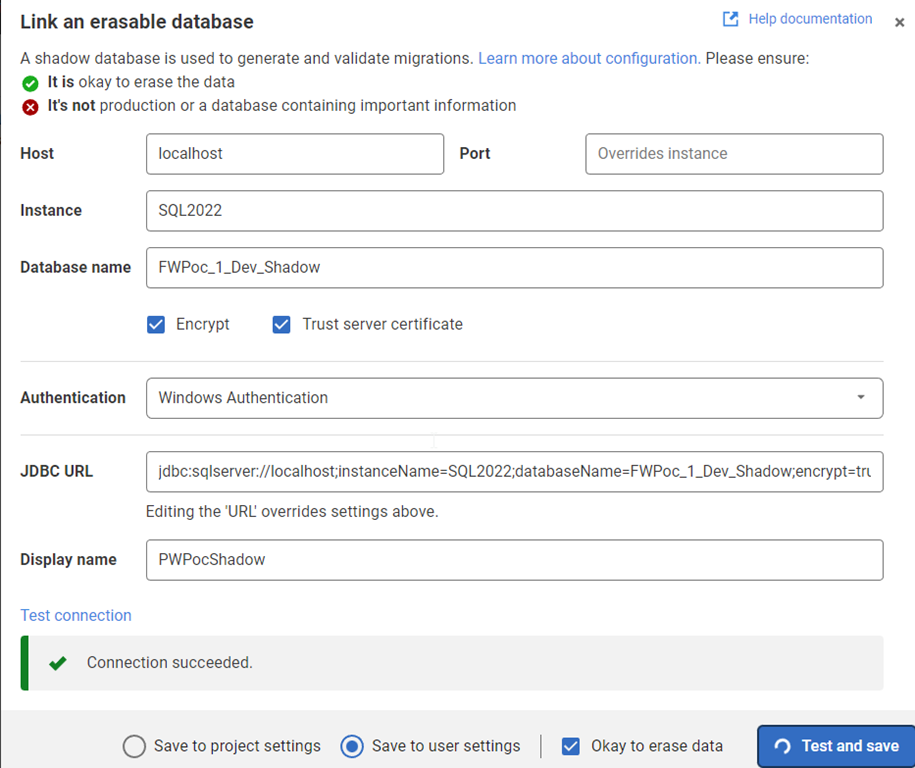
    The shadow is essentially a development V-1 (v minus one) version. This is where I test all migrations, compare the state with development, and then determine what’s changed. This is just a regular database, but I create this outside of Flyway Desktop. For me, I created a database (FWPoc_1_Dev_Shadow) and then clicked Set up shadow database to get this dialog. You can name this anything.

    I enter details, and test the connection before saving this. In general, this ought to be saved to my user settings as I’ll have my own shadow different from other developers. I DO NEED to click the “ok to erase data” box.
    2023-04-04 16_14_09-Flyway Desktop

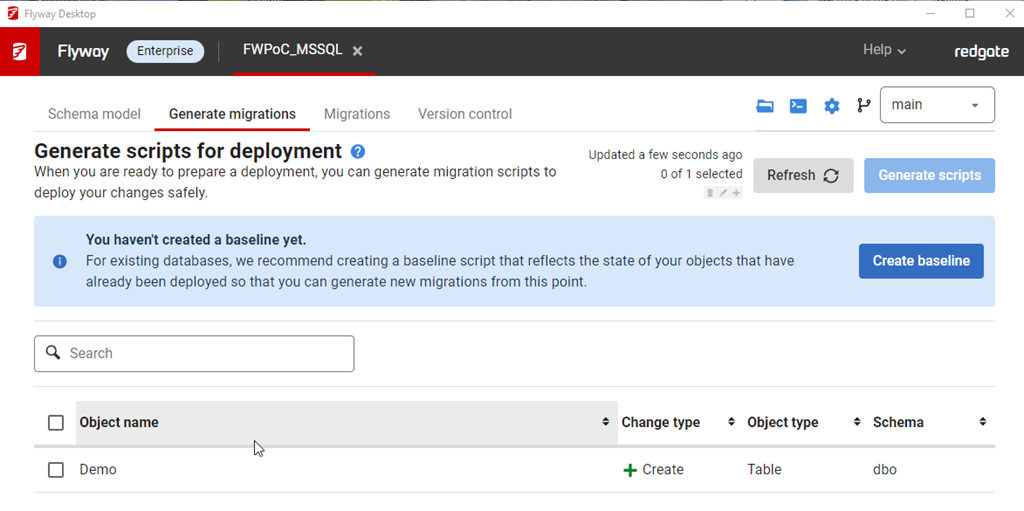
    Once this is done, I now see another prompt on the Generate Migrations tab. Now I need a baseline script. I don’t have anything, but I will click the button.
    2023-04-04 16_14_28-Flyway Desktop

    This gives me a dialog to pick a target database. This target is used to get the initial set of objects to populate in the baseline script. You can use production or a copy (recommended) as the target database.
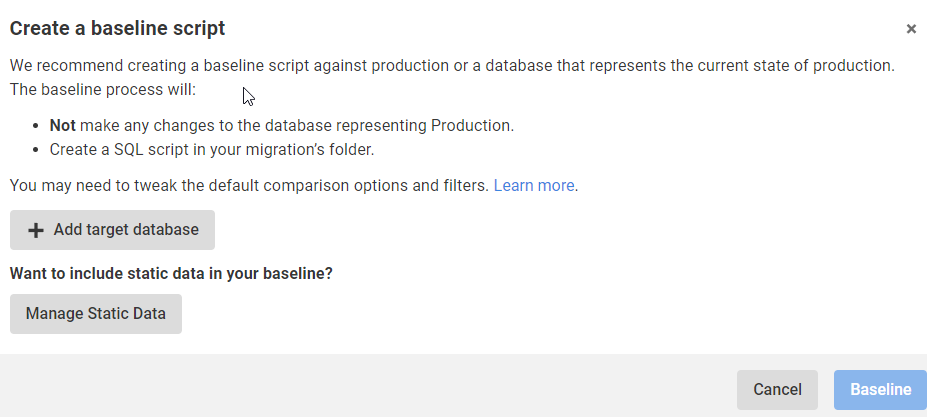
    2023-04-04 16_14_41-Flyway Desktop

    My QA is the same as prod, so I add that with the proper connection string and then I see the target here for the Baseline. I am ignoring static (or lookup/reference data for now). I’ll click the Baseline button.

    2023-04-04 16_15_25-Flyway Desktop

    This runs and … nothing.

    Which makes sense, as there is nothing in my target database. I actually get an error after this, which tells me that it doesn’t make sense to baseline an empty database.
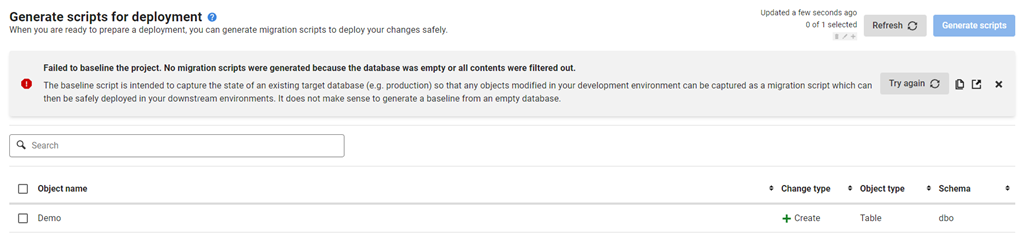
    2023-04-10 12_38_51-Flyway Desktop

    I wish that were surfaced earlier. In any case, if I close this, I get the same image above, saying I don’t have a baseline. For now, I’ll ignore that.

    Summary

    Not much happened in this post. I added a shadow database, which I’ll use to generate scripts. I tried to baseline, but that errored, as it should. I really don’t need a baseline, so I’ll come back to this later in another format.

    For now, I’ve advanced the SQL Server project. I’ll actually repeat these steps for the PostgreSQL one, but it’s really creating a new database for the shadow and setting a connections string. Everything else looks the same.

    The next post will actually generate a script and deploy this to QA.

  • How Important is Zero Downtime?

    As I work with more and more customers at Redgate, I see some interesting trends. During the pandemic (and prior), we got a lot of questions on zero downtime and how to achieve database DevOps without causing problems. Those are always interesting discussions, and I find many people want magical solutions without having to change the way they work.

    The last year, however, has had more people looking to implement database DevOps and speed up their development, but not a lot of questions or demands for zero downtime during these deployments. I find that interesting as the world depends more and more on computer systems, and the customer base for many organizations may demand access to the systems at any hour of the day or night.

    However, it doesn’t seem that as many people are concerned about small moments of downtime. Does this mean that more organizations aren’t measuring uptime anymore? Perhaps the interruptions caused by software deployments aren’t being counted? Or maybe the application software has gotten better at hiding blips in database access. Perhaps feature flags are catching on as a standard practice, so database deployments are less troublesome.

    I’m not sure what has changed, but it has been noticeable by me that the importance of making changes without downtime has not been a requirement from many customers. Is that the case for many of you reading this? Are you less concerned about downtime? I think one nice thing about the move to the cloud is it’s a little less stable, and perhaps that has lowered some of the expectations of our management. Since it’s out of our control, maybe we shouldn’t be too concerned about the need for retries, either automatic or a customer pressing a button again.

    Let us know today if you feel pressure to get closer to zero downtime, either in your everyday management of databases or during deployments. Or maybe tell us if you’ve gotten so good at your job that no one every notices when you do make changes.

    Steve Jones

  • Resources for Architecting Zero Downtime Deployments

    I delivered my talk on Architecting Zero Downtime Deployments yesterday at VS Live Las Vegas 2023. It went fairly well, even though I ran some incorrect code somewhere. Apologies for that, but glad I could fix things.

    The code for the database and the C# app is in this Github repo: https://github.com/way0utwest/ZeroDowntime

    The PPT is also in the repo, updated today.

    If you find issues, or an improve my C#, please feel free to open an issue or submit a PR.

  • Metrics and Measures

    Many organizations have been trying to find better ways to build and deploy software for their customers. Whether they deal with the general public or internal customers, we know that delivering software that customers use can be a competitive advantage. That’s the goal of DevOps.

    While most developers and management want to do this, they sometimes forget what the goal is. Instead, they want to continue to work in a similar manner themselves while giving lip service to actual change. They often do this while pushing others to somehow produce more and better software inside the same system. I see this over and over inside various companies.

    To become better, many of us use metrics and measurement of data to help guide us in determining how to move forward. In the area of software, there are a number of research reports showing which metrics are indicative of organizations that do a good job of delivering value to their customers. There are four main metrics: deploy frequency, lead time, change fail percentage, and mean time to repair. These are highlighted, though there are plenty of other things to track in your software process.

    However, aiming to just improve their metrics as the primary goal isn’t going to make your software better. The goal is to deliver software that meets your customers’ needs. Quicker, better quality, more features, and all those things that customers use are what is important. These metrics are there to help guide you, not to be the targets of efforts.  There’s a good article that talks about some of the downsides of just trying to improve these metrics.

    The goal is the continuous delivery of value to customers. The way we do this is by experimenting with code, getting rapid feedback from customers, adjusting and improving the code, and repeating the process, learning from our efforts. We drive automation to make this smooth and easy while enabling us to get our software to customers at the pace that suits our situation. It sounds vague and amorphous, and it is.

    There is a bit of an art to developing a process that efficiently builds software. It depends highly on the people involved, and on two other things. First, guiding them to improve their process and skills with references to practices that have worked well. Second, giving them the freedom and support to experiment and learn from their efforts. In doing those two things, it’s important to remember that while you can measure how well things are changing, aiming to improve the measurements often doesn’t help you improve the goal: building better software.

    It’s good to measure things, but keep in mind that the measures are not the goal.

    Steve Jones

    Listen to the podcast at Libsyn, Stitcher, Spotify, or iTunes.