Tag: hardware

  • Cool Tech Tools

    Completely off topic from SQL Server, but cool nevertheless.

    I have been using Skype to communicate with Red Gate on a regular basis for video calls every week. It’s been over a year, and I’ve always had to get my laptop ready for weekly calls. I often take them in another room when my wife has a call scheduled at the same time, and it’s a slight pain. It also means that I sometimes interrupt what I’m doing on the desktop when I have a call, which is annoying.

    I downloaded the Skype app on my iPhone awhile back, and I’ve used it for calls with family, but never for work. It didn’t buy my anything since I’d need to hold the iPhone up, which defeats some of the purpose as I can’t look something up on the call, which I often do as we refer to data, prototypes, or something else.

    I have had a GorillaPod for sometime that I’ve carried in my laptop bag for use with my camera

    41rh8oPpSLL._AA300_PIbundle-1,TopRight,0,0AA300_SH20_

    I decided to search around and see if I could find some mount for the iPhone. I have one that lets me use it as a teleprompter, but it isn’t very portable. I ended up finding a snapmount for the iPhone. They make a bunch of other ones for various phones as well.

    31UFaJknfVL._SL500_AA300_

    It arrived recently and I hooked them together. I had a call with Andrew Clarke last week, and I decided to use Skype on my phone, rather than tracking down the laptop. It worked out pretty well, allowing me to see Andrew, and he to see me, as well as letting me still use the computer and send him a couple emails while we were chatting.

    Not the neatest desk, but it worked well.

    I paired this with my wired headphones from Body Glove, which worked well, but the cord is a little short. I like to lean back to talk when I don’t need to type, and this one is a little restricting. However it’s my favorite for traveling.

    21MRYY4KT6L._SL500_AA300_

    however I’m really looking forward to next week when I’ll use my Gogroove bluetooth headset. That will be really cool.

    41JcKvr1g1L._SL500_AA300_

  • Max Memory

    What's the most RAM you have in a server?

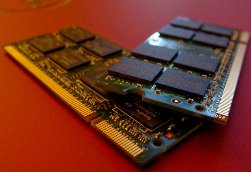
    Recently I upgraded the memory in my laptop. For a few hundred dollars, I went to 16GB of RAM, which means that I can more easily run Virtual Machines without a noticeable slowdown on my system. Combining that with an SSD as a second drive, and I have laptop that I think performs well.

    For servers, 16GB wouldn’t be much RAM. In fact, I heard from a friend recently who had enough RAM in one of his servers that my jaw dropped open a little.  I know hardware has advanced a lot in the last few years, but I wonder how much of that has filtered down to the average company.

    It’s time to brag a bit today, and let others drool over your SQL Server. Give us the answer to this poll question if you can.

    What’s the largest amount of RAM in one of your database instances?

    I’m looking for the biggest box you have, and then maybe you can let us know how it’s used, or how many people it supports, or some other metrics. Perhaps even tell us the database size, so we can guess what percentage is in cache.

    Let us know today just how much RAM you have and how proud you are of your large instances. I’ll say that 16GB is the largest server I have here at the ranch. The SQLServerCentral database servers have 24GB of RAM in their virtual machines.

    Steve Jones


    The Voice of the DBA Podcasts

  • Disk Partition Alignment–MCM Prep

    Does disk partition alignment matter to SQL Server? Without a doubt. When new disk partitions are created, there could be a reserved set of sectors that could differ across disks because of the way that the hardware interacts. In the white paper, Disk Partition Alignment Best Practices for SQL Server, there is an image that helps to explain this:

    Starting with Windows 2008, the disk partitions are automatically aligned to help improve performance. In a decade, it is unlikely that this will be a problem for most systems as most of the installed systems will be running Windows 2008 or later, at least for SQL Server.

    However now there are still lots of Windows 2003 and Windows 2000 systems out there at this time. For those systems, they could be experiencing a degradation of up to 30% according to the testing done by Microsoft. Which means that you can get a quick performance improvement in your systems, if they are disk I/O bound, if you can realign partitions.

    How can you do this? The hard part is that you must move everything off the partition (all data), delete, and then recreate the partition and restore data. That can be a time consuming exercise, but it is really a time effort. It doesn’t cost anything if you have extra disk to hold your data and can handle the downtime. In the white paper, there is a section that explains how to align your partitions in Windows 2000 and Windows 2003 using diskpar.exe and diskpart.exe, respectively.

    Note that this is mentioned in another white paper on SQL Server Best Practices. This gives you a number of I/O related pre-deployment best practices that you ought to consider before installing SQL Server on your systems. If you are building a system of any importance, this is a great article to understand, and apply many of these practices before SQL Server is installed.

    This can cause a delay in the deployment of a new server, but performing these tests and establishing a baseline cannot be done later, and discovering potential problems early can help you to build a better performing server from day one. Finding these problems later will ultimately result in way more embarrassment and hassle than implementing a short delay before deployment.

    If you have a group of people responsible for installing Windows and possibly SQL Server as part of your build process, have them review the article, or even give them a checklist that will help them to incorporate this testing and benchmarking into their routine.

  • Windows Experience on W510

    I toyed with the idea of using the SSD for my main drive, but I’d really like to get the VMs running quicker and in the end decided to use that as my secondary, as the location for the VHD and VDI files.

    As a result, my Windows Experience Index is only 5.9, as shown below:

    WindowsExperience_20110107

    The reason? The disk transfer rate from my primary drive is the lowest score. If I had used the SSD, I’m sure I’d have a 6.4 score or better. I’m not 100% positive I have the best driver for video on my machine, but since I don’t game, and primarily write here, I won’t worry about it. The CPU and memory scores are pretty good.

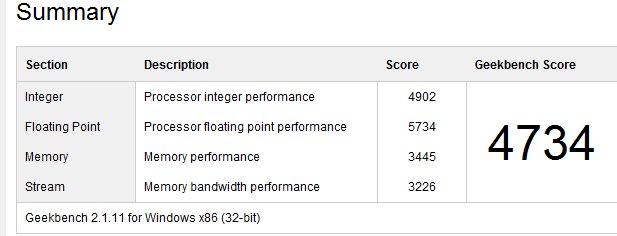
    I downloaded Geekbench as well, and ran that.

    As a note, this is a Lenovo W510 that is about a year old. I upgraded to 16GB of RAM recently, but here are the specs I note:

    • Core i7 CPU Q720, 1.6GHz
    • 16GB RAM
    • 500GB SATA 5400rpm drive
    • 80GB Intel SSD
    Overall, it seems snappier. I’ll get some VMs running and see how those perform.