Tag: Redgate

  • Flyway Mistakes

    I have been doing some testing with Redgate’s Flyway Desktop as a new way of managing code for databases. However, just like Git, I appreciate clients, but I want to know how the CLI (command line interface) works. I spent time learning git add, git push, git checkout and more. Now I have more comfort understanding how SourceTree or GitKraken work.

    I wanted to do the same thing with Flyway, just to be sure that I know what the options, switches, and behavior for Flyway operations would be.

    The Scenario

    I had an existing database, and I wanted to play around with adding this to a DevOps flow. I was looking for a basic experiment, and decided to create a new repo. I copied the default flyway.conf file into this folder and changed it.

    The only thing I did was alter the Flyway conf file in my folder to work with SQL Server. I copied the connection string into the flyway.url parameter and set it as follows:

    flyway.url=jdbc:sqlserver://aristotle:1433;instanceName=SQL2017;databaseName=AdventureWorks2017;integratedSecurity=true

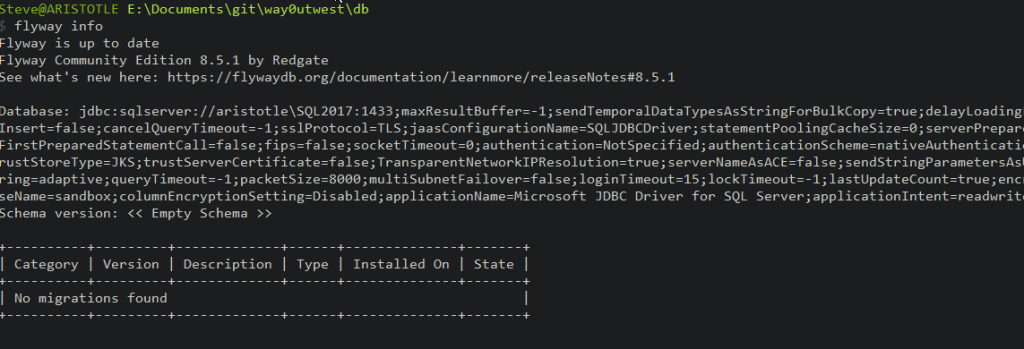
    When I ran the info command, it failed.

    fw_fail

    When I ran the same command with a different database, it worked:fw_succeed

    I was highly confused. I tried a number of different databases, and some of them worked, not I couldn’t see a pattern.

    I checked a number of things, including the database owners, a few of which I changed. I thought it might be some permissions and dropped my sysadmin account and added it back.

    I tried connecting with SSMS and with sqlcmd. Both of those tools seemed to work.

    I was really stumped.

    A Small Conflict

    Finally, after a bit of back and forth with a few developers, someone noted that I shouldn’t need the port included in the string. Sure enough, when I removed it, things started working.

    Apparently, the JDBC documentation notes the issue. I kept looking at Flyway docs, but they just pass things along to the JDBC driver from the various parameters and environment variables.

    There is a note that says provide the port number to stop a round trip to the browser to determine the port number for a named instance. If the port number and name are included, the port takes precedence.

    I have two instances, some of which have the same databases on each. The databases that worked were on a different instance (which responds to 1433). The ones that didn’t, weren’t on that instance. I kept examining the \SQL2017 instance, but that wasn’t the one I was logging into with my string.

    A silly mistake, but a good one to note. The port is a higher priority than the instance in a Java connection string.

    I can’t find a priority in the docs for OLEDB or the native client, but they do all say the address takes precedence over the address parameter.

  • A New Command Palette in SQL Prompt

    I’ve gotten used to using the Command Palette in VS Code/ADS/Sublime Text regularly to find some setting or change something. What felt strange at first has become a habit for me. I actually like having this one place to search and get things done.

    It’s now in SQL Prompt.

    If I press ALT+S, I see this in SSMS. A large command prompt with lots of entries.

    2022-02-22 12_33_20-SQLQuery1.sql - ARISTOTLE_SQL2017.sandbox (ARISTOTLE_Steve (54))_ - Microsoft SQ

    This popup lets me do a few things. If I start typing, I can get to most any object or SQL Prompt command from here. It’s like a global search for all things Prompt.

    As an example, I can highlight an object and then ALT+S, type “object ex” and I’ll see this:

    2022-02-22 12_35_27-SQL Prompt_ Command Palette

    If I select the “Select in Object Explorer” (or click), the OE will navigate to that item.

    2022-02-22 12_36_57-

    Simple, and I could get there in other ways, but having all this in one searchable place, rather than right clicking and looking through a menu, or looking at the top menu bar, is easy. I even see the shortcut in the command palette (CTRL+F12) if I want to memorize it.

    I can also use this for commands like insert semicolons, which I can never remember the shortcut for.

    2022-02-22 12_38_50-SQL Prompt_ Command Palette

    I can look for objects, commands, or options, filtering my results with the selection at the top. Or I can look in all areas. I can even look at the see the status of options in the palette, as shown here.

    2022-02-22 12_41_38-SQL Prompt_ Command Palette

    I have some things memorized, and the ALT+S isn’t quite in my muscle memory, but I am finding that I use it when I don’t know where something is located, or can’t remember a shortcut.

    It’s a new feature, and the team is looking for feedback, so give it a try and let them know what you think.

    If you don’t have SQL Prompt for SSMS and SQL Server, download an eval today and give it a try.

  • New Tagging in SQL Monitor to Keep Organized

    I recently got an update from the SQL Monitor PM on the progress we’ve made across all the teams. We have a number focusing on different aspects of the product, and they’ve built an impressive produce over the years. I remember when it was SQL Response and only provided alerting. Now it’s an Enterprise Monitoring solution for SQL Server.

    One of the additions that was added across the last few months is tagging. Traditionally the monitored instances and databases are organized in categories, which is OK, but very limited. Below you can see at monitor.red-gate.com that we have instances in various categories: production, azure database, staging, test, and simulation.

    2022-02-10 12_12_40-Global Dashboard

    Tagging is a much more flexible structure that makes it easy to classify and filter your estate. There are plenty of cases where you might not only have an instance set as Production, but perhaps it’s a US or UK server and you want to know the geography. Maybe there is a need to know this instance also relates to CRM v a data warehouse system. Tagging makes that easy.

    Filtering with Tags

    At the top of the global dashboard shown above, there is a new filtering area where we can filter by tags. You can see below that I’ve filtered the 28 instances in our demo setup to the 2 that have the “sqlservercentral” tag.

    2022-02-10 12_15_45-Global Dashboard

    What’s more, clicking in the tag box shows me the existing tags that are applied.

    Tagging is also available on the Estate tabs.

    2022-02-10 12_28_55-Installed Versions

    There are a few other places, and it’s slowly making its way across the product to all areas. You’ll see it slowly appear in other places as well.

    Adding Tags

    You can add these in the Server Configuration, which works fine. Pick a server and then you can add tags that correspond to what you care about.

    2022-02-10 12_48_21-Monitored Servers

    If I’m working with a server in the overview, I can also expand the right Alerts panel and in the top About section, I can adjust tags. A good way to fix these up as you work on issues.

    2022-02-10 12_48_55-ssc-db-n1_ - Server Overview

    Look for tagging to make it’s way into the PowerShell cmdlets as well.

    There’s a post on the Redgate Blog about tagging as well. They are looking for feedback, so please send it along.

    If you haven’t used SQL Monitor, it’s a great tool to help you keep an eye on your estate with minimal effort. You can get alerted of issues and even integrate with other tools. Download an eval and give it a try today.;

  • Data and DevOps Predictions for 2022

    All the Advocates at Redgate (Kathi, Grant, myself) got asked about some of the future predictions we might have, based on some of the data from The 2021 State of Database DevOps and The 2021 State of Database Monitoring. We each came up with a few things and then someone summarized them. Grant has an official blog post, but I thought I’d glance through the summary, see what the others wrote, and then come up with a few things.

    Side note: I hope to review this next January and see how I did.

    I didn’t do this last year, but I’m going to separate the DevOps and monitoring topics and give a few thoughts on each.

    DevOps

    DevOps continues to grow and really become almost a mainstream idea. I don’t know if I think the majority of companies are really adopting much of it, but many are adopting something. I rarely need to explain DevOps, though I do often need to define it for me and level set how I view it. It still seems everyone things about this differently.

    The main challenges for DevOps are adding automation, moving to the cloud (or hybrid) and writing better code. DevOps can help with all these things, but I think far too many organizations still want to tackle these are projects, not an ongoing habit.

    Well, all but the last one. It seems no one really prioritizing better code in most management I encounter.

    Automation is the easiest of these, and I find that more and more DBAs are embracing automation in different ways. Some still want to do everything manually, but more of them are starting to accept that a framework (like Flyway) or even a simple automated script runner can be used without them needing to connect with SSMS.

    I see this as a trend that will continue to increase, and eventually we’ll expect 95% of all deployment code to run with an automated process of some sort. Bt process I mean you aren’t connecting to a production server from your workstation.

    My prediction for 2022 is also that I won’t see anyone create new repos in a version system other than git. I do tend to work in the MS stack or the Flyway area, and I don’t expect to encounter any clients still trying to work with SVN, CVS, Vault, Perforce. or even TFVC. Any why should they?

    I also expect that we will see more cross platform work from everyone, which means that we will want a fairly consistent way of managing development, whether this is on SQL Server, Oracle, PostgreSQL, or MongoDB. I know that deploying code here means more chances for mistakes, so having a consistent high level process is important. This might mean that you use one type of framework for SQL Server and another for PostgreSQL, but the flow will be the same. Save code, run CI, deploy with automation. Hopefully testing in there somewhere.

    The cloud encourages automation, but not completely. The portals are complex, the offerings changing, and no one wants to worry about which version of a CLI you have on which machines. Still, I hope to see more GitOps or Infrastructure as Code used by clients.

    Monitoring

    I think two things here. First, people are going to rely more and more on monitoring systems to manage the disparate and ever-growing estates of data stores they have. This is going to come about with the problem for many people of not only managing different platforms, but also different monitoring tools.

    People already struggle with SQL Server and Oracle (or any other combination of platforms). I expect they will have AWS and Azure to contend with as well, though likely each organization will lean more heavily on one than the other. However, they’re also going to be dealing with different products for different platforms.

    I predict some stress, confusion, and anxiety about incidents and employees trying to decide how to find and use information.

    The second prediction is that we are going to see another security issue with a monitoring and/or management platform. We had a big one last year, but I bet hackers are working out how to attack other platforms, especially those that require sysadmin privileges and also allow the tools to change the remote systems.

    Security is always a problem and after last year’s incident, I expect other software to be targeted in this same way.

    Looking Forward

    If you are trying to find a new job, or improve your career, here’s what I suggest. First, learn to write and speak. However you can, but working with others, advocating your position, and improving your showing at interviews will matter.

    In terms of tech, get good at something but learn a bit of many things. Pick a cloud and learn how the general infrastructure of IaaS, PaaS, and SaaS work. Things will vary a bit from Azure to AWS to GCP, but the core remains the same. Learn how to spin up and work with a variety of technologies related to data. Be comfortable with version control, with repos, with CI, with CLI tools, with finding answers on how to accomplish tasks. Knowing a bit and how to find out more might be a good way to answer some of those interview questions.