Tag: Redgate

  • Don’t Leave the Database Behind…Or Win If You Do

    If you’ve had struggles with database development and had a real world disaster, you could win in a new Redgate contest. We’re looking for the places where old style, waterfall, traditional database development has been a problem. Especially when application software developers have been adopting DevOps, small, rapid release strategies.

    Enter before Mar 20 and give us your story.  Don’t worry, we’ll anonymize your name and company details. You can enter as many times as you like, but can only win once.

    My Struggles

    I started working with a small startup company that had 8-10 application developers. We tried to work in a rapid format, releasing a new version of our website every 2-3 weeks. This was going OK, but not great. Often we’d release and developers would go to test their new feature, only to realize that they’d forgotten a database component.

    They would roll forward, finding code and deploying a database change during the release process, usually getting the feature working in 10 or 15 minutes.

    Until they broke something else because they hadn’t really tested the database component complete. Or they realized they needed yet another database change. Or they had forgotten to code for some edge case that another developer tried during the release smoke test.

    When I started, we all gathered in the office on a Sunday night and spent an hour or two releasing code. Not one of my favorite times.

    The app developers were using source control, and trying to test, but they often sent code to QA and then fixed things in QA, forgetting that they needed to ensure those changes were deployed again to production.

    Across a few months, we implemented what people would not call a DevOps process, reducing our release time to a few minutes, with myself and another developer on the phone, releasing automated changes from a CLI.

    Database DevOps makes everyone happier.

    Share your story before Mar 20 and good luck.

  • Adding Objects to our SCA Project

    In my last post, I started out with a new SCA project, getting a connection to my database up and running. Now, let’s start the new project by adding some objects.

    Adding Objects

    I’m going to start with a couple objects to make this simple, but we’ll move on from there in other posts to describe the options and details.

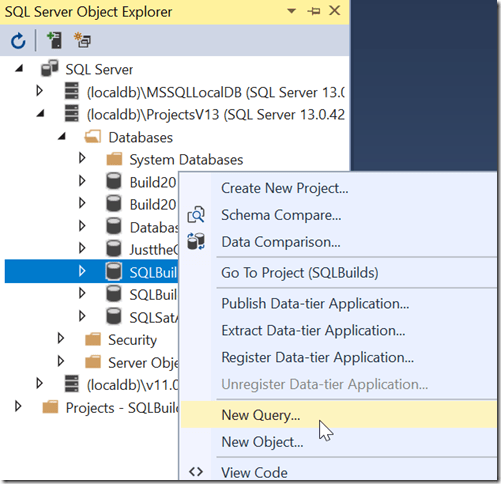
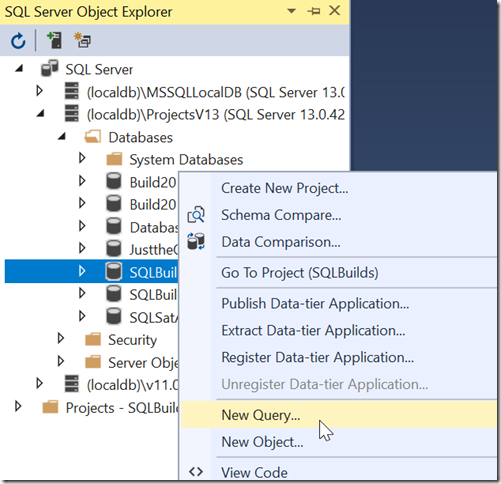
    Our database is not terribly useful without tables, so let’s create a table. I’ll start by using a query window to build a table. Right click the database and choose New Query.
    2018-09-19-00_48_40-_thumb1

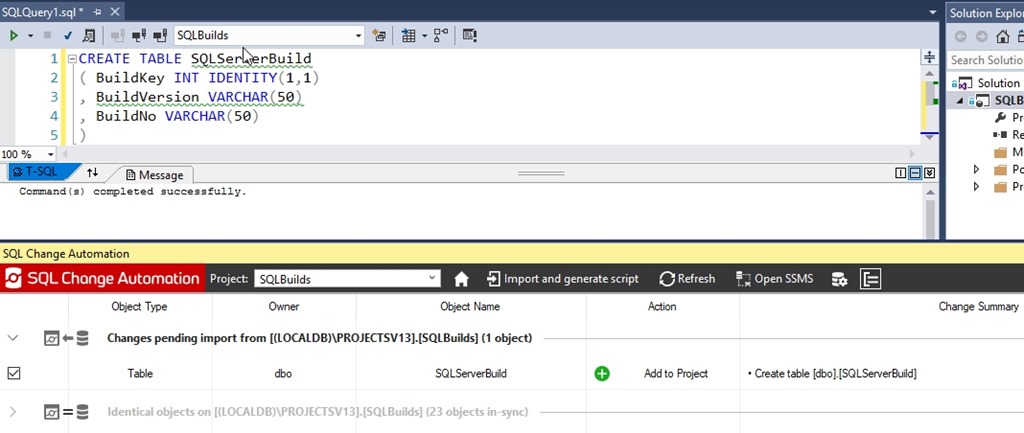
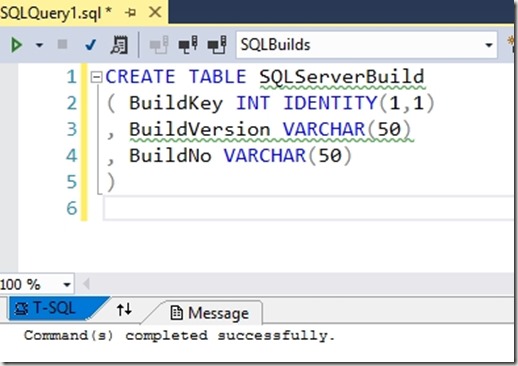
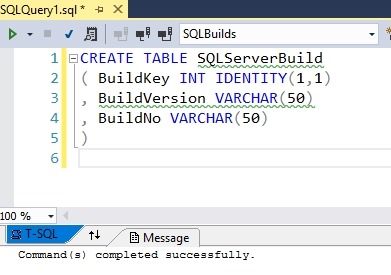
    Once this opens, let’s write a query. I’m comfortable building tables like this, so I’ll add the first table to hold my SQL Server builds.  I’ll write the code shown below and then execute this.
    2019-02-11 14_09_59-SQLBuilds - Microsoft Visual Studio

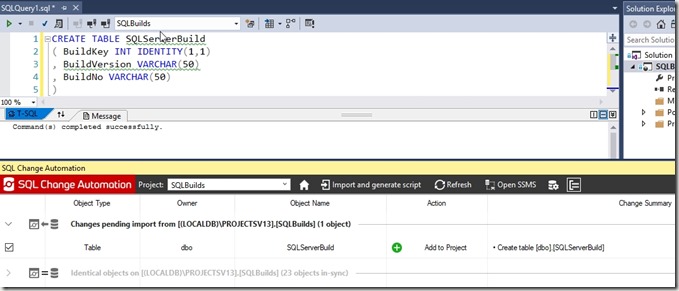
    At this point, the development database has a change, but it’s not in my project. I need to use the SCA pane to let VS know that I’m ready to import this change. Open the pane and click refresh. The following should appear when the process completes.
    2019-02-11 14_10_30-SQLBuilds - Microsoft Visual Studio

    In this dialog, we see a new table was found. The process compares the Shadow database, where no changes have occurred, with the development database, which has a new table. This gives me a “diff” in essence and I can add this to my project.

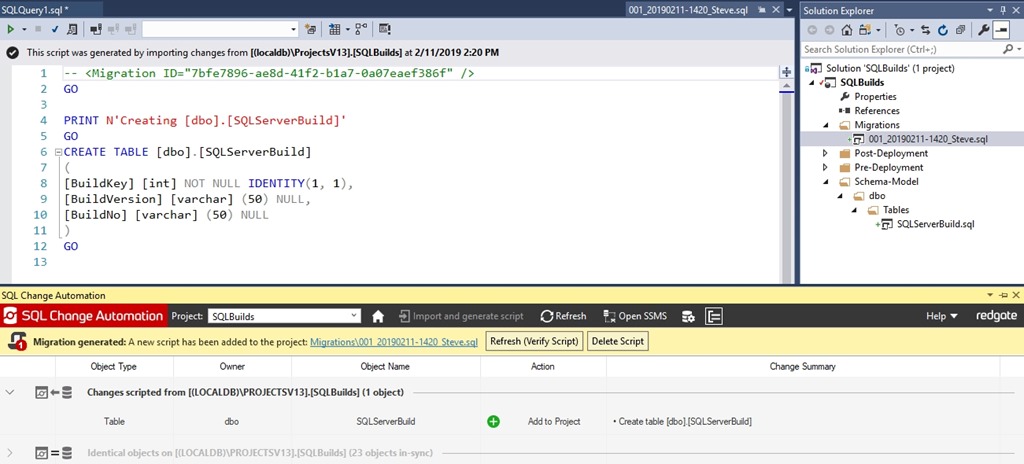
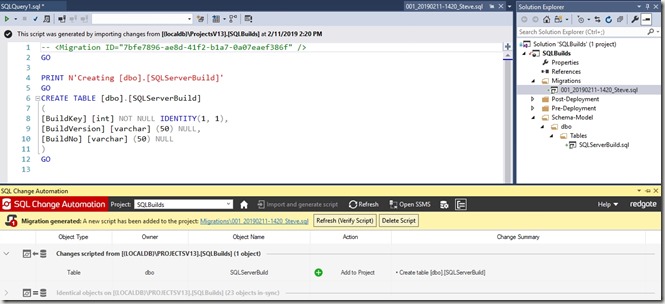
    The change is checked on the left, so I can click the Import and Generate Script button. I’ll do that and I see the image below. There’s a lot here, so let’s discuss this after the image.
    2019-02-11 14_20_43-SQLBuilds - Microsoft Visual Studio

    The first thing to look at is the script that’s active in the upper pane. If you notice, the tab name is on the right side of that upper left pane, highlighted in blue. This is my first migration script. You can see the migration ID at the top and then a PRINT statement, which is useful for logging during the build or deployment process, then the top of my code.

    On the right side, in the Solution Explorer, we see that my script has been added to the Migrations folder. The default name has been applied, but I can rename this if I want.

    In the SCA pane, we see a few things. First, the change is grayed out because the change was scripted.  Above that, we have a yellow bar that notes a migration was generated, and it gives us the path in the project. Finally, there is a “Refresh” button to verify the script. We want to click that. This will use our script with the Shadow database to verity the code is correct. Once I click that, I get a note that the project was verified.

    2019-02-11 14_21_52-SQLBuilds - Microsoft Visual Studio

    At this point, the Shadow and development databases are in sync.

    This tells me that my changes should work when I deploy them to another system. Hopefully that works, and we’ll tackle that next time.
  • Webinar next week on Database DevOps

    Next week is my webinar on why the database is the heart of DevOps. You can still register today to discuss and debate why we need to ensure that database development is integrated into any DevOps work we do for other software.

    Webinar social_Heart of DevOps

    Register: https://attendee.gotowebinar.com/register/3005019550714731265?source=KB

  • The Heart of DevOps Webinar

    One of the things that I think about DevOps is that it’s really hard to focus on the hard things that create friction in your process. Most of us want to move faster, and tackle the easy things to automate, the easy things to fix. We want to trust developers to move quickly and pick those items that get in their way.

    They do, but they often stop before the database. Or they start to try and find ways to use a different database (ugh). Or they just start putting strange data into existing columns to get things done.

    The database matters, and I’ll be talking about why.

    Webinar social_Heart of DevOps

    I’m doing a webinar on Feb 6 for 30 minutes to talk about the database in DevOps. You can register here: https://attendee.gotowebinar.com/register/3005019550714731265?source=KB