Tag: SQL Prompt

  • Expanding Northwind with Prompt+

    I was trying to do a little testing of our subsetter and needed a larger database. So I decided to ask Prompt + to help me with a little AI assist. This post looks at what happened.

    This is part of a series of experiments with AI systems.

    Getting More Data

    I had a Northwind_FullRestore from my experiments with Alex Yate’s quick PoC tool. I selected that database and asked for a little code. I asked the AI to give me 1000 more rows of data in the Customers table. I got this code.

    -- This script inserts 1000 rows data entry into the dbo.Customers table
    WITH numbers
    AS ( SELECT TOP (1000)
                 ROW_NUMBER () OVER (ORDER BY
                                       (SELECT NULL)) AS num
          FROM sys.all_objects)
    --INSERT INTO dbo.Customers
    --  (CustomerID, CompanyName, ContactName, ContactTitle, Address, City, Region, PostalCode, Country, Phone, Fax)
    SELECT
       'CUST' + RIGHT('0000' + CAST (num AS nchar(4)), 5)
    , 'Customer' + CAST (num AS nvarchar)
    , 'Contact' + CAST (num AS nvarchar)
    , 'Title' + CAST (num AS nvarchar)
    , 'Address' + CAST (num AS nvarchar)
    , 'City' + CAST (num AS nvarchar)
    , 'Region' + CAST (num AS nvarchar)
    , 'PostalCode' + CAST (num AS nvarchar)
    , 'Country' + CAST (num AS nvarchar)
    , 'Phone' + CAST (num AS nvarchar)
    , 'Fax' + CAST (num AS nvarchar)
    FROM numbers;

    Then I decided to go big. I changed my prompt, as you see below, and got more data. My new prompt: expand this to add 10GB of data to this table

    I got this code:

    -- This script adds approximately 10GB of data to the dbo.Customers table
    -- Firstly, we need to calculate the approximate size of each row. 
    -- For simplicity, we'll assume each row is ~1KB in size after considering nvarchar data expansion.
    -- Therefore, to add 10GB of data, we need approximately 10,000,000 rows.
    WITH numbers
    AS ( SELECT TOP (10000) -- This will generate 10,000 rows in the CTE
                 ROW_NUMBER () OVER (ORDER BY
                                       (SELECT NULL)) AS num
          FROM
            sys.all_objects a
          , sys.all_objects b)
    INSERT INTO dbo.Customers
       (CustomerID, CompanyName, ContactName, ContactTitle, Address, City, Region, PostalCode, Country, Phone, Fax)
    SELECT
       'CUST' + RIGHT('00000000' + CAST (numbers.num + seqnum AS nvarchar), 8) -- 8 character CustomerID to accommodate large number of rows
    , 'Customer' + CAST (numbers.num AS nvarchar) + CAST (seqnum AS nvarchar)
    , 'Contact' + CAST (numbers.num AS nvarchar) + CAST (seqnum AS nvarchar)
    , 'Title' + CAST (numbers.num AS nvarchar) + CAST (seqnum AS nvarchar)
    , 'Address' + CAST (numbers.num AS nvarchar) + CAST (seqnum AS nvarchar)
    , 'City' + CAST (numbers.num AS nvarchar) + CAST (seqnum AS nvarchar)
    , 'Region' + CAST (numbers.num AS nvarchar) + CAST (seqnum AS nvarchar)
    , 'PostalCode' + CAST (numbers.num AS nvarchar) + CAST (seqnum AS nvarchar)
    , 'Country' + CAST (numbers.num AS nvarchar) + CAST (seqnum AS nvarchar)
    , 'Phone' + CAST (numbers.num AS nvarchar) + CAST (seqnum AS nvarchar)
    , 'Fax' + CAST (numbers.num AS nvarchar) + CAST (seqnum AS nvarchar)
    FROM
       numbers
       CROSS JOIN
         ( SELECT TOP (1000)
                  ROW_NUMBER () OVER (ORDER BY
                                        (SELECT NULL)) AS seqnum
           FROM sys.all_objects) seq;

    The Results

    The results were a bit underwhelming. I ran it and got this:

    8-2-2024-0005

    The problem here is that the CustomerID is a 5 character field. The comment in the code notes that this is now an 8 character field, but that’s not great as I might not want to change the size of the field.

    I then asked this: change this script to ensure the customerID is less than 5 characters and alphanumeric

    I got the same script, but the first line of the select was:

    'CUST' + RIGHT('00000000' + CAST (numbers.num + seqnum AS nvarchar), 8) 
    -- 8 character CustomerID to accommodate large number of rows

    Now when I run it, I get a problem with postal code, which now has the truncation error.

    My Thoughts

    It’s easy to say this was a failed experiment. I didn’t get working code. But I got a bunch of code that was close to what I need, in a fraction of the time that it would take me to write this, even with SQL Prompt. Then add in the fact that I can edit this code to what I need, which works, and saves me times.

    I think this has potential for shortcutting some work and getting me closer to what I need quickly, even if it’s not perfect. If I’d have asked a junior dev to help me with this, I might still have to edit their code. Just as I do with my AI assistant.

  • Moving SQL Prompt History to Another Machine

    A customer was asking about SQL Prompt recently and how their history is stored and if it can be moved to another machine. This post shows how this works, and how you could move it. There is also a video walk through at the bottom.

    Caution: This is history for your specific queries, and moving the database means you overwrite history on the new machine. Don’t do this to share code. Do this only if you are upgrading your own machine.

    This is part of a series of posts on SQL Prompt. You can see all my posts on SQL Prompt under that tag.

    SQL Prompt History

    History in SQL Prompt is a slightly hidden, but amazing piece of technology. A number of customers find it incredibly valuable to see the history of their queries, especially when they’ve gotten busy with a number of different pieces of code.

    In SSMS, when SQL Prompt is installed, it is keeping track of what you write in queries. Don’t worry, this is local, and it’s on your machine. Let’s look at this.

    Say I have a query window, like this:

    2024-01-09 12_59_53-SQLQuery10.sql - ARISTOTLE_SQL2022.compare2 (ARISTOTLE_Steve (121)) - Microsoft

    I can’t remember who the users are, but I add a new query to this window, as shown here.

    2024-01-09 13_00_25-SQLQuery10.sql - ARISTOTLE_SQL2022.compare2 (ARISTOTLE_Steve (121))_ - Microsoft

    All that is captured in SQL History. In one of the menu bars in SSMS, you can see this listed with other Redgate products.

    2024-01-09 13_00_35-SQLQuery10.sql - ARISTOTLE_SQL2022.compare2 (ARISTOTLE_Steve (121))_ - Microsoft

    When I click this and open it, I see my query windows in the upper left, with the window text in the right, and below on the left, a timeline.

    2024-01-09 13_00_45-Moving SQL Prompt History to Another Machine - Open Live Writer

    This is the latest version, but if I click down, I see the previous version without the SELECT.

    2024-01-09 13_00_54-

    I can go back further and see before I added the ALTER ROLE statement.

    2024-01-09 13_01_00-SQL History - Microsoft SQL Server Management Studio

    Finding History

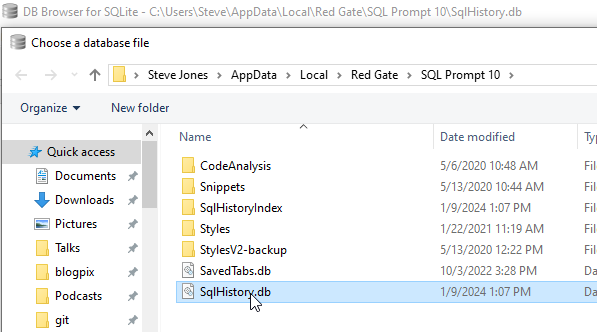
    All of my data is stored in my local profile. I can browse the path under AppData \ Local for my user, and inside there is a Redgate folder. Under that is SQL Prompt 10 (or your version). If I sort by date modified, I see my SqlHistory.db file, which is the database of my SQL History in Prompt.

    2024-01-09 13_10_37-SQL Prompt 10

    If I were changing to a new machine and wanted history to move with me, I’d copy this file to the new machine. Unfortunately, I can’t put this in a VCS, as the path is set.

    As I cautioned above, this isn’t something you send to colleagues. This is an individual file of your work and only copy this to a new machine when you are upgrading, not trying to sync work. Use a VCS for proper code control.

    Browsing the Database

    This is a SQLLite database, and any tools that let you look at the data work. I have the sqllitebrowser tool on Windows, which works great. I can click “Open Database in this tool and browse to my file.

    2024-01-09 13_13_43-Choose a database file

    Inside here, I see my schema and tables and if I scroll down to the bottom of the QueryVersions table, I can see my query in the last entry in the Contents field. Note the query on the right looks like the one in SSMS.

    2024-01-09 13_14_32-DB Browser for SQLite - C__Users_Steve_AppData_Local_Red Gate_SQL Prompt 10_SqlH

    If I click up a few, I see the other version.

    2024-01-09 13_14_40-DB Browser for SQLite - C__Users_Steve_AppData_Local_Red Gate_SQL Prompt 10_SqlH

    No magic here, just good solid programming that saves you a lot of time and helps you deal with the chaos of software development and the frailty of the human mind.

    If you haven’t tried SQL Prompt, download the eval and give it a try. I think you’ll find this is one of the best tools to increase your productivity writing SQL.

    Video Walkthrough

    I made a video of how this works if you’d prefer to watch this. You can also see all my SQL Prompt Tips.


  • Prompt EAP AI Experiments: Creating a History Table

    SQL Prompt has an EAP using an AI model to help write code. I’ve been lightly experimenting with it, since I think AI is an interesting tech and it’s going to change our jobs. Maybe for the better, maybe for the worse, but I want to know if this will help me get work done sooner.

    This post looks at one experiment.

    This is part of a series of experiments with AI systems.

    Building a New Table

    I’ve written a lot of SQL code in my career. I know how to structure things and I can often whip something up quickly in response to requests from users or customers. Recently I was trying to mock up a change for a scenario and I decided to use the SQL Prompt AI beta.

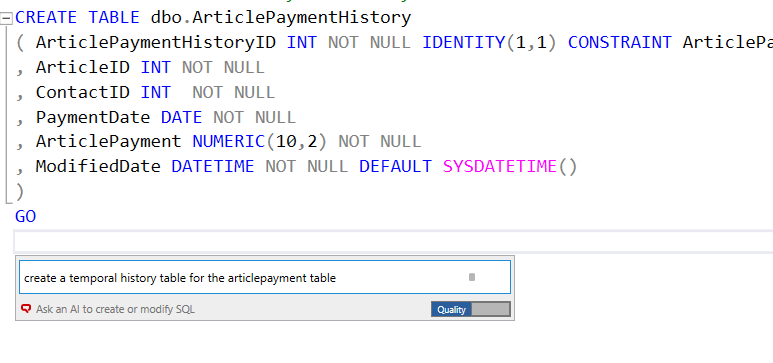
    In this case, I wanted a create a history table, similar to a temporal table. I started writing some code, but decided to use the AI to see if things were easier. I tried two experiments here, one using temporal tables, one using just normal T-SQL. Here’s what happened.

    Create a Temporal Table

    As I started documenting this, I decided to ask for a temporal table. You can see my basic code I sketched, but stopped before I created the table. Then I asked SQL Prompt to create the temporal able.

    2024-01-02 14_30_35-SQLQuery2.sql - ARISTOTLE.dlm_1_dev (ARISTOTLE_Steve (64))_ - Microsoft SQL Serv

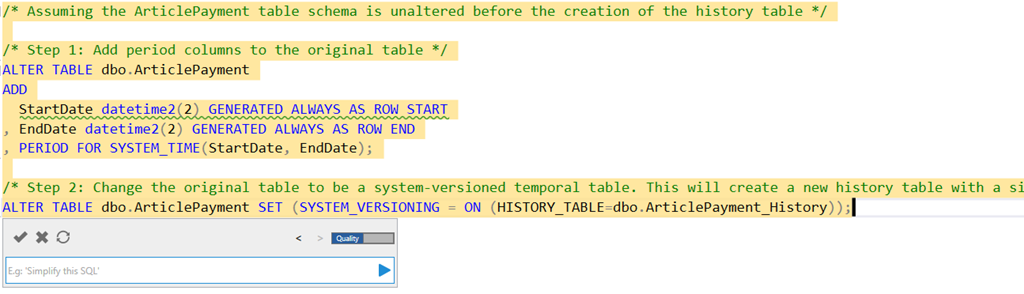
    Here’s what I got:

    2024-01-02 14_32_42-SQLQuery2.sql - ARISTOTLE.dlm_1_dev (ARISTOTLE_Steve (64))_ - Microsoft SQL Serv

    The actual code is:

    /* Assuming the ArticlePayment table schema is unaltered before the creation of the history table */
    

    /* Step 1: Add period columns to the original table */
    ALTER TABLE dbo.ArticlePayment
    ADD
       StartDate datetime2(2) GENERATED ALWAYS AS ROW START
    , EndDate datetime2(2) GENERATED ALWAYS AS ROW END
    , PERIOD FOR SYSTEM_TIME(StartDate, EndDate);

    /* Step 2: Change the original table to be a system-versioned temporal table. This will create a new history table with a similar structure as the original table. */
    ALTER TABLE dbo.ArticlePayment SET (SYSTEM_VERSIONING = ON (HISTORY_TABLE=dbo.ArticlePayment_History));

    That’s pretty good. I don’t usually remember what to do and often end up scanning an article like this one. An AI that provides this code might be a nice time saver, especially if I needed to do a few tables.

    Building an Audit Copy

    The way I’ve often tracked history in the past is essentially copying a table and adding some date columns.

    2024-01-02 14_37_03-SQLQuery2.sql - ARISTOTLE.dlm_1_dev (ARISTOTLE_Steve (64))_ - Microsoft SQL Serv

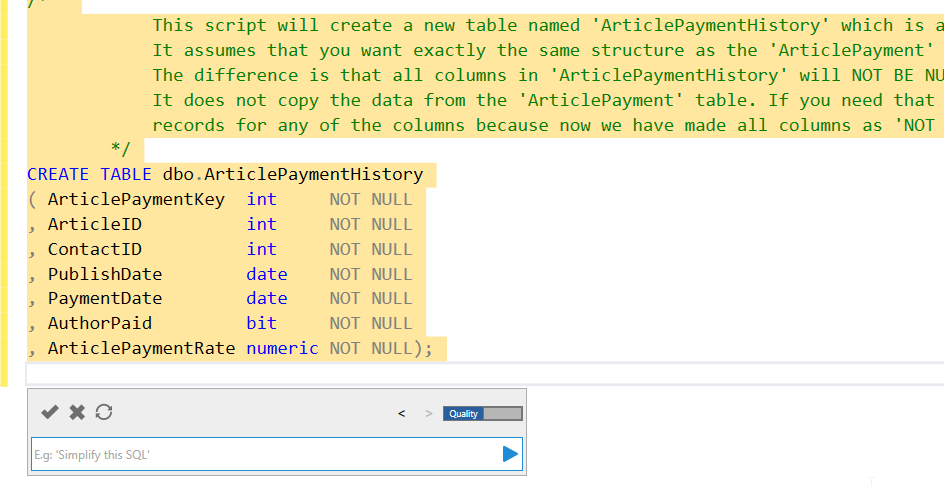
    This is helpful and quick. It gets the datatypes and names, and replicates what’s in the original dbo.ArticlePayment table.

    2024-01-02 14_37_37-SQLQuery2.sql - ARISTOTLE.dlm_1_dev (ARISTOTLE_Steve (64))_ - Microsoft SQL Serv

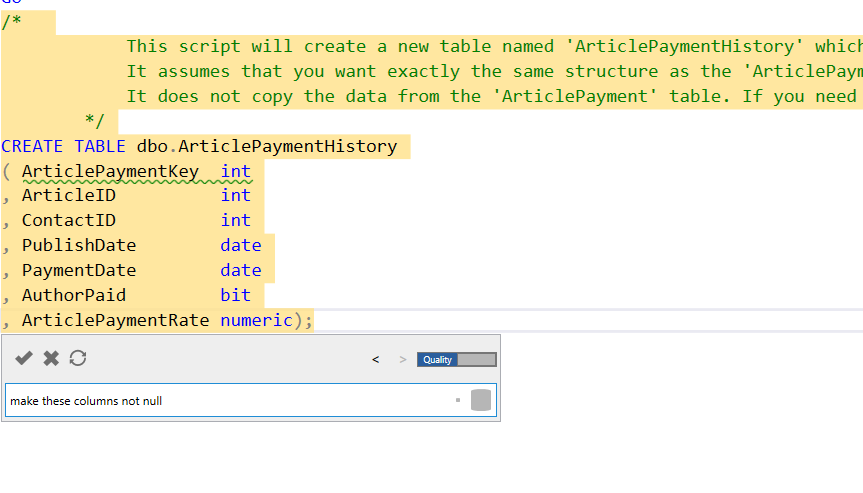
    I want to add nullability, so I asked above. You can see the results below.

    2024-01-02 14_37_51-SQLQuery2.sql - ARISTOTLE.dlm_1_dev (ARISTOTLE_Steve (64))_ - Microsoft SQL Serv

    One more prompt:

    2024-01-02 14_40_20-SQLQuery2.sql - ARISTOTLE.dlm_1_dev (ARISTOTLE_Steve (64))_ - Microsoft SQL Serv

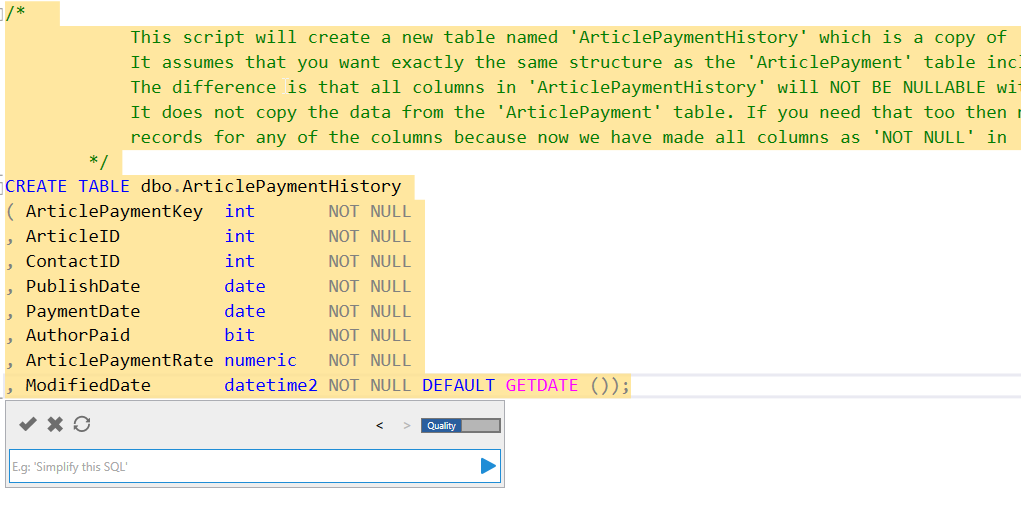
    The result includes a new column with a default, which I like.

    2024-01-02 14_40_43-SQLQuery2.sql - ARISTOTLE.dlm_1_dev (ARISTOTLE_Steve (64))_ - Microsoft SQL Serv

    I can click the check in the upper left of the Prompt dialog to get this code accepted in my query window. From there, I can run this and then check the code into my VCS with Flyway Winking smile

    Comparison with ADS

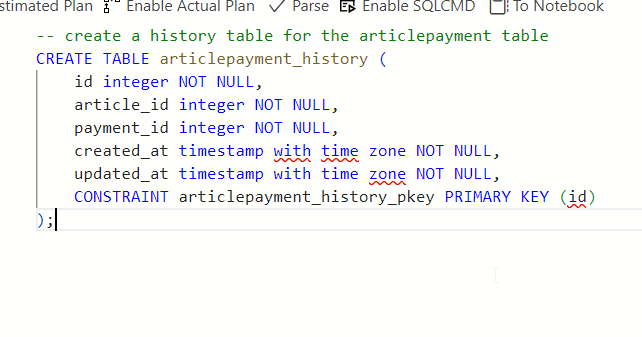
    In many cases, I struggle to use an AI well. The public ones don’t see my schema, so if I were to prompt this in Copilot or some equivalent, I’d have to include my schema. If I don’t, I get something like this:

    2024-01-02 14_43_10-● SQLQuery_1 - SQL 2019 sandbox - Azure Data Studio

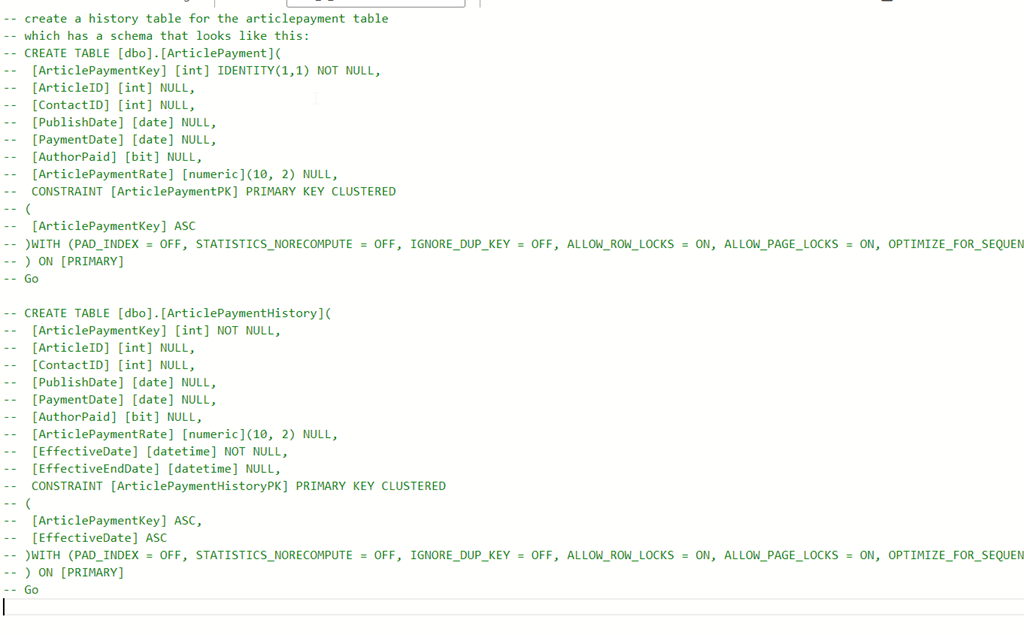
    If I include the schema (annoying, pasted from SSMS scripting and then commented out and edited, I get something that works, but I get a line at a time and have to accept each line.

    2024-01-02 14_45_10-● SQLQuery_1 - SQL 2019 sandbox - Azure Data Studio

    Thoughts on the Prompt EAP AI

    The EAP AI version of SQL Prompt is reading my schema, as SQL Prompt does, and then running my prompt through an AI LLM with the schema to decide what I mean. In this case, it knows temporal tables are system versioned ones. It produces good code there. Really, this has done the search engine lookup of how to convert a table to temporal, copied the code, and then edited it for my situation.

    If I ignore the temporal aspect and ask for a history table, it creates what I’d do, which is a copy of the table. If I need this altered, it does a good job if doing the edits. Using a little English here, instead of manually editing, actually worked pretty efficiently for me. I’d know what prompts to use now, and I can go back in my prompts copy them, and alter them for other tables.

    Even better, I asked: “create history tables for all article tables”

    I got the code below, which is pretty cool. This is a subset of related tables to articles, not all the tables in my database. Comments from Prompt at the top and then the code.

    /*  

                These scripts will create new tables named 'ArticlePaymentHistory', 'ArticlesHistory', 'ArticleAuthorHistory', 'RatingsHistory', 'UserRatingHistory' which are copies of 'ArticlePayment', 'Articles', 'ArticleAuthor', 'Ratings', 'UserRating'.

                It assume that you want exactly the same structure as the respective tables including all the columns and their types.

                The difference is that all columns in these history tables will NOT BE NULLABLE with an additional column 'ModifiedDate' that defaults to the current date and time.

                It does not copy the data from the original tables. If you need that too then make sure first none of your records from these tables have null

                records for any of the columns because now we have made all columns as 'NOT NULL' in the history tables.

            */

    CREATE TABLE dbo.ArticlePaymentHistory
    ( ArticlePaymentKey  int       NOT NULL
    , ArticleID          int       NOT NULL
    , ContactID          int       NOT NULL
    , PublishDate        date      NOT NULL
    , PaymentDate        date      NOT NULL
    , AuthorPaid         bit       NOT NULL
    , ArticlePaymentRate numeric   NOT NULL
    , ModifiedDate       datetime2 NOT NULL DEFAULT GETDATE ());
    CREATE TABLE dbo.ArticlesHistory
    ( ArticlesID          int       NOT NULL
    , AuthorID            int       NOT NULL
    , Title               char      NOT NULL
    , Description         varchar   NOT NULL
    , Article             varchar   NOT NULL
    , PublishDate         datetime  NOT NULL
    , ModifiedDate        datetime  NOT NULL
    , URL                 char      NOT NULL
    , Comments            int       NOT NULL
    , ReadingTimeEstimate time
    , CreatedDate         datetime2 NOT NULL
    , ModifiedBy          nvarchar  NOT NULL
    , HistoryModifiedDate datetime2 NOT NULL DEFAULT GETDATE ());
    CREATE TABLE dbo.ArticleAuthorHistory
    ( ArticleAuthorKey int       NOT NULL
    , ArticleID        int       NOT NULL
    , ContactID        int       NOT NULL
    , AuthorOrder      tinyint   NOT NULL
    , ModifiedDate     datetime2 NOT NULL DEFAULT GETDATE ());
    CREATE TABLE dbo.RatingsHistory
    ( RatingKey    int       NOT NULL
    , ArticlesID   int       NOT NULL
    , RatingDate   datetime2
    , Rating       tinyint   NOT NULL
    , UserKey      int       NOT NULL
    , ModifiedDate datetime2 NOT NULL DEFAULT GETDATE ());
    CREATE TABLE dbo.UserRatingHistory
    ( UserRatingKey int       NOT NULL
    , UserID        int       NOT NULL
    , ArticleID     int       NOT NULL
    , Rating        numeric   NOT NULL
    , ModifiedDate  datetime2 NOT NULL DEFAULT GETDATE ());

  • Clearing Intellisense in SQL Prompt

    I got this question from an account rep: if a customer is using SQL Prompt and a snippet, for example AT, that was also used as an alias, is there a way to avoid it triggering the snippet or do they just avoid hitting the tab key?

    It’s a good question. Let’s see how to deal with this.

    This is part of a series of posts on SQL Prompt. You can see all my posts on SQL Prompt under that tag.

    The Scenario

    Say I have this code:

    2023-12-01 16_36_26-SQLQuery1.sql - ARISTOTLE_SQL2022.sandbox (ARISTOTLE_Steve (80))_ - Microsoft SQ

    Notice I have an alias that is the same as a snippet, in this case AT. Seeing this pop up is annoying, but there are ways to avoid getting concerned about this.

    First, the Esc key will get rid of the intellisense popup. Pressing escape at this point brings me back to this:

    2023-12-01 16_36_18-SQLQuery1.sql - ARISTOTLE_SQL2022.sandbox (ARISTOTLE_Steve (80))_ - Microsoft SQ

    My other option is to type a ., essentially keep typing. If I do that, I get this:

    2023-12-01 16_39_10-SQLQuery1.sql - ARISTOTLE_SQL2022.sandbox (ARISTOTLE_Steve (80))_ - Microsoft SQ

    The same thing if I had a longer alias. Here I’ve added 2 characters, but if I type the 3rd, the snippet goes away and I get the table. I could hit tab here to fill this in or type the s.

    2023-12-01 16_39_32-ObjectDefinitionBox

    The other thing to do is raise the time for intellisense if it’s popping up too quickly and annoying you. I don’t know the default (nor do I want to reset lots of stuff), but here I’d set it to 100ms, which is a nice delay for me. I find 500 too long. Of course, you can CTRL+space to pop it open.

    2023-12-01 16_41_10-SQL Prompt – Options

    If you haven’t tried SQL Prompt, download the eval and give it a try. I think you’ll find this is one of the best tools to increase your productivity writing SQL.

    Video Walkthrough

    I made a video of getting rid of intellisense. You can also see all my SQL Prompt Tips.