Tag: sql server

  • SQL Server 2017 RC1 is Here

    And I’ve got it.

    2017-07-17 10_33_19-SQLQuery1.sql - 192.168.1.210.master (sa (52))_ - Microsoft SQL Server Managemen

    Glenn Berry posted a a link to the MSDN blog and almost immediately a note that the link was still the CTP. I decided to fire up my Ubuntu install and check. No updates there, though a few people reported Docker had the new bits.

    A short while later, the Windows link was correct, and my Linux update worked.

    I did re-register the repository

    curl https://packages.microsoft.com/config/ubuntu/16.04/mssql-server.list | sudo tee /etc/apt/sources.list.d/mssql-server.list

    And then the rest was the same as previous updates. Quick and easy, a few command line things to type and I was updated.

    Now I need to get Docker working, since I’m betting we’ll see updates and changes there faster than anywhere else.

  • Database Mirroring Needs FQDNs

    A quick basic post, and one that I’ve forgotten. Since blogging is a good way to remind myself of things, here goes.

    I was testing Database Mirroring (DBM) recently for an upgrade situation. I’ve set up it up in the past, but since it’s deprecated, I’ve moved on to working with Availability Groups (AG) for the most part. However, mirroring might still be in use for you, or you’re looking to perform a simple rolling upgrade, and DBM works well.

    I restored a database on a new instance, opened the firewalls for 5022, and then went through the mirroring wizard. Once I was done, I enabled mirroring on the secondary database (the one restoring) and that worked fine.

    Then I ran this on the primary:

    ALTER DATABASE Baseball SET PARTNER = 'TCP://192.168.1.201:5022'

    After a few minutes, I got an error:

    Msg 1418, Level 16, State 1, Line 10
    The server network address “TCP://192.168.1.201:5022” can not be reached or does not exist. Check the network address name and that the ports for the local and remote endpoints are operational.

    I tried all sorts of things, including shutting off firewalls, and disabling the rebuilding mirroring. My endpoints were fine, the domain accounts running the instances had access, but it wouldn’t work. I tore down mirroring and added it back, verifying each machine could see the other by name. I tried again.

    ALTER DATABASE Baseball SET PARTNER = 'TCP://SQL02:5022'

    I knew I had a problem when this took more than 5sec to respond. Again, an errror.

    Msg 1418, Level 16, State 1, Line 10
    The server network address “TCP://SQL02:5022” can not be reached or does not exist. Check the network address name and that the ports for the local and remote endpoints are operational.

    Finally I tore things down again, deleted endpoints, but this time I connected to the instance with an FQDN and configured things. I made I connected to the mirror with an FQDN as well. Finally things worked:

    ALTER DATABASE Baseball SET PARTNER = 'TCP://SQL02.HOME.XXXXX.COM:5022'

    I must have read the documentation numerous times, each time reading the FQDN, but somehow thinking that couldn’t be the issue in a small network.

    Hopefully this blog will help me remember.

  • SQL Server is Lagging a Bit

    I don’t expect this to last, or I hope it doesn’t, but SQL Server is lagging behind. I ran across a short piece on the SQL:2016 standards, and I know these standards aren’t necessarily an important consideration for most of us when choosing a database. The standards are a compromise from many industry professionals working together. However, they do influence the vendors a bit. The way the list is written makes me wonder if Oracle provides more input and resources, or exercises more influence than other platforms. I hope not.

    In any case, I would expect that Microsoft to be able to make change and catch up quickly with their rapid engineering process. At least, they will if they want to, which means, do these things matter do you as a customer? Or maybe, do these things matter to the really large customers that use, or might switch to, SQL Server?

    I’m not sure I understand all of the changes to the standards, but row pattern recognition looks like some sort of LIKE-across-a-row feature. I know there are people that might need this, but I worry about the performance implications of doing this. As we move to larger data sets, perhaps those that come from sensors and other large data producers, this might be an important feature. Hopefully the implementation perform well.

    The one thing I expect is more JSON support. As much as I saw the value of XML and hated working with it, I see JSON as a better format, and one that developers use extensively. I do hope that SQL Server gets more extensive JSON support, though I expect plenty of people with a native JSON type to just start stuffing blobs in a column and spending lots of CPU cycles trying to de-serialize the values for queries. If this a native JSON type is an intermediate store before moving the data into a better format, I think this makes sense. However, we can’t prevent poor choices from database designers, and I would expect consultants to love this, as I’m sure more JSON creates more issues for them to fix.

    I am glad that date/time work gets some attention in the standards, but since I can never remember the actual syntax and values, I don’t really care. I’ll depend on SQL Prompt to get me through changes here, and then try to get all data in yyy-mm-dd format so I am not confused. LISTAGG is interesting, but I expect JSON to be used more. There are other changes, and I’m not sure how valuable they are for most data professionals.

    Adding small functions and features, even those that are used rarely, are ways that we can dramatically improve developer productivity. Looking back over a career, I’m glad that I don’t need to write sorting routines anymore. Using an ORDER BY or x.Sort() is a great time saver. There are certainly some poor implementations of some features, but we can often override and write our own implementations if needed. Or find workarounds that will meet our needs.

    I do hope to see the T-SQL language grow and expand over time, with regular enhancements that might help us work with data in easier and more efficient ways in future versions.

    Steve Jones

    The Voice of the DBA Podcast

    Listen to the MP3 Audio ( 4.7MB) podcast or subscribe to the feed at iTunes and Libsyn.

  • Adding Performance Counters back for SQL Server

    I had a strange situation the other day, where a number of things went wrong with my instance. First, I lost permissions to detached databases. The SID was listed in the file permissions, but apparently unlinked to an account.

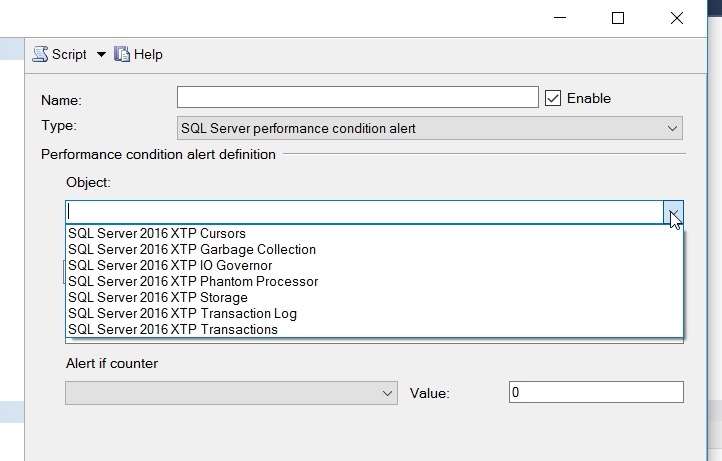
    Next, I went to add an alert, and I only had the XTP counters.

    2017-06-14 12_16_20-SQLQuery4.sql - (local)_SQL2016.sandbox2 (PLATO_Steve (63))_ - Microsoft SQL Ser

    The counters are also missing in Performance Monitor. What is interesting is that I show the correct SQLAgent counters for each of my three instances.

    2017-06-16 08_54_19-Add Counters

    A quick search found me this blog on MSDN, where it recommends the following:

    unlodctr mssqlserver
    
    lodctr perf-mssqlserversqlctr.ini

    I had a named instance, so for me I entered:

    unlodctr mssql$sql2016
    
    lodctr perfMSSQL$SQL2016sqlctr.ini

    from an elevated command prompt. Running the last command again shows the counters loaded.

    2017-06-16 09_19_26-cmd (Admin)

    I also checked my registry, which appeared to be fine:

    2017-06-16 09_08_38-Adding Performance Counters back for SQL Server - Open Live Writer

    I next found another blog that noted I might need to resynch WMI, so I ran winmgmt, using the PID from Task Explorer (details tab):

    2017-06-16 09_24_32-cmd (Admin)

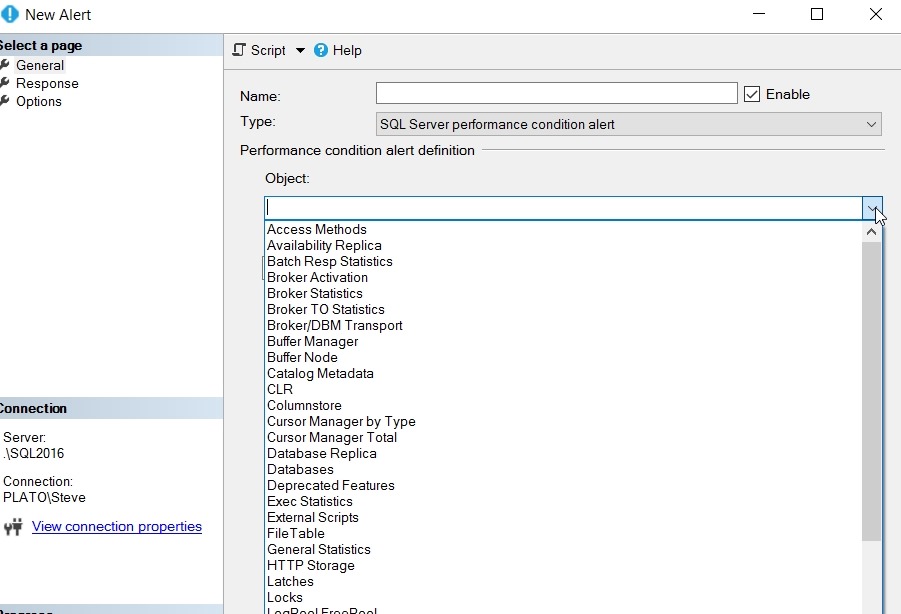
    I didn’t see counters at first, but I restarted the instance. Once that was done …

    2017-06-16 09_23_29-New Alert

    A nice fix, and one I probably won’t forget after this blog.