Tag: sql server

  • Restore a BACPAC–#SQLNewBlogger

    Another post for me that is simple and hopefully serves as an example for people trying to get blogging as #SQLNewBloggers.

    I needed to get the WideWorldImporters sample database for a project and noticed that there was a BACPAC available. I downloaded it and needed to restore this as a database. At least, that’s what many people would think.

    However, if you go to the restore dialog, and select Device and then pick your location, there’s no filter for a .bacpac. In fact, if you choose one, it won’t restore. You’ll get the “no backupset selected” error.

    2017-05-30 08_51_40-Locate Backup File - PLATO_SQL2016

    How do you restore a .bacpac? Well, you import it. If you right click the databases folder in SSMS, you’ll see this:

    2017-05-30 08_54_40-SQLQuery16.sql - (local)_SQL2016.model (PLATO_Steve (60))_ - Microsoft SQL Serve

    The BACPAC is a DACPAC with data, in other words, a data-tier application with the data included. Once we click this, we get a wizard. Of course, there’s a introduction screen.

    2017-05-30 08_57_17-Import Data-tier Application

    Then we get to choose the file, or import one from Windows Azure storage. I’ll limit the image here to the relevant parts. You can see below I’ve selected the file I downloaded.

    2017-05-30 08_57_33-Import Data-tier Application

    Once I do that, the next screen allows me to set the database name and the paths. I shot this screen, and then changed the name, but forgot to reshoot. However, this is where you’d set the paths for files and change the name of the database.

    2017-05-30 08_58_30-Import Data-tier Application

    You get to verify your settings. I know many people blow by this screen, but make sure you double check this is what you want. Notice I moved the data, but not the log. I went back and fixed things, again, forgetting to reshoot the image.

    2017-05-30 08_59_25-Import Data-tier Application

    Once you click Finish, the import begins. This can take time, depending on the system you use.

    2017-05-30 08_59_31-Import Data-tier Application

    However, you get detailed progress. As you can see, I get a lot of details on what happened. There’s plenty more below this.

    2017-05-30 09_06_28-Import Data-tier Application

    But it worked, and I have my data.

    2017-05-30 09_07_28-SQLQuery1.sql - (local)_SQL2016.WideWorldImporters (PLATO_Steve (59))_ - Microso

    You should practice this. It’s simple, but know how to import a BACPAC. You never know when you might get one and someone is at your desk. Having to google to import a simple database is a little embarrassing.

    SQLNewBlogger

    This is a simple post, one that took longer to write than setup and perform, but a good skill to showcase. If you’re looking for something to blog, create a bacpac on another instance and import it into your local SQL Server.
  • Restore to a point in time–#SQLNewBlogger

    Another post for me that is simple and hopefully serves as an example for people trying to get blogging as #SQLNewBloggers. This is also a part of a basic series on git and how to use it.

    One of the things I had to show recently was a restore to a point in time, and I needed to actually lookup syntax. That’s a good excuse for a #SQLNewBlogger post, so here we go.

    When you restore, the default is to restore to the end of the backup file, whether full, diff, or log. In the latter, you have the option to stop early, and only restore part of the log. In doing this, you have two choices:

    • restore to a time
    • restore to a marked transaction

    Relatively few of us use marked transactions, but they can be useful. However, this post looks at time.

    Let’s do a few things and show how this works.

    Setup

    The first thing I need to do is get a database, with some data. I’ll create a database, add a table with a row, and then back up the database.

    CREATE DATABASE RestoreTime;
    GO
    USE RestoreTime
    GO
    CREATE TABLE BackupLog
    ( logdate DATETIME2 DEFAULT SYSDATETIME()
    , logmessage VARCHAR(200)
    )
    -- add a message
    INSERT dbo.BackupLog
            ( logdate, logmessage )
        VALUES ( SYSDATETIME(), '1st Log, before a backup' )
    GO
    BACKUP DATABASE RestoreTime TO disk = 'RestoreTime.bak'
    GO

    Next we want to add some data to the table and get some log records. In this case, I’ll use a simple loop to add a new row to the table every second. This gives me some points in time to look for and use to show I  am restoring to a point in time.

    DECLARE @seconds INT = 10,
            @starttime DATETIME2 = SYSDATETIME();
    
    WHILE (SYSDATETIME() < DATEADD( SECOND, @seconds, @starttime))
     BEGIN
      INSERT dbo.BackupLog
            ( logdate, logmessage )
        VALUES ( SYSDATETIME(), 'Log record entered at ' + CAST(SYSDATETIME() AS VARCHAR(30)) )
      WAITFOR DELAY '00:00:01'
     END
    
    GO
    BACKUP LOG RestoreTime TO DISK = 'RestoreTime.trn'
    GO

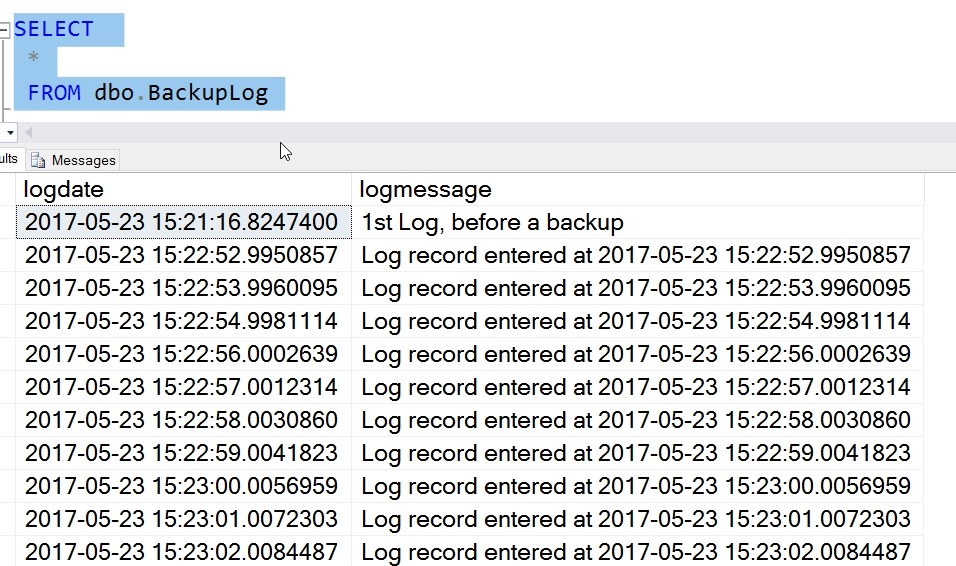
    I’ve added data, and my table looks like this:

    2017-05-23 15_23_12-SQLQuery8.sql - (local)_SQL2016.RestoreTime (PLATO_Steve (57))_ - Microsoft SQL

    My log backup contains all these records. If I restore the full backup and log now, by default I’ll end up in this state, with all these rows in my table. However, what if I want to only get the first 5?

    I can use the STOPAT syntax in my restore. I start by restoring the full with NORECOVERY and then the log. However, in the log, I’ll choose a time that is after row 5, but before 6. In this case, that’s 2017-05-23T15:22:57. Here’s the code:

    USE master
    GO
    RESTORE DATABASE RestoreTime FROM DISK = 'RestoreTime.bak' WITH NORECOVERY, replace
    GO
    RESTORE LOG RestoreTime FROM DISK = 'RestoreTime.trn' WITH RECOVERY, STOPAT = '2017-05-23T15:22:57'
    GO
    USE RestoreTime
    GO
    SELECT 
     *
     FROM dbo.BackupLog

    I have my results below

    2017-05-23 15_31_10-SQLQuery8.sql - (local)_SQL2016.RestoreTime (PLATO_Steve (57))_ - Microsoft SQL

    Only the log activity before this time is restored.

    SQLNewBlogger

    After I’d looked up the syntax, I spent only about 10 minutes setting up the demo and getting this ready. Practice skills and write about it. Show your next employer you are always learning and working.

  • Listening and Taking Action

    One way most of us would like to work is to have others listen to our concerns, our requests, our requirements, and then take action to help us. One of the principles of DevOps is just this. We work together and optimize the entire system, increasing the flow of work, and not just trying to ensure our particular task or part is improved. I would hope that most of us would actually take time to listen, evaluate what we hear, and then move forward in a way that is a good decision for both parties. We certainly might debate about what action makes sense, but I would hope we could some to some consensus and decision.

    Microsoft is listening and responding as well. They aren’t building SQL Server based on everything we file on Connect or complain about, but certainly they are listening to some of our concerns and requests. There is a good post that look sat some of the community driven enhancements, which are being included into SQL Server 2017. These are different customer and community requests that were given some attention and added to SQL Server 2017.

    These don’t seem like big changes to me, but as I read through them, a few seem to go quite deep into the engine, and I’m sure there was quite a bit of testing to get these completed. You can test them in SQL Server 2017 today, helping to ensure they work correctly in the final product. Some of these will change the way you run backups or diagnose issues, perhaps even enough to consider an upgrade.

    I especially like that performance of smaller databases is addressed with backup improvements. I would still guess that most of the SQL Server databases out there are smaller than 100GB, maybe substantially smaller, and while we may consolidate and change hardware, we need these systems to perform well. The large, 100TB database changes are nice, and I know some customers need these improvements, but most of us don’t. Even though the percentage of people with 1TB systems grows regularly, it’s still a minority, so kudos to Microsoft for doing some work here.

    Not every highly rated Connect item is addressed. The string or binary data truncated message isn’t changed, and that’s been highly rated for years. However, the top JSON request made it into SQL Server 2016, and there are other items in the most voted on list that haven’t been addressed. I understand, though I don’t always like the way Microsoft looks at the product. I can relate their decisions to my own when building software, realizing that the customer doesn’t always have the best view of what makes sense for commercial viability. However, I’d also like to see the platform continue to evolve and make development and administration easier for all of us.

    I’ll keep voting on, and creating Connect requests as I see a need, and I’d encourage you to do the same. Think about what you are really asking for and decide if it makes sense for large numbers of people, but continue to participate and let Microsoft know what changes are needed. Your voice can make a difference, so please use it in a constructive and positive way.

    Steve Jones


  • Quick Graph Database

    There’s a sample to work through here: https://docs.microsoft.com/en-us/sql/relational-databases/graphs/sql-graph-sample

    I decided to try this in CTP2 and just see how it works. I didn’t do much, but I added a node and an edge with this code:

    CREATE TABLE Person (ID INTEGER PRIMARY KEY, name VARCHAR(100)) AS NODE;
    CREATE TABLE friends (StartDate date) AS EDGE;

    Next I added a few values, based on the samples.

    INSERT Person
     VALUES (1, 'Steve')
          , (2, 'Andy')
          , (3, 'Brian')
          , (4, 'Leon')
          , (5, 'Jon')
    GO
    INSERT Friends VALUES ((SELECT $node_id FROM Person WHERE id = 1), (SELECT $node_id FROM Person WHERE id = 2),'3/10/2001')
    INSERT Friends VALUES ((SELECT $node_id FROM Person WHERE id = 3), (SELECT $node_id FROM Person WHERE id = 4),'5/1/2000')
    INSERT Friends VALUES ((SELECT $node_id FROM Person WHERE id = 1), (SELECT $node_id FROM Person WHERE id = 3), '3/1/2001')

    Then I ran query.

    SELECT *
    FROM Person p1, Friends, Person p2
    WHERE MATCH (p1-(friends)->p2)
    AND p1.name = 'Brian';

    What does this give me? First, these columns with this data. It’s a wide result set, so I have the column and data listed after it, even though this is really a 1 row table.

    $edge_id_5F276FF32E2B492A96858AC68B530F09                                               
    
    {"type":"edge","schema":"dbo","table":"friends","id":1}
    
    $from_id_DE63E53A3F4749C2980FC989BC2E5405                                            
    
    {"type":"node","schema":"dbo","table":"Person","id":2}                                              
    
    $to_id_19F4532DDEC74B22876DCCFBB24797BE                                                 
    
    {"type":"node","schema":"dbo","table":"Person","id":3}                                              
    
    StartDate  
    
    2000-05-01
    
    $node_id_D004B78ADB644588BE4B9E337823356A                                            
    
    {"type":"node","schema":"dbo","table":"Person","id":2}
    
    ID
    
    3
    
    name                                                                                                 
    
    Brian
    
    $node_id_D004B78ADB644588BE4B9E337823356A                                        
    
    {"type":"node","schema":"dbo","table":"Person","id":3}   
    
    ID
    
    4
    
    name
    Leon

    What does all that mean? No idea. Clearly there is JSON that’s returned here and can be deserialized to gather meanings. Is this useful? I think graphs solve a certain set of problems very well, and more efficiently than relational systems. Certainly I could implement a graph structure relationally, but at scale I’m not sure the queries would be as easy to write or run as quickly.

    I don’t know if I’d use a graph structure in any of the problems we try to solve in the SQLServerCentral app, but who knows. Maybe we would if we could.

    This is just another option for SQL Server, another tool in your toolbelt. Should you use it? I don’t know, but I’d recommend that if you think you have a complex relationship structure, maybe lots of FKs internal to a table or you are modeling relationships, learn more about GraphSQL and how graph databases work and build a POC. I’m not sure when the SQL Server implementation will be production ready, but it doesn’t hurt to test and learn a bit if you have the chance.