Tag: sql server

  • Using DBCC Clonedatabase

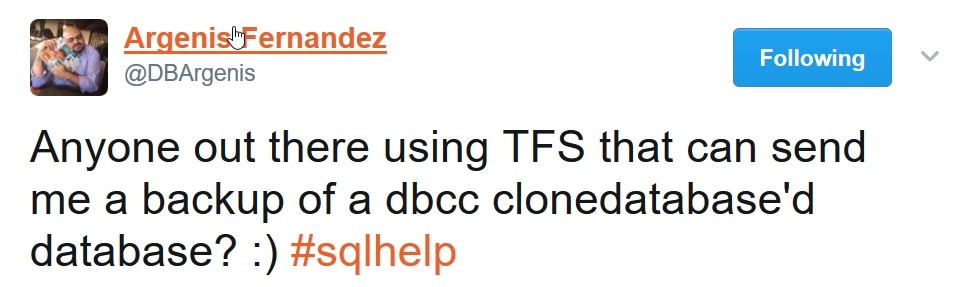
    I haven’t messed with the new DBCC CloneDatabase option in SQL Server 2014/12016 (depending on patches), but recently I saw this:
    2017-04-28 17_39_32-Argenis Fernandez on Twitter_ _Anyone out there using TFS that can send me a bac

    On a quiet Friday afternoon, this seemed like a good time to experiment. We (Redgate Software) have a salesdemo VM that we use to show various Redgate products to customers and clients. On the VM, we have a TFS install that shows how we plug into that platform.

    We have a slick demo system on EC2 where I can fire up a self-service VM for use anytime. Since DBCC CloneDatabase needs recent SQL Server versions, I had to use that. My export of the demo VM from late last year is SQL 2012 Sad smile.

    Once the system was up, I found the SQL instance that hosted the TFS databases and connected with SSMS. Then what?

    I ran a quick search and found the MS support article: How to use DBCC CLONEDATABASE to generate a schema and statistics only copy of a user database in SQL Server 2014 SP2 and SQL Server 2016 SP1

    This explains that the basic syntax is

    DBCC CLONEDATABASE (source, target)

    The source is the database to clone, and the target is the new database you want created. Using that, I quickly ran this twice, once for the tfs_config database and once for the tfs_defaultcollection db. I used create names for the targets.

    DBCC CLONEDATABASE (tfs_config, argenistfs_config)
    
    DBCC CLONEDATABASE (tfs_defaultcollection, argenistfs_defaultconfig)

    With these database, I ran backups and uploaded these to a share for Argenis to use. The clones contain schema and stats, but no data, so they’re small. The live databases are a few GB, but the clones are small.

    2017-04-28 17_49_58-Public

    I haven’t used the cloned databases for anything, but there are articles out there that will help you to use this to work on issues in your main system. SQL Performance has one from Erin Stellato and so does Brent Ozar.

    This is going to be one of those tools that will be helpful for DBAs in the future, so play around with it.

  • Balloons and Data

    This editorial was originally published on Aug 8. 2013. It is being re-run as Steve is out of the office.

    We see a lot of questions at SQLServerCentral repeated over the years as workers new to the platform encounter some of the issues that many of us have dealt with repeatedly over the years. One of the more common questions that I see in the SQLServerCentral forums has to do with tempdb growth.

    Many people coming to the SQL Server platform realize tempdb is a workspace, but they don’t always understand how it works. Many times I see questions where people don’t understand why tempdb will grow from it’s default size. Even more surprising is that they don’t understand why it doesn’t shrink back to the default size. After all, it contains temporary information, and when it’s not being used, the size should shrink, right?

    If only that were true, it would make administration simpler, though performance might be worse. Many people view the files in a computer like balloons. We add data and they grow. We remove data, and they shrink. However that’s not the model for SQL Server files. Our mdf/ldf/ndf files are allocations, and once we allocate space, we don’t remove it if no data is present. The allocations are available for the next time we need them, minus the time we spent requesting and receiving the allocation from the Operating System.

    The space you need for tempdb is the peak space you need for the largest set of temporary operations in your workload. Even if all your data sets are small, say 100kb, if you have 1000 of them occurring at once, you’ll need 100MB of space. With sorts, intermediate worktables, and more, you could easily have an average data set above 10kb, which is why your tempdb size might need to grow.

    Just like with any other database, you need to monitor the size and load for tempdb. Adjust it as needed, based on your requirements, so that it will be properly sized each time to start the instance. The administration level isn’t high for tempdb, as long as you have monitoring in place and you periodically perform the administration to appropriately size your system.

    Steve Jones

  • Starting to Use SQL Server 2017

    We’ll have a new version of SQL Server this year. If you missed the Data Amp keynote, in it Scott Gu announced the name as SQL Server 2017, which I assume means we’ll have installable RTM bits sometime this year. Maybe in June, maybe August, maybe later. In any case, there are some interesting changes coming, though not a ton. We will get a new platform (Linux) and certainly some nice improvements in a few areas, but overall a limited release. Given this will be a year or so after the last one, that’s not surprising.

    This rapid release cycle means that all of us will support more versions of SQL Server. I don’t know many organizations that wholesale upgrade all their servers. The last time I saw that at any size was in SQL Server 2000, and even then it was painful. Since then it seems many organizations will add some instances of new versions, but continue to support old versions. The more people I talk to, the more I think the ten year rule does exist in many companies. I met someone years ago that said their company (Fortune 100) expected any server installed to run for ten years. Period.

    That seems to be the case. Lots of people still have SQL 2005, or at least SQL 2008 instances. A few SQL 2000, and certainly newer versions, but a mix. Keep that in mind, as most of your companies will move forward with new work even as you support old server. This week I wanted to ask, when do you think you’ll have SQL Server 2017 in production.

    Realistically, when will you have a 2017 platform running a live workload. I don’t care how big or small, Windows or Linux, bare metal or in a container. When will you start to use resumable index rebuilds, graph structures, adaptive query processing or more? Will it be in 2017? 2018? For budget or other reasons, later than that?

    I’m at an interesting place. We still run SQL 2008 at SQLServerCentral, and it works fine. The site needs a basic relational system, though certainly some of the T-SQL changes in 2012+ would be welcome and make some code easier to write. The thing is, code is already written and most things work. We’re debating going to 2016, but I wonder if we shouldn’t just aim at 2017, get one more version ahead, and delay the next upgrade for another decade. I’m certainly tempted as most of the work we through at the database is simple relational work that really would run on SQL 2000 if it had to.

    Regardless of when you might upgrade, are you interested in doing so? Anything catch your eye in the new version? Or have you not even bothered to pay attention? All valid answers, and I’m interested in your view of the new platform.

    Steve Jones

  • SQL Server on Linux is Just SQL Server

    I’ve been working with the SQL Server on Linux (SSoL) version for quite some time, almost a year. In all of that time, I’ve for the most part found that SQL Server is SQL Server. When I connect, run demos, check code, almost everything just works. If I didn’t bother to check @@version, this would appear to be just another SQL Server to me. That’s what a new video on Channel 9 shows as well. SQL Server is pretty much the same on both platforms. I’ve tested the Redgate tools and to all of them, SSoL is just SQL Server.

    There are some differences, which is to be expected. Any operations that access the file system and require paths work a bit differently, and for those people that end up administering the product, there will be some changes to get used to. The advanced HA features are similar, but again, some work is required. However, this isn’t all bad. I’m impressed with the apt-get process (I’m testing on Ubuntu), which is way, way easier than any patching or updating process I’ve gone through on Windows. In fact, setting up an Ubuntu VM last year was easy, and installing SQL Server was about as easy as it could be.

    The tooling on Linux isn’t as mature, and I don’t know when we will see a GUI client, but as I move more and more to PoSh or scripting to make changes in SQL Server, I expect more and more people to manage both Windows and Linux versions in the same way. Certainly using SSMS to write queries is a much nicer experience, and I would guess that many developers that might run SQL Server on OSX or Linux will want a Windows VM for SSMS. Of course, since Visual Studio is now on OSX, maybe we’ll see SSMS running natively on other platforms.

    I don’t know how many enterprises will run SQL Server on Linux, but I’m sure there are some that will. I don’t think a lot of organizations will move from Windows to Linux, unless they have loved SQL Server enough to install a single Windows host for the database and want to get rid of it now. I do think lots of developers will run SQL Server on Linux/OSX, especially in containers, where it is really easy to get a container running on their platforms.

    If you’ve experimented with SQL Server on Linux, or you are excited, let us know. If you think your organization might use this platform, let us know as well. I suspect a few of you will just because you can, which is as good a reason as any.

    Steve Jones