Tag: sql server

  • SSoL: Adding disk space with a repartition

    I don’t think most of us need to know Linux, but if you end up managing a system, it’s good to have a little idea of how to get around. This is a short series of posts as I remember the skills I used to have back in university.

    While working with some SQL Server 2017 tests, I ran out of disk space. I tend to size my VMs around 40GB, and that works for some things, but I’ll run out of space.

    2017-06-15 10_09_14-Ubuntu 64-bit SQL Server .210 - VMware Workstation

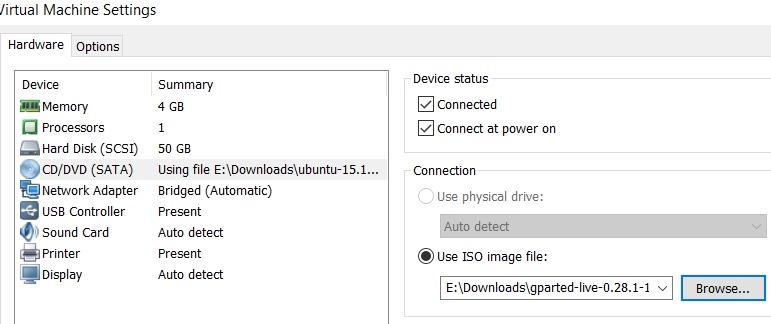
    I needed to expand the VMWare disk. That doesn’t mean Linux sees the space directly, and I had to figure out how to make the partition bigger. I could have added another disk, but I wanted to work through this process. I learned I needed to have an inactive partition, so I download gparted on a live cd and booted to that.

    2017-06-15 11_32_50-Virtual Machine Settings

    Next I started working through a few of the tutorials on Linux partitions. This one on AskUbuntu was helpful, as I ended up having to move my swap partition to the end of the disk.

    2017-06-15 11_42_23-Ubuntu 64-bit SQL Server .210 - VMware Workstation

    GParted isn’t completely intuitive for a Windows guy, but I muddled through it.

    Once I had the operations I wanted, I applied them, and partitions moved.

    2017-07-09 10_57_51-Ubuntu 64-bit SQL Server .210 - VMware Workstation

    I rebooted, and checking the main partition properties, I had space.

    2017-07-09 11_04_59-Ubuntu 64-bit SQL Server .210 - VMware Workstation

    Now, back to SQL Server on Linux.

  • Backup Log to Nul– #SQLNewBlogger

    Another post for me that is simple and hopefully serves as an example for people trying to get blogging as #SQLNewBloggers. This is also a part of a basic series on git and how to use it.

    There are times when you might be working on your demo/lab system and you generate a lot of tranasaction log activity. This isn’t data you want to save, so perhaps you want to remove the activity without saving it.

    There are a few choices:

    1. Run a normal log backup to a file, then delete the .trn file.
    2. Switch to simple mode
    3. Run a log backup to nul

    The first one is easy, but it’s a pain. I have to go to explorer, or open a VM, delete the file once I find it. The second one is what I’d suggest. In fact, as soon as you install SQL on a lab system, set model to Simple.

    The third item is valid, and I ran across this recently. When you use this syntax, make sure you use “nul” and not “null”. We are trying to send to /dev/nul, which is nowhere. If you backup here, then nothing happens. You can use this command:

    BACKUP Log sandbox2 TO DISK = N’nul’

    This will run a backup, and discard all of the backup data. When I say discard, I mean it’s not written anywhere.

    However, this is a real backup. It’s marked as such. This breaks a log chain, and you can do this with a full database backup as well, which means you really need another full backup after this to reestablish a baseline.

    Again, I ran across this, but it’s not what you want to do. If you need to clear the log, use

    ALTER DATABASE xx SET RECOVERY SIMPLE

    ALTER DATABASE xx SET RECOVERY FULL

    and take a full backup.

    More thoughts from Gail Shaw.

  • SSoL: Where are my data and log files?

    I don’t think most of us need to know Linux, but if you end up managing a system, it’s good to have a little idea of how to get around. This is a short series of posts as I remember the skills I used to have back in university.

    This is easily documented, and once you start working, you’ll learn this, and it is documented, but after a few weeks when I actually go into a Linux VM, sometimes I forget. Most of the time I connect with SSMS, and it’s just another server.

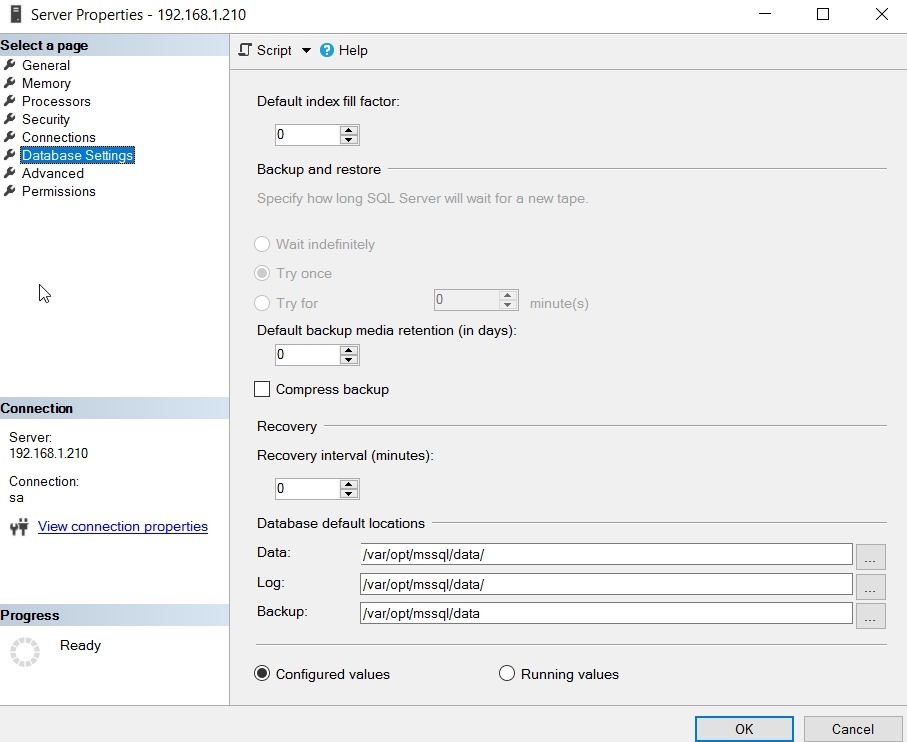
    Data and log files are stored in /var/opt/data. You can see this in SSMS by selecting the properties of the server instance.

    2017-06-15 11_21_18-Server Properties - 192.168.1.210

    If you check the Files tab in a database properties, you’ll also see this:

    2017-06-15 11_22_41-Database Properties - AlwaysEncrypted

    You can also get this in Linux by starting the file manager as root. In a terminal type:

    sudo nautilus

    and enter your password. Then browse to the folder (computer/var/opt/mssql/data) as shown here:

    2017-06-15 11_19_11-Ubuntu 64-bit SQL Server .210 - VMware Workstation

  • Getting Close to the 2017 RTM

    I still can’t believe that we’ll have a new version of SQL Server this year. After speaking at so many events last year, talking about the new features of SQL Server 2016, it seems crazy that there’s a new version coming out a year later. Welcome to the new world of DevOps, fast engineering processes, and the increasing pace of software releases from vendors. We can debate the wisdom or value of this, and you might not like it, but it’s certainly the reality of today.

    The first Release Candidate (RC) for SQL Server 2017 is available this week. The big change for RC1 is that we can now use Active Directory authentication on Linux, and we get SSIS on Linux. There are a few other items, but these are the big ones. I guess SSIS scale out is a big deal for some people as their data load times increase, but I’d think that is a relatively small number of people. I’d also be wary of having clustering support for my ETL workloads, all of which haven’t been designed for that environment. I would see this feature as being more important and valuable over time. For now, let the SSIS gurus develop some patterns and practices that make sense for us to follow.

    There are other new features in SQL Server 2017, and I’d urge you to play with them a bit. Upgrades are always tricky to justify for me, as I’m sure they are for you. If you don’t know how the new features work, or how they might apply to your systems, how can you decide what to do?

    I tend to favor sticking with what works for older systems and moving to new versions for newer systems. Your view might vary, and certainly unless you want to setup SQL Server instances on Linux, I’m not sure 2017 offers a lot over 2016. In fact, I’d accelerate any SQL 2016 instance installations I could to avoid being trapped with SQL 2017 licenses and the chance that price or licensing terms will change. If there were features that made significant advances for my current system, I’d certainly look at SQL Server 2017.

    Since I tend to only move to newer versions when there is a good reason or a new install is being performed, I like the rapid release cadence. With the deployment and testing in Azure, it seems to me the quality of SQL Server keeps increasing, and the rapid releases allow new changes to come out sooner rather than later. With a version every 18 months (my guess at the new pace), I can adopt new features relatively quickly if I think they are beneficial.

    That being said, SQLServerCentral still runs on SQL Server 2008. It works, and we really just would like a core database engine. I do find it strange to work on the 2008 version of T-SQL as some of the data analysis I try to do is harder to write. I’d really like to upgrade and hopefully we’ll make a good enough case to try and move to SQL 2017 late this year or next. Maybe then we can get the chance to play with some graph capabilities and add them to SQLServerCentral, comparing them to good old relational queries in real time.

    Steve Jones

    The Voice of the DBA Podcast

    Listen to the MP3 Audio ( 4.8MB) podcast or subscribe to the feed at iTunes and Libsyn.