Tag: SQLNewBlogger

  • DevOps Basics–Staging and Committing Changes

    Another post for me that is simple and hopefully serves as an example for people trying to get blogging as #SQLNewBloggers. This is also a part of a basic series on git and how to use it.

    In the course of normal work, you’ll change your code files. Git requires that you specify those changes that you want to commit, and those that you don’t. This means I can make changes to a few files, but not commit all those changes.

    For example, let’s say that I add a couple files to my repo. I’ll add the Tables/Log.sql and Views/LogView.sql to my repo. This will give me a status in git that shows these are new files. In this case, I see the folders as they are new as well.

    2017-06-27 21_21_16-cmd

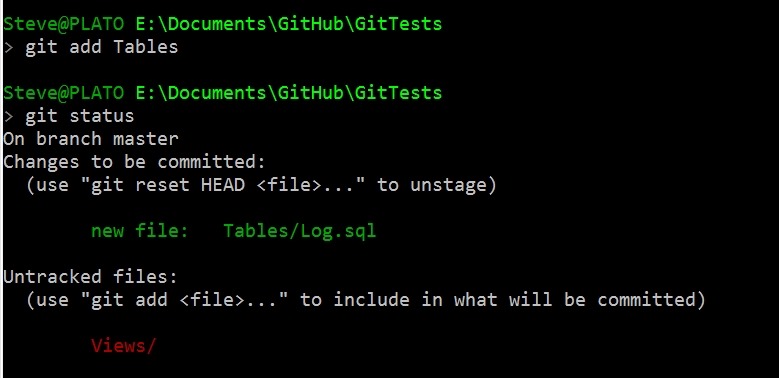
    If I add these files as being tracked, I’ll use “git add Tables” to add that folder and file. I get a new status.

    2017-06-27 21_22_07-cmd

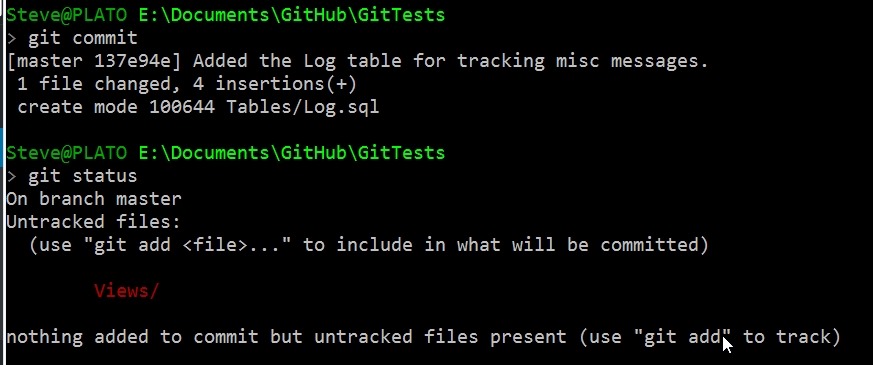
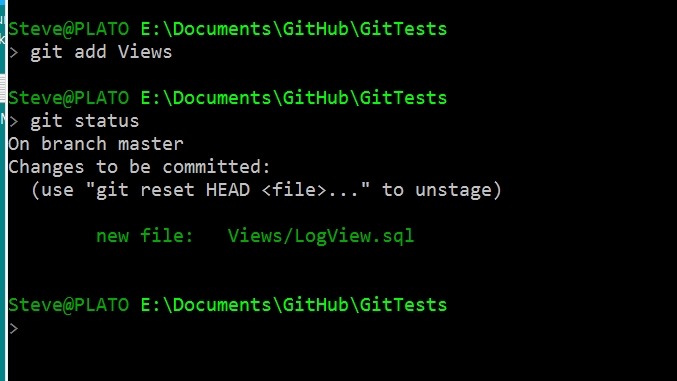
    Here my Log.sql file is being tracked (and the folder) as changes that are staged to be committed. If I commit now, I’ll get just that file added, but not Views\LogView.sql.

    2017-06-27 21_23_40-cmd

    Staged and Changed

    There is one strange thing I’ve run into, at least, strange to me. If I stage my Views folder, I’ll get this:

    2017-06-28 12_12_23-cmd

    Now I’ll change the LogView.sql file, removing the SELECT * and adding columns. When I check the status, I now see the file in both the staged and unstaged areas.

    2017-06-28 12_13_25-cmd

    This is allowed, but if I commit, I’ll get the original version of LogView.sql as it existed when I ran the git add command. See below that after my commit, I still see the modified file.

    2017-06-28 12_15_50-cmd

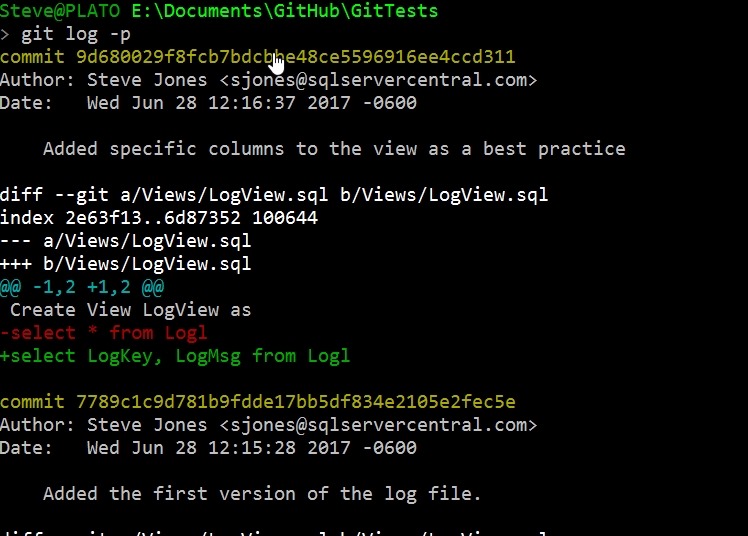
    If  I add and commit that file, I can use git log to see the actual changes. See the line in red with the – is the original line, while the green line with + is the change.

    2017-06-28 12_17_02-cmd - git  log -p

    Git add and git commit are the main ways you’ll commit files. If you have issues with a GUI client, then this is a good way for you to debug and clean up your repo. Knowing the command line is always the best way to truly understand what is happening.

  • SSoL–Elevating Privileges

    I don’t think most of us need to know Linux, but if you end up managing a system, it’s good to have a little idea of how to get around. This is a short series of posts as I remember the skills I used to have back in university.

    One of the things that you might find the need to do on a Linux system is elevate your privileges. By default when we connect and work on Linux, we are working as normal users. We do this in Windows, but when we need more privileges, Windows will give us a UAC prompt. Linux doesn’t.

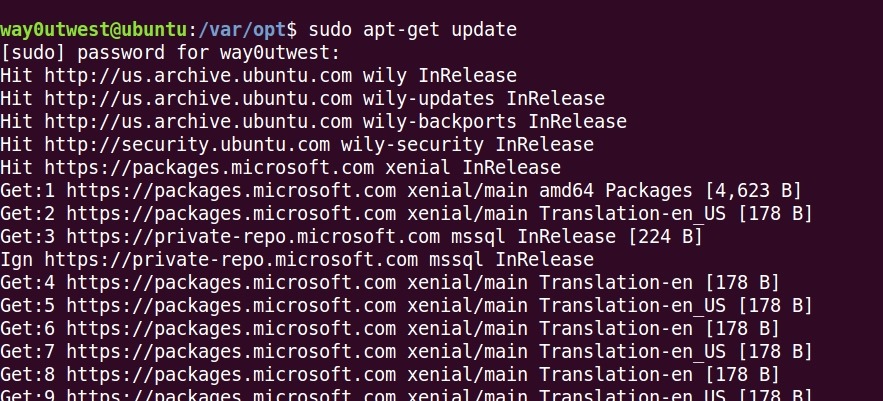
    For example, when I want to check for updates of software, I use apt-get. That doesn’t work for my normal user:

    2017-06-15 09_54_59-Ubuntu 64-bit SQL Server .210 - VMware Workstation

    Instead I need to use sudo to elevate privileges. You prefix a command with sudo, enter the root password, and you get elevated privileges, as shown here.

    2017-06-15 09_57_14-Ubuntu 64-bit SQL Server .210 - VMware Workstation

    If you just enter sudo -i, then you get the shell to switch and all commands execute as root.

    2017-06-15 10_00_09-Ubuntu 64-bit SQL Server .210 - VMware Workstation

    Don’t do this. DON’T. Work as a normal user until you need higher privileges. For the most part you don’t.

  • Move a Stored Procedure to a New Schema–SQLNewBlogger

    Another post for me that is simple and hopefully serves as an example for people trying to get blogging as #SQLNewBloggers.

    One of the things I needed to do recently was move an object. I was testing the WideWorldImporters database and created an object in the dbo schema. That’s the default for me, which is fine. However, in this case I wanted it in a different schema.

    The way to do this is with the ALTER SCHEMA command. There is a TRANSFER option, which takes the original schema and object name.

    In my case, I had the dbo.GetOpenPurchaseOrderCount procedure in my database.

    2017-06-07 14_40_29-SQLQuery1.sql - (local)_SQL2016.WideWorldImporters-RR (PLATO_Steve (53))_ - Micr

    I used this command to move it.

    ALTER SCHEMA Website
    TRANSFER dbo.GetOpenPurchaseOrderCount

    And then verified things moved.

    2017-06-07 14_40_37-SQLQuery1.sql - (local)_SQL2016.WideWorldImporters-RR (PLATO_Steve (53))_ - Micr


    SQLNewBlogger

    This was one of those quick items where I checked the ALTER commands, thinking it was in there. I didn’t see a changeobjectschema procedure, and since this was a new skill, it was a 5 minute blog.

  • Renaming MDF/LDF Files–SQLNewBlogger

    Another post for me that is simple and hopefully serves as an example for people trying to get blogging as #SQLNewBloggers.

    I would guess many people would run into this situation at some point. A developer or DBA creates a database, then decides to rename it, but the logical and physical names aren’t correct. This post will look at how to do this. A couple of notes and then the process below.

    This might not matter to many of you, but in development, I sometimes find I’ll rename a database and then attempt to recreate (or deploy) a new database with the old name. The mdf/ldf files don’t match, and I realize it’s because I’m using defaults.

    However, I’d also say this is an issue in a DR situation. If the filenames don’t seem to match, someone might restore the wrong database or the wrong files. Or worse, think the can delete a file on the file system because there’s no database with that name.

    Renaming the Database

    This is easy. Right click, select Rename.

    2017-06-07 09_38_49-

    Then type the name name. In this case, I’m going from WideWorldImporters-SSDT to WideWorldImporters-RR.

    2017-06-07 09_38_59-SQLQuery1.sql - (local)_SQL2016.msdb (PLATO_Steve (52)) - Microsoft SQL Server M

    That renames the database, but what about the files? If I run this:

    sp_helpdb ‘WideWorldImporters-RR’

    I get this:

    2017-06-07 09_42_00-SQLQuery1.sql - (local)_SQL2016.msdb (PLATO_Steve (53)) - Microsoft SQL Server M

    Not really what I want. I need these mdf/ldf files to be changed. How do I do this?

    I can get to the properties for the database and select the “Files” pane to get a list of files. Here I can change the logical name by clicking that field and typing a new name. I’ve done that here.

    2017-06-07 09_43_29-Database Properties - WideWorldImporters-RR

    However, if I scroll to the right to the File Name column, I can’t change anything.

    2017-06-07 09_43_44-SQLQuery1.sql - (local)_SQL2016.msdb (PLATO_Steve (53))_ - Microsoft SQL Server

    What I need to do is use the ALTER DATABASE command with the MODIFY FILE command. I need to do this twice.

    1. Change the physical file name
    2. Change the logical file name

    Let’s do that. Here’s the code to change the physical name.

    ALTER DATABASE [WideWorldImporters-RR]
     MODIFY FILE
     (   NAME = 'WideWorldImporters-SSDT_Data',
         FILENAME = 'C:\Program Files\Microsoft SQL Server\MSSQL13.SQL2016\MSSQL\DATA\WideWorldImporters-RR.mdf'
     );

    I need to repeat this for the log file and the MOT file. Once I change the names, I get this message.

    2017-06-07 09_48_38-SQLQuery1.sql - (local)_SQL2016.WideWorldImporters-RR (PLATO_Steve (53))_ - Micr

    This is key. If I were to restart my system now, when the database attempted to start and go through recovery, the files would not have been found. Now, I need to change the physical file names.

    To do that, I first need to take the database offline.

    USE master
    go
    ALTER DATABASE [WideWorldImporters-RR] SET OFFLINE

    Then I go to the location of the physical files and rename them in Windows Explorer.

    2017-06-07 09_53_35-DATA

    Now I bring the database online.

    ALTER DATABASE [WideWorldImporters-RR] SET ONLINE

    Once that’s done, I can then use ALTER DATABASE again to change the logical file names.

    ALTER DATABASE [WideWorldImporters-RR]
      MODIFY FILE (NAME='USERDATA_612671E2',
                   NEWNAME = 'WWI_UserData'
                   );


    And run a final sp_helpdb.

    2017-06-07 09_54_13-SQLQuery1.sql - (local)_SQL2016.master (PLATO_Steve (53))_ - Microsoft SQL Serve

    SQLNewBlogger

    An easy task, with a touch of research in Books Online, but not too difficult. This took me about 10 minutes to do, and since I realized this was a good skill, I took screenshots and saved code as I went.

    Then about 10 minutes to write this up.