Tag: syndicated

  • Daily Coping 26 Jan 2023

    Today’s coping tip is to focus on what’s good, even if today feels tough.

    Yesterday was a tough day. I got busy, distracted, had some bad news come up, family needed some care, and I struggled to get work done. On top of that, something I thought would be easy to setup and test for a customer didn’t work at all. I’d made an assumption and my process needs to be redesigned.

    I felt like I wasted a day.

    However, it wasn’t all bad. I took care of my wife, who had surgery recently. I got her lunch and spent a little time chatting with her. I helped my daughter get a few things done before leaving to return to school. I got the dogs outside for a walk and I found time to exercise.

    There were good things, even if it was a tough day.

    I started to add a daily coping tip to the SQL Server Central newsletter and to the Community Circle, which is helping me deal with the issues in the world. I’m adding my responses for each day here. All my coping tips are under this tag.

  • Using SQL Data Compare from the Command Line with a Project

    SQL Data Compare (SDC) is a great way to sync data among tables. It’s a software utility analogous to SQL Compare, but working with data rather than schema. I had a customer ask recently about setting up a SDC project and then calling that from the command line rather than using the GUI and clicking.

    This post looks at how you can call a project from the command line. The project has a WHERE clause in it, so it uses the settings from the project.

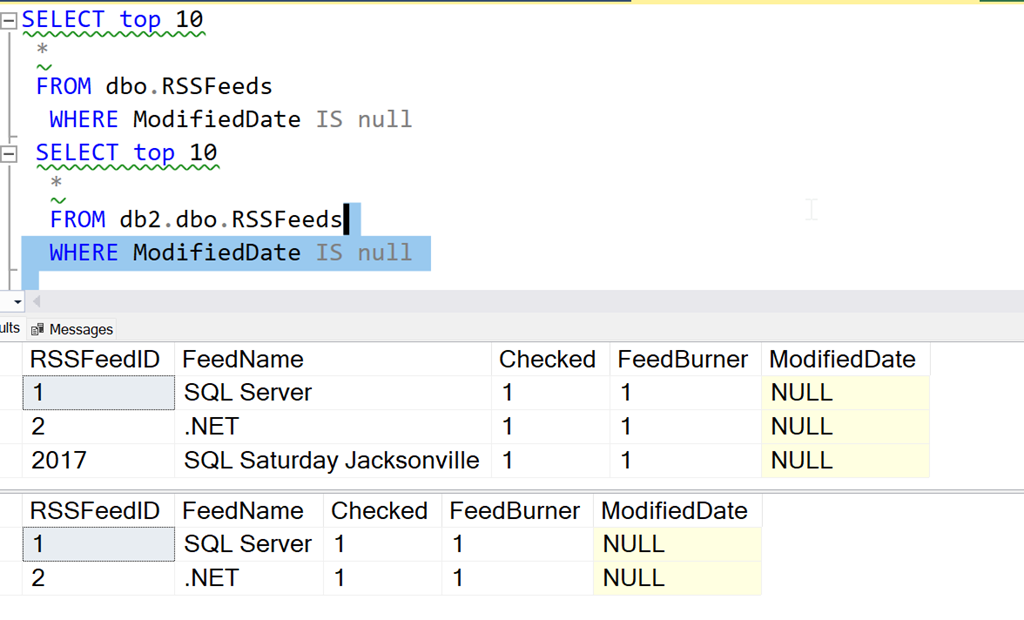
    We have the data shown here, from two different databases. There is 1 row in the first table that is not in the second table (in the second database).
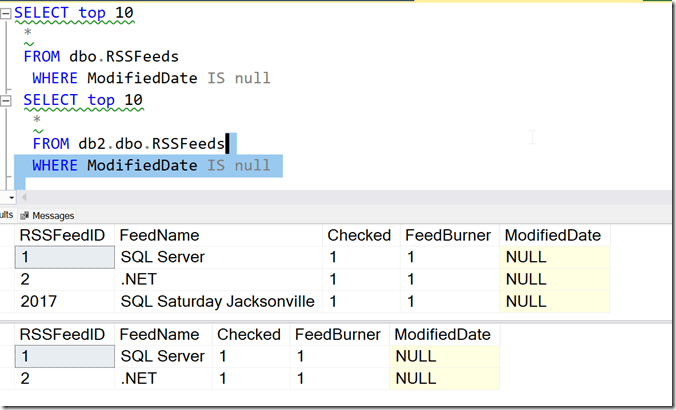
    2023-01-11 10_12_23-SQLQuery3.sql - localhost.db1 (WAY0UTWESTHP_way0u (59))_ - Microsoft SQL Server

    I’ll build a SQL Data Compare project. In this project, I point to these two databases and the tables.

    2023-01-11 10_12_34-SQL Data Compare - C__Users_way0u_OneDrive_Documents_SQL Data Compare_SharedProj

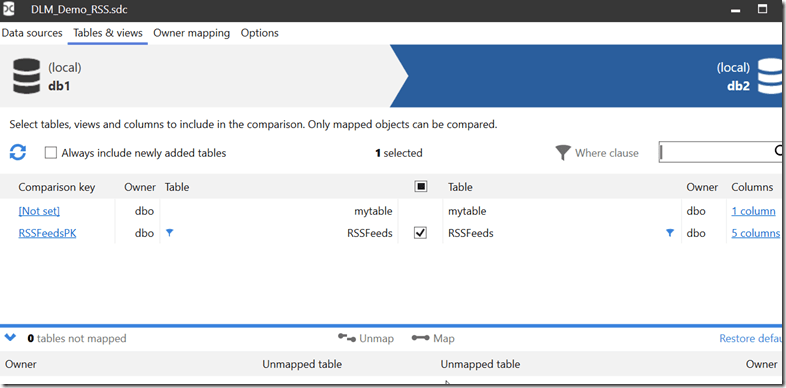
    If I edit the project, I can choose the tables and views tab. Here I see my tables, and I select the dbo.RSSFeeds table.
    2023-01-11 10_24_46-DLM_Demo_RSS.sdc

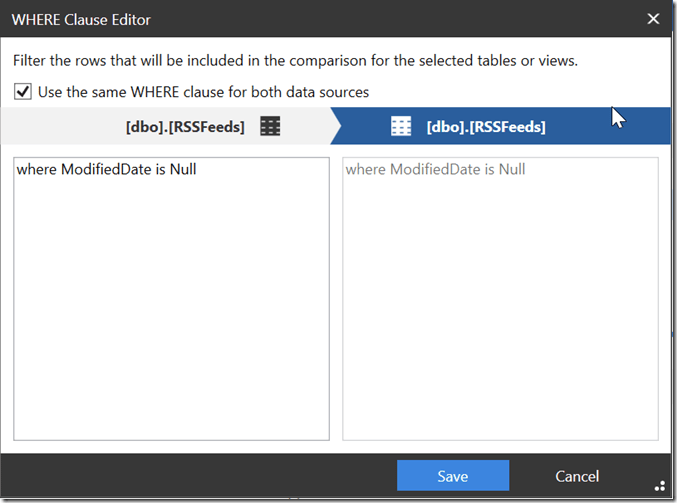
    When I select the row with dbo.RSSFeeds, I can then click the “Where clause” option and get a dialog where I can filter data. Here I can enter the where clause I used in the first query above. I also have the”use the same WHERE Clause” box checked.
    2023-01-11 10_12_50-DLM_Demo_RSS.sdc_

    Now I can save that project. I’ll then execute this from the command line. Note that I don’t have the SQL Data Compare install in my path, so I qualify both of these files, the executable and the project file. The call for me is:

    "C:\Program Files (x86)\Red Gate\SQL Data Compare 14"\sqldatacompare /project:"C:\Users\way0u\OneDrive\Documents\SQL Data Compare\SharedProjects"\DLM_Demo_RSS.sdc

    You can see this being run below:
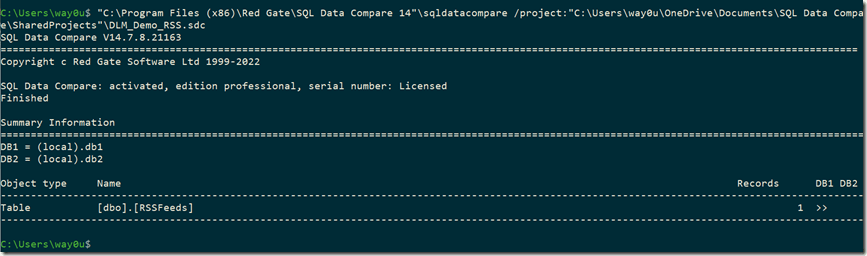
    2023-01-11 10_13_13-cmdI can see there is a single row in the DB! that needs to move to DB2, which is the result I saw in the first queries above and in the SQL Data Compare gui.

    If I add the /synchronize option to this call, SQL Data Compare will deploy the changes. Once I do that, I can query the two tables and see the data is the same. At least the data matching the WHERE clause.

    2023-01-11 10_13_41-SQLQuery3.sql - localhost.db1 (WAY0UTWESTHP_way0u (59))_ - Microsoft SQL Server

    Some of this is documented, but not worked through in an example, so I wrote this post to help myself and anyone else looking to work with SQL Data Compare from the command line. This is a great way to sync data easily between systems, if you have a repeatable set of data that you need to move.

    SQL Data Compare is a very handy tool for checking and moving data between tables that needs to be synched. All sorts of lookup or reference data can be managed with SQL Data Compare. If you haven’t tried it, grab an evaluation and give it a try.

    Disclosure: I work as an advocate for Redgate Software.
  • Daily Coping 25 Jan 2023

    Today’s coping tip is to be gentle with yourself when you make mistakes.

    I forgot about a commitment. I had agreed to do a webinar and prepare some content. I got busy with life, almost forgot the webinar, and was scrambling to put together a couple of slides. I got something ready, but it didn’t look great, and I wasn’t happy with it.

    Fortunately, I never needed the slides in the webinar.

    I was upset with myself, and I spent a few minutes berating myself, as well as thinking “what could I do differently?” Should I set more reminders? Do I need a better to-do list? Should I let some personal things go to ensure I stay on task?

    Ultimately I stopped that. I had planned for the webinar, it was on my calendar, and I had done some prep the week before. I got hung up this week with a few personal issues, and that is something I need to accept will happen. Things worked out, so I need to forgive this mistake.

    I started to add a daily coping tip to the SQL Server Central newsletter and to the Community Circle, which is helping me deal with the issues in the world. I’m adding my responses for each day here. All my coping tips are under this tag.

  • Daily Coping 24 Jan 2023

    Today’s coping tip is to get outside and notice five beautiful things.

    I decided to do this on a snowy, stormy day in Denver. I was up early with my daughter running a couple errands, and I took a few minutes at different times to look around. Here’s what I noticed:

    1. My driveway markers stand out nicely and helped us get out of the driveway, which was covered under a blanket of snow.
    2. The snow is sticking nicely on the trees, making a wonderful winter wonderland.
    3. It was a bit of a blizzard, but walking between the car and a building, we were sheltered. Without wind, even in 25F weather, the air was brisk and refreshing.
    4. Snow is fun. Even without sticking together to make a snowball to throw at my kid, it’s a neat form of water.
    5. It was mostly cloudy, which made it hard to see, but a few times the sun started to shine through. Even mostly blocked by clouds, the bright ball made the entire landscape brighten up.

    I started to add a daily coping tip to the SQL Server Central newsletter and to the Community Circle, which is helping me deal with the issues in the world. I’m adding my responses for each day here. All my coping tips are under this tag.