Tag: syndicated

  • Heading Back to VS Live in March 2023

    I’m speaking at VS Live in March 2023 for the Las Vegas show. This time it’s at Planet Hollywood, which is a hotel a new place for me. I’m looking forward to seeing lots of friends at the show. I was in Redmond and Austin last year for the VS Live shows and I can’t wait to get back to Las Vegas.

    If you want to join me at fun show, register with the code Jones for $500 off the price.

    VS Live is a multi technology show. I always learn something interesting there from Brian Randall, Rocky Lhotka, Bob Ward, Andrew Brust or any of the other amazing speakers. There are lots of development sessions, both technical and soft skills, along with a few of us data people delivering talks on how to deal with the database and power your software.

    The schedule is up and it looks exciting. A wide variety of talks, including these two from me:

    • Architecting Zero Downtime Database Deployments
    • Adding Graph Structures to your SQL Server Database

    There are lots of talented speakers and great topics, so think about kicking off your 2023 development efforts by coming to  VS Live Las Vegas, Mar 19-24, 2023.

    Register with the code Jones for $500 off the price.

  • Connecting to PostgreSQL from Azure Data Studio

    I’ve been doing a bit of work with PostgreSQL as part of my work with Redgate. PostgreSQL is a relational platform that is open source, free to use, available as a supported commercial product from various companies, and has been in active development for over 35 years.

    More and more organizations are looking at PostgreSQL for relational data stores as both SQL Server and Oracle are very expensive, and this is a viable alternative.

    This post looks at the basics of getting started with PostgreSQL by connecting to the platform with Azure Data Studio.

    If you haven’t installed PostgreSQL, or want to work with a container, check out my previous post: Creating a PostgreSQL Docker Container with a Volume on Windows

    Azure Data Studio

    Azure Data Studio (ADS) is a fork of Visual Studio Code, but specialized for databases. I don’t use it a lot, but I find it useful for some coding. They also have added an extension that allows connections to PostgreSQL.

    If you click the Extensions blade and then search for postgresql, you’ll find it. You can see it installed on my system below. Before you do this, the button that says uninstall would say install.

    2022-12-27 10_26_31-Extension_ PostgreSQL - DBAScripts - Azure Data Studio

    Once installed, the connection is like any connection in ADS.

    First, make sure you have PostgreSQL installed. If you want to do this in a container, see my link above.

    Connecting

    To connect, first open a new Query window.
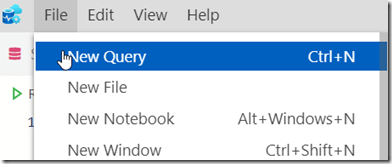
    2022-12-27 10_28_43-SQLQuery_2 - disconnected - DBAScripts - Azure Data Studio

    At the top there is a “Connect” button. Click this.

    2022-12-27 10_28_47-SQLQuery_2 - disconnected - DBAScripts - Azure Data Studio

    Now the connection blade opens. As you can see below, there are now two choices for the connection type: SQL Server and PostgreSQL. Choose PostgreSQL.

    2022-12-27 10_29_34-Window

    I choose localhost, as that’s where my instance is running. I also change the authentication type to Login and enter “postgres” as the default user. If you haven’t set up a user, use this. Then enter the password.

    One last thing, as I often run databases in containers, I’ll change the port. To do that for PostgreSQL, click the “Advanced” button. I often use 54320, 54321, 54322 for my ports, so you can see I’ve entered that below:
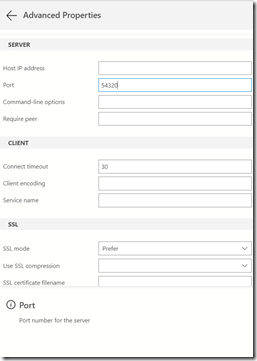
    2022-12-27 10_32_04-SQLQuery_2 - disconnected - DBAScripts - Azure Data Studio

    Click Ok if you’re added a port, and you should see these details:

    2022-12-27 10_31_49-SQLQuery_2 - disconnected - DBAScripts - Azure Data Studio

    Click Connect, and you should connect immediately. Then you can verify your connection with a query or two. As you can see, the database is defaulted to postgres and my queries have returned the version and tables in this database.

    2022-12-27 10_35_20-● SQLQuery_2 - localhost.postgres (postgres) - DBAScripts - Azure Data Studio

    That’s it. Now time to work on some pgsql.

  • Daily Coping 18 Jan 2023

    Today’s coping tip is to say positive things to the people you meet today.

    In general, I don’t encounter a lot of people on any day, but I do get to see my family, usually someone at the gym, and maybe a cashier in a store.

    Today I ran into family, and had the chance to smile and complement them. I went to a basketball game with two kids, one of whom bought the tickets. I made sure to thank him and tell them how I enjoyed the time.

    While at the game, I thanked the vendors for their help, donated to their cause (they use tips for their server organization), and be happy and positive when making an order, really a request.

    Managed to get to the gym as well, and ask the reception people how they were and wish them a good day.

    I started to add a daily coping tip to the SQL Server Central newsletter and to the Community Circle, which is helping me deal with the issues in the world. I’m adding my responses for each day here. All my coping tips are under this tag.

  • Daily Coping 17 Jan 2023

    Today’s coping tip is to get moving. Ideally do something outside.

    Taking time to walk the dogs outside, heading to the dog park to get them, and me, some exercise.

    I started to add a daily coping tip to the SQL Server Central newsletter and to the Community Circle, which is helping me deal with the issues in the world. I’m adding my responses for each day here. All my coping tips are under this tag.