Tag: syndicated

  • Getting Your SET Options

    Have you ever used @@options? I haven’t typically needed this, but there are times that you might wonder what options are set for a session. You can check in SSMS, look for defaults, etc., but there’s an easy way.

    SELECT @@OPTIONS

    This uses the @@options function, which contains a bitmap of your session settings. There are defaults with the sp_configure user options, but these can be overridden.

    If you want to get the options, which are also stored as bitmaps in various places, you can code them with this BOL article.

    Or use a script like this:

    DECLARE @i INT;
    SELECT @i = @@OPTIONS;
    SELECT ConstraintChecking = CASE WHEN (@i & 1 = 1 ) THEN 'ON' ELSE 'OFF' end,
            ImplicitTransactions = CASE WHEN (@i & 2 = 2 ) THEN 'ON' ELSE 'OFF' end,
            CursorCloseonCommit = CASE WHEN (@i & 4 = 2 ) THEN 'ON' ELSE 'OFF' end,
            AnsiWarnings = CASE WHEN (@i & 8 = 8 ) THEN 'ON' ELSE 'OFF' end,
            AnsiPadding = CASE WHEN (@i & 16 = 16 ) THEN 'ON' ELSE 'OFF' end,
            AnsiNulls = CASE WHEN (@i & 32 = 32 ) THEN 'ON' ELSE 'OFF' end,
            ArithAbortSetting = CASE WHEN (@i & 64 = 64 ) THEN 'ON' ELSE 'OFF' end,
            ArithIgnoreSetting = CASE WHEN (@i & 128 = 128 ) THEN 'ON' ELSE 'OFF' end,
            QuotedIdentifer = CASE WHEN (@i & 256 = 256 ) THEN 'ON' ELSE 'OFF' end,
            NoCount = CASE WHEN (@i & 512 = 512 ) THEN 'ON' ELSE 'OFF' end,
            AnsiNullDefaultOn = CASE WHEN (@i & 1024 = 1024 ) THEN 'ON' ELSE 'OFF' end,
            AnsiNullDefaultOff = CASE WHEN (@i & 2048 = 2048 ) THEN 'ON' ELSE 'OFF' end,
            ConcatNullYieldsNull = CASE WHEN (@i & 4096 = 4096 ) THEN 'ON' ELSE 'OFF' end,
            NumericRoundAbort = CASE WHEN (@i & 8192 = 8192 ) THEN 'ON' ELSE 'OFF' end,
            XactAbort = CASE WHEN (@i & 16384 = 16384 ) THEN 'ON' ELSE 'OFF' END

    For the row-based people, how about this:

    DECLARE @i INT;
    SELECT @i = @@OPTIONS;
    SELECT 'ConstraintChecking', CASE WHEN (@i & 1 = 1 ) THEN 'ON' ELSE 'OFF' END
    UNION 
    SELECT  'ImplicitTransactions', CASE WHEN (@i & 2 = 2 ) THEN 'ON' ELSE 'OFF' end
    UNION 
    SELECT  'CursorCloseonCommit', CASE WHEN (@i & 4 = 4 ) THEN 'ON' ELSE 'OFF' end
    UNION 
    SELECT  'AnsiWarnings', CASE WHEN (@i & 8 = 8 ) THEN 'ON' ELSE 'OFF' end
    UNION 
    SELECT  'AnsiPadding', CASE WHEN (@i & 16 = 16 ) THEN 'ON' ELSE 'OFF' end
    UNION 
    SELECT  'AnsiNulls', CASE WHEN (@i & 32 = 32 ) THEN 'ON' ELSE 'OFF' end
    UNION 
    SELECT  'ArithAbortSetting', CASE WHEN (@i & 64 = 64 ) THEN 'ON' ELSE 'OFF' end
    UNION 
    SELECT  'ArithIgnoreSetting', CASE WHEN (@i & 128 = 128 ) THEN 'ON' ELSE 'OFF' end
    UNION 
    SELECT  'QuotedIdentifer', CASE WHEN (@i & 256 = 256 ) THEN 'ON' ELSE 'OFF' end
    UNION 
    SELECT  'NoCount', CASE WHEN (@i & 512 = 512 ) THEN 'ON' ELSE 'OFF' end
    UNION 
    SELECT  'AnsiNullDefaultOn', CASE WHEN (@i & 1024 = 1024 ) THEN 'ON' ELSE 'OFF' end
    UNION 
    SELECT  'AnsiNullDefaultOff', CASE WHEN (@i & 2048 = 2048 ) THEN 'ON' ELSE 'OFF' end
    UNION 
    SELECT  'ConcatNullYieldsNull', CASE WHEN (@i & 4096 = 4096 ) THEN 'ON' ELSE 'OFF' end
    UNION 
    SELECT  'NumericRoundAbort', CASE WHEN (@i & 8192 = 8192 ) THEN 'ON' ELSE 'OFF' end
    UNION 
    SELECT  'XactAbort', CASE WHEN (@i & 16384 = 16384 ) THEN 'ON' ELSE 'OFF' END

    UPDATE: From the comments, an UNPIVOT might be easier to read for some of you.

    DECLARE @i INT;
    SELECT @i = @@OPTIONS;
    SELECT [Option], [Value]
    FROM(
    SELECT ConstraintChecking = CASE WHEN (@i & 1 = 1 ) THEN ‘ON’ ELSE ‘OFF’ end,
    ImplicitTransactions = CASE WHEN (@i & 2 = 2 ) THEN ‘ON’ ELSE ‘OFF’ end,
    CursorCloseonCommit = CASE WHEN (@i & 4 = 2 ) THEN ‘ON’ ELSE ‘OFF’ end,
    AnsiWarnings = CASE WHEN (@i & 8 = 8 ) THEN ‘ON’ ELSE ‘OFF’ end,
    AnsiPadding = CASE WHEN (@i & 16 = 16 ) THEN ‘ON’ ELSE ‘OFF’ end,
    AnsiNulls = CASE WHEN (@i & 32 = 32 ) THEN ‘ON’ ELSE ‘OFF’ end,
    ArithAbortSetting = CASE WHEN (@i & 64 = 64 ) THEN ‘ON’ ELSE ‘OFF’ end,
    ArithIgnoreSetting = CASE WHEN (@i & 128 = 128 ) THEN ‘ON’ ELSE ‘OFF’ end,
    QuotedIdentifer = CASE WHEN (@i & 256 = 256 ) THEN ‘ON’ ELSE ‘OFF’ end,
    NoCount = CASE WHEN (@i & 512 = 512 ) THEN ‘ON’ ELSE ‘OFF’ end,
    AnsiNullDefaultOn = CASE WHEN (@i & 1024 = 1024 ) THEN ‘ON’ ELSE ‘OFF’ end,
    AnsiNullDefaultOff = CASE WHEN (@i & 2048 = 2048 ) THEN ‘ON’ ELSE ‘OFF’ end,
    ConcatNullYieldsNull = CASE WHEN (@i & 4096 = 4096 ) THEN ‘ON’ ELSE ‘OFF’ end,
    NumericRoundAbort = CASE WHEN (@i & 8192 = 8192 ) THEN ‘ON’ ELSE ‘OFF’ end,
    XactAbort = CASE WHEN (@i & 16384 = 16384 ) THEN ‘ON’ ELSE ‘OFF’ END) AS options
    UNPIVOT (
    [Value] FOR [OPTION] IN ([ConstraintChecking],[ImplicitTransactions],[CursorCloseonCommit],[AnsiWarnings],[AnsiPadding],[AnsiNulls],[ArithAbortSetting],[ArithIgnoreSetting],[QuotedIdentifer],[NoCount],[AnsiNullDefaultOn],[AnsiNullDefaultOff],[ConcatNullYieldsNull],[NumericRoundAbort],[XactAbort])
    ) AS T1
    ORDER BY [Option]
    GO
  • Learning Goals–January Review

    In December I participated in T-SQL Tuesday #97 and wrote a post about 2018 goals. I promptly spent two weeks out of the country and then a relaxing holiday season. Actually, holidays extended slightly with a ski trip and a wedding in January.

    This is a look back at my goals, since I have a monthly reminder to do so. This is the first review, a little late as I’ve struggled to focus a bit on work in January, but here goes.

    Progress

    I picked two things to work on this year: Python and Extended Events. I’m failing miserably in both.

    I did work on a little Python in solving a few of the Advent of Code puzzles, but I’ve only read a few pages in the Machine Learning book and not much else. I’ve gotten distracted by other items on my list.

    I haven’t done anything on Extended Events.

    I did play with a little more Pester, and I set up an MVC site in a project for a demo, so I tackled things that interest me, but not in the extra areas I wanted to learn.

    Planning and Moving Forward

    I didn’t actually do my planning in December. When the appointment came up, I was a little buried with other items and let it pass without rescheduling.

    Moving forward, here’s what I want to do. I’m going to set a reminder for Tuesday afternoons to spend an hour on XE. I’ll set that for 3 months and see where we stand. I’m hoping to work through a bit of Pluralsight courses and then some of Jason Brimhall’s series on his blog.

    For Python, I’m going to take some time on Friday mornings here. That’s likely a slower time for me, so I’m scheduling a half hour to work on something with Python. I need to refresh some core skills and then move on from there. I’ll likely go back through a bit of the Dive into Python book, then try moving to a bit of ML stuff. This is good as I’ll get some content, at least questions of the day, out of this work.

    I also realize that I continue to spend some time on R, as this is a part of SQL Server and it’s an area that generates some content for SSC. That along with my MVC project are things that will distract me a bit, but I’ll try to push forward in all these directions.

    Hopefully this will result in a better review next month.

  • Summit 2018 Program Survey

    PASS has a survey out asking for your thoughts on the  2018 content. Take a few minutes and fill it out, and maybe you’ll win a registration.

  • Surround Code with Comments in SQL Prompt

    I work for Redgate and write about products. I’ve got a series of SQL Prompt posts here on little things I like. SQL Prompt might be my favorite tool.  SQL Prompt will be yours as well if you give it a try.

    I can’t believe I haven’t built this snippet before now, but it’s not in my list. I’ve dealt with this for some time, but I decided enough was enough.

    Here’s what I want. Note that all the code is inside a single comment.

    2018-01-27 09_28_29-SQLQuery1.sql - (local)_SQL2016.Northwind (PLATO_Steve (66))_ - Microsoft SQL Se

    Getting There

    I often have some random notes that I want to keep in a comment. For example, I might get a list of tables like this:

    2018-01-27 09_25_12-SQLQuery1.sql - (local)_SQL2016.Northwind (PLATO_Steve (66))_ - Microsoft SQL Se

    If I highlight this code and hit Ctrl, I get a list of snippets that contain a certain token. In my case, I get:

    2018-01-27 09_26_31-SQLQuery1.sql - (local)_SQL2016.Northwind (PLATO_Steve (66))_ - Microsoft SQL Se

    If I select Comment, I get the code commented, but as single line quotes.

    2018-01-27 09_26_58-SQLQuery1.sql - (local)_SQL2016.Northwind (PLATO_Steve (66))_ - Microsoft SQL Se

    That’s OK, but if I am saving something like STATISTICS output, that’s not pretty or easy for me to read. I prefer a single comment, not a series of separate inline comments. This is even more annoying with code.

    Let’s fix this with a snippet. Here’s my snippet code:

    2018-01-27 09_30_43-SQL Prompt - Create New Snippet

    The $SELECTEDTEXT$ token will take whatever text you’ve highlighted and insert it into the token. In my case, I just want this commented out.

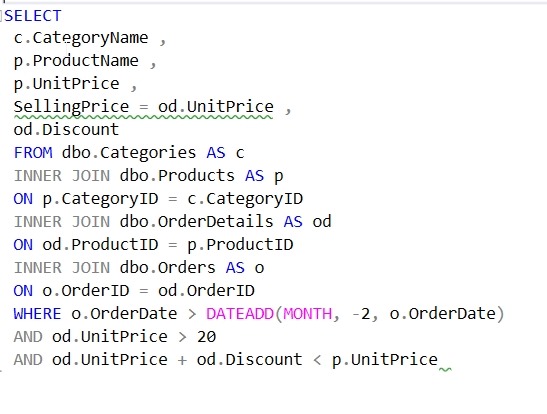
    Let’s see how this works. Suppose I have this query:

    2018-01-27 09_36_06-SQLQuery1.sql - (local)_SQL2016.Northwind (PLATO_Steve (66))_ - Microsoft SQL Se

    I really want to get the results from STATISTICS IO and TIME as I’m tuning a few things here and I want to check how well my changes work.

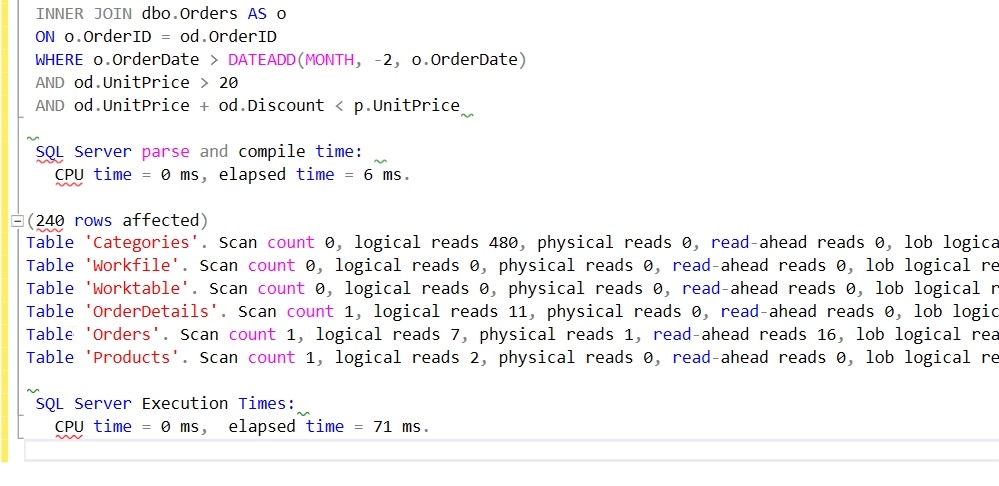
    Once I run this, I’d like to place the results with the query and see them to compare with the next iteration. I paste the results into the query window like this:

    2018-01-27 09_37_42-SQLQuery1.sql - (local)_SQL2016.Northwind (PLATO_Steve (66))_ - Microsoft SQL Se

    Now I can highlight those results and hit CTRL, type surr, and get this:

    2018-01-27 09_38_12-SQLQuery1.sql - (local)_SQL2016.Northwind (PLATO_Steve (66))_ - Microsoft SQL Se

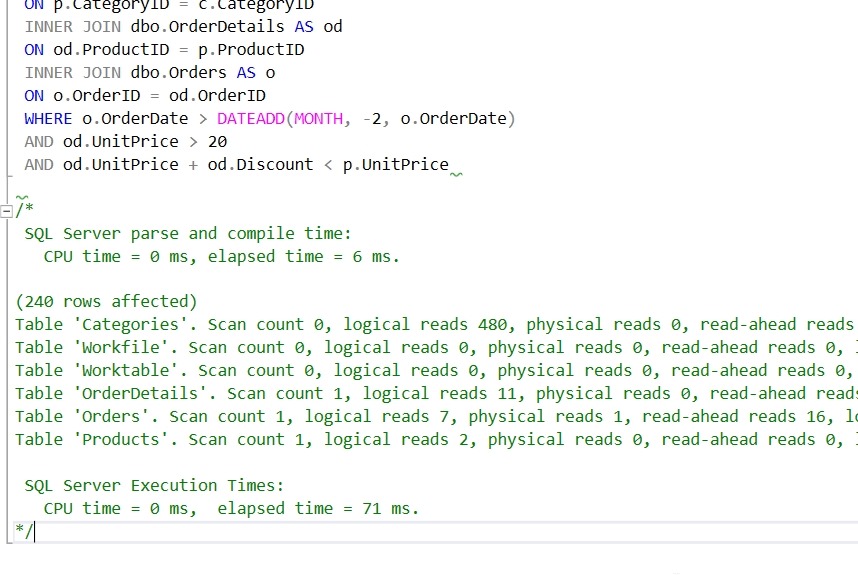
    I hit tab and I have my notes commented out:

    2018-01-27 09_38_28-SQLQuery1.sql - (local)_SQL2016.Northwind (PLATO_Steve (66))_ - Microsoft SQL Se

    The next time I run the query, I can easily compare how things have changed:

    2018-01-27 09_38_37-SQLQuery1.sql - (local)_SQL2016.Northwind (PLATO_Steve (66))_ - Microsoft SQL Se

    I also use this when working through a list of results. I’ll get those in the query window, highlight them, and then surround them with a comment.

    There are lots of places you might like to use this token with SQL Prompt. For more ideas, Phil Factor has a nice scenario for using this with other tokens in the Redgate Hub.

    Give SQL Prompt a try today and see how it can improve coding and feel free to share your tips here.