Tag: syndicated

  • Managing SQL Prompt Code Analysis Rules

    I work for Redgate and write about products. I’ve got a series of SQL Prompt posts here on little things I like. SQL Prompt might be my favorite tool.  SQL Prompt will be yours as well if you give it a try.

    SQL Prompt includes new Code Analysis rules that help you write better code. This iteration of the rules in v9 are items that are highlighted with a green squiggly line. These are basic rules, and may not apply in your environment, and you may want to disable some of these. Here’s how.

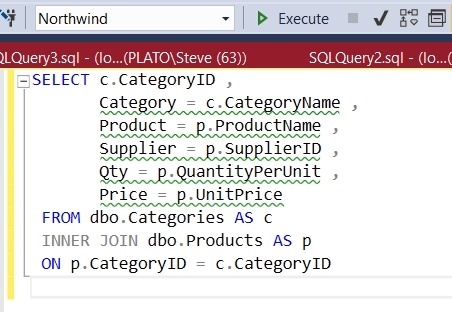
    Imagine you have a simple query like this one:
    2018-01-29 13_14_03-SQLQuery1.sql - (local)_SQL2016.Northwind (PLATO_Steve (66))_ - Microsoft SQL Se

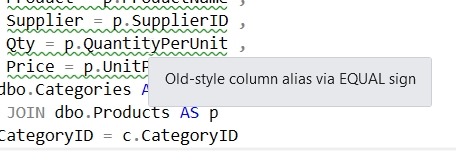
    As you can see, there are green squiggly lines under some code. These are static Code Analysis warnings from SQL Prompt. If I put my cursor on the line, I’ll see the warning about the old style column alias:
    2018-01-29 13_19_24-SQLQuery1.sql - (local)_SQL2016.Northwind (PLATO_Steve (66))_ - Microsoft SQL Se

    In this case, I know this is rule ST02, and it’s not a warning I care about. I like the equals alias construct and don’t want to constantly see this, so I’ll disable this rule.

    First, open the SQL Prompt menu. There are a few new items shown below. The “Enable Code Analysis” is below the other Prompt “Enable Suggestions”. There is also the “Manage Code Analysis Rules”. Select that item.

    2018-01-29 13_20_59-

    When the dialog opens, we see a number of rules broken into sections. Each of these is numbers, and has a prefix. Best Practices have BP prefixes, Deprecated items use DEP, etc.

    2018-01-29 13_21_50-Sql Prompt - Code analysis rules

    Scroll down to the Style rules, which have ST prefixes. We can see that ST002 is the Old-style column alias. Uncheck this box and click “Save”.

    2018-01-29 13_23_23-Sql Prompt - Code analysis rules

    Now the rule is disabled. If I wait a couple seconds, I’ll see the green lines disappear.

    2018-01-29 13_24_20-SQLQuery1.sql - (local)_SQL2016.Northwind (PLATO_Steve (66))_ - Microsoft SQL Se

    There are all sorts of items that SQL Prompt tracks as a part of Code Analysis. We’re looking to understand how you use these rules, what exceptions you need, and any additional rules you’d like to see added. Send us feedback at UserVoice.

    Give SQL Prompt a try today and see how it can improve coding and feel free to let me know how you like this new feature.

  • No Default CONTEXT_INFO()

    I was doing a little testing of Row-Level Security (RLS) for the stairway, and one of the ways that some people implement RLS is with CONTEXT_INFO().

    I haven’t every really used CONTEXT_INFO in production, though it’s been around for some time. This is a way of setting some session information, as this data is stored for the connection. However, since it can be reset by the connection, it’s value isn’t necessarily trustworthy from a system perspective.

    If you don’t set this with SET CONTEXT_INFO, then a NULL is stored there for on-premises systems. This makes sense, there’s no initialization there.

    In Azure SQL Database, however, you get a GUID that’s a unique value. That’s good to know, as if you’re checking if this is NULL, you might assume you have something stored there, and since you need to CAST this back to the original datatype, this might cause issues.

    This could be a good way to store data for a single session, but beware. If the session drops and reconnects, you’ll lose your data.

  • Better Security with dbatools

    I really like the dbatools project. This is a series of PowerShell cmdlets that are built by the community and incredibly useful for migrations between SQL Servers, but also for various administrative actions. I have a short series on these items.

    One of the things that I see many junior SQL Server people struggle with (or forget) is the need to get logins onto multiple servers. This is often in situations where some sort of DR or HA technology is being used between instances. An admin will set up a second server, add logins, and forget about the entire system.

    Until something fails. Then their failover works perfectly, or mostly, or good enough, and they move on with their day. A few days later

    The cmdlet, Sync-DbaSqlLoginPermissions, is designed to help solve this issue. I certainly could use this to quickly sync logins (SQL or Windows) between two instances, but it’s great for an automated, regular sync between two HA or DR instances. If you set this up as a job, it won’t necessarily catch every login if servers fail between the syncs and a login is added, but this will give you some added protection over a long term as you make changes on one system.

    This is a way to solve some cross instance issues that are hard in T-SQL, but simple in PoSh. Kudos to the dbatools team for this cmdlet.

  • Advent of Code 2017 Day 5–#SQLNewBlogger

    Another post for me that is simple and hopefully serves as an example for people trying to get blogging as #SQLNewBloggers.

    This is day 5 of the Advent of Code 2017. If you want to read about the puzzles, start with Day 1. This is going to be a crazy looping item, since it will move through the list, relative to the current spot, and incrementing items, I know this won’t be good in SQL.

    Still. Worth solving.

    Let’s load the data. I’ll use a table, but first, I’ll also add an identity. This will help me number instructions and figure out what the next one is.

    CREATE TABLE Day5
    ( InstructionKey INT IDENTITY(1,1)
    , Instruction INT)
    GO

    There are issues with identities, but this is a great trick:

    CREATE VIEW Day5V
    AS
    SELECT d.Instruction FROM dbo.Day5 AS d
    GO
    -- reusable code
    BULK INSERT Day5V FROM 'e:\Documents\GitHub\AdventofCode\2017\Day5\Input.txt' WITH (ROWTERMINATOR='\n')
    GO

    Now I can get to work. Here’s the logic I used.

    I wanted to first set some starting points. I have a counter (0 based, increment first). This determines how many times I jump around. I also need to track the current instruction key and the next key. And, of course, I need the instruction value.

    The identity is the array index, or the instruction key (which place am I in). In this case, I’ll try to follow this logic.

    Get the end (out of bounds, which is the max + 1). I loop until I get an jump outside of the end range. The loop does these items:

    • Get the current instruction jump
    • Set the next location to be the current key + the current jump
    • Update the current jump to increment by 1
    • Set the current instruction key to the next key
    • loop

    This seems to be what I need. On the test set, this worked fine. When I first set this up, I used this code:

    DECLARE @end INT ,
             @CurrentInstructionKey INT = 1 ,
             @Instruction INT ,
             @NextInstructionKey INT ,
             @counter INT = 0;
    SELECT @end = MAX(InstructionKey) + 1
    FROM dbo.Day5 AS d;
    
    -- SELECT [end] = @end;
    
    WHILE @CurrentInstructionKey < @end
    BEGIN
         SET @counter = @counter + 1;
         SELECT @Instruction = Instruction
         FROM Day5
         WHERE InstructionKey = @CurrentInstructionKey;
         SELECT @NextInstructionKey = @CurrentInstructionKey + @Instruction;
         UPDATE dbo.Day5
         SET Instruction = Instruction + 1
         WHERE InstructionKey = @CurrentInstructionKey;
         SET @CurrentInstructionKey = @NextInstructionKey;
    --PRINT @CurrentInstruction
    END;
    
    SELECT Counter = @counter ,
            [current] = @CurrentInstruction;

    When I ran this, it chugged for some time. I bet in Python or C#, which would solve quickly with arrays. With updates, it’s slow. Like minutes slow for 1074 rows.

    However, it worked.

    Part II

    In this part, this instructions are almost the same, but based on the current instruction value, we either increase or decrease the value. Not a big change. Our new update looks like:

    UPDATE dbo.Day5
    SET Instruction = Instruction + CASE
                                         WHEN @Instruction >= 3 THEN
                                             -1
                                         ELSE
                                             1
                                     END
    WHERE InstructionKey = @CurrentInstructionKey;

    This also works, albeit slowly. I left this around 5:30 and went to the gym.

    One of the easier puzzles.