Tag: syndicated

  • A Trip Across the Pond for the Community Hub

    The Redgate Community Hub is out, and people are starting to use it. It’s a an idea that we think will provide our customers, and potential customers, a better way to learn about our products, get information, and learn from Redgate.

    Annabel Bradford and I are going to be introducing you to the Hub in a formal launch this Wednesday, September 6, 2017, live from the Redgate offices. We have a livestream scheduled a couple times that day for you to tune in and watch. (6am and 8pm, so a long day).  We have a three hour schedule covering a few different pieces of knowledge that you might find handy.

    So, today, I’m off. I’ll be flying today to the UK, rehearsing tomorrow, and then ready to go early on Wednesday.

    If you have a chance, join us. Register today and tune in on Wednesday.

  • Livestreaming the Redgate Hub for the US

    The Livestream launch for the Redgate Community Hub is next Wednesday, Sept 6, 2017. To ensure that our customers and friends in the US and the rest of the this hemisphere can enjoy the festivities, we are broadcasting at 8pm GMT.

    Register today and watch us live.

    I’m flying to the UK Monday, and hopefully I’ll be semi-adjusted for the event. I have a 6am broadcast for AsiaPac and will likely go to the gym in the afternoon and take a short nap before coming back to the office for the 8pm broadcast.

    We’re showcasing some new features and functions in our software, while showing you how we are helping provide you more knowledge and learning in the Hub. This is a more organized set of information that should help you evaluate, understand, and use our software to build better software faster.

    I hope you’ll join us and Watch Tuesday.

  • Bulk Inserting Build Data–#SQLNewBlogger

    Another post for me that is simple and hopefully serves as an example for people trying to get blogging as #SQLNewBloggers.

    One of the common tasks that many DBAs need to do is insert data into a database. Often this comes from various sources, but a CSV (comma separate value) format is common. One could use the data import wizard, but that seems to be very flaky with CSVs, so I’ll show a quick way to use the BULK INSERT command.

    This command is a way to read files and load them into a table, similar to how bcp works. However, this is a T-SQL command, and can be included inside your database.

    The basic format is

    BULK INSERT <table>

    FROM <source>

    WITH <options>

    For most CSV imports, this means we need to pick a table, in my case, the BuildStaging table, and a source file. My statement looks like this:

    BULK INSERT dbo.BuildStaging
    FROM ‘e:\Documents\ssc\BuildList_SQLServer2014.csv’

    I also need some options. The basics for a CSV are:

    WITH
    (   FIELDTERMINATOR = ‘,’,
         ROWTERMINATOR = ‘\n’
    );

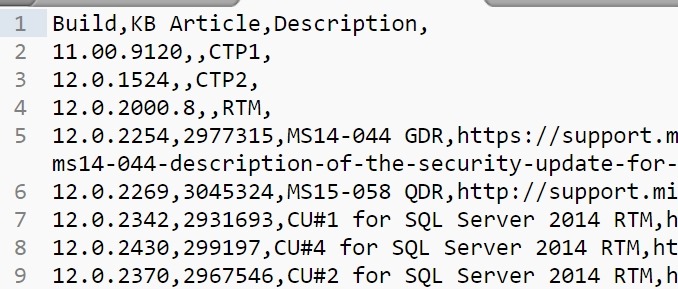
    There could be other items you want to enable, and there is quite a list. In my case, my file looks like this:

    2017-08-24 14_26_20-E__Documents_ssc_BuildList_SQLServer2014.csv - Sublime Text

    I have a header row, so let’s get rid of that by adding a FIRSTROW = 2 option.

    Now when I run my command, the data is inserted.

    2017-08-24 14_28_12-SQLQuery1.sql - (local)_SQL2016.SSBuilds_1_Dev (PLATO_Steve (62))_ - Microsoft S

    From here, I need to work with the data and clean it futher for insert into other tables.

    SQLNewBlogger

    This was a quick task I needed to accomplish. I knew most of the syntax, but had to double check the option names, and ended up taking about 2 minutes to import the data and 10-15 to write this post.

    And, I’ll likely remember how to do this import after spending time writing about it.
  • Getting the Hyperlink from Excel

    I had a spreadsheet of data that contained hyperlinks. In this case, it was a series of Microsoft Knowledge Base Articles with a hyperlink associated with them. I would assume there’s an easy function in Excel to extract these, but apparently there isn’t. That’s certainly a useful function for a data person.

    I turned to the handy, dandy Google and found this Q&A and Superuser. I needed to delve back into VBA and build a macro, which is easy, but seems silly. In any case, I pasted this in and then set a formula based on a cell.

    And got a 0 in the field. I started to try and debug this, before trying another cell. That one worked. Apparently some of my cells, formatted as blue, underlined text, don’t really have formulas.

    No big deal, but good to know.

    Here’s the macro formula repeated from the post, just in case.

    Function GetURL(cell As range, Optional default_value As Variant)
     'Lists the Hyperlink Address for a Given Cell
     'If cell does not contain a hyperlink, return default_value
          If (cell.range("A1").Hyperlinks.Count <> 1) Then
              GetURL = default_value
          Else
              GetURL = cell.range("A1").Hyperlinks(1).Address
          End If
    End Function