Tag: syndicated

  • Remove an Active Lease on a Blob in Azure

    I was creating and dropping VMs in Azure, and found myself charged money for disks that I thought I’d deleted. I found later that deleting a VM doesn’t necessarily remove the disk blob. Here was one way that I removed some of those blobs.

    First, go to the classic portal. For some reason, the new Portal doesn’t have the capability.

    2017-06-21 21_11_07-Virtual machines - Microsoft Azure

    Click Disks

    2017-06-21 21_11_19-Virtual machines - Microsoft Azure

    At the bottom, click Delete

    2017-06-21 21_11_31-

    That removed one lease, but not others. To get rid of those, I had to do more research and searching. That process is for another post.

  • Automate Migrations–T-SQL Tuesday #94

    tsqltuesdayIt’s T-SQL Tuesday time again, and I’m slightly pressed for time, which is sad. This is a great topic.

    Rob Sewell hosts this month with his question about what we are going to automate? He’s a PowerShell advocate, so I’m not surprised here. As much as I enjoy working in various languages, PoSh becomes more and more handy to me when I need to work outside of the SQL Server platform. I’ve been trying to play with it, and I enjoy it more and more.

    If you want to participate, check out the rules:

    1. Write a post on the topic below
    2. Schedule the post to go live on Tuesday, September 12th (between zero am and midnight, UTC)
    3. Include the TSQL Tuesday logo in the top of your post
    4. Link the post back to this one (it’s easier if you comment on this post and link it)
    5. Optional: Tweet a link to your post using the #tsql2sday hash tag on Twitter

    Automate Things Between Instances

    The first time I saw the dbatools project in action was at SQL Saturday Cambridge, where Chrissy Lemaire gave a session with Rob. I was surprised at the power and ease of the project. I was impressed, and decided to help learn more as well as promote the project. I’ve tried to blog regularly about their cmdlets as I get a chance to play with them and I’m pretty much always impressed.

    The next time you need to move some object, setting, job, etc. from one instance to another, you should try this:

    1. install the dbatools module
    2. look through the command index
    3. try migrating your object(s) with PoSh.

    That’s it.

    Maybe you need to copy a database or login. Maybe you want to copy jobs to a new server. The dbatools module makes all of these things easy.

    So give it a try. There are some great tools for migrations as well as wonderful items for common DBA tasks.

  • DevOps Basics–Git Clients

    This is also a part of a basic series on git and how to use it.

    There are lots of git clients. If you look at the top list for this year, you’ll see quite a few. I’ve used a couple of these, but they all give you roughly the same information. Where am I in the commit tree, and what branches are out there. I tend to prefer the command line most times, but clients are handy to have.

    There are two main ones that I have been using, trading off and on between them, so a quick look at both Sourcetree and Gitkrakken.

    Sourcetree

    Sourcetree is a free client from Atlassian. They’re a software company, much like Redgate, that gives back to the community. One of the ways they do this is with Sourcetree and Bitbucket . This client is available for Windows and MacOS, so it’s cross platform.

    It’s simple and easy to setup, and the install isn’t worth covering. Amazing how simple most installs are these days. Once installed, you can open or create repositories easily.

    The interface is clean and easy to understand. All the main features (push, pull, commit, branch, etc.) are large buttons at the top. The graph, comments, and other information is in the middle.
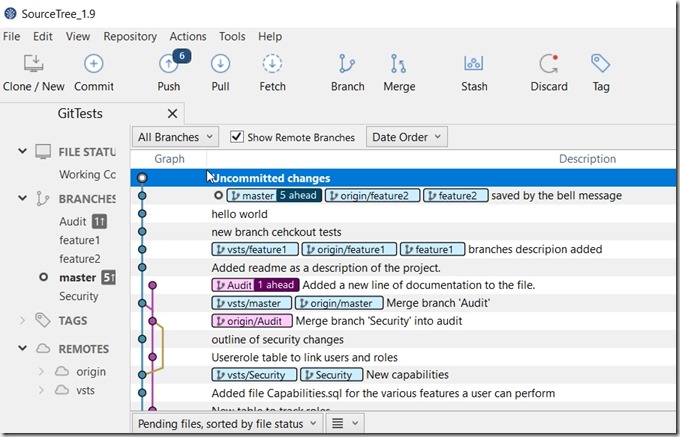
    2017-08-25 11_36_24-SourceTree_1.9

    Below here are the staged and unstaged files in my repo, so I can easily see the state of my work.

    There are tabs for each repo, so if you open multiple ones, you’ll see them listed at the top and can easily switch between them. Handy if you need to work on multiple projects.

    Sourcetree will check for updates and let you know when they are available. As with most software, this will download the patch and then let you know that you need to close the app to start the install.
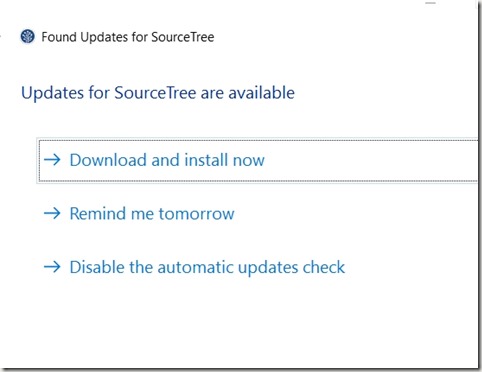
    2017-08-25 11_33_48-Found Updates for SourceTree

    After using other clients, I find this sometimes a bit slow, but usually commit/push time isn’t a large factor in work. I can start the process and go get coffee or take some break.

    I’d say Sourcetree is a nice client, and it’s easy to use. There’s also a nice button to pop open a Git Bash terminal, which is helpful if you want to work in a text format.

    Gitkraken

    I stumbled on this client somewhere. I think someone recommended it on Twitter, and I decided to give it a try. Sourcetree was working, but I was curious if there was something else.

    Gitkraken bills itself as the most popular client. It might be, but even if it’s not, I like some of the simplicity. This client is available for Windows, MacOS, and Linux, so you might prefer this if you move across all those platforms.

    It’s also cool to look at. The animation when it starts is neat.

    Others

    There are other clients, including some MS tools in Visual Studio (regular and code) that work with git. I don’t really use those, as I tend to work with the command line or simple interfaces for commits, not examining differences or looking at branches. For those tasks, I do like these two clients.

    Of course, at some point you may need to drop into the command line if you find yourself in a pickle. While I’m sure you’ll google most issues, be comfortable solving them in the command line and practice a few tasks periodically by typing the syntax.
  • Game Night is Back at the Summit

    Last year Andy Warren and I worked out a deal with the PASS organization to sponsor a game night on Thursday evening since there were no official events. The event went well, with way more attendance than we expected. I was actually amazed at the number of people that brought games I’d never heard of.

    This year Andy and I are a bit busy with other events, and Halloween is causing some issues. Over the year we’ve had discussions with PASS and they agreed to host Game Night as an official event, providing the room and support. Kevin Hill (b | t) is going to lead the event, and everyone should thank him for stepping up.

    Game Night tickets are available now, for $12, which will cover admission and an alcoholic (or 2 non-alcoholic) drinks. I expect space will be limited, so sign up today if you want a quieter, fun time Thursday night competing with other attendees.

    I think I’ll have other commitments, but I’ll try to stop by and say hi. Don’t worry, I won’t take a ticket, and prevent one of you from enjoying the games.

    If this is your thing, and you’d like to help out in 2018, let me know. I’d like PASS to run this every night and get multiple volunteers to help keep things organized. I think plenty of you would love a space to compete for fun instead of searching for something else.